
GMKtec NucBox K3 Pro
Updated on

The GMKtec NucBox K3 Pro is a 2022 mini PC built around the 10-core Intel Core i7-12650H, with 24GB of soldered LPDDR5, a 1TB NVMe SSD, and a USB4 port that can drive an external GPU. Robtech ran the i7-12650H model through a benchmark roundup and an eGPU test, and Team Pandory used it as an unboxing-to-music-production walkthrough. Both called it a strong little Intel box for editing and emulation, but not a gaming machine on its integrated graphics.
| Pros | Cons |
|---|---|
| 10-core i7-12650H is quick for productivity and editing | Integrated UHD graphics (64 EUs) cannot run modern AAA titles |
| 24GB of LPDDR5 carries Photoshop and a DAW at once | RAM and Wi-Fi are soldered |
| USB4 port runs an external GPU at 40Gbps | Only one M.2 slot, no second NVMe and no 2.5-inch bay |
| QuickSync helps with video editing and 4K playback | M.2 slot has no dedicated cooling |
| Quiet at idle, with a large fan | CPU hit 93C under load; “game mode” gets loud and throttles |
Related Videos
GMKtec NucBox K3 Pro Comparison Chart
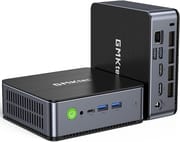 GMKtec NucBox K3 Pro | |
| Price | List Price: $609.99 Amazon Prices: |
| Version | 24GB/1TB/Intel Core i7-12650H |
| Performance Rating | 5.1 |
| Operating System | Windows 11 Pro |
| Processor | Deca-core 3.50 Ghz (max 4.70 Ghz) Intel Core i7-12650H |
| GPU | Integrated Intel UHD Graphics |
| RAM | 24 GB |
| Internal Storage | 1 TB |
| Dimensions width x length x thickness | 4.84 x 4.4 x 1.7 inches (122.94 x 111.76 x 43.18 mm) |
| Weight | 0.93 lbs (0.42 kg) |
| WiFi | Wi-Fi 6 (802.11ax) |
| Bluetooth | Bluetooth 5.2 |
| Ethernet | 1 Ethernet port at 1 Gbps |
| HDMI | 2 Full-Size HDMI Ports |
| DisplayPort | No DisplayPort |
| VGA | No VGA Ports |
| USB Ports | 2 USB 2.0, 2 USB 3, 1 USB-C (1 USB4) The USB-C port supports USB4, Power, and DisplayPort |
| Thunderbolt Ports | No |
| OCuLink | No |
| Internal SATA Ports | No SATA ports |
| Card Reader | No Card Reader |
| Headphone Jack | combo |
| Fanless | No |
| VESA Mount | Yes |
| In the Box | GMKtec Nucbox K3 pro Intel core i7-12650H Mini PC, Power Adapter, VESA Mount with Screws, HDMI Cable, User Manual |
| Expandability | Supports up to 2TB M.2 2280 SSD, memory and WiFi chip are soldered on, no further storage expansion |
Related Mini PCs
-
 GMKtec NucBox K16The GMKtec NucBox K16 is a CNC-aluminium mini PC on the AMD Ryzen 7 7735HS with Radeon 680M…
 -
 GMKtec Nucbox K2The GMKtec Nucbox K2 is a compact AMD Ryzen 7 7735HS mini PC with Radeon 680M graphics, DDR5 to…
 -
 Beelink EQR7The Beelink EQR7 pairs an AMD Ryzen 7 7735U with a built-in power supply, dual Gigabit Ethernet,…
 -
 Beelink SER5 MAX (Ryzen 7 7735HS)The Beelink SER5 MAX pairs an 8-core Ryzen 7 7735HS and Radeon 680M graphics with 24GB of LPDDR5,…
 -
 BOSGAME M4The BOSGAME M4 pairs an AMD Ryzen 7 8745HS with 32GB of DDR5, an OCuLink port for an external GPU,…
 -
 BOSGAME P3 LiteThe BOSGAME P3 Lite pairs an AMD Ryzen 7 6800H and Radeon 680M graphics with dual 2.5G Ethernet,…
A Metal Box With USB4 Up Front and One M.2 Slot Inside
The K3 Pro is a small metal-bodied box (4.84 x 4.40 x 1.7 inches, under a pound) with a textured plastic top and bottom. Robtech notes that the exterior is identical to the AMD Ryzen-based NucBox K2, and Team Pandory’s unboxing shows GMKtec bundles a Hunt Key 120W power adapter (19V, 6.32A), a VESA mount, an HDMI cable, and a manual.
The front has a headphone jack, a USB4 Type-C port, and two 5Gbps USB-A ports; the back adds a DC barrel jack, two HDMI 2.0 outputs, two USB 2.0 ports, a Gigabit Ethernet jack, and a Kensington lock, plus a pinhole BIOS reset. Both reviewers identified the wired network port as Gigabit (1GbE), not 2.5GbE. Wireless is Wi-Fi 6 (Team Pandory’s teardown shows an Intel AX201 module) with Bluetooth 5.2.
Inside, there is a single M.2 slot that the spec sheet lists as Gen 4 capable, though GMKtec shipped a Gen 3 drive (a 1TB Lexar 610 Pro in both review units). There is no room for a second NVMe and no 2.5-inch bay; Team Pandory said they “would have loved another” M.2 slot. The RAM and Wi-Fi card are soldered, so storage is the only upgrade you can make.
Benchmarks Put It Close to a Core i5-12500H
Robtech ran the i7-12650H at its 45W power limit and it landed near the top of his single-core Cinebench chart. In multi-core it trailed AMD parts and sat behind the same 12500H by roughly 11 percent at default settings. Enabling the BIOS “game mode,” which raises the power and fan speed, recovered some of that, around a 16 percent multi-core improvement, at the cost of noise. He also noted that Intel’s QuickSync hardware encoder made the machine “pretty responsive when scrubbing across the timeline” in a 4K editing project at half resolution. Team Pandory reached the same practical verdict, finding Office, Photoshop, and a digital audio workstation (recording vocals and guitar in Reaper, then editing the video in DaVinci Resolve on the same box) all ran comfortably.
The integrated graphics are the limit. Team Pandory said “it’s going to be interesting to see if 64 EUs is going to be enough to run the latest games.” Robtech found that “it’s not powerful enough to handle the latest game title releases, even at the lowest settings.” Esports titles are fine (League of Legends ran at a high frame rate), but newer games need an external GPU.
Emulation Holds Up and USB4 Opens the eGPU Path
Team Pandory found Doom and Doom Eternal playable, dropped CS:GO to 720p for smoothness, and “jump straight into the deep end with PlayStation 2,” which ran fine before upscaling. PS2, GameCube (F-Zero GX), and Wii U emulation held up; PlayStation 3 was mixed and slow depending on the game. Robtech’s comparison data showed integrated graphics trailing Ryzen mini PCs in modern titles, though the K3 Pro matched the AMD K2 in some emulation tests.
The USB4 port covers the cases integrated graphics cannot. Robtech ran Forza Horizon at 4K with an external RTX 3070 attached, noting that “the USB 4 port supports a Thunderbolt eGPU with 40 gigabits per second bandwidth.”
The CPU Peaks at 93C and Game Mode Throttles
Balance mode ships as the default because game mode brought thermal throttling and a fan Robtech called “a bit too loud”; he measured the CPU peaking at 93C under load in both modes. The M.2 slot has no dedicated cooling, so the drive runs warm, though Robtech’s Lexar unit did not thermal throttle in his tests. At idle the machine pulled about 12W, with game mode adding roughly 4W at the top end. Team Pandory described the result as “a nice and snappy Mini PC” that stays quiet in normal use thanks to a fan that is large for the case.
A Quiet Intel Box for Editing and Music Work
Team Pandory said “we wouldn’t say it’s one for the gamers; it’s definitely a candidate for someone who wants to make a bit of music,” and called it a tidy machine for an office. Robtech called it a good Intel mini PC option, especially for video editing, while pointing buyers who care about gaming toward the AMD-based K2 instead. The K3 Pro makes most sense for someone who wants a quiet, compact Intel box for productivity, QuickSync-accelerated editing, and emulation, with USB4 as the upgrade path when integrated graphics fall short. Skip it if you need a second drive or upgradeable memory. For a side-by-side with other models, use the Mini PC Comparison Chart.
Frequently Asked Questions
Can the GMKtec NucBox K3 Pro run modern games?
Not on its integrated graphics. The i7-12650H’s UHD Graphics (64 EUs) handle esports titles and emulation, but Robtech found it short of the power needed for the latest game releases even at the lowest settings. For modern games you would attach an external GPU through the USB4 port.
Can I connect an external GPU to the NucBox K3 Pro?
Yes. The USB4 Type-C port supports a Thunderbolt-class eGPU at 40Gbps. Robtech demonstrated this by running Forza Horizon at 4K with an external RTX 3070 attached.
Can I upgrade the RAM or storage in the NucBox K3 Pro?
Only the storage. The 24GB of LPDDR5 RAM and the Wi-Fi module are soldered to the board. There is a single M.2 slot (listed as Gen 4 capable, shipped with a Gen 3 drive), but no second M.2 slot and no 2.5-inch bay, so you can swap the SSD but not add a second drive.
How hot and loud does the NucBox K3 Pro get?
Robtech measured the CPU peaking at 93C under load, with the BIOS “game mode” pushing the fan loud enough that thermal throttling was recorded; balance mode is the default for that reason. Team Pandory described it as quiet and snappy in normal use. The M.2 slot has no dedicated cooling.
Does the NucBox K3 Pro have 2.5GbE networking?
No. Both reviewers identified the wired network port as Gigabit Ethernet (1GbE), not 2.5GbE. Wireless is Wi-Fi 6 (Intel AX201) with Bluetooth 5.2.
Who is the NucBox K3 Pro best for?
Productivity, QuickSync-accelerated video editing, music production, and emulation. Team Pandory ruled out gamers and pointed to someone who wants to make a bit of music. Robtech pointed gamers toward the AMD-based K2 instead.