
Lenovo ThinkCentre neo 50q Gen 5
Published on

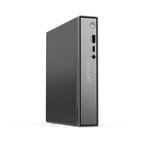
The ThinkCentre neo 50q Gen 5 is Lenovo’s budget 1-liter business desktop, and it is the DDR5 answer to the neo 50q Gen 4 that came before it. The chassis measures 7.05 by 7.2 by 1.44 inches and weighs about 2.5 pounds, so it mounts behind a monitor or sits on a shelf under a reception counter. Lenovo’s spec sheet lists three processor options for the line: a Core i3-1315U, the Core 5 210H that every configuration on this page uses, and a Core 7 240H. What changed against the Gen 4 is the memory and the storage: two DDR5-5600 SO-DIMM slots instead of DDR4-3200, a 64GB ceiling instead of 32GB, and two M.2 PCIe 4.0 slots in place of one M.2 plus an optional 2.5-inch SATA bay.
Two M.2 slots and DDR5, minus the SATA bay
| Pros | Cons |
|---|---|
| Two M.2 PCIe 4.0 x4 slots with RAID 0/1 support, up to 1TB each | Lenovo dropped the 2.5-inch SATA bay the Gen 4 offered |
| DDR5-5600 across two SO-DIMM slots, up to 64GB | Integrated Intel graphics rules out CAD, 3D, and serious video work |
| 1L chassis (7.05 x 7.2 x 1.44 in, 2.49 lbs) with 100mm VESA mounting | Onboard networking is Gigabit Ethernet; 2.5GbE is an extra-cost punch-out option |
| Punch-out port option adds DisplayPort, VGA, serial, or 2.5GbE | Core 5 210H is a Raptor Lake part that launched in Q4 2024 |
| Discrete TPM 2.0, TCG and FIPS 140-2 certified, plus a Kensington slot | Base warranty is one year courier or carry-in |
| Wi-Fi 6E and Bluetooth 5.3 on the wireless cards the US listings ship | No published benchmark figures for this chip in this chassis |
Lenovo ThinkCentre neo 50q Gen 5 Comparison Chart
5 configurations
| Configuration | RAM | Storage | Performance | List price | Amazon price | Compare |
|---|---|---|---|---|---|---|
| 8GB/256GB | 8 GB | 256 GB SSD | 4.0 | $599.98 | Loading... | Details
|
| 8GB/512GB | 8 GB | 512 GB SSD | 4.0 | $629.98 | Loading... | Details
|
| 16GB/256GB | 16 GB | 256 GB SSD | 4.4 | --- | Details
| |
| 16GB/512GB | 16 GB | 512 GB SSD | 4.4 | $759.97 | Loading... | Details
|
| 32GB/1TB | 32 GB | 1 TB SSD | 4.8 | $1159.99 | Loading... | Details
|
Specs shared by every configuration
| Operating System | Windows 11 Pro |
|---|---|
| Processor | Octa-core 2.20 Ghz (max 4.80 Ghz) Intel Core 5 210H |
| GPU | Integrated Intel Graphics |
| Dimensions width x length x thickness | 7.05 x 7.2 x 1.44 inches (179.07 x 182.88 x 36.58 mm) |
| Weight | 2.49 lbs (1.13 kg) |
| WiFi | Wi-Fi 6E (802.11ax) |
| Bluetooth | Bluetooth 5.3 |
| Ethernet | 1 Ethernet port at 1 Gbps |
| HDMI | 1 Full-Size HDMI Port |
| DisplayPort | 1 DisplayPort (DP 1.4b; optional punch-out adds DP, VGA, serial, or 2.5GbE) |
| VGA | No VGA Ports |
| USB Ports | 2 USB 2.0, 3 USB 3, 1 USB-C Front: 1x USB-C 10Gbps, 1x USB-A 10Gbps (Always On); Rear: 2x USB-A 10Gbps, 2x USB 2.0 |
| Thunderbolt Ports | No |
| OCuLink | No |
| Internal SATA Ports | No SATA ports |
| Card Reader | No Card Reader |
| Headphone Jack | front |
| Fanless | No |
| VESA Mount | Yes |
| In the Box | 90W adapter, wireless antenna; USB keyboard and mouse on some listings |
| Expandability | 2x DDR5 SO-DIMM slots (max 64GB DDR5-5600, dual-channel), 2x M.2 PCIe 4.0 NVMe up to 1TB each, no SATA bay |
Related Mini PCs
-
 Lenovo ThinkCentre neo 50q Gen 4The Lenovo ThinkCentre neo 50q Gen 4 is a 1-liter business desktop built around a 13th Gen Intel…
 -
 Beelink SER5 Mini PCThe Beelink SER5 is a compact AMD mini PC (Ryzen 5 5560U or Ryzen 7 5700U) with Radeon graphics,…
 -
 BOSGAME E5 PlusThe BOSGAME E5 Plus pairs a four-core Ryzen 3 5400U with two 2.5GbE ports, two memory slots, and a…
 -
 CHUWI LarkBox X (Core i3-1220P)The CHUWI LarkBox X (Core i3-1220P) is a three-monitor office desktop with upgradable memory and a…
 -
 GMKtec NucBox M2 Pro SPalm-sized GMKtec mini PC built on Intel's 11th-gen Core i7-1185G7, with triple 4K60 output, Intel…
 -
 ORIGIMAGIC N5The ORIGIMAGIC N5 is a small desktop with a four-core Ryzen 3 5400U, two 2.5GbE ports, two M.2…
Office-class throughput from a Raptor Lake H-series chip
The Core 5 210H has four performance cores and four efficiency cores for eight cores and 12 threads, with the P-cores boosting to 4.8 GHz, the E-cores to 3.6 GHz, and 12MB of Intel Smart Cache. Intel’s own spec page puts the launch at Q4 2024 and lists the microarchitecture as Raptor Lake, so this is a refresh of 2023-era silicon rather than a current Intel mobile design. Base power is 45W with a maximum turbo power of 115W, which is why Lenovo pairs the Core 5 configurations with a 90W adapter. Against the i5-13420H in the Gen 4, the CPU Mark gap is a single-digit percentage rather than a generational one; the meaningful upgrade in this box is DDR5 and the second M.2 slot, not the processor.
Some resellers advertise the machine as “12-Core.” It is not. Intel lists eight cores and 12 threads, and Lenovo’s spec sheet says the same.
Graphics are the ceiling. Lenovo’s spec sheet lists “Intel Graphics” for the Core 5 and Core 7 configurations and “Intel UHD Graphics” for the i3, and Intel gives the integrated GPU a 1.4 GHz maximum dynamic frequency. It drives up to three independent displays and is fine for dual 4K office work, remote desktops, and browser-based applications. Anything that leans on the GPU belongs on a different machine.
Two displays onboard, a third by option, and one Gigabit port
Video output is one HDMI 2.1 TMDS port and one DisplayPort 1.4b, each capable of 4096x2160 at 60Hz. Lenovo lists support for up to three independent displays, but the third output only exists if the punch-out port was ordered: you pop the metal plate off the back panel and screw in an extra DisplayPort, a VGA connector, a serial port, or a 2.5 Gigabit Ethernet port. For point-of-sale, lab, and industrial deployments that still need serial or VGA, that option is the reason to look at this chassis rather than a generic mini PC.

Ports are split front and back. The front bezel carries one USB-C at 10Gbps with 5V/3A charging, one USB-A at 10Gbps with Always On charging, and a 3.5mm combo jack. The rear adds two USB-A 10Gbps ports, two USB 2.0 ports (one supporting Smart Power On), the HDMI and DisplayPort outputs, and the Ethernet jack. Onboard networking is Gigabit Ethernet through a Realtek RTL8111K; 2.5GbE via a Realtek RTL8125BGS is the punch-out option, not the default. Wireless is configurable across Intel Wi-Fi 6 AX203, Realtek Wi-Fi 6E RTL8852CE, Intel Wi-Fi 6E AX211, and Realtek Wi-Fi 7 RTL8922AE; the US Amazon listings tracked here all list Wi-Fi 6E with Bluetooth 5.3, and at least one names the Intel AX211 card.
Audio is a Realtek ALC256 codec with a single 2W speaker and no built-in microphone, so plan on a headset for calls. The Gen 5 carries discrete TPM 2.0 (TCG and FIPS 140-2 certified), a 3x7mm Kensington Security Slot, and an available chassis intrusion switch. Lenovo ships the machine with Windows 11 Pro or Home, Ubuntu Linux, or no preload, and the base warranty is one year of courier or carry-in service.
Memory and storage are both serviceable. Two DDR5 SO-DIMM slots run dual-channel at 5600 MT/s up to 64GB total, and the two M.2 slots take PCIe 4.0 x4 NVMe drives up to 1TB each with RAID 0 or RAID 1 support. Lenovo does not list a SATA option on the Gen 5, so the 2.5-inch bay that the Gen 4 could be ordered with is gone; if you were planning to drop a large spinning disk or a cheap SATA SSD in this box, that plan does not survive the generation change.
Reviewer Insights
ITdaily (Michaël Aussems, February 2026)
The only hands-on coverage of this exact machine that Starry Hope could find is ITdaily’s three-way comparison, which put a neo 50q Gen 5 with a Core 5 210H and a 256GB SSD next to a neo 55q Gen 6 running an AMD Ryzen 5 220 and a neo 50q QC running a Qualcomm Snapdragon X X1-26-100, all in the same chassis family. Aussems framed the exercise as follows: “There’s no better way to discover the best chip for the occasion than by testing all three in an identical PC enclosure.”
On clock behaviour under sustained load, Aussems wrote that “The Intel CPU can maintain 4.1 GHz for half a minute, after which the P-core drops to a stable and very respectable 3.8 GHz,” and on the core layout that “With the help of the E-cores, the four P-cores can outclass the AMD Ryzen 5 220.” In the Procyon office-productivity run, his summary was that “Only the Intel Core 5 processor from Intel delivers slightly better results.” The review does not publish the underlying benchmark figures, so those are the limits of what this page can report as measured.
Aussems did not recommend the Intel model. His verdict rested on European pricing: “Why you would pay 250 euros extra for the Intel model is something we cannot understand from our test. So we choose the cheapest: with price taken into account, AMD wins.” The Intel unit he tested listed at 903.22 euros against 657.73 euros for the AMD one. US pricing on the configurations tracked here does not carry that same gap, so read the verdict as a value judgment tied to his market rather than a fixed rule.
No publication has published raw benchmark figures for the Core 5 210H in this chassis. Anyone who needs measured Cinebench, 3DMark, or SPECworkstation figures for a Lenovo 1L is better served by the numbers on the Gen 4 page, with the caveat that those were produced by a different chip in a DDR4 chassis.
Customer Reviews
The 16GB/512GB listing shows 4.5 stars across 90 ratings, with 79% of them at five stars and 7% at one. That figure covers every configuration sold under the same Amazon listing, so it is a line-level average rather than a per-configuration one.
Named buyers praise the size, the port count, and long uptime without overheating. The Motley Dude, a verified buyer, gave it five stars in May 2026 after running one at a salon front desk: “We use it in a busy salon environment for around 10 hours a day, 7 days a week, and it has handled everything without issue. It is compact, does not overheat, has plenty of ports, and takes up very little space, which is exactly what we needed for a front desk/business setup.” Mtn Land, another verified buyer, wrote in January 2026 that “It is small, yet powerful and fast. I run 2 monitors and it handles them with ease. It was delivered timely in a factory-sealed carton.” KC Williams, writing in February 2026, reported that setup “Took about 30 minutes and pretty much did it all” and that it “Runs smoothly with my QuickBooks program.”
The complaints cluster on who is selling the unit rather than on the hardware. Every ASIN on this page is fulfilled by a third-party marketplace seller, not by Lenovo or Amazon directly, and buyers notice. Arichem Purchasing, a verified buyer, left four stars in August 2026 with the observation that “This are refurbished, but seem to be doing OK. Have had a couple of glitches, slow performance, but they were more software related.” Lenovo’s base warranty on this line is one year of courier or carry-in service, so confirm the condition and the remaining warranty term with the seller before placing a fleet order. Read more owner reviews on the 16GB/512GB listing.
A DDR5 refresh of a quiet office box, thin on independent testing
The neo 50q Gen 5 earns its place in a narrow band: office productivity, thin-client and VDI work, digital signage, point-of-sale, and reception desks, where a serviceable 1L machine with certified TPM 2.0 and a serial or VGA option matters more than raw speed. The move to DDR5-5600, a 64GB ceiling, and two M.2 slots makes it a better long-term proposition than the Gen 4 for anyone who plans to keep the box for five years.
The Core 5 210H is a Raptor Lake part from late 2024 that gains only a single-digit percentage on CPU Mark over the Gen 4’s i5-13420H, and no publication has published raw benchmark figures for this exact chip and chassis. Every US listing also runs through a third-party seller, which is where most of the buyer complaints start. Anyone weighing it against boxes with AMD Radeon graphics or 2.5GbE as standard should start from Starry Hope’s Mini PC Comparison Chart, and anyone expecting a mini PC to replace a tower should read what mini PCs cannot do first.
Frequently Asked Questions
What processor does the Lenovo ThinkCentre neo 50q Gen 5 use?
Lenovo’s spec sheet lists three options for the line: an Intel Core i3-1315U, an Intel Core 5 210H, and an Intel Core 7 240H. Every configuration tracked on this page uses the Core 5 210H, which has 8 cores (4 performance and 4 efficiency) and 12 threads, with performance cores boosting to 4.8 GHz and efficiency cores to 3.6 GHz. Listings that advertise it as a “12-Core” processor are quoting the thread count, not the core count.
How much RAM can the ThinkCentre neo 50q Gen 5 take?
Lenovo lists a maximum of 64GB of DDR5-5600 across two SO-DIMM slots, which are dual-channel capable. That doubles the 32GB DDR4-3200 ceiling on the Gen 4.
Can the ThinkCentre neo 50q Gen 5 take a 2.5-inch drive?
No. Lenovo’s spec sheet lists two M.2 slots and no SATA support on the Gen 5, so the optional 2.5-inch bay that the Gen 4 could be ordered with is not available. Storage is up to two M.2 PCIe 4.0 x4 NVMe drives of up to 1TB each, with RAID 0 and RAID 1 supported.
How many monitors can the ThinkCentre neo 50q Gen 5 support?
Two out of the box and three with an option. The onboard HDMI 2.1 TMDS and DisplayPort 1.4b each support up to 4096x2160 at 60Hz. Lenovo lists support for up to three independent displays, but the third output requires ordering the punch-out port, which can be fitted with an extra DisplayPort, a VGA connector, a serial port, or a 2.5GbE jack.
Is the ThinkCentre neo 50q Gen 5 a big upgrade over the Gen 4?
It depends which part you care about. Memory and storage improve clearly: DDR5-5600 instead of DDR4-3200, a 64GB ceiling instead of 32GB, and two M.2 PCIe 4.0 slots instead of one. Wireless improves too, with Wi-Fi 6E and Bluetooth 5.3 on the cards the US listings ship. The processor barely moves, with PassMark’s CPU Mark separating the Core 5 210H from the Gen 4’s i5-13420H by a single-digit percentage. The Gen 5 also drops the Gen 4’s optional 2.5-inch SATA bay.