
MINIX Z100-0dB
Updated on

The MINIX NEO Z100-0dB is a fanless mini PC: there is no internal fan, and the all-metal case doubles as the heatsink, so it runs in total silence. Inside is an Intel N100 (a quad-core Alder Lake-N chip up to 3.4 GHz) with Intel UHD Graphics, paired with 8GB or 16GB of single-channel DDR4 (upgradeable to 32GB) and an NVMe SSD, running Windows 11 Pro. Connectivity covers dual HDMI for 4K at 60Hz, Wi-Fi 6, Bluetooth 5.2, and a 2.5GbE port, in a 1.96-pound chassis. Its job is silent, low-power duty: web, office, streaming, and always-on home-server roles. Gaming and heavy creative work sit outside what the N100 can carry.
| Pros | Cons |
|---|---|
| Fanless, completely silent (the metal case is the heatsink) | Single RAM slot (N100 is single-channel) |
| Memory upgradeable to 32GB | One M.2 slot only, no second drive bay |
| Wi-Fi 6 and 2.5Gb Ethernet | No DisplayPort |
| Dual HDMI ports supporting 4K at 60Hz | C-States not enabled by default in BIOS |
| Pre-installed with Windows 11 Pro | Gaming capabilities limited to older or less demanding titles |
Related Videos
MINIX Z100-0dB Comparison Chart
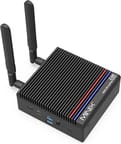 MINIX Z100-0dB | MINIX Z100-0dB | |
| Price | List Price: $239.90 Amazon Prices: | List Price: $269.90 Amazon Prices: |
| Version | 8GB/256GB/Intel N100 | 16GB/512GB/Intel N100 |
| Performance Rating | 4.3 | 4.9 |
| Operating System | Windows 11 Pro | Windows 11 Pro |
| Processor | Quad-core 3.40 Ghz (max 3.40 Ghz) Intel Processor N100 | Quad-core 3.40 Ghz (max 3.40 Ghz) Intel Processor N100 |
| GPU | Integrated Intel UHD Graphics | Integrated Intel UHD Graphics |
| RAM | 8 GB | 16 GB |
| Internal Storage | 256 GB | 512 GB |
| Dimensions width x length x thickness | 4.84 x 4.72 x 1.81 inches (122.94 x 119.89 x 45.97 mm) | 4.84 x 4.72 x 1.81 inches (122.94 x 119.89 x 45.97 mm) |
| Weight | 1.96 lbs (0.89 kg) | 1.96 lbs (0.89 kg) |
| WiFi | Wi-Fi 6 (802.11ax) | Wi-Fi 6 (802.11ax) |
| Bluetooth | Bluetooth 5.2 | Bluetooth 5.2 |
| Ethernet | 1 Ethernet port at 2.5 Gbps | 1 Ethernet port at 2.5 Gbps |
| HDMI | 2 Full-Size HDMI Ports | 2 Full-Size HDMI Ports |
| DisplayPort | No DisplayPort | No DisplayPort |
| VGA | No VGA Ports | No VGA Ports |
| USB Ports | 2 USB 2.0, 2 USB 3, 1 USB-C | 2 USB 2.0, 2 USB 3, 1 USB-C |
| Thunderbolt Ports | No | No |
| OCuLink | No | No |
| Internal SATA Ports | No SATA ports | No SATA ports |
| Card Reader | microSD Card Reader | microSD Card Reader |
| Headphone Jack | combo | combo |
| Fanless | Yes | Yes |
| VESA Mount | Yes | Yes |
| In the Box | power supply with multiple region adapters, HDMI cord, two antennas, a reusable cable tie, monitor mount, screws, and the user guide | power supply with multiple region adapters, HDMI cord, two antennas, a reusable cable tie, monitor mount, screws, and the user guide |
| Expandability | Memory upgradable to 32GB, storage upgradable. Extra expansion with microSD card. | Memory upgradable to 32GB, storage upgradable. Extra expansion with microSD card. |
Related Mini PCs
-
 Lenovo ThinkCentre M625The Lenovo ThinkCentre M625 is a fanless 1-liter thin client built on the AMD A4-9120C, with a…
 -
 MeLE PCG02The MeLE PCG02 is a fanless Intel N100 PC stick with 8GB of memory, 256GB of eMMC storage, dual…
 -
 MINIX Z300-0dBThe MINIX Z300-0dB is a fanless Intel Core i3-N300 mini PC with 16GB of upgradeable RAM, dual 4K…
 -
 MeLE Quieter 4CThe MeLE Quieter 4C is a fanless, silent Intel N100 (or N150) mini PC with 16GB of soldered memory,…
 -
 MeLE Quieter3QThe MeLE Quieter3Q is an ultra-slim, fanless mini PC built around the Intel Celeron N5105, with…
 -
 MINIX Z100-AeroThe MINIX Z100-Aero is an active-cooled Intel N100 mini PC with a single DDR4 slot (to 32GB), an…
Expansion stops at one memory slot and one M.2 bay
There are no moving parts inside, and the all-metal body carries the heat out on its own. At 4.84 x 4.72 x 1.81 inches it tucks behind a monitor on the bundled VESA mount. The port set covers a USB-C (data), two USB 3.0 and two USB 2.0 ports, dual HDMI for 4K at 60Hz, a 2.5GbE jack, and a microSD reader, with Wi-Fi 6 and Bluetooth 5.2 for wireless.
Memory runs single-channel through one DDR4-3200 SO-DIMM slot that takes up to 32GB, and storage sits in one Gen3 M.2 NVMe slot that ships with a heatsink. The N100 cannot address dual-channel memory, and there is no second drive bay, so those two slots are the whole upgrade path once you leave the microSD reader out of it. C-States also ship disabled in the BIOS, and reviewers found that switching them on raises performance.
Reviewer Insights
Robtech: two BIOS changes put the fanless box level with cooled N100 minis
Robtech starts with the all-metal chassis, which he credits for both feel and for dissipating CPU heat far better than plastic could without a fan. He says, “It’s my dream come true. Super solid and feels very premium.” He walks through the side-mounted ports (USB-C and dual USB 3.0 he rates at 10 Gbit, dual USB 2.0, a Realtek 2.5GbE jack, and dual HDMI for 4K at 60Hz, plus a microSD slot) and the Intel Wi-Fi 6 AX201 card, then lifts the lid to show the single DDR4-3200 stick (the N100 is single-channel only) and the heatsinked Gen 3 NVMe drive.
Out of the box the Z100-0dB already beat the other fanless N100 boxes he had tested, and he found two BIOS tweaks that push it further: enabling C-States lifted single-core performance by “a whopping 16%,” and raising the power limit to 30 watts (setting PL1 and PL2 to 30,000) added “an extra 14%” in multi-core, putting the silent unit level with the best actively cooled N100 minis. The maximum CPU temperature climbed about 10C across his half-hour load test once the power limit was raised, though he stressed a passively cooled box only reaches those temps under constant load, not bursty everyday use. Idle draw sat at a low 8 watts, and the heatsinked NVMe stayed cool enough that it was “definitely not going to thermal throttle.”
On graphics the DDR4 memory costs it only a little. In 3DMark it landed 5% behind the best DDR5 N100 results in DX11 and 2% behind in DX12. Older games run well at the 30-watt limit, where Quake 3 Arena “comfortably holds above 200 FPS” and maxed-out Unreal Tournament 2004 at 1080p can dip to the high 60s; GTA 5 is “playable at 720p but runs too slow at 1080.” His structural gripes are the lack of internal SSD expansion beyond the single M.2 slot and C-States shipping disabled, but he still called the Z100-0dB “by far the best budget fanless Mini PC” he had tested.
Britec09: no throttling, and 25 to 27 watts at the top of turbo
Britec09 tests whether a fanless N100 box can stand in for a desktop tower. He confirms the silence first (there are no fans inside, only a large aluminium heatsink under the all-metal shell) and logs the physical details at 0.89 kg and 123 x 120 x 46 mm. On power he measured typical consumption of “10 to 12 watts” rising to “25 to 27 watts” under turbo, which he frames as low enough for an always-on Plex or light-desktop role. He would have preferred dual-channel memory, though the lone DDR4-3200 slot still takes 32GB.
Streaming 4K YouTube with stats-for-nerds open showed only a few dropped frames and instant scrubbing, and a 400 Mbps 4K HEVC 10-bit jellyfish test file played back “silky smooth,” the kind of bitrate a Plex library throws at a box. Running Geekbench 6 and a disk benchmark, he stressed “you’ll get no thermal throttling on this little mini PC whatsoever,” logged an OpenCL GPU score of 3,240, and measured the bundled MINIX NVMe at sequential reads in the low-2,000 MB/s range and writes near 1,580 MB/s. At a $259 asking price he came away calling it a capable silent machine for web, office, streaming, and Plex duty, while ruling it out for 4K rendering or AAA gaming.
In 2026 the N100 is 2023-era Alder Lake-N silicon scoring around 5,643 on PassMark, an entry-level figure that puts the Z100-0dB in browsing, office, media, and light-emulation territory. Both reviewers flag the single memory slot and the limited internal storage expansion as the structural limits of the design.
Customer Reviews
Across 42 ratings on Amazon, the MINIX Z100-0dB averages 4.4 stars, with 74 percent of reviewers leaving 5 stars and a smaller tail of critical ones. The recurring praise is the fanless, silent design: PicassoPC, a buyer who liked the included Wi-Fi antennas and HDMI cable, wrote “The unit is silent! There are no fans - the case is the heatsink, so it can run warm at times.” That heat is the other recurring theme. Several owners note the metal chassis gets warm or hot under load, and M. Wedderburn, a verified buyer, went so far as to add an external fan: “This little guy does get hot. Even though it’s billed as “fanless”, I purchased an AC Infinity MULTIFAN S3 USB muffin fan (from Amazon) to sit on top and keep it cooler.” A reviewer in France using it as a Proxmox server reported measuring around 40°C at half load.
Buyers describe using it for everyday productivity and streaming. Gene M summarizes it as “If you need an absolutely silent, productivity machine, this will not fail you. If you’re looking to game or do some more intensive tasks, look elsewhere.” The two lower scores are about software and load behavior. The one 3-star review, from The H.E.A.T., calls the hardware “awesome” but objected to the setup requiring a Microsoft account, and a 4-star buyer, J C, flagged that it “will slow down and lag with the mouse not moving at all for extended periods of time when it’s under heavy load.” Read more owner reviews on Amazon.
Worth it when silence matters more than speed
Home-theater duty and always-on light-server work are where this box earns its keep, along with everyday web, office, and 4K video on a desk. Robtech’s measurements show the fanless design matching actively cooled N100 minis once C-States and the power limit are tuned, which is the reason to pick the 0dB over a fan-cooled rival. Our guide to when fanless cooling pays off walks through the tradeoffs with sustained-load data.
The N100 is entry-level silicon, so AAA gaming, 3D rendering, and heavy video work belong on another machine, and owners note the metal case gets warm under sustained load (the price of going fanless). The MINIX Z300-0dB keeps the same fanless design and steps up to the Intel N300. For dual Ethernet with a fan in the case, the MINIX Z100-Aero uses the same N100 with active cooling. Starry Hope’s Mini PC Comparison Chart lines the rest of the catalog up side by side.
Frequently Asked Questions
Can the Z100-0dB run Windows 11 Pro?
Yes. Windows 11 Pro comes pre-installed, so the box is usable from first boot.
Is the RAM in the Z100-0dB upgradable?
Yes. It has a single DDR4-3200 SO-DIMM slot that takes up to 32GB. The N100 is single-channel, so there is only the one slot.
Does the Z100-0dB support Wi-Fi 6?
Wi-Fi 6 (802.11ax) comes from an Intel AX201 card, and Bluetooth 5.2 is on board as well.
What type of storage does the Z100-0dB use?
A single Gen 3 M.2 NVMe SSD, in a slot that ships with a heatsink. You can swap the drive for a larger one, but there is no second bay.
Is the Z100-0dB fanless?
Yes. There is no internal fan; the all-metal case is the heatsink.
Can I mount the Z100-0dB behind a monitor?
Yes. A monitor mount and screws are in the box, so it can hang off the back of a VESA-compatible display.
What kind of graphics does the Z100-0dB have?
Integrated Intel UHD Graphics. Older titles run well at the 30-watt power limit, and GTA 5 is playable at 720p.
How many USB ports does the Z100-0dB have?
Four Type-A ports, split two USB 3.0 and two USB 2.0, plus one USB-C for data.
Does the Z100-0dB have an Ethernet port?
It has one 2.5 gigabit jack, wired to a Realtek controller.
Can I use the Z100-0dB for gaming?
Light and retro gaming, yes. Quake 3 Arena holds above 200 FPS at the raised power limit, while GTA 5 runs at 720p and struggles at 1080p.
What comes included in the box with the Z100-0dB?
The power supply with multiple region adapters, an HDMI cord, two antennas, a reusable cable tie, a monitor mount, screws, and the user guide.
Is there a card reader on the Z100-0dB?
Yes, a microSD slot, which is the only storage expansion beyond swapping the M.2 drive.