
AOOSTAR WTR MAX
Published on

The AOOSTAR WTR MAX is a NAS for people who want to run TrueNAS, Unraid, or Proxmox on one box that holds six hard drives, five NVMe SSDs, and a few virtual machines. Its 8-core AMD Ryzen 7 PRO 8845HS supports ECC memory. AOOSTAR sells it barebone: no memory, no SSD, and no NAS software, so the build starts with RAM, an M.2 drive for the operating system, and SFP+ modules or DAC cables for the 10GbE ports. The M.2 slots run at only one or two PCIe lanes each, and there is no internal PCIe slot. AOOSTAR’s US store sells the barebone unit for $659.00; it launched at $699 in spring 2025.
Pros and cons
| Pros | Cons |
|---|---|
| Six 3.5-inch SATA bays plus five M.2 NVMe slots in one chassis | M.2 slots run at PCIe 4.0 x2 or x1, so a fast Gen 4 SSD gets less than half its rated speed |
| Ryzen 7 PRO 8845HS supports ECC DDR5 SO-DIMMs up to 128GB | Copies between internal SSDs measured only about 550MB/s |
| Two Intel X710 10GbE SFP+ ports and two 2.5GbE ports | No NAS operating system; you install and maintain your own |
| Radeon 780M handles Plex hardware transcoding | No internal PCIe slot; OCuLink is the only PCIe expansion path |
| USB4 and OCuLink ports for an eGPU or external NVMe enclosure | LCD panel software was hard to download and configure |
| 35 to 38 dBA on automatic fan control in NASCompares tests | 10GbE ports are SFP+, so copper networks need modules or adapters |
Related Videos
AOOSTAR WTR MAX Comparison Chart
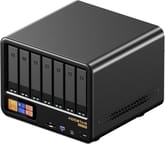 AOOSTAR WTR MAX | AOOSTAR WTR MAX | |
| Price | List Price: $659.00 Amazon Prices: Loading prices... | List Price: $1,419.00 Amazon Prices: |
| Version | Barebone (no RAM, SSD, or OS) | 64GB ECC RAM, no SSD |
| Drive Bays | 6 x 3.5-inch SATA (2.5-inch compatible) Not hot-swap, tool-less trays | 6 x 3.5-inch SATA (2.5-inch compatible) Not hot-swap, tool-less trays |
| M.2 Slots | 5 x M.2 NVMe, cache or storage pool 3x PCIe 4.0 x2, 2x PCIe 4.0 x1 | 5 x M.2 NVMe, cache or storage pool 3x PCIe 4.0 x2, 2x PCIe 4.0 x1 |
| Max Raw Capacity | 144 TB | 144 TB |
| Included Drives | None (diskless) | None (diskless) |
| System Drive | None (install your own M.2 SSD) | None (install your own M.2 SSD) |
| Processor | Octa-core 3.80 Ghz (max 5.10 Ghz) AMD Ryzen 7 PRO 8845HS | Octa-core 3.80 Ghz (max 5.10 Ghz) AMD Ryzen 7 PRO 8845HS |
| Hardware Transcoding | Yes (AMD Radeon 780M (VCN); Plex transcoding tested) | Yes (AMD Radeon 780M (VCN); Plex transcoding tested) |
| RAM | 0 GB DDR5 SO-DIMM Max 128 GB, 2 slots DDR5-5600, ECC or non-ECC | 64 GB DDR5 SO-DIMM Max 128 GB, 2 slots DDR5-5600, ECC or non-ECC |
| ECC Memory | Yes (ECC SO-DIMM) | Yes (ECC SO-DIMM) |
| Network Ports | 2 x 10GbE SFP+ 2 x 2.5GbE RJ45 | 2 x 10GbE SFP+ 2 x 2.5GbE RJ45 |
| PCIe Slot | No (No internal slot; OCuLink port (PCIe 4.0 x4)) | No (No internal slot; OCuLink port (PCIe 4.0 x4)) |
| Expansion Unit | None | None |
| Operating System | None (barebone, Windows 11 Pro key) | None (barebone, Windows 11 Pro key) |
| Third-Party OS | Yes (Bring your own OS: TrueNAS, Unraid, Proxmox, or Linux) | Yes (Bring your own OS: TrueNAS, Unraid, Proxmox, or Linux) |
| File Systems | ZFS (with TrueNAS or Unraid; no NAS OS included, so Btrfs, ext4, or XFS depend on the OS you install) | ZFS (with TrueNAS or Unraid; no NAS OS included, so Btrfs, ext4, or XFS depend on the OS you install) |
| USB Ports | 3 USB 3, 2 USB-C (1 USB4) Rear: USB4, 2x USB-A 10Gbps. Front: USB-C, USB-A | 3 USB 3, 2 USB-C (1 USB4) Rear: USB4, 2x USB-A 10Gbps. Front: USB-C, USB-A |
| Thunderbolt Ports | No | No |
| HDMI | 1 | 1 |
| WiFi | -- | -- |
| Idle Power | 18 W (No hard drives, OS on one NVMe SSD, 10GbE not connected) | 18 W (No hard drives, OS on one NVMe SSD, 10GbE not connected) |
| Load Power | 89 W (Peak with 6 HDDs and 5 SSDs active, both 10GbE links busy, CPU at 40 to 50%) | 89 W (Peak with 6 HDDs and 5 SSDs active, both 10GbE links busy, CPU at 40 to 50%) |
| Power Supply | 280W external | 280W external |
| Noise | 38 dB (Automatic fan setting, drives under test, NASCompares; 43 to 44 dBA at maximum fan speed) | 38 dB (Automatic fan setting, drives under test, NASCompares; 43 to 44 dBA at maximum fan speed) |
| Dimensions width x length x thickness | --- | --- |
| Weight | unknown | unknown |
| Released | April 2025 at $699 | April 2025 at $699 |
| In the Box | Main unit, HDMI cable, power adapter, manual. | Main unit, HDMI cable, power adapter, manual. |
| Expandability | RAM to 128GB (2x SO-DIMM, ECC). 5x M.2 NVMe PCIe 4.0. OCuLink and USB4 for external devices. No PCIe slot. | RAM to 128GB (2x SO-DIMM, ECC). 5x M.2 NVMe PCIe 4.0. OCuLink and USB4 for external devices. No PCIe slot. |
Six SATA bays and five M.2 slots
The front of the WTR MAX has seven vertical trays. Six are click-in trays for 3.5-inch or 2.5-inch SATA drives, and AOOSTAR rates them for drives up to 24TB each, or 144TB across all six. The seventh tray, at the far left, is a spring-loaded sled that holds four M.2 2280 NVMe SSDs, with room for heatsinks. A fifth M.2 slot sits under the bottom panel next to the two SO-DIMM slots, and that slot suits the operating system drive. AOOSTAR does not list hot-swap support for the SATA bays, and Level1Techs pointed out that the M.2 sled is not hot-swappable either.
The six SATA bays connect through an ASMedia ASM1166 controller on a PCIe 3.0 x2 link, which NASCompares put at about 2GB/s shared across all six drives. That is plenty for hard drives. Six SATA SSDs at about 550MB/s each would need more than 3GB/s, so that link limits an all-SSD SATA pool. Three M.2 slots run at PCIe 4.0 x2 and two at PCIe 4.0 x1, so a Gen 4 SSD in any of them runs below its rated speed. NASCompares measured about 2.9GB/s reads on the x2 slots and about 1.6GB/s on the x1 slots, and copies from one internal SSD to another stayed near 550MB/s in every slot combination. A single 10GbE link carries about 1.1GB/s, less than either slot speed, so the slot widths do not limit file transfers over the network.
The two SO-DIMM slots take DDR5-5600 memory up to 128GB, ECC or non-ECC. AOOSTAR also sells a configuration with 64GB (2x 32GB) of Apacer ECC memory for $1,419.00.
10GbE SFP+, USB4, and OCuLink

Most ports are on the back: two 10GbE SFP+ ports on an Intel X710 controller, two 2.5GbE RJ45 ports on Intel I226-V controllers, a USB4 port, an OCuLink port, two 10Gbps USB-A ports, HDMI 2.1, DisplayPort 1.4, and a 3.5mm audio jack. The front has a microSD slot, a USB-A port, a USB-C port, and the power button. The front USB-C port is not USB4, per Level1Techs. All four network ports use Intel controllers, and VMware ESXi 8 detected both the 10GbE and 2.5GbE adapters in VirtualizationHowto’s testing.
The 10GbE ports are SFP+ cages that take a DAC cable or a transceiver module, and a DAC cable to an SFP+ switch draws the least power. SFP+ to RJ45 copper modules draw more power and add heat, according to Level1Techs, and the two cages sit close together, so NASCompares advised watching temperatures with copper adapters. Both 10GbE links reached about 9.5Gbps in NASCompares’ iPerf3 test, and large SMB file copies ran at more than 1.1GB/s.
The OCuLink port carries PCIe 4.0 x4 and does not share lanes with the M.2 slots. It is the only way to add a PCIe device, such as an external GPU, a faster network card, or an NVMe enclosure, since the case has no internal slot. OCuLink is not hot-pluggable. Level1Techs ran an external GPU enclosure over USB4 and confirmed the OCuLink port worked with an external adapter that has its own power supply.
Ryzen 7 PRO 8845HS with ECC memory

This 8-core, 16-thread Zen 4 laptop chip from 2024 boosts to 5.1GHz and scores about 28,600 in PassMark, more than five times the score of the Intel N150 in budget NAS units such as the TerraMaster F4-425 Plus. The PRO version adds ECC memory support, which the N150 lacks. Level1Techs installed two 48GB ECC SO-DIMMs, ran them at 5600, and found that memory errors were reported correctly to the Linux kernel.
The Radeon 780M handles hardware video transcoding. NASCompares ran four large 4K and 8K streams in Plex at once, with three of them transcoding on the GPU, and CPU load stayed under 50%. NASCompares also ran six Windows 10 VMs and two Ubuntu VMs under Proxmox at the same time.
AOOSTAR does not make NAS software. The barebone unit includes a Windows 11 Pro key. VirtualizationHowto installed Proxmox VE 8, VMware ESXi 8, TrueNAS Scale, Ubuntu 24.04, Debian, Rocky, and Arch without problems. Level1Techs found the BIOS fully unlocked, with network boot and PCIe error-reporting (AER) and IOMMU options, but Secure Boot is not configured out of the box. There is no vendor app store, phone backup app, or remote-access service, so setup takes more knowledge than a Synology or UGREEN unit; see UGREEN vs Synology for how those vendor systems compare.
The front LCD shows CPU, memory, and drive status through AOOSTAR’s own control software for Windows and Linux. NASCompares found that browsers flagged the download and that the configuration client needed a specific internal IP address, which was difficult on its network.
Power draw and noise
Power comes from a 280 W external adapter. NASCompares measured 18 W at idle with only the OS SSD installed and the 10GbE ports unused, about 24 W with five SSDs, 52 to 53 W with six hard drives and five SSDs idle, and 73 to 89 W with every drive busy, both 10GbE links active, and the CPU at 40 to 50%. Other reviewers saw higher idle figures: VirtualizationHowto measured 36 to 40 W at idle in Proxmox and 95.7 W with all cores at full load, and Level1Techs saw about 42 W at idle before adding drives. Level1Techs did not expect the system to idle below about 25 W once drives are installed.
Four fans cool the case: two at the rear, one on the CPU vapor chamber, and one on the bottom over the memory and the internal M.2 slot. NASCompares measured 35 to 38 dBA on automatic fan control with drives under test and 43 to 44 dBA with the fans forced to maximum. VirtualizationHowto found the fans quiet at idle but heard them ramp up with all six bays holding spinning drives.
Reviewer Insights
Three reviewers tested the Ryzen 7 PRO 8845HS model in 2025. All three praised the hardware design, and Level1Techs confirmed that ECC error reporting works. VirtualizationHowto faulted the x1 and x2 M.2 slot widths, NASCompares faulted the slow copies between internal SSDs, and both listed the missing PCIe slot.
NASCompares
Rob Andrews of NASCompares used the WTR MAX daily for a week and scored it 9.2 out of 10, with 10 out of 10 for build quality and hardware and 8 out of 10 for performance. In his video review he said, “As far as I’m concerned, this thing is a blinder,” and “I was really impressed by the noise and the temperature management of this system.” The written review measured the M.2 slot speeds, the SSD-to-SSD bottleneck, power draw, and noise, and concluded, “While internal bandwidth sharing across NVMe slots may limit some inter-disk operations, this did not impact external throughput or sustained application performance.” The LCD software was his main complaint: “This was the only area of the review that I found inconsistent and messy!” The review also listed the missing internal PCIe slot and the external power adapter as cons.
VirtualizationHowto
Brandon Lee of VirtualizationHowto tested the WTR MAX as a homelab server and installed Proxmox, ESXi, TrueNAS Scale, and several Linux distributions. He wrote, “In fact, it is one of the best that I have tested and had my hands on.” On price, he wrote, “The Aoostar WTR Max is extremely reasonably priced in my opinion.” His cons were idle power of 36 to 40 W, M.2 slots limited to x1 and x2, no PCIe slot, and fan noise with all bays full of spinning drives. In his video he added, “I think the Oculink port makes up for the lack of the PCIe as well as the fact that you’ve got many storage options, helps to offset the lack of full potential on those Gen 4 drives.”
Level1Techs
Level1Techs reviewed a unit AOOSTAR sent and compared it to its own wish list for a NAS: “This is the sort of fantasy checklist for a home server type solution that I’ve wanted since time in memorial.” The review confirmed ECC error reporting under Linux, recorded CPU temperatures topping out near 80°C in a 30-minute Cinebench run with the fans only slightly louder, and tested the USB4, OCuLink, and BIOS options. It noted that Secure Boot needs manual setup, that the bottom fan uses a small four-pin connector that needs care, and that the support email at an Outlook.com address and parts of AOOSTAR’s website seemed odd. The video is a first look, and the reviewer said more testing was planned.
How the Intel model, the WTR PRO, and the N5 Pro differ
AOOSTAR sells the same chassis with an Intel Core i5-1235U for $559. That version drops ECC support, caps memory at 96GB of DDR5-4800, and runs its M.2 slots at PCIe 3.0 instead of 4.0, so the Ryzen model is the one to pick for ECC or an SSD pool. The AOOSTAR WTR PRO 5825U is a smaller 4-bay sibling with an older Ryzen 7 5825U, two M.2 slots, and dual 2.5GbE only.
The Minisforum N5 Pro also takes ECC memory but has five SATA bays instead of six, and it uses RJ45 10GbE and 5GbE ports rather than SFP+. It has an internal PCIe 4.0 slot for a low-profile card, which the WTR MAX lacks.
Who should buy it
The WTR MAX fits a homelab builder who wants to install TrueNAS, Unraid, or Proxmox and keep six hard drives, an SSD pool, and several virtual machines on one box. The Ryzen 7 PRO 8845HS takes up to 128GB of ECC memory, the Radeon 780M handled Plex transcodes in NASCompares’ tests, and both SFP+ ports reached about 9.5Gbps. All three reviewers praised the hardware design.
Skip it if you want a NAS that works out of the box, with a vendor app store, phone backup, and hot-swap bays; a vendor system such as the UGREEN NASync DXP6800 Pro is the easier route. Skip it too if your network is RJ45 copper or you need an internal PCIe card: the Minisforum N5 Pro has both. An all-SSD pool that needs fast internal copies is a poor fit too, since those copies stayed near 550MB/s. The NAS comparison chart lines up the other options.
Frequently Asked Questions
Does the AOOSTAR WTR MAX support ECC memory?
Yes, with ECC DDR5 SO-DIMMs up to 128GB. AOOSTAR says the unit does not accept the common 2x 48GB non-ECC laptop kit, but 96GB works as ECC SO-DIMMs.
What comes in the box with the barebone WTR MAX?
The unit, an HDMI cable, the 280 W power adapter, and a manual. Memory, an M.2 2280 NVMe SSD for the operating system, hard drives, and SFP+ modules or DAC cables are all extra.
Which operating systems run on the WTR MAX?
Reviewers ran Proxmox VE 8, VMware ESXi 8, TrueNAS Scale, Ubuntu 24.04, Debian, Rocky Linux, and Arch Linux, plus Windows 10 virtual machines under Proxmox. AOOSTAR includes a Windows 11 Pro key with the barebone unit but no NAS software of its own.
Can I add a graphics card or network card to the WTR MAX?
Only externally. The OCuLink port carries PCIe 4.0 x4 to an external dock that has its own power supply, and the USB4 port can run a Thunderbolt-style enclosure. OCuLink is not hot-pluggable, so connect an OCuLink dock with the system powered off.
How fast are the M.2 slots in the WTR MAX?
PCIe 4.0 x2 has about the same bandwidth as PCIe 3.0 x4, so a Gen 3 SSD runs close to its rated speed in the three x2 slots. A fast Gen 4 SSD gets less than half its rated speed there, and less again in the two x1 slots; NASCompares measured about 2.9GB/s reads in the x2 slots.