Can you download and install iTunes on a Chromebook?

Short Answer:
No. Apple discontinued iTunes in 2019 and replaced it with Apple Music, which works on Chromebooks through both a web player and an Android app.
Long Answer:
If you’ve been away from the Apple ecosystem for a while, the biggest news is that iTunes no longer exists. In 2019, Apple split iTunes into three separate apps: Apple Music for music, Apple TV for video, and Apple Podcasts for podcasts. The old model of buying individual tracks and syncing them to your device gave way to streaming, and Apple made the transition official by building Apple Music as a full streaming service to compete with Spotify and YouTube Music.
The good news for Chromebook users is that Apple Music is far more accessible than iTunes ever was. You can open music.apple.com in Chrome and start listening immediately with an Apple Music subscription. If your Chromebook supports Android apps, you can also install the Apple Music app from the Google Play Store, which adds offline downloads and a native-feeling experience. For a full walkthrough on getting Apple Music set up on your Chromebook, check out our dedicated guide: Does Apple Music Work on Chromebooks?
Of course, Apple Music isn’t your only option. YouTube Music is Google’s own streaming service and the successor to Google Play Music. It’s deeply integrated into Chrome OS, lets you upload your own music library, and comes bundled with YouTube Premium. Spotify remains one of the most popular choices with both a web player and an Android app available for Chromebooks. Amazon Music is another solid option, especially if you’re already an Amazon Prime member.
The shift from local music storage to cloud streaming felt uncertain back when Chromebooks first arrived, but today it’s the standard across every platform. Even Windows and Mac users have largely moved to streaming services. The advantage is clear: your entire music library is backed up automatically, accessible from any device, and doesn’t eat into your storage. Most streaming services also offer offline downloads for when you need music without an internet connection.
Chromebooks for Music Streaming
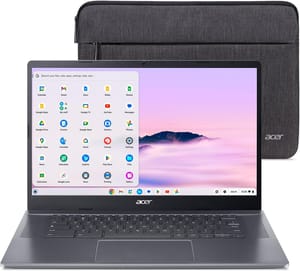
If you’re looking for a Chromebook that delivers a great music streaming experience with Apple Music, YouTube Music, Spotify, or any other service, you’ll want good speakers and reliable connectivity. The Acer Chromebook Plus 515 covers both, featuring upward-firing DTS speakers that sound good for the price, along with Wi-Fi 6E for buffer-free streaming and plenty of storage for offline music libraries.
Acer Chromebook Plus 515