
Acer Chromebook 15
Updated on

Note: The Acer Chromebook 15 CB5-571 reached its Auto Update Expiration in June 2021 and is no longer receiving Chrome OS updates. This page is maintained for historical reference.
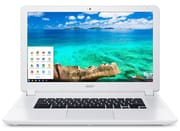
The Acer Chromebook 15 CB5-571 made waves when it launched in early 2015 as one of the first 15.6-inch Chromebooks on the market. At a time when most Chromebooks featured compact 11 to 13-inch displays, Acer recognized that some users wanted the larger screen real estate typically found only on traditional laptops. The CB5-571 series delivered this with a Full HD IPS display, Intel Celeron 3205U processor, and 9-hour battery life, all at price points ranging from $249 to $499 depending on the configuration. While this Chromebook is no longer supported by Google, it represented a significant milestone in Chromebook evolution and demonstrated that Chrome OS could power larger, more productivity-focused devices.
Related Videos
Acer Chromebook 15 Comparison Chart
 Acer Chromebook 15 | Acer Chromebook 15 | Acer Chromebook 15 | Acer Chromebook 15 | Acer Chromebook 15 | Acer Chromebook 15 | |
| Price | List Price: $449.99 Amazon Prices: | List Price: $349.99 Amazon Prices: | List Price: $499.99 Amazon Prices: | List Price: $249.99 Amazon Prices: | List Price: $249.99 Amazon Prices: | List Price: $299.99 Amazon Prices: |
| Model number | CB5-571-362Q / NX.MUNAA.008 | CB5-571-C09S / NX.MUNAA.003 | CB5-571-58HF / NX.MUNAA.009 | CB5-571-C4T3 / NX.MUNAA.005 | CB5-571-C9DH / NX.MUNAA.013 | CB5-571-C1DZ / NX.MUNAA.014 |
| Performance Rating | 3.1 | 2.7 | 3.4 | 2.2 | 2.2 | 2.7 |
| Chromebook Plus | No | No | No | No | No | No |
| Processor | Dual-core 2.00 Ghz Intel Core i3-5005U | Dual-core 1.50 Ghz Intel Celeron 3205U | Dual-core 2.20 Ghz Intel Core i5-5200U | Dual-core 1.50 Ghz Intel Celeron 3205U | Dual-core 1.50 Ghz Intel Celeron 3205U | Dual-core 1.50 Ghz Intel Celeron 3205U |
| RAM | 4 GB | 4 GB | 4 GB | 2 GB | 2 GB | 4 GB |
| Internal Storage | 32 GB SSD | 32 GB SSD | 32 GB SSD | 16 GB SSD | 16 GB SSD | 16 GB SSD |
| Screen Size | 15.6" | 15.6" | 15.6" | 15.6" | 15.6" | 15.6" |
| Screen Resolution | 1920x1080 | 1920x1080 | 1920x1080 | 1366x768 | 1366x768 | 1920x1080 |
| Screen Type | LED | LED | LED | LED | LED | LED |
| Touch Screen | No | No | No | No | No | No |
| Stylus / Pen | No Stylus Support | No Stylus Support | No Stylus Support | No Stylus Support | No Stylus Support | No Stylus Support |
| Dimensions width x length x thickness | 15.1 x 9.6 x 1 inches (383.54 x 243.84 x 25.4 mm) | 15.1 x 9.6 x 1 inches (383.54 x 243.84 x 25.4 mm) | 15.1 x 9.6 x 1 inches (383.54 x 243.84 x 25.4 mm) | 15.1 x 9.6 x 1 inches (383.54 x 243.84 x 25.4 mm) | 15.1 x 9.6 x 1 inches (383.54 x 243.84 x 25.4 mm) | 15.1 x 9.6 x 1 inches (383.54 x 243.84 x 25.4 mm) |
| Weight | 4.85 lbs (2.2 kg) | 4.85 lbs (2.2 kg) | 4.85 lbs (2.2 kg) | 4.85 lbs (2.2 kg) | 4.85 lbs (2.2 kg) | 4.85 lbs (2.2 kg) |
| Backlit Keyboard | No | No | No | No | No | No |
| Webcam | No Webcam | No Webcam | No Webcam | No Webcam | No Webcam | No Webcam |
| WiFi | 802.11 a/b/g/n/ac | 802.11 a/b/g/n/ac | 802.11 a/b/g/n/ac | 802.11 a/b/g/n/ac | 802.11 a/b/g/n/ac | 802.11 a/b/g/n/ac |
| Bluetooth | Bluetooth 4.0 | Bluetooth 4.0 | Bluetooth 4.0 | Bluetooth 4.0 | Bluetooth 4.0 | Bluetooth 4.0 |
| Ethernet | No | No | No | No | No | No |
| Cellular Modem | No | No | No | No | No | No |
| HDMI | Full-Size HDMI | Full-Size HDMI | Full-Size HDMI | Full-Size HDMI | Full-Size HDMI | Full-Size HDMI |
| USB Ports | 1 USB 2.0, 1 USB 3 | 1 USB 2.0, 1 USB 3 | 1 USB 2.0, 1 USB 3 | 1 USB 2.0, 1 USB 3 | 1 USB 2.0, 1 USB 3 | 1 USB 2.0, 1 USB 3 |
| Thunderbolt Ports | No | No | No | No | No | No |
| Card Reader | SD | SD | SD | SD | SD | SD |
| Battery | 4 cell, 3220 mAh, Lithium-ion | 4 cell, 3220 mAh, Lithium-ion | 4 cell, 3220 mAh, Lithium-ion | 4 cell, 3220 mAh, Lithium-ion | 4 cell, 3270 mAh, Lithium-ion | 4 cell, 3270 mAh, Lithium-ion |
| Battery Life | 9.0 hours | 9.0 hours | 9.0 hours | 9.0 hours | 9.0 hours | 9.0 hours |
| Fanless | No | No | No | No | No | No |
| Auto Update Expiration Date | June, 2021 | June, 2021 | June, 2021 | June, 2021 | June, 2021 | June, 2021 |
Related Chromebooks
-
 Acer Chromebook 315The Acer Chromebook 315 shines with its vivid 15.6-inch FHD IPS display, 10-hour battery life, and…
 -
 Acer Chromebook 15 CB315 (AMD)The Acer Chromebook 15 CB315 (AMD) is a 15.6-inch budget Chromebook built around AMD's 7th-gen…
 -
 ASUS Chromebook C523The ASUS Chromebook C523 brings a 15.6” anti-glare display, robust connectivity with 802.11ac Wi-Fi…
 -
 Lenovo 3i ChromebookThe Lenovo 3i Chromebook offers a large 15.6-inch anti-glare FHD display with a numeric keypad,…
 -
 Lenovo IdeaPad 3i ChromebookA budget-friendly 15.6" Chromebook featuring a Full HD display, Intel Celeron N4500 processor, and…
 -
 ASUS Chromebook CX1 (CX1500)The ASUS Chromebook CX1 (CX1500) boasts a full HD display, long-lasting battery, and peppy…
Detailed Insights into the Acer Chromebook 15
The Acer Chromebook 15 CB5-571 features a sturdy plastic construction with a distinctive white textured finish that reviewers consistently described as surprisingly durable for its price point. Laptop Mag characterized the build quality as “give-it-to-your-kid-sturdy,” noting that the woven texture provides better grip. The chassis measures 15.1 x 9.6 x 1.0 inches and weighs 4.85 pounds, making it notably heavier than smaller Chromebooks but still manageable for occasional transport. The keyboard spans nearly the full width of the machine and offers comfortable typing for extended sessions, though NotebookCheck noted the keys feel somewhat spongy with shorter travel than ideal.
The 15.6-inch IPS display delivers wide viewing angles and a matte finish that reduces glare in various lighting conditions. While the Full HD resolution on the higher-end variants provides crisp text and detailed images, reviewers consistently noted that display brightness falls below expectations, measuring around 248 cd/m² according to NotebookCheck’s testing. The matte panel helps compensate somewhat in bright environments, but this remains a weak point compared to more expensive laptops. Audio quality, however, exceeds expectations thanks to upward-facing speakers that produce surprisingly loud and clear sound for a Chromebook in this price range, making it a reasonable companion for music production on a Chromebook using browser-based tools.
Connectivity options include one USB 2.0 port, one USB 3.0 port, HDMI output, an SD card reader, a combo headphone/microphone jack, and 802.11ac Wi-Fi with MIMO technology. While the port selection was adequate for 2015, the lack of USB-C (which became standard in later Chromebooks) dates the design. The USB 3.0 port could accommodate a USB Ethernet adapter for wired networking since there was no built-in Ethernet port. Battery life consistently impressed reviewers, with real-world usage yielding 7 to 9 hours depending on workload. NotebookCheck measured excellent efficiency, noting the system remains cool and quiet even under load, never producing uncomfortable heat or distracting fan noise.
Reviewer Insights on the Acer Chromebook 15
Bruce Naylor’s Technical Review
Bruce Naylor from Desktop HIFI provided one of the most comprehensive video reviews of the Acer Chromebook 15, walking through every port, feature, and real-world usage scenario. He positioned the device primarily as “a great entertainment laptop,” emphasizing its suitability for watching movies and YouTube videos thanks to the large screen and excellent speakers. “One thing I really like is the speakers on this Chromebook. Very loud and clear,” he noted during his demonstration. His testing revealed boot times of just 5 to 7 seconds and smooth performance for general web browsing, though he observed performance degradation once eight or nine browser tabs were open simultaneously. Despite this limitation, he concluded that “for $350, I don’t think you’re going to go wrong.”
NotebookCheck’s Professional Analysis
NotebookCheck provided the most technical evaluation, scoring the CB5-571 at 78% (Good). Their comprehensive testing revealed strong benchmark performance with an Octane V2 score of 13,238 points, positioning it among the faster Chromebooks of its era. Thermal management impressed, with the case never reaching uncomfortable temperatures even under sustained load. They praised the IPS panel’s wide viewing angles and the trackpad’s responsiveness, noting that “fingers glide beautifully across the smooth surface.” However, they criticized the limited upgrade and maintenance options and the keyboard’s spongy feel. Their verdict summarized: “Those who are content just doing office work and hopping around the Internet will find that this is an exemplary device.”
Laptop Mag’s Value Assessment
Cherlynn Low from Laptop Mag awarded the Chromebook 15 a 3.5/5 star rating, recommending it for budget-conscious users. Her testing confirmed the cool operation, with the underside reaching only 87.5°F after 15 minutes of video streaming, well below the 95°F comfort threshold. She praised the large trackpad, loud speakers, and best-in-class performance for its price category. The primary drawback in her assessment was the display, which she described as “dull” compared to competitors. Nevertheless, she concluded that the combination of strong performance, excellent battery life, and sturdy build quality justified its $250 to $350 price point.
Conclusion
The Acer Chromebook 15 CB5-571 served as an important proof of concept that larger Chromebooks could succeed in the market. Its combination of a spacious 15.6-inch display, loud speakers, excellent battery life, and sturdy construction made it particularly well-suited for entertainment, productivity, and educational use cases. While the dim display, heavier weight, and eventual performance limitations with many open tabs represented real drawbacks, the value at $249 to $499 was strong for 2015.
Though this Chromebook reached its end of support in June 2021 and can no longer be recommended for new purchases, its legacy lives on in modern large-screen Chromebooks that followed. For those who owned and enjoyed the CB5-571, it demonstrated that Chrome OS could power a full-sized laptop experience effectively. If you’re looking for a current large-screen Chromebook, consider exploring newer models with updated processors, USB-C connectivity, and longer support timelines. Our Chromebook Comparison Chart can help you weigh the options side by side.