
Acer Chromebook 15
Updated on

Note: The CB5-571 reached its Auto Update Expiration in June 2021 and no longer receives Chrome OS updates. This page is maintained for historical reference.
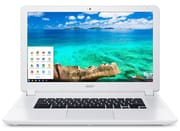
The Acer Chromebook 15 CB5-571 launched in early 2015 as one of the first 15.6-inch Chromebooks sold. Most Chromebooks of that period used 11 to 13-inch displays, and Acer built this one around the screen size buyers were used to seeing on traditional laptops. The line shipped with a Full HD IPS display, an Intel Celeron 3205U processor, and 9-hour battery life, at prices from $249 to $499 depending on the configuration. Google support has ended, but the machine showed that Chrome OS could power larger, productivity-focused devices.
Related Videos
Acer Chromebook 15 Comparison Chart
6 configurations
| Configuration | Processor | RAM | Storage | Screen | List price | Amazon price | Compare |
|---|---|---|---|---|---|---|---|
| CB5-571-362Q / NX.MUNAA.008 | Core i3-5005U | 4 GB | 32 GB SSD | 1920x1080 | $449.99 | Details
| |
| CB5-571-C09S / NX.MUNAA.003 | Celeron 3205U | 4 GB | 32 GB SSD | 1920x1080 | $349.99 | Details
| |
| CB5-571-58HF / NX.MUNAA.009 | Core i5-5200U | 4 GB | 32 GB SSD | 1920x1080 | $499.99 | Details
| |
| CB5-571-C4T3 / NX.MUNAA.005 | Celeron 3205U | 2 GB | 16 GB SSD | 1366x768 | $249.99 | Details
| |
| CB5-571-C9DH / NX.MUNAA.013 | Celeron 3205U | 2 GB | 16 GB SSD | 1366x768 | $249.99 | Details
| |
| CB5-571-C1DZ / NX.MUNAA.014 | Celeron 3205U | 4 GB | 16 GB SSD | 1920x1080 | $299.99 | Details
|
Specs shared by every configuration
| Chromebook Plus | No |
|---|---|
| Screen Size | 15.6" |
| Screen Type | LED |
| Touch Screen | No |
| Stylus / Pen | No Stylus Support |
| Dimensions width x length x thickness | 15.1 x 9.6 x 1 inches (383.54 x 243.84 x 25.4 mm) |
| Weight | 4.85 lbs (2.2 kg) |
| Backlit Keyboard | No |
| Webcam | No Webcam |
| WiFi | 802.11 a/b/g/n/ac |
| Bluetooth | Bluetooth 4.0 |
| Ethernet | No |
| Cellular Modem | No |
| HDMI | Full-Size HDMI |
| USB Ports | 1 USB 2.0, 1 USB 3 |
| Thunderbolt Ports | No |
| Card Reader | SD |
| Battery Life | 9.0 hours |
| Fanless | No |
| Auto Update Expiration Date | June, 2021 |
Related Chromebooks
-
 Acer Chromebook 315The Acer Chromebook 315 (CB315-4H) is a fanless 15.6-inch FHD IPS Chromebook with an Intel Celeron…
 -
 Acer Chromebook 15 CB315 (AMD)The Acer Chromebook 15 CB315 (AMD) is a 15.6-inch budget Chromebook built around AMD's 7th-gen…
 -
 ASUS Chromebook C523The ASUS Chromebook C523 is a fanless 15.6-inch Chromebook with an anti-glare display, an Intel…
 -
 Lenovo IdeaPad 3i ChromebookThe Lenovo IdeaPad 3i Chromebook is a 15.6-inch Full HD Chromebook with an Intel Celeron N4500 and…
 -
 ASUS Chromebook CX1 (CX1500)The ASUS Chromebook CX1 (CX1500) is a 15.6-inch full HD Chromebook with a number pad, an Intel…
 -
 HP Chromebook 14 (AMD)The HP Chromebook 14 (AMD) is a fanless 14-inch Chromebook built on the AMD A4-9120C APU with…
A big matte IPS screen, spongy keys, and a 9-hour battery
The shell is plastic with a white textured finish that reviewers rated durable for the price. Laptop Mag characterized the build quality as “give-it-to-your-kid-sturdy,” noting that the woven texture provides better grip. The chassis measures 15.1 x 9.6 x 1.0 inches and weighs 4.85 pounds, heavier than smaller Chromebooks but manageable for occasional transport. The keyboard spans nearly the full width of the machine and stays comfortable over long typing sessions, though NotebookCheck noted the keys feel somewhat spongy with shorter travel than ideal.
The 15.6-inch IPS panel gives wide viewing angles behind a matte finish that cuts glare. Full HD resolution on the higher-end variants renders crisp text and detailed images, but brightness measured around 248 cd/m² in NotebookCheck’s testing, low enough that reviewers called it out as a weak point next to more expensive laptops. The matte coating makes up part of that gap outdoors. Audio runs the other way. The upward-facing speakers play loud and clear for a Chromebook at this price, enough to make the machine a reasonable companion for music production on a Chromebook using browser-based tools.
Connectivity covers one USB 2.0 port, one USB 3.0 port, HDMI output, an SD card reader, a combo headphone and microphone jack, and 802.11ac Wi-Fi with MIMO. The selection was adequate for 2015, though the absence of USB-C, which became standard on later Chromebooks, dates the design. With no built-in Ethernet, the USB 3.0 port takes a USB Ethernet adapter for wired networking. Battery life ran 7 to 9 hours in real-world use depending on workload. NotebookCheck measured excellent efficiency and reported that the system stays cool and quiet under load, without uncomfortable heat or distracting fan noise.
Reviewer Insights
Bruce Naylor’s Technical Review
Bruce Naylor from Desktop HIFI walked through the ports and everyday use in his video review. He positioned the device primarily as “a great entertainment laptop,” emphasizing its suitability for watching movies and YouTube videos thanks to the large screen and excellent speakers. “One thing I really like is the speakers on this Chromebook. Very loud and clear,” he noted during his demonstration. His testing revealed boot times of just 5 to 7 seconds and smooth performance for general web browsing, though he observed performance degradation once eight or nine browser tabs were open simultaneously. Despite this limitation, he concluded that “for $350, I don’t think you’re going to go wrong.”
NotebookCheck’s Professional Analysis
NotebookCheck scored the CB5-571 at 78% (Good). Their testing recorded an Octane V2 score of 13,238 points, positioning it among the faster Chromebooks of its era. Thermal management impressed, with the case never reaching uncomfortable temperatures even under sustained load. They praised the IPS panel’s wide viewing angles and the trackpad’s responsiveness, noting that “fingers glide beautifully across the smooth surface.” However, they criticized the limited upgrade and maintenance options and the keyboard’s spongy feel. Their verdict summarized: “Those who are content just doing office work and hopping around the Internet will find that this is an exemplary device.”
Laptop Mag’s Value Assessment
Cherlynn Low from Laptop Mag awarded the machine a 3.5/5 star rating, recommending it for budget-conscious users. Her testing confirmed the cool operation, with the underside reaching only 87.5°F after 15 minutes of video streaming, well below the 95°F comfort threshold. She praised the large trackpad, loud speakers, and best-in-class performance for its price category. The primary drawback in her assessment was the display, which she described as “dull” compared to competitors. Nevertheless, she concluded that the combination of strong performance, excellent battery life, and sturdy build quality justified its $250 to $350 price point.
Five to eight hours of battery and loud speakers in video tests
Hardware Canucks measured 5 hours and 4 minutes on the $300 Celeron model in a heavy test of video playback and browsing, with about 2 hours for a full recharge. The reviewer called the speakers “by far one of the most impressive at this price point” and noticed that the white fabric-textured shell picked up stains after some use. Digital Trends got almost 7 hours of web browsing from its $350 1080p unit and wrote that it “felt quicker in day-to-day use than any Chromebook we’ve reviewed yet.” Tomas Villegas got seven and a half to eight hours in his own use against Acer’s nine-hour claim, and ran a 3440x1440 ultrawide monitor at full resolution from the HDMI port.
A big-screen value pick that ran out of updates in 2021
The 15.6-inch display, loud speakers, long battery life, and sturdy construction suited this machine to entertainment and schoolwork. The dim display, the 4.85-pound weight, and the slowdown with many tabs open were the drawbacks, but at $249 to $499 the hardware gave buyers a lot of screen for the money in 2015.
Support ended in June 2021, so the CB5-571 is not a machine to buy now. Owners who still have one saw Chrome OS run a full-sized laptop well. For a current large-screen Chromebook, look at newer models with updated processors, USB-C connectivity, and support that runs for years yet; our Chromebook Comparison Chart lays the options out side by side.