
Acer Chromebook 314 (CB314-4H/4HT)
Updated on

The Acer Chromebook 314 represents the 2023 refresh of Acer’s popular 14-inch Chromebook line, bringing Intel Alder Lake-N processors and WiFi 6E connectivity to the budget segment. Available with either the Intel Processor N100 or the more powerful Intel Core i3-N305, this Chromebook targets students, remote workers, and general users who need a reliable machine for everyday productivity. The extended Auto Update Expiration date of June 2033 ensures nearly a decade of software support, making it a sensible long-term investment. With its OceanGlass touchpad made from recycled ocean-bound plastics and upward-firing DTS-tuned speakers, Acer has added thoughtful touches that elevate the experience beyond typical budget fare.
Pros and Cons of the Acer Chromebook 314
| Pros | Cons |
|---|---|
| Long software support through June 2033 | No keyboard backlighting |
| WiFi 6E for fast, modern wireless connectivity | Plastic build feels budget-oriented |
| OceanGlass touchpad provides smooth, accurate input | No HDMI port requires USB-C adapter for monitors |
| USB-C charging available on both sides | 720p webcam (though with good 60fps and TNR) |
| MIL-STD 810H certified durability | Thick screen bezels look dated |
| Upward-firing DTS speakers deliver decent audio | eMMC storage slower than NVMe SSD |
Related Videos
Acer Chromebook 314 (CB314-4H/4HT) Comparison Chart
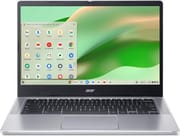 Acer Chromebook 314 (CB314-4H) | Acer Chromebook 314 (CB314-4HT) | |
| Price | List Price: $299.99 Amazon Prices: Loading prices... | List Price: $449.99 Amazon Prices: Loading prices... |
| Model number | CB314-4H-C2UW | CB314-4HT-32X6 |
| Performance Rating | 3.5 | 7.1 |
| Chromebook Plus | No | No |
| Processor | Quad-core 3.40 Ghz (max 3.40 Ghz) Intel Processor N100 | Octa-core 1.80 Ghz (max 3.80 Ghz) Intel Core i3-N305 |
| RAM | 4 GB | 8 GB |
| Internal Storage | 64 GB eMMC | 128 GB eMMC |
| Screen Size | 14" | 14" |
| Screen Resolution | 1920x1080 | 1920x1080 |
| Screen Type | IPS | IPS |
| Touch Screen | No | Yes |
| Stylus / Pen | No Stylus Support | No Stylus Support |
| Dimensions width x length x thickness | 12.87 x 8.86 x 0.81 inches (326.9 x 225.04 x 20.57 mm) | 12.87 x 8.86 x 0.81 inches (326.9 x 225.04 x 20.57 mm) |
| Weight | 3.15 lbs (1.43 kg) | 3.15 lbs (1.43 kg) |
| Backlit Keyboard | No | No |
| Webcam | 720p 60fps | 720p 60fps |
| WiFi | Wi-Fi 6E (802.11ax) | Wi-Fi 6E (802.11ax) |
| Bluetooth | Bluetooth 5.1 | Bluetooth 5.1 |
| Ethernet | No | No |
| Cellular Modem | No | No |
| HDMI | No HDMI | No HDMI |
| USB Ports | 2 USB 3, 2 USB-C 2x USB-C 3.2 Gen 1 with DisplayPort and Power Delivery, 2x USB-A 3.2 Gen 1 | 2 USB 3, 2 USB-C 2x USB-C 3.2 Gen 1 with DisplayPort and Power Delivery, 2x USB-A 3.2 Gen 1 |
| Thunderbolt Ports | No | No |
| Card Reader | microSD Card Reader | microSD Card Reader |
| Battery | 50Wh | 50Wh |
| Battery Life | 11 hours | 11 hours |
| Fanless | No | No |
| Auto Update Expiration Date | June, 2033 | June, 2033 |
Related Chromebooks
-
 Acer Chromebook 314The Acer Chromebook 314 combines a crisp 1920x1080 IPS display with a robust 12.5-hour battery life…
 -
 Acer Chromebook 514 (ARM)The Acer Chromebook 514 showcases a perfect blend of form and function with its robust aluminum…
 -
 ASUS Chromebook C424The ASUS Chromebook C424 boasts a crisp 14-inch FHD anti-glare display, durable spill-resistant…
 -
 HP Chromebook 14a (Intel N100)The HP Chromebook 14a with Intel N100 processor offers excellent keyboard and trackpad quality,…
 -
 HP Chromebook 14a (ne Series)The HP Chromebook 14a (ne Series) is a budget-friendly 14-inch notebook powered by the Intel…
 -
 Samsung Galaxy Chromebook Go 14"The Samsung Galaxy Chromebook Go offers LTE connectivity, military-grade durability, and a…
Detailed Insights into the Acer Chromebook 314

The Acer Chromebook 314 measures 12.87 x 8.86 x 0.81 inches and weighs 3.15 pounds, making it reasonably portable for a 14-inch notebook. The chassis is constructed primarily from plastic with a silver finish that keeps fingerprints visible but maintains a clean aesthetic. Hi-Tech.ua noted the build passes MIL-STD 810H durability testing and features a spill-resistant keyboard rated for up to 330ml of liquid. The rear ventilation pushes hot air away from the user, and the upward-firing speakers flanking the keyboard provide better audio directionality than bottom-firing alternatives. The touchpad features Acer’s OceanGlass surface made from recycled ocean-bound plastics, which multiple reviewers praised for its smooth feel and responsiveness.
The base model runs on the Intel Processor N100 with 4 cores and 4 threads, achieving a PassMark score around 5,643. The higher-end touchscreen variant steps up to the Intel Core i3-N305 with 8 cores and 8 threads, delivering significantly stronger performance at roughly 9,577 on PassMark. According to the Chrome Unboxed video review, the i3-N305 configuration nearly qualifies as Chromebook Plus performance, handling multitasking and Android apps smoothly. The reviewer noted that ChromeOS feels snappy and responsive on this hardware, with the 8GB RAM variant recommended for users who plan to keep many tabs open or run Linux applications. The i3-N305 configuration also has enough processing power for browser-based music production through DAWs like BandLab and Soundtrap.
Connectivity includes WiFi 6E (802.11ax) and Bluetooth 5.1 for modern wireless standards. The port selection provides two USB-C 3.2 Gen 1 ports with DisplayPort Alt Mode and Power Delivery on both sides, along with two USB-A 3.2 Gen 1 ports, a microSD card reader, and a 3.5mm headphone/microphone combo jack. The symmetrical USB-C placement means you can charge from either side, which the hi-tech.ua review specifically called out as a convenience feature. There is no HDMI port, so external display connections require a USB-C adapter or direct USB-C monitor. Similarly, users needing a wired network connection can add one with a USB Ethernet adapter plugged into either USB-C or USB-A port.
Reviewer Insights on the Acer Chromebook 314

Chrome Unboxed’s Perspective
Chrome Unboxed tested the CB314-4H with the Intel Core i3-N305 configuration and came away impressed by the value proposition. The reviewer described it as “more of an entry-level Chromebook but with some higher spec internals, those that on paper to me would even qualify this as a Chromebook Plus.” The OceanGlass touchpad received particular praise: “the trackpad is really excellent and although the name ocean glass refers to it being made from recycled bottles… it does still feel really high quality.”
The review noted that the plastic build “feels solid enough in the build but a little cheapy at the same time,” acknowledging this is expected at the price point. The 1080p FHD webcam with manual privacy shutter was highlighted as a notable upgrade over typical 720p Chromebook cameras. The reviewer appreciated that the speakers are “directed out to the rear of the Chromebook not just underneath,” and the IPS display “seems bright enough to me for general indoor use” despite lacking the vibrancy of premium panels.
Hi-Tech.ua’s Written Review
According to hi-tech.ua, the Acer Chromebook 314 excels at its intended purpose: providing “high speed of operation and responsiveness” for web-based workflows. The review praised the excellent cost-to-functionality ratio and the symmetrical port arrangement with USB-C on both sides. Battery testing revealed around 7.5 hours of continuous office work, with Acer claiming up to 11 hours in lighter usage scenarios.
The review’s main criticism focused on the lack of keyboard backlighting, calling it “the only and main remark about this model.” The reviewer also noted that the display’s color palette, while adequate for productivity, is “not suitable for high-quality movie watching.” The eMMC storage was flagged as slower and potentially less reliable than SSD alternatives, though sufficient for ChromeOS workloads. Overall, the conclusion was that the Chromebook 314 “is perfect for office, daily tasks related to texts, organization and participation in information processes.”
Both reviewers agreed that the Chromebook 314 delivers strong value for users who prioritize longevity (AUE 2033) and modern connectivity (WiFi 6E) over premium materials or high-end displays. The i3-N305 touchscreen variant offers notably better performance, while the N100 non-touch model serves as a capable entry-level option.
Customer Reviews of the Acer Chromebook 314
Amazon customers have rated the Acer Chromebook 314 4.5 out of 5 stars based on 56 reviews. The most praised aspects include the impressive battery life, with one reviewer reporting 11 hours of use, and the overall responsiveness of ChromeOS on this hardware. Several buyers noted they were pleasantly surprised by the build quality and display brightness for the price point, with one calling the display “clear and bright” and the device “fast and responsive.”
However, some customers have encountered confusion around touchscreen availability, with at least one buyer receiving a non-touch model when expecting touch capability due to listing ambiguities. The lack of a dedicated delete key was mentioned as a minor inconvenience. One satisfied buyer, approaching 70 years old, praised the Chromebook as their second purchase of the type, noting it handles everyday tasks like “checking email, surfing the web, paying bills, and using Google Docs” without the complexity of a traditional computer.
Overall, the customer sentiment is positive, with most buyers finding the Acer Chromebook 314 meets or exceeds expectations for the price. The combination of longevity, reliability, and adequate performance for everyday tasks appears to satisfy the target audience of students, families, and light productivity users.
Conclusion
The Acer Chromebook 314 stands out as a sensible choice for users who want modern features and long software support without premium pricing. Its combination of WiFi 6E connectivity, Intel Alder Lake-N processors, and an AUE date extending to June 2033 makes it well-suited for students, remote workers, and households seeking a reliable everyday Chromebook. The touchscreen i3-N305 variant offers performance approaching Chromebook Plus levels, while the N100 non-touch model provides an affordable entry point.
That said, users who require keyboard backlighting, premium build materials, or HDMI connectivity should consider alternatives. The eMMC storage is adequate but not fast, and the thick bezels around the display may feel dated compared to more modern designs. Power users or those planning intensive Linux development work would benefit from stepping up to a Chromebook Plus device with more RAM and faster storage.
For those comparing options, see our Chromebook Comparison Chart to find the best match for your needs.
Frequently Asked Questions
What processor does the Acer Chromebook 314 (CB314-4H/CB314-4HT) use?
The Acer Chromebook 314 is available with two processor options. The CB314-4H non-touch model uses the Intel Processor N100 with 4 cores and 4 threads, scoring approximately 5,643 on PassMark. The CB314-4HT touchscreen model uses the Intel Core i3-N305 with 8 cores and 8 threads, scoring approximately 9,577 on PassMark. Both are Alder Lake-N generation processors offering efficient performance for ChromeOS.
Can I upgrade the RAM in the Acer Chromebook 314?
No, the Acer Chromebook 314 uses soldered memory that cannot be upgraded after purchase. The CB314-4H-C2UW model comes with 4GB RAM, while the CB314-4HT-32X6 model comes with 8GB RAM. Choose the RAM configuration that meets your needs at purchase time.
What ports does the Acer Chromebook 314 have?
The Acer Chromebook 314 includes 2x USB-C 3.2 Gen 1 ports with DisplayPort Alt Mode and Power Delivery (one on each side), 2x USB-A 3.2 Gen 1 ports, a microSD card reader, a 3.5mm headphone/microphone combo jack, and a Kensington lock slot. There is no HDMI port, so external displays require a USB-C connection or adapter.
How long will the Acer Chromebook 314 (CB314-4H) receive updates?
The Acer Chromebook 314 (CB314-4H/CB314-4HT) has an Auto Update Expiration (AUE) date of June 2033. Until this date, the device will receive Chrome OS updates including new features, security patches, and bug fixes. This provides nearly a decade of software support from the 2023 release date.
Does the Acer Chromebook 314 have a touchscreen?
It depends on the model. The CB314-4HT-32X6 variant includes a touchscreen, while the CB314-4H-C2UW does not. Check the model number carefully when purchasing: models with “4HT” have touch capability, while “4H” models are non-touch.
Does the Acer Chromebook 314 have a backlit keyboard?
No, the Acer Chromebook 314 (CB314-4H/CB314-4HT) does not have keyboard backlighting. This was noted by multiple reviewers as the main drawback of the model. Users who frequently work in low-light environments may want to consider alternatives with backlit keyboards.
Is the Acer Chromebook 314 a Chromebook Plus?
No, the Acer Chromebook 314 (CB314-4H/CB314-4HT) is not officially certified as a Chromebook Plus. However, the i3-N305 variant with 8GB RAM delivers performance that approaches Chromebook Plus levels, according to Chrome Unboxed’s review. It lacks some Chromebook Plus requirements like an FHD webcam on the base model.