
Acer Chromebook Spin 11 R751T
Updated on

The Acer Chromebook Spin 11 R751T was built for schools, pairing a ruggedized shell with a 360-degree convertible hinge. It earned U.S. MIL-STD-810G military specification certification, meaning it can survive drops of up to 48 inches and withstand 132 pounds of downward force. The spill-resistant keyboard features drainage channels capable of handling up to 11 ounces of liquid, while Corning Gorilla Glass protects the anti-microbial touchscreen from the inevitable bumps and scratches of classroom life. It is no longer sold new, but it stays worth a look on the secondary market for schools and budget-conscious users who want a durable Chromebook that will receive ChromeOS updates through June 2027.
Related Videos
Acer Chromebook Spin 11 R751T Comparison Chart
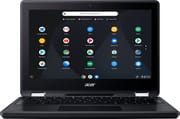 Acer Chromebook Spin 11 R751T | Acer Chromebook Spin 11 R751T | |
| Price | List Price: $329.00 Amazon Prices: | List Price: $329.00 Amazon Prices: |
| Model number | --- | R751T-C4XP / NX.GPZAA.001 |
| Performance Rating | 2.8 | 2.8 |
| Chromebook Plus | No | No |
| Processor | Dual-core 1.10 Ghz (max 2.40 Ghz) Intel Celeron N3350 | Dual-core 1.10 Ghz (max 2.40 Ghz) Intel Celeron N3350 |
| RAM | 4 GB | 4 GB |
| Internal Storage | 32 GB eMMC | 32 GB eMMC |
| Screen Size | 11.6" | 11.6" |
| Screen Resolution | 1366x768 | 1366x768 |
| Screen Type | IPS | IPS |
| Touch Screen | Yes | Yes |
| Stylus / Pen | Supported | Supported |
| Dimensions width x length x thickness | 11.65 x 8.2 x 0.82 inches (295.91 x 208.28 x 20.83 mm) | 11.65 x 8.2 x 0.82 inches (295.91 x 208.28 x 20.83 mm) |
| Weight | 3.08 lbs (1.4 kg) | 3.08 lbs (1.4 kg) |
| Backlit Keyboard | No | No |
| Webcam | HD | HD |
| WiFi | IEEE 802.11a/b/g/n/ac | IEEE 802.11a/b/g/n/ac |
| Bluetooth | Bluetooth 4.2 | Bluetooth 4.2 |
| Ethernet | No | No |
| Cellular Modem | No | No |
| HDMI | No HDMI | No HDMI |
| USB Ports | 2 USB 3, 2 USB-C (supports external display) | 2 USB 3, 2 USB-C (supports external display) |
| Thunderbolt Ports | No | No |
| Card Reader | microSD Card Reader | microSD Card Reader |
| Battery | 2 cell, 4870 mAh, Lithium Ion | 2 cell, 4870 mAh, Lithium Ion |
| Battery Life | 10.0 hours | 10.0 hours |
| Fanless | Yes | Yes |
| Auto Update Expiration Date | June, 2027 | June, 2027 |
Related Chromebooks
-
 Acer Chromebook Spin 11 CP311The Acer Chromebook Spin 11 combines functionality and portability with its 11.6-inch touch IPS…
 -
 Acer Chromebook 311Dive into productivity with the Acer Chromebook 311: an 11.6-inch HD touchscreen laptop packing an…
 -
 Lenovo Flex 3 ChromebookThe Lenovo Flex 3 Chromebook hits the sweet spot with its 11.6-inch IPS touchscreen, 4GB RAM, and…
 -
 ASUS Chromebook Flip CR1The ASUS Chromebook Flip CR1 (CR1100FKA) is a rugged 11.6-inch education convertible on an Intel…
 -
 Samsung Chromebook Plus v2The Samsung Chromebook Plus v2 boasts a versatile 12.2" touch LED screen, dual cameras, and pen…
 -
 ASUS Chromebook C203XAThe ASUS Chromebook C203XA is a rugged 11.6-inch education laptop with a MediaTek MT8173C, an…
A drop-rated 11.6-inch convertible with entry-level internals
The Spin 11 measures 11.65 x 8.2 x 0.82 inches and weighs approximately 3.08 pounds, portable enough for students moving between classrooms. The housing is durable plastic with rubber bumpers at the corners, rubberized edges, and a sparkly silver soft-touch finish that resists fingerprints and scratches well. The 360-degree hinge folds the display completely flat or into tent and tablet configurations, though at nearly three pounds, extended one-handed tablet use can become uncomfortable.
The Intel Celeron N3350 dual-core processor paired with 4GB of RAM handles basic ChromeOS tasks adequately and runs out of headroom on heavier ones. Opening a stack of tabs or a demanding Android app brings stuttering. The 32GB eMMC storage boots quickly but leaves little room for local files, so cloud storage does most of the work. Everyday educational tasks like web browsing, document editing, and video streaming run without major issues.
The 11.6-inch IPS touchscreen runs at 1366x768, which looks grainy at this size. Brightness is low, contrast levels are poor, and the backlighting is uneven, so dark scenes look murky and outdoor visibility is limited. The touchscreen itself tracks the included Wacom stylus well for annotation and note-taking, which is the part of this machine that holds up best against newer hardware.
Two USB Type-C 3.1 ports carry DisplayPort video output, and two USB 3.0 Type-A ports sit alongside them (one takes a USB ethernet adapter for wired networking). A microSD card slot and a combo headphone/microphone jack round out the wired options. Dual-band 802.11ac Wi-Fi with 2x2 MIMO provides reliable wireless performance, Bluetooth 4.2 handles peripheral connections, and the HD webcam above the display is adequate for classroom video calls.
Acer claimed up to 10 hours of battery life, and real-world endurance falls somewhat short of that headline figure; TechRadar listed “less-than-stellar battery life” among the device’s cons. Even so, the runtime remains sufficient for a full school day with moderate use.
Reviewer Insights
cbutters Tech on the bundled stylus and case
cbutters Tech purchased the Spin 11 from Best Buy for $309 (down from the $349.99 retail price) specifically as his daughter’s first laptop for learning typing and programming. Cameron, the reviewer behind the channel, highlights the included Wacom stylus and carrying case as standout value additions. He noted the “soft touch paint that seems to be very durable” with a sparkly sheen that looks nice while hiding wear. He wanted “her to have the feel of a computer that could be used for real tasks with the keyboard,” so schoolwork mattered more to him than games. His main frustration centered on Google Family Link restrictions that prevented Play Store app installation at the time of his review, though this has since been improved.
Alice Keeler on what the stylus does in a classroom
Educator and Google specialist Alice Keeler highlights the Google Keep integration as her “favorite feature,” demonstrating how she can capture screenshots, annotate them with handwriting using the Wacom stylus, and drop the notes directly into Google Docs. She appreciates the rubberized edges for durability in educational settings and notes the rear-facing camera enables photos and video when the device is in tablet mode. She also calls out the smooth stylus writing experience and the laser pointer and magnifying glass modes that prove useful for teaching.
TechRadar weighed sturdiness against the screen and the chip
TechRadar awarded the Spin 11 a 4 out of 5 rating, recommending it for buyers who “don’t need frivolous features and a high resolution display.” Their review praises the durability, noting it is “one of the sturdiest laptops we’ve ever used. No matter how hard we try, we can’t get the laptop to flex even a little.” The spill-resistant keyboard with drainage channels and anti-microbial Gorilla Glass receive particular praise for classroom environments. They flagged “less-than-stellar battery life” falling short of Acer’s 10-hour claim, and they criticized the dim, grainy screen and sluggish performance with multiple tabs open.
Trusted Reviews on the keyboard and the tinny speakers
Trusted Reviews rates the device 3 out of 5, listing “versatile design” and “decent battery life” among its pros. They appreciate the comfortable edge-to-edge chiclet keyboard and the bundled stylus pen for sketching and note-taking. The review notes the IPS panel delivers decent color reproduction but criticizes the poor contrast levels and uneven backlighting. Performance received mixed marks, with the Celeron processor handling basic tasks adequately but showing occasional stuttering with multiple apps open. The bottom-mounted speakers, the review notes, produce “tinny” output that gets “muffled by your desk” in standard laptop use.
A secondhand pick for the shell, with an aging screen and chip
The drop rating is the reason to buy one used, and the Wacom stylus and carrying case come in the box at no extra cost. The Celeron N3350 and 4GB of RAM run out of room quickly, the 1366x768 panel is dim, and the RAM and storage are soldered in place, so the configuration you buy is the one you keep. A sharp display or room for a dozen open tabs means shopping for something newer. To weigh this model against current options, the Chromebook Comparison Chart lets you compare specs side by side.
Frequently Asked Questions
How long will the Spin 11 R751T receive ChromeOS updates?
Its Auto Update Expiration (AUE) date is June 2027. Until then it continues receiving ChromeOS updates, security patches, and new features. After that date the device still functions, but Google stops sending automatic updates.
Does it come with a stylus?
Yes. A Wacom passive stylus ships in the box, along with a carrying case that has a pen holder. The stylus works with the touchscreen for drawing, note-taking, and annotation, and it pairs well with Google Keep for capturing and marking up screenshots.
Is the Spin 11 R751T a good fit for students?
It was designed for educational use. MIL-STD-810G durability covers 48-inch drops and 132 pounds of force, the keyboard is spill-resistant with drainage channels, and the touchscreen is anti-microbial Corning Gorilla Glass. That combination suits the rough handling typical in K-12 classroom environments.
Can I upgrade the RAM or storage?
No. The RAM and the eMMC storage are soldered to the motherboard. The built-in microSD card slot is the only way to add space locally, and Google Drive covers file storage beyond that.
What is the battery life like in daily use?
Acer claims up to 10 hours, and real-world endurance falls short of that headline figure; TechRadar listed “less-than-stellar battery life” among the device’s cons. Typical classroom use with moderate brightness and web browsing should still get most users through a school day.
Can it run Android apps?
Yes, through the Google Play Store. The Intel Celeron N3350 processor and 4GB of RAM may struggle with more demanding Android applications, though basic productivity apps, educational software, and lightweight games run acceptably. Performance can become sluggish with multiple apps open simultaneously.