
Acer Chromebook Spin 15
Updated on

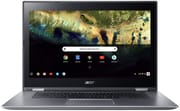
The Acer Chromebook Spin 15 (CP315-1H) is a 15.6-inch convertible Chromebook that pairs a Full HD IPS touch panel with a 360-degree hinge that flips the screen into tent, stand, and tablet modes. It launched in 2018 around the $399 to $449 mark for people who wanted screen area more than a light bag, with a desktop-replacement footprint running ChromeOS instead of Windows. Google’s Auto Update Expiration for this model runs through June 2027, so existing units still receive ChromeOS security and feature updates until that date.
| Pros | Cons |
|---|---|
| Big touchscreen: 15.6-inch 1920x1080 IPS panel with Gorilla Glass, easy to read at arm’s length. | Heavy for a convertible: 4.85 lb and a 15.2 x 10.3 inch footprint make tablet mode awkward. |
| Silent operation: Fanless Intel Pentium N4200 design produces zero noise under load. | Aging silicon: Apollo Lake N4200 is fine for browsing and streaming, less so for many Android apps. |
| Two USB-C, two USB-A 3.0: DisplayPort over USB-C drives an external monitor, and either USB-C port charges the machine. | Wide bezels: The chassis is larger than a 15.6-inch panel needs. |
| Long battery life: Acer rates the pack at 13 hours; Laptop Mag measured 9 hours 37 minutes. | No SSD upgrade path: eMMC storage is soldered; 32GB and 64GB are the only configurations. |
| Backlit keyboard: Full-size deck with palm rest space and key backlighting. | WiFi 5 only: 802.11ac is workable but a step behind current WiFi 6 budget Chromebooks. |
| Full HD IPS touch panel on a 15.6-inch convertible | Short support window: ChromeOS updates stop in June 2027, which leaves a new buyer little runway. |
Related Videos
Acer Chromebook Spin 15 Comparison Chart
 Acer Chromebook Spin 15 | Acer Chromebook Spin 15 | Acer Chromebook Spin 15 | |
| Price | List Price: $449.99 Amazon Prices: | List Price: $449.99 Amazon Prices: | List Price: $399.99 Amazon Prices: |
| Model number | CP315-1H-P1K8 / NX.GWGAA.001 | CP315-1H-P4VG / NX.GWGAA.002 | CP315-1H-P8QY / NX.GWGAA.003 |
| Performance Rating | 2.8 | 2.8 | 2.8 |
| Chromebook Plus | No | No | No |
| Processor | Quad-core 1.10 Ghz (max 2.50 Ghz) Intel Pentium N4200 | Quad-core 1.10 Ghz (max 2.50 Ghz) Intel Pentium N4200 | Quad-core 1.10 Ghz (max 2.50 Ghz) Intel Pentium N4200 |
| RAM | 4 GB | 4 GB | 4 GB |
| Internal Storage | 64 GB eMMC | 64 GB eMMC | 32 GB eMMC |
| Screen Size | 15.6" | 15.6" | 15.6" |
| Screen Resolution | 1920x1080 | 1920x1080 | 1920x1080 |
| Screen Type | IPS | IPS | IPS |
| Touch Screen | Yes | Yes | Yes |
| Stylus / Pen | No Stylus Support | No Stylus Support | No Stylus Support |
| Dimensions width x length x thickness | 15.2 x 10.3 x 0.8 inches (386.08 x 261.62 x 20.32 mm) | 15.2 x 10.3 x 0.8 inches (386.08 x 261.62 x 20.32 mm) | 15.2 x 10.3 x 0.8 inches (386.08 x 261.62 x 20.32 mm) |
| Weight | 4.85 lbs (2.2 kg) | 4.85 lbs (2.2 kg) | 4.85 lbs (2.2 kg) |
| Backlit Keyboard | Yes | Yes | Yes |
| Webcam | 1280x720 wide angle HDR | 1280x720 wide angle HDR | 1280x720 wide angle HDR |
| WiFi | IEEE 802.11a/b/g/n/ac | IEEE 802.11a/b/g/n/ac | IEEE 802.11a/b/g/n/ac |
| Bluetooth | Bluetooth 4.2 | Bluetooth 4.2 | Bluetooth 4.2 |
| Ethernet | No | No | No |
| Cellular Modem | No | No | No |
| HDMI | No HDMI | No HDMI | No HDMI |
| USB Ports | 2 USB 3, 2 USB-C (DisplayPort over USB-C) | 2 USB 3, 2 USB-C (DisplayPort over USB-C) | 2 USB 3, 2 USB-C (DisplayPort over USB-C) |
| Thunderbolt Ports | No | No | No |
| Card Reader | microSD Card Reader | microSD Card Reader | microSD Card Reader |
| Battery | 3 cell, 4670 mAh, Lithium Polymer | 3 cell, 4670 mAh, Lithium Polymer | 3 cell, 4670 mAh, Lithium Polymer |
| Battery Life | 13.0 hours | 13.0 hours | 13.0 hours |
| Fanless | Yes | Yes | Yes |
| Auto Update Expiration Date | June, 2027 | June, 2027 | June, 2027 |
Related Chromebooks
-
 Acer Chromebook 15The Acer Chromebook 15 stands out with a 15.6" FHD IPS touch display, backlit keyboard, and up to…
 -
 Acer Chromebook 315The Acer Chromebook 315 (CB315-4H) is a fanless 15.6-inch FHD IPS Chromebook with an Intel Celeron…
 -
 ASUS Chromebook C523The ASUS Chromebook C523 is a fanless 15.6-inch Chromebook with an anti-glare display, an Intel…
 -
 Lenovo Flex 3 ChromebookThe Lenovo Flex 3 Chromebook is a fanless 11.6-inch convertible with an IPS touchscreen, a MediaTek…
 -
 Samsung Chromebook Plus v2The Samsung Chromebook Plus v2 is a fanless 12.2-inch convertible Chromebook with an Intel Celeron…
 -
 HP Chromebook 15a (15a-nb0013dx)The HP Chromebook 15a (15a-nb0013dx) is a fanless 15.6-inch Chromebook with an Intel N200, 8GB of…
Big-screen comfort at nearly five pounds
The 15.6-inch IPS touchscreen runs at 1920x1080. Viewing angles are good and color reproduction is adequate for a budget Chromebook, though colors look muted next to premium displays. The Gorilla Glass cover stands up well to fingerprints and the daily abuse of touch input. The bezels around the panel are thick, which inflates an already large chassis and undercuts the case for using the machine as a tablet.
The keyboard deck uses a metal construction that feels solid under typing pressure, while the outer shell is a textured plastic that comes across as less premium. The 360-degree hinge mechanism is smooth, holds positions well, and supports the laptop, tent, stand, and tablet modes that justify the “Spin” name. At nearly 5 pounds with a 15.2 by 10.3 inch footprint, the Spin 15 is impractical as a handheld tablet; tent and stand modes are the more realistic uses for the convertible hardware.
Performance comes from the Intel Pentium N4200, a quad-core Apollo Lake chip paired with 4GB of LPDDR4 RAM. That combination is adequate for typical ChromeOS workloads: web browsing, document editing, video streaming, and 10 to 15 open tabs without significant slowdown. The fanless design runs silently, which suits a library, a shared office, or a bedroom. Limits show up on heavier Android workloads and on demanding web apps that have grown since 2018, so anyone treating one of these as a Chromebook 2-in-1 desktop replacement should size the workload against 2018 silicon first.
Two USB-C ports and two USB-A 3.0 ports handle peripherals and charging from either side, and DisplayPort over USB-C drives an external monitor with the right adapter. The microSD slot extends storage past the soldered 32GB or 64GB eMMC, which matters more than usual here because neither the storage nor the RAM is upgradeable. There is no Ethernet jack, so wired-network users will need a USB Ethernet adapter. WiFi tops out at 802.11ac (WiFi 5) and Bluetooth at 4.2, both behind the WiFi 6 radios in current budget Chromebooks.
Acer claimed up to 13 hours, and Laptop Mag’s testing measured 9 hours 37 minutes in their browsing benchmark, well above the Chromebook average of the time and enough to comfortably last a full work or school day on a charge. The 4670 mAh, 3-cell pack charges over either USB-C port.
Reviewer Insights
TWiT Tech Podcast Network on the 4GB ceiling
Leo Laporte and Jason Howell from TWiT Tech Podcast Network framed the Spin 15 around the appeal of its size for readers who struggle with smaller laptops. “Look at the size of this. This is one of the biggest Chromebooks out there,” Laporte said early in the review, calling out the 15-inch panel as the obvious selling point. The duo flagged the N4200 + 4GB configuration and the absence of an 8GB option (“I’d like to see more RAM in a Chromebook, but four is fine”), and recommended the device particularly for older users who find smaller laptop screens difficult to use day to day. Aluminum top, silent fanless operation, and the security model of ChromeOS were the upsides; the substantial size and weight were the downsides for portability.
Product Impressions: metal keyboard tray, tinny speakers
Ryan from Product Impressions reviewed the Spin 15 hands-on straight out of the box. “The keyboard tray here is metal, so that does feel nice,” he observed, contrasting the metal interior with the plastic exterior. His review highlighted the display quality and the responsive touchpad, while criticizing the keyboard for feeling somewhat squishy under heavier typing and calling the speakers tinny and hollow, a problem that gets worse in tent mode because the speakers point away from the listener. He summed it up as “This is a pretty nice machine, pretty well rounded,” and positioned it primarily as a media-consumption device rather than a productivity workhorse.
Chrome Unboxed saw the Chromebook 15 with a hinge added
Robby Payne from Chrome Unboxed covered the Spin 15 alongside the Spin 13 at Acer’s launch event. The video framed the Spin 15 as essentially the existing Chromebook 15 with a 360-degree hinge bolted on, since the internals stay close to the non-convertible sibling and the chassis size makes “tablet mode” more of a tent-or-stand proposition than something a user actually holds.
Published reviews put it in the large-screen budget class
TechRadar (4 out of 5 stars) called the Spin 15 a strong multitasking machine, praising the responsive touchscreen and comfortable backlit keyboard while criticizing the wasted space around the panel. Digital Trends (8 out of 10) positioned it as suitable for inexpensive media consumption, noting that build quality holds up despite the mostly plastic shell. Laptop Mag (3.5 out of 5) confirmed the long battery life at 9 hours 37 minutes in their browsing test and called out the compromises on display color accuracy and audio quality. All three reviews describe a large-screen ChromeOS machine that stays on a desk.
Best kept as a desk machine by its current owner
The Acer Chromebook Spin 15 traded portability for screen size and battery life, and the wide bezels, muted display colors, and mediocre speakers were the compromises that came with a $399 to $449 launch price. The convertible modes earn their keep in tent and stand viewing, so in daily use the machine stays on a desk. An existing owner still has a capable touchscreen ChromeOS device through the June 2027 end-of-life date, with browsing, email, streaming, and document work all comfortably within reach of the N4200. Current 15-inch convertibles with a longer update runway sit beside it in the Starry Hope Chromebook comparison tool.