
Acer Chromebook Spin 311
Updated on

The Acer Chromebook Spin 311 (CP311-3H) holds an important place in Chromebook history as one of the most successful ARM-based convertibles in the budget market. Released in 2020, this 11.6-inch device demonstrated that MediaTek’s MT8183 processor could deliver a smooth Chrome OS experience with genuinely all-day battery life - something that Intel-based competitors of the era struggled to match. Publications like TechRadar (4.5/5) and Android Central (4/5) praised it for being exactly what users expected from a budget Chromebook: small, inexpensive, and capable enough for everyday tasks.
| Pros | Cons |
|---|---|
| Exceptional all-day battery life - 15+ hours claimed, 8+ hours tested (TechRadar) | Dim display at only 214.4 cd/m² brightness (NotebookCheck testing) |
| Completely silent fanless operation with no moving parts | Thick bezels significantly reduce usable screen area |
| Lightweight at just 1.05 kg (2.36 lbs) for true portability | No microSD card slot limits storage expansion options |
| Antimicrobial Gorilla Glass touchscreen for durability | Only 4GB RAM configuration available - no upgrade option |
| Quick USB-C charging - fully charged in 2 hours (TechRadar) | Loses a USB port when charging via USB-C |
| Convertible 2-in-1 design with 360-degree hinge flexibility | Glossy screen makes outdoor use challenging |
Related Videos
Acer Chromebook Spin 311 Comparison Chart
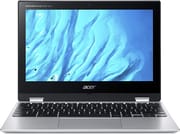 Acer Chromebook Spin 311 | Acer Chromebook Spin 311 | |
| Price | List Price: $299.99 Amazon Prices: | List Price: $249.99 Amazon Prices: |
| Model number | CP311-3H-K6XD / NX.HUVAA.004 | CP311-3H-K4S1 |
| Performance Rating | 3.8 | 3.8 |
| Chromebook Plus | No | No |
| Processor | Octa-core 2.00 Ghz (max 2.00 Ghz) MediaTek MT8183 | Octa-core 2.00 Ghz (max 2.00 Ghz) MediaTek MT8183 |
| RAM | 4 GB | 4 GB |
| Internal Storage | 64 GB eMMC | 32 GB eMMC |
| Screen Size | 11.6" | 11.6" |
| Screen Resolution | 1366x768 | 1366x768 |
| Screen Type | IPS | IPS |
| Touch Screen | Yes | Yes |
| Stylus / Pen | No Stylus Support | No Stylus Support |
| Dimensions width x length x thickness | 11.42 x 8.11 x 0.74 inches (290.07 x 205.99 x 18.8 mm) | 11.42 x 8.11 x 0.74 inches (290.07 x 205.99 x 18.8 mm) |
| Weight | 2.64 lbs (1.2 kg) | 2.64 lbs (1.2 kg) |
| Backlit Keyboard | No | No |
| Webcam | HD | HD |
| WiFi | Wi-Fi 5 (802.11ac) | Wi-Fi 5 (802.11ac) |
| Bluetooth | Bluetooth 4.2 | Bluetooth 4.2 |
| Ethernet | No | No |
| Cellular Modem | No | No |
| HDMI | No HDMI | No HDMI |
| USB Ports | 1 USB 2.0, 1 USB-C (with DisplayPort and charging) | 1 USB 2.0, 1 USB-C (with DisplayPort and charging) |
| Thunderbolt Ports | No | No |
| Card Reader | No Card Reader | No Card Reader |
| Battery | 2 cell, 4670 mAh, Lithium Ion | 2 cell, 4670 mAh, Lithium Ion |
| Battery Life | 16.0 hours | 16.0 hours |
| Fanless | Yes | Yes |
| Auto Update Expiration Date | June, 2028 | June, 2028 |
Related Chromebooks
-
 Acer Chromebook 311Dive into productivity with the Acer Chromebook 311—an 11.6-inch HD touchscreen laptop packing an…
 -
 Acer Chromebook Spin 311The Acer Chromebook Spin 311 offers an 11.6-inch HD touch display, versatile 360-degree hinge, and…
 -
 Lenovo 300e Yoga Chromebook Gen 4The Lenovo 300e Yoga Chromebook Gen 4 shines with a MediaTek Kompanio 520 processor, up to 16 hours…
 -
 ASUS Chromebook Flip C214The ASUS Chromebook Flip C214 combines versatility with a 360° hinge, 11.6-inch anti-glare…
 -
 ASUS Chromebook CR11 (CR1104C)The ASUS Chromebook CR11 (CR1104C) is a ruggedized 11.6-inch Chromebook built for students and…
 -
 Dell Chromebook 3120A rugged and affordable 11.6-inch Chromebook with Intel N100 processor, available in clamshell and…
A Milestone in ARM-Based Chromebooks
The Spin 311 represented a maturation point for ARM Chromebooks. Earlier MediaTek and Rockchip devices had often felt underpowered, but the MT8183’s eight-core design proved capable enough for web browsing with numerous tabs, Google Workspace applications, video streaming, and running Android apps from the Play Store. The 4GB of LPDDR4X RAM was adequate for Chrome OS at the time, though this single configuration meant no upgrade path for users who found it limiting.
The fanless design was a key differentiator. While Intel Chromebooks of the era often included fans that could spin up during moderate workloads, the Spin 311 remained completely silent under all conditions. This made it particularly well-suited for libraries, classrooms, and late-night work sessions. The trade-off was that sustained heavy processing would lead to thermal throttling, but for the lightweight tasks this Chromebook targeted, that rarely mattered in practice.
Display and Design Philosophy
The 11.6-inch IPS touchscreen with 1366x768 resolution represented a deliberate set of compromises. The lower resolution preserved battery life and matched the modest GPU capabilities of the ARM processor, while the IPS panel ensured acceptable viewing angles across the 360-degree hinge rotation. NotebookCheck’s testing measured brightness at just 214.4 cd/m² - well below the 300 cd/m² typically needed for comfortable indoor use in bright conditions.
The antimicrobial Gorilla Glass covering was a forward-thinking addition that became particularly relevant during the pandemic era when this Chromebook saw widespread adoption in schools. The thick bezels that reviewers consistently criticized were a product of the budget constraints and screen technology of the time, though they did provide a natural grip area in tablet mode.
Battery Life That Set Expectations
Perhaps the Spin 311’s most lasting contribution to the Chromebook landscape was demonstrating what ARM-based battery life could achieve. Acer claimed up to 16 hours of runtime, and while real-world testing by TechRadar showed more like 8+ hours during continuous video playback, users consistently reported making it through full work and school days without needing to charge. One reviewer noted that 50% battery capacity lasted an entire work day from 9 AM to 5 PM.
This set a new benchmark that subsequent budget Chromebooks had to meet. The combination of efficient ARM silicon, modest display resolution, and relatively small 36.5Wh battery proved to be a winning formula that influenced later MediaTek-based Chromebooks.
Legacy and Historical Context
The Spin 311’s success came at an inflection point for Chromebooks. Released just as the pandemic drove unprecedented demand for affordable education devices, it became a staple in remote learning setups. Its combination of durability (thanks to that Gorilla Glass), convertible flexibility, and all-day battery life made it ideal for children who needed a device that could survive being carried in a backpack and used throughout a school day.
With Chrome OS updates guaranteed through June 2028, units still in service continue to receive security patches and new features. However, the 4GB RAM limitation increasingly shows its age as Chrome OS and web applications have grown more demanding. Users seeking similar functionality today will find modern successors with more capable processors and 8GB RAM configurations that better accommodate contemporary workloads.
The Acer Chromebook Spin 311 (CP311-3H) deserves recognition as a device that proved budget ARM Chromebooks could be genuinely useful rather than merely cheap. It set expectations for battery life and silent operation that continue to influence the market today.