
ASUS Chromebook C202SA
Updated on

The ASUS Chromebook C202SA reached its Chrome OS Auto Update Expiration in June 2022 (Google’s official Chrome Enterprise list lists “Chromebook C202SA: Jun 2022”). The hardware still powers on and the catalog entry below is preserved for owners researching their existing devices, but the device no longer receives Chrome OS updates or security patches, and Starry Hope does not recommend it for new purchases. The two retail configurations are listed below for historical reference: C202SA-YS01 (Intel Celeron N3060, 2 GB RAM, 16 GB eMMC, $199) and C202SA-YS02 (Intel Celeron N3060, 4 GB RAM, 16 GB eMMC, $229). We no longer link to any live retail listings for this model.
Overview
The ASUS Chromebook C202SA shipped in February 2016 as an education-first Chromebook built around an Intel Celeron N3060 (Braswell, dual-core, 1.6 to 2.48 GHz), 2 or 4 GB of LPDDR3 RAM, 16 GB of eMMC, and an 11.6-inch 1366x768 anti-glare TN display. The case is the point: rubber bumpers around the lid and lower half, a spill-resistant keyboard, a 180-degree hinge so a dropped open lid does not snap back on itself, and an ASUS drop spec of 120 cm flat and 80 cm side. The C202SA was never built to be fast; it was built to come back from a fall and to keep working through a spilled juice box.
The trade-off was the display and the SoC. The TN panel is bright enough for indoor classroom use but the colors are dull and viewing angles are narrow. The Celeron N3060 handles single-tab Chrome OS work and Google Docs comfortably and slows down with several open tabs and media-rich pages. At the original $199 to $229 price the C202SA hit the K-12 fleet sweet spot anyway; the device sold heavily into school districts and remained Chrome-supported until June 2022.
Related Videos
ASUS Chromebook C202SA Comparison Chart
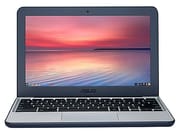 ASUS Chromebook C202SA | ASUS Chromebook C202SA | |
| Price | List Price: $229.00 Amazon Prices: | List Price: $199.00 Amazon Prices: |
| Model number | C202SA-YS02 | C202SA-YS01 |
| Performance Rating | 2.4 | 1.9 |
| Chromebook Plus | No | No |
| Processor | Dual-core 1.60 Ghz (max 2.48 Ghz) Intel Celeron Processor N3060 | Dual-core 1.60 Ghz (max 2.48 Ghz) Intel Celeron Processor N3060 |
| RAM | 4 GB | 2 GB |
| Internal Storage | 16 GB eMMC | 16 GB eMMC |
| Screen Size | 11.6" | 11.6" |
| Screen Resolution | 1366x768 | 1366x768 |
| Screen Type | Anti-glare TN | Anti-glare TN |
| Touch Screen | No | No |
| Stylus / Pen | No Stylus Support | No Stylus Support |
| Dimensions width x length x thickness | 11.6 x 7.9 x 0.9 inches (294.64 x 200.66 x 22.86 mm) | 11.6 x 7.9 x 0.9 inches (294.64 x 200.66 x 22.86 mm) |
| Weight | 2.2 lbs (1 kg) | 2.2 lbs (1 kg) |
| Backlit Keyboard | No | No |
| Webcam | HD | HD |
| WiFi | 802.11 b/g/n/ac | 802.11 b/g/n/ac |
| Bluetooth | Bluetooth 4.2 | Bluetooth 4.2 |
| Ethernet | No | No |
| Cellular Modem | No | No |
| HDMI | Full-Size HDMI | Full-Size HDMI |
| USB Ports | 2 USB 3 | 2 USB 3 |
| Thunderbolt Ports | No | No |
| Card Reader | SD | SD |
| Battery | 2 cell, 38 Whrs, Lithium-ion | 2 cell, 38 Whrs, Lithium-ion |
| Battery Life | 10.0 hours | 10.0 hours |
| Fanless | Yes | Yes |
| Auto Update Expiration Date | June, 2022 | June, 2022 |
Related Chromebooks
-
 ASUS Chromebook C203XAThe ASUS Chromebook C203XA shines with military-grade durability, an 11.6-inch anti-glare HD…
 -
 ASUS Chromebook C423The ASUS Chromebook C423 packs a 14-inch HD display, Intel Celeron power, and 10-hour battery life…
 -
 Acer Chromebook 311 (AMD)The Acer Chromebook 311 combines an 11.6-inch ComfyView screen, robust AMD processing, and 10-hour…
 -
 Acer Chromebook Spin 11 CP311The Acer Chromebook Spin 11 combines functionality and portability with its 11.6-inch touch IPS…
 -
 Lenovo Flex 3 ChromebookThe Lenovo Flex 3 Chromebook hits the sweet spot with its 11.6-inch IPS touchscreen, 4GB RAM, and…
 -
 Dell Chromebook 3120A rugged and affordable 11.6-inch Chromebook with Intel N100 processor, available in clamshell and…
A Tank Built for Education
The C202SA earned its reputation through ruggedness rather than specifications. PCWorld’s Melissa Riofrio (August 15, 2016) reported the official ASUS durability figures verbatim: “the C202S can handle a flat drop (onto its bottom panel) of up to 120 centimeters (a little over 47 inches), and a side drop of up to 80 centimeters (a little over 31 inches).” Her verdict was that “what sets the Asus C202S apart from other low-cost models is the better build and better keyboard, all of which improve the user experience. This is one of the very few bargains I’d heartily recommend.”
The durability extends past drop protection. ASUS includes rubber bumpers around the lid and the bottom edges, plus rubber feet that take up a meaningful percentage of the underside (Lon Seidman, in his Lon.TV review, points this out directly: the chassis “is surrounded by Rubber here so it’s designed in case you drop it off the desk or something to most likely survive the fall”). The spill-resistant keyboard sits over a mylar-lined protective plate; PCWorld notes that “Asus says it can handle a small spill of up to 2.23 ounces because the innards are protected by a solid, mylar-lined plate built underneath the keyboard.”
For IT administrators managing fleets, the modular construction is the second-order benefit. PCWorld measured the path to the internals: “12 screws stand between you and removing the bottom, plus more screws await inside to remove the thermal module, the motherboard, and the battery in order to get to other components.” ASUS’s own teardown video walks through the same procedure (the device in the teardown video uses 10 outer screws rather than 12, which suggests at least one minor mid-cycle chassis revision; both numbers are real).
Display
The 11.6-inch 1366x768 display is the most visibly compromised part of the device. The panel is a TN with an anti-glare coating, and TechRadar’s Jacob Grana (June 3, 2016) summarized it bluntly in the published Cons list: “Dull, glare-prone screen.” The viewing angles narrow off-center, which is the standard TN behavior. At the C202SA’s price point in 2016 this was not unusual; mid-range and upper-tier Chromebooks of the same era moved to IPS, and the C202SA stayed on TN to hit the $199 starting price.
The matte coating does help in fluorescent classroom lighting; it does not fix the underlying color and viewing-angle limitations. The screen does not support touch input and the lid does not fold past 180 degrees. The 180-degree hinge is there so a student opening the lid hard does not tear the cable, not so the device can serve as a tablet.
Performance
TechRadar measured the C202SA’s JavaScript performance directly: “Octane: 8,303, Mozilla Kraken: 3,913.8.” Lon Seidman’s Octane test on the same device returned a “great score of 8,714,” which lines up with the published Octane reference for the Intel Celeron N3060 in our processor catalog and the natural run-to-run variance on a low-power chip. TechRadar’s comparison against the Acer C740 is the figure most reviewers cited: “the Acer C740, for comparison, scored nearly 60% better on the Octane and Kraken tests.” Real-world use lines up: TechRadar described the typical experience as “the C202 handles multiple browser windows and applications well enough, but open too many and the device slows down considerably,” and Lon Seidman framed it the same way (“this actually is performing very well for what it has under the hood” given the price point).
The 4 GB SKU (C202SA-YS02) and the 2 GB SKU (C202SA-YS01) share the same SoC and storage; the RAM is the difference that matters for multi-tab Chrome OS work. The 2 GB variant strains noticeably with more than a handful of tabs and Android apps; the 4 GB variant handles classroom workloads without obvious complaint. Both have soldered RAM and a soldered 16 GB eMMC; the SD card slot is the only post-purchase expansion path.
Keyboard, Battery, and Connectivity
The keyboard is one of the C202SA’s strongest features. PCWorld called it out directly: “the C202S offers a keyboard with a surprisingly gentle, 2 mm travel. The fonts on the keys are even a little bigger than usual so it’s easier to see the letters.” Lon Seidman echoed that judgment from a different angle: “I am very pleased with the keyboard it’s very solid feeling it doesn’t feel cheap,” and noted that the chunky chassis allows “a lot of travel” in the keystroke. The keyboard is not backlit; for the C202SA’s intended classroom use that is a reasonable cost compromise.
ASUS rated the 38 Wh battery at up to 10 hours. TechRadar’s HD-video battery test landed at 8 hours and 42 minutes (“the C202 actually fares quite well: it lasts a school-day-ready 8 hours and 42 minutes”). Lon Seidman reported real-world figures in the same range: “I’m going to put that around 8 to 10 hours based on my usage so enough to get through a school day.” Either way, the C202SA covers a full school day on a charge.
The port complement is two USB 3.0 Type-A (both on the right edge), one full-size HDMI, a full-size SD card reader, a combo 3.5 mm jack, and a Kensington lock slot. There is no Ethernet (a USB Ethernet adapter covers that) and no USB-C. Wireless is dual-band 802.11ac with Bluetooth 4.2. The fanless design means the device is silent under any workload.
Reviewer Insights
PCWorld (Melissa Riofrio, August 15 2016) was the most positive contemporary review. Headline: “Asus Chromebook C202S review: You won’t find a better-built bargain.” Published pros: “Very durable design, Chassis can be opened for upgrades or repairs, Very nice keyboard for the price, Very long battery life.” Published con: “Average chip limits it to mainstream applications.” Verdict: “What sets the Asus C202S apart from other low-cost models is the better build and better keyboard, all of which improve the user experience. This is one of the very few bargains I’d heartily recommend.” The drop-resistance figures, the spill-resistance figure (2.23 ounces), and the 12-screw teardown count cited above are all from this review.
TechRadar (Jacob Grana, June 3 2016) rated the C202SA 3 / 5. Published pros: “Built like a tank, Easy-to-use keyboard, Budget friendly.” Published cons: “Looks and runs like a tank, Dull, glare-prone screen.” Octane 2.0 score: 8,303. Mozilla Kraken: 3,913.8. Battery life on the HD-video test: 8 hours 42 minutes. Comparison against the Acer C740: “scored nearly 60% better on the Octane and Kraken tests.” That figure is the strongest concise way to describe the C202SA’s performance ceiling relative to budget competitors of its era.
Lon Seidman’s Lon.TV hands-on is the most thorough video review of the C202SA and an in-trusted-channel source. Lon’s specific Octane number (8,714) is the highest in the public record for this device and matches the Intel reference. ASUS’s own Introducing the ASUS C202 Chromebook and Tear Down videos document the chassis details on the record (the teardown video specifically demonstrates 10 outer screws, not 12; both screw counts are accurate for different chassis revisions across the C202SA production run).
Targeted searches across the trusted-channel list in research/chromebooks/youtube-channels.csv (Chrome Unboxed, MergeDroid, PCWorld, Liliputing, MobileTechReview, 9to5Google) did not surface a dedicated C202SA review video that is not already cited; Lon.TV is the only trusted-channel video on the page and no additions were merited in this refresh.
Who Was the C202SA For?
The C202SA fit two distinct buyer types: K-12 IT departments deploying carts of identical devices into elementary and middle-school classrooms, and individual budget buyers who wanted a fanless silent Chromebook that would survive being moved around the house. For the first group, the durability spec, the modular repair path, the spill-resistant keyboard, the 180-degree hinge, and the $199 to $229 list prices were the entire pitch. For the second group, the same features mattered: a Chromebook that survives a coffee spill or a slide off the couch is worth more than one that runs faster.
It was not the right pick for anyone who needed a fast browser, color-accurate display, touch input, USB-C charging, or a long Chrome OS runway. By 2022 the device had aged out of all of those.
To see how the C202SA compares against other Chromebooks by specs, see the Chromebook Comparison Chart.
Frequently Asked Questions
When did the ASUS Chromebook C202SA reach its Chrome OS Auto Update Expiration date?
June 2022. Google’s official Chrome Enterprise Auto Update Expiration list shows “Chromebook C202SA: Jun 2022.” After that date, Chrome OS no longer ships updates or security patches to the device. The browser still loads, but the device should not be used for accounts that involve a current browser security sandbox (banking, payments, healthcare logins).
What is the difference between the C202SA-YS01 and C202SA-YS02?
Both share the Intel Celeron N3060 processor, the 16 GB eMMC storage, the 11.6-inch 1366x768 anti-glare TN display, the rubber-bumpered chassis, the spill-resistant keyboard, the 38 Wh battery, the 2x USB 3.0 / HDMI / full-size SD card / combo audio jack port set, and the 802.11ac plus Bluetooth 4.2 wireless. They differ on RAM: C202SA-YS01 ships 2 GB of LPDDR3 at $199, and C202SA-YS02 ships 4 GB of LPDDR3 at $229. The 4 GB variant is the one to look for if you find one secondhand; 2 GB is enough for Chrome OS itself but tight for any real multi-tab use.
How durable is the C202SA?
ASUS certified the device for a 120 cm (47 inch) flat drop onto the bottom panel and an 80 cm (31 inch) side drop. The chassis is wrapped in rubber bumpers around the lid and lower edges. The keyboard is rated for a spill of up to 2.23 ounces because of a mylar-lined plate underneath. These specifications, all reported by PCWorld at review time, are the C202SA’s main reason for existing.
Can I upgrade the RAM or storage?
No. Both the LPDDR3 RAM (2 or 4 GB depending on SKU) and the 16 GB eMMC are soldered to the motherboard. The included SD card slot is the only post-purchase storage expansion path.
Is the C202SA still safe to use in 2026?
Not for anything sensitive. The Chrome OS Auto Update Expiration was June 2022, so the browser sandbox is no longer being patched. The device still works for offline tasks (basic typing into cached Google Docs, simple homework, reading). It should not be used for online banking, online payments, school accounts that handle PII, or any other workflow where browser security matters.
What replaced the C202SA?
ASUS continued the rugged-education line with the convertible Chromebook Flip C213 and later the Chromebook Flip C214, both of which added a touchscreen, stylus support, and a 360-degree hinge while keeping the rubber-bumper, spill-resistant, drop-rated design language.