
ASUS Chromebook Flip CM5 (CM5500)
Updated on

Note: ASUS no longer sells the Chromebook Flip CM5, and new units are no longer in stock at major retailers. Google’s device list shows ChromeOS auto updates for it through June 2031. This page is a reference for people who own one or are looking at a secondhand unit.
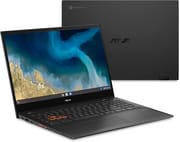
The ASUS Chromebook Flip CM5 (CM5500) is a 15.6-inch convertible for people who type, browse, and stream at a desk more than they carry a laptop around. It weighs 4.3 pounds, and its 1080p touch screen folds back into easel, tent, or tablet modes. The 8GB Ryzen 5 3500C model is the one to look for: it is the version PCMag and CNET tested, and owners of the 4GB Ryzen 3 3250C model report slowdowns with several tabs open.
Pros and Cons
| Pros | Cons |
|---|---|
| Good performance with multiple browser tabs and videos playing on the Ryzen 5 model | Webcam quality is poor |
| Comfortable backlit keyboard with a number pad and Home, End, Page Up, and Page Down keys | Screen brightness is only 250 nits, and the glossy panel reflects |
| Large, smooth glass touchpad | Performance drops by about 40 percent when not plugged in |
| Full-size HDMI, two USB-C ports, USB-A, and microSD | 4.3 pounds is heavy for a daily carry and for tablet use |
| Loud speakers that do not distort | No pen in the box, though it works with USI pens |
| ChromeOS updates through June 2031 | The 4GB Ryzen 3 model slows down with many tabs |
Related Videos
ASUS Chromebook Flip CM5 (CM5500) Comparison Chart
4 configurations
| Configuration | Processor | RAM | Storage | List price | Amazon price | Compare |
|---|---|---|---|---|---|---|
| CM5500FDA-DS344T | Ryzen 3 3250C | 4 GB | 64 GB eMMC | $499.99 | Details
| |
| CM5500FDA-IN588T | Ryzen 5 3500C | 8 GB | 128 GB SSD | $489.99 | Details
| |
| CM5500FDA-IS588T | Ryzen 5 3500C | 8 GB | 128 GB SSD | $599.99 | Details
| |
| CM5500FDA-DN344T | Ryzen 3 3250C | 4 GB | 64 GB eMMC | --- | Details
|
Specs shared by every configuration
| Performance Rating | 2.9 |
|---|---|
| Chromebook Plus | No |
| Screen Size | 15.6" |
| Screen Resolution | 1920x1080 |
| Screen Type | IPS |
| Touch Screen | Yes |
| Stylus / Pen | Supported |
| Dimensions width x length x thickness | 14.08 x 9.48 x 0.73 inches (357.63 x 240.79 x 18.54 mm) |
| Weight | 4.3 lbs (1.95 kg) |
| Backlit Keyboard | Yes |
| Webcam | 720p HD |
| WiFi | WiFi 6 |
| Bluetooth | Bluetooth 5.0 |
| Ethernet | No |
| Cellular Modem | No |
| HDMI | Full-Size HDMI |
| USB Ports | 1 USB 3, 2 USB-C |
| Thunderbolt Ports | No |
| Card Reader | microSD Card Reader |
| Battery | 3 cell, 57 WHrs, Li-ion |
| Battery Life | 10.0 hours |
| Fanless | No |
| Auto Update Expiration Date | June, 2031 |
Related Chromebooks
-
 ASUS Chromebook CX1 (CX1500)The ASUS Chromebook CX1 (CX1500) is a 15.6-inch full HD Chromebook with a number pad, an Intel…
 -
 ASUS Chromebook CX15The ASUS Chromebook CX15 is a 15.6-inch 1920x1080 ChromeOS laptop on an Intel Celeron N4500 with a…
 -
 Lenovo IdeaPad 3i ChromebookThe Lenovo IdeaPad 3i Chromebook is a 15.6-inch Full HD Chromebook with an Intel Celeron N4500 and…
 -
 Lenovo IdeaPad Flex 3i Chromebook 15.6"The Lenovo IdeaPad Flex 3i Chromebook 15.6" pairs a full-size keyboard with numeric keypad and a…
 -
 Samsung Chromebook 4+The Samsung Chromebook 4+ is a fanless 15.6-inch FHD Chromebook with an Intel Celeron N4000, dual…
 -
 Acer Chromebook 715The Acer Chromebook 715 is a 15.6-inch full-HD IPS Chromebook with an aluminum chassis, a keyboard…
Ryzen 3 and Ryzen 5 models
The Ryzen 3 3250C has two cores and four threads, and that model pairs it with 4GB of memory and 64GB of eMMC flash, and PCMag says it costs $100 less than the Ryzen 5 model. It was sold under two part numbers with the same specs, CM5500FDA-DS344T and CM5500FDA-DN344T. The Ryzen 5 3500C has four cores and eight threads, and that model gets 8GB of memory and a 128GB M.2 NVMe SSD, which ASUS lists as PCIe 3.0. On every model the memory is soldered and cannot be upgraded.
PCMag and CNET both tested the Ryzen 5 model (CM5500FDA-IS588T), which Costco sold for $599.99. Chrome Unboxed also had the Ryzen 5 unit. None of them tested the cheaper Ryzen 3 model, so the performance notes below apply to the faster version.
Ports, keyboard, screen, and battery
The left edge carries a USB 3.2 Type-C port, a USB 3.2 Type-A port, an audio jack, a volume rocker, and a power button. The right side has a second USB-C port, the HDMI port, and a microSD card slot. The compact power adapter plugs into either USB-C port. The WASD keys are outlined in orange, as on some gaming laptops, and the power and volume buttons are orange to match.
The keyboard has a numeric keypad on the right, with small Home, End, Page Up, and Page Down keys above it. PCMag points out that hardly any Chromebooks have those four keys; on most you press a modifier with the arrow keys instead.
The 1080p IPS screen is rated at only 250 nits of brightness, but it looked bright enough in PCMag’s testing, with white instead of dingy backgrounds and decent contrast. CNET found the glossy surface harder to live with, since reflections are hard to see past even at full brightness. PCMag found the 720p webcam so blurred that you won’t recognize yourself, and it has no privacy shutter. The screen works with USI active pens, but ASUS did not include one in the box.
PCMag measured eight and a half hours of looped video playback, which is enough for a few classes on campus or a Google Slides presentation at a client’s office. CNET’s streaming test ran 10 hours and 2 minutes with the screen at 50 percent brightness, close to the 10 hours ASUS claims. For more options suited to academic use, see our guide to the best Chromebooks for college students.
Reviewer Insights
Eric Grevstad of PCMag rated it 3.5 out of 5 and summed it up this way: “Its webcam makes you look bad, but the Asus Chromebook Flip CM5 is an otherwise excellent choice among big-screen, small-price convertibles.” He notes that the Flip CM5 has an aluminum lid and plastic bottom, styled in a nearly black hue Asus calls Mineral Gray. On speed, he writes that it didn’t slow or stutter even with numerous browser tabs open and a couple of videos playing. The webcam cost the system half a star: “I’m used to soft-focus or slightly fuzzy or noisy images, but it’s much worse than that, so blurred you won’t recognize yourself.” He also found it too heavy and unwieldy for comfort in tablet mode.
Joshua Goldman of CNET gave it an 8.0 and opened with, “The Asus Chromebook Flip CM5 is different than what you might be used to seeing in the world of Chromebooks.” He tested it as a machine for cloud gaming services and wrote, “Although the Flip CM5 doesn’t have the graphics performance of a Windows gaming laptop, it does have solid performance for a Chromebook.” Goldman praises the comfortable, backlit keyboard and the smooth, responsive glass touchpad, and he found the speakers can get loud without distorting. He points out that the display’s brightness is a bit dim, making it hard to see past reflections on the glossy screen, and that the webcam and microphones are mediocre.
The YouTube channel Chrome Unboxed likes the look, the speakers, and the glass trackpad, but criticizes performance when the machine is not plugged into a power source. They state, “It’s a shame that you’re dropping 40 percent performance and you notice it, you feel it. It doesn’t mean it’s unusable. It doesn’t mean that you can’t get some stuff done when you’re not plugged into the wall, but you’re going to notice a performance drop off.” On the audio, they said, “These speakers sound incredible… nice bass response, crispy highs, just really full.”
Customer Reviews
Amazon buyer reviews of the Ryzen 3 model with 4GB of memory and 64GB of storage split along how hard buyers push the machine. Buyers who use it for browsing and writing tend to be happy, and two of them single out the touchscreen and backlit keyboard. Joyce, a verified buyer, wrote “Was looking for a chromebook with a touch screen and backlit keyboard and the ASUS has both,” and a verified buyer writing as tiger fan framed it as a tablet substitute: “Nearly the same functionality of an iPad but at a fraction of the price. Battery last very long.”
The low-star reviews blame the 4GB of RAM and the Ryzen 3 3250C for sluggish multitasking. Vaanth, a verified buyer who rated it 2 stars, wrote “Opening multiple tabs, especially with a couple of ‘heavy’ pages, would quickly overload the system,” and replaced it with an 8GB model that “performs like this one should have.” Even some satisfied owners concede it is not fast; verified buyer trent (4 stars) called it “Slow at times but, does what I need it to do.” If you plan to keep many tabs open, the 8GB Ryzen 5 configuration is the one PCMag and CNET tested, and CNET said the Ryzen 3 model would still be fine for general use, but that spending the extra $100 gets you a much better Chromebook.
A big-screen convertible for browsing and typing
Web browsing, streaming video, making music, cloud gaming, and document editing are the workloads it handles. The comfortable keyboard, number pad, and large touchpad suit people who type for hours, and the touch screen folds flat for reading or watching.
Gaming on the device itself and video editing ask for more than these Ryzen chips and up to 8GB of memory can give, and buyers who spend a lot of time on video calls will run into the webcam. At 4.3 pounds it is also a heavy machine to carry every day. For more options, compare it with others using Starry Hope’s Chromebook Comparison Tool.
Frequently Asked Questions
What is the screen size of the ASUS Chromebook Flip CM5 (CM5500)?
The screen measures 15.6 inches with a 1920 by 1080 resolution, and it is a touch panel. The hinge folds the screen back into easel, tent, and tablet modes.
What processor does the ASUS Chromebook Flip CM5 (CM5500) have?
It depends on the model. The Ryzen 3 model has an AMD Ryzen 3 3250C with 2 cores and 4 threads, running from 2.6 GHz up to 3.5 GHz. The Ryzen 5 models have an AMD Ryzen 5 3500C with 4 cores and 8 threads, running from 2.1 GHz up to 3.7 GHz.
How long will the ASUS Chromebook Flip CM5 (CM5500) get updates?
Google lists June 2031 as the auto update expiration date for the Chromebook Flip CM5 (CM5500FDA).
Does the ASUS Chromebook Flip CM5 (CM5500) have a backlit keyboard?
Yes. The CM5 ships with a backlit keyboard that includes a number pad, and the WASD keys are outlined in orange.
What is the battery life of the ASUS Chromebook Flip CM5 (CM5500)?
ASUS rates the 57Wh battery for up to 10 hours. On the Ryzen 5 model, PCMag measured about eight and a half hours of video playback and CNET measured 10 hours and 2 minutes of streaming at half brightness.
What storage does the ASUS Chromebook Flip CM5 (CM5500) use?
The Ryzen 3 model has 64GB of eMMC flash. The Ryzen 5 model has a 128GB M.2 NVMe SSD. Both have a microSD card slot for extra storage.
Does the ASUS Chromebook Flip CM5 (CM5500) support a stylus?
Yes. The touch screen works with USI active pens, but no pen comes in the box.
Is the ASUS Chromebook Flip CM5 (CM5500) good for gaming?
Not for demanding games run on the laptop itself. The Ryzen chips and their integrated Radeon graphics are modest, and performance drops further when the device is unplugged. Light Android games and cloud game streaming work fine, with Wi-Fi 6 on the models that ship with it, and our guide to Steam on Chromebook covers the other options.