
ASUS Chromebook Flip CX3 (CX3400)
Updated on

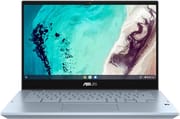
The ASUS Chromebook Flip CX3 (CX3400) was a premium 2-in-1 convertible Chromebook released in 2022, with a 360-degree hinge that moves it between laptop, tent, stand, and tablet modes. It pairs a completely fanless design with 11th-generation Intel Tiger Lake processors, so it stays silent in noise-sensitive rooms like libraries, offices, and meeting spaces. A garaged USI stylus comes in the box, which suits note-takers and creative users who need pen input. The model has been discontinued and replaced by the newer ASUS Chromebook Plus CX34, and it remains a capable machine for anyone who finds one on the secondary market.
Related Videos
ASUS Chromebook Flip CX3 (CX3400) Comparison Chart
 ASUS Chromebook Flip CX3 (CX3400) | ASUS Chromebook Flip CX3 (CX3400) | ASUS Chromebook Flip CX3 (CX3400) | |
| Price | List Price: $599.99 Amazon Prices: | List Price: $999.99 Amazon Prices: | List Price: $749.99 Amazon Prices: |
| Model number | CX3400FMA-DH388T-S | CX3400FMA-DH762T-S | CX3400FMA-DH586T-S |
| Performance Rating | 7.1 | 8.0 | 7.1 |
| Chromebook Plus | No | No | No |
| Processor | Quad-core 1.80 Ghz (max 4.00 Ghz) Intel Core i5-1130G7 | Quad-core 1.80 Ghz (max 4.00 Ghz) Intel Core i5-1130G7 | Quad-core 1.80 Ghz (max 4.00 Ghz) Intel Core i5-1130G7 |
| RAM | 8 GB | 16 GB | 8 GB |
| Internal Storage | 128 GB NVMe SSD | 512 GB NVMe SSD | 256 GB NVMe SSD |
| Screen Size | 14" | 14" | 14" |
| Screen Resolution | 1920x1080 | 1920x1080 | 1920x1080 |
| Screen Type | LED Backlit, 250nits | LED Backlit, 250nits | LED Backlit, 250nits |
| Touch Screen | Yes | Yes | Yes |
| Stylus / Pen | Supported | Supported | Supported |
| Dimensions width x length x thickness | 12.8 x 8.65 x 0.78 inches (325.12 x 219.71 x 19.81 mm) | 12.8 x 8.65 x 0.78 inches (325.12 x 219.71 x 19.81 mm) | 12.8 x 8.65 x 0.78 inches (325.12 x 219.71 x 19.81 mm) |
| Weight | 3.64 lbs (1.65 kg) | 3.64 lbs (1.65 kg) | 3.64 lbs (1.65 kg) |
| Backlit Keyboard | Yes | Yes | Yes |
| Webcam | 720p HD | 720p HD | 720p HD |
| WiFi | Wi-Fi 6 (802.11ax) | Wi-Fi 6 (802.11ax) | Wi-Fi 6 (802.11ax) |
| Bluetooth | Bluetooth 5.2 | Bluetooth 5.2 | Bluetooth 5.2 |
| Ethernet | No | No | No |
| Cellular Modem | No | No | No |
| HDMI | No HDMI | No HDMI | No HDMI |
| USB Ports | 2 USB 3, 2 USB-C USB-C supports display out and power delivery | 2 USB 3, 2 USB-C USB-C supports display out and power delivery | 2 USB 3, 2 USB-C USB-C supports display out and power delivery |
| Thunderbolt Ports | No | No | No |
| Card Reader | microSD Card Reader | microSD Card Reader | microSD Card Reader |
| Battery | 3 cell, 50WHrs, Li-ion | 3 cell, 50WHrs, Li-ion | 3 cell, 50WHrs, Li-ion |
| Battery Life | 11.0 hours | 11.0 hours | 11.0 hours |
| Fanless | Yes | Yes | Yes |
| Auto Update Expiration Date | June, 2031 | June, 2031 | June, 2031 |
Related Chromebooks
-
 ASUS Chromebook Vibe CX34 FlipThe ASUS Chromebook Vibe CX34 Flip is a cloud-gaming convertible Chromebook with a 12th Gen Intel…
 -
 ASUS Chromebook Flip CX5 (CX5400)The ASUS Chromebook Flip CX5 (CX5400) is a fanless 14-inch aluminum convertible sold with an Intel…
 -
 Acer Chromebook Spin 314 (2024)A 14-inch convertible Chromebook with a 16:10 WUXGA touch display, 360-degree hinge, and software…
 -
 Acer Chromebook Vero 514The Acer Chromebook Vero 514 blends sustainability with performance. Sporting a Full HD IPS…
 -
 Dell Latitude 5430 Chromebook 2-in-1The Dell Latitude 5430 Chromebook 2-in-1 is a 14-inch business convertible with 12th Gen Intel…
 -
 Acer Chromebook Plus 514A 14-inch Chromebook Plus line sold in three board configurations: the AMD Ryzen 3 7320C CB514-3H,…
Silent cooling, a dim screen, and all-day battery
The chassis meets MIL-STD 810H military durability standards, so it has been tested against drops, vibration, and temperature extremes. It is plastic rather than aluminum, and the “AI Blue” color option separates it from the usual silver and gray Chromebooks. The 360-degree ErgoLift hinge gives firm resistance at any angle and moves smoothly between modes. At 3.64 pounds it is not the lightest 14-inch Chromebook, though the weight is spread well enough that it does not feel cumbersome during extended use.
The 14-inch Full HD touchscreen reproduces color well for a Chromebook in this price range, and its 250-nit brightness is the panel’s limit. Android Police described the device as “useless outdoors” due to the dim, reflective screen, making this strictly an indoor Chromebook. The 16:9 aspect ratio suits media and game streaming services like GeForce Now and Xbox Cloud Gaming. The screen takes USI stylus input from the included garaged pen, which charges wirelessly when stored in its slot on the right side. About Chromebooks noted that the stylus tip creates an “intolerable sensation” on the glass screen compared to higher-end styluses with soft tips.
Passive cooling keeps the machine silent and holds the processor well below its ceiling. About Chromebooks tested the Core i7-1160G7 and found it mostly ran between 1.0-1.2 GHz during sustained workloads, never approaching its rated 4.4 GHz turbo speed. In those benchmarks the Core i7 model scored lower than cheaper Chromebooks with Core i3 and even Pentium processors that have active cooling. The 50 Wh battery delivers 8-9.5 hours of measured real-world use against the claimed 11 hours.
Reviewer Insights
C4ETech’s Perspective
C4ETech praised the CX3400 as a premium convertible that delivers versatility through its 360-degree hinge. He highlighted the fanless design as a major advantage: “Asus have gone with a fan-less thermal design, so this Chromebook, it’s super silent.” He was impressed by the military-grade durability certification and the included garaged USI stylus, noting that “what’s new here? The CX3, given it has a full laptop form factor, it includes way more I/O” compared to tablet-style Chromebooks. He concluded that the CX3 offers a solid media experience thanks to the 14-inch Full HD IPS panel and comprehensive port selection.
Android Police’s Perspective
Android Police delivered a mixed review, awarding the CX3400 a 7.5/10 score while describing it as “the minivan of Chromebooks: a utilitarian device that might not be sexy, but it sure can get work done.” Their testing of the Core i7 model found that “apps always felt snappy” despite the thermal constraints, but the 250-nit screen brightness was a dealbreaker for outdoor use. They praised the large, responsive trackpad and dual USB-C charging ports that support 45W power delivery on both sides. However, they criticized the included stylus for its rough plastic tip and noted that the silver keyboard has poor legibility, which is made worse rather than better by the backlight. At $979 for the Core i7 model, they felt the plastic construction was inconsistent with the premium price.
About Chromebooks’ Perspective
About Chromebooks published the most critical review, ultimately recommending against purchasing the CX3400 at its original $979 price point. Their detailed stress testing revealed the fundamental problem with the fanless Core i7: “This is nearly a $1,000 Chromebook with an 11th-generation Intel Core i7…So why doesn’t the performance reflect that? Because there’s no fan, you get a silent experience. So yay! However, this processor is limited in terms of how long it can run at a higher clock speed, due to heat.” Benchmark scores showed the device underperforming not just cheaper Core i3 Chromebooks, but even some Pentium models. Kevin C. Tofel concluded: “Unless you fully understand the performance shortcomings of this particular Core i7 and really want a fanless Chromebook experience, I’d pass, at least at this price.”
A silent note-taking convertible for indoor desks
In quiet environments like libraries, shared offices, or recording studios, including work such as music production on a Chromebook, the fanless design runs with no noise at all. The convertible hinge and included stylus fit students and professionals who take handwritten notes or annotate documents, though anyone who wants a better pen feel should budget for a third-party USI pen with a soft tip.
Skip it if you need maximum performance, work outdoors often, or expect Core i7 speeds to match a desktop or a high-performance laptop. For a current Chromebook with similar features, the ASUS Chromebook Plus CX34 offers 12th-generation Intel processors and Chromebook Plus AI features at a more accessible price. Starry Hope’s Chromebook Comparison Tool lays the alternatives out side by side.
Frequently Asked Questions
Is the ASUS Chromebook Flip CX3 (CX3400) still available for purchase?
No. It is discontinued and no longer sold new by retail stores, so new-old-stock and used units on secondary marketplaces like eBay or Amazon third-party sellers are the remaining sources. The replacement is the ASUS Chromebook Plus CX34 (CX3402) series with 12th-generation Intel processors.
Does the CX3400 include a stylus?
Yes. A garaged USI stylus stores and charges wirelessly inside the right side of the chassis. It supports 4,096 levels of pressure sensitivity and charges fully in about 15 seconds for 45 minutes of use. About Chromebooks found the hard plastic tip uncomfortable on the glass screen.
Is the CX3400 completely silent?
Yes. The passive cooling design has no fan, so the machine makes no noise in use. The cost is speed: without active cooling the processors throttle to prevent overheating, and About Chromebooks measured the Core i7 model at 1.0-1.2 GHz under sustained loads rather than its rated 4.4 GHz turbo speed.
How long will the CX3400 receive Chrome OS updates?
The CX3400FMA has an Auto Update Expiration (AUE) date of June 2031, so Chrome OS updates, security patches, and new features arrive until then. After June 2031 the device keeps working without further updates.
Can I use the CX3400 outdoors?
Not comfortably. The 250-nit display is hard to read outdoors or in brightly lit rooms, and Android Police called the machine “useless outdoors” because of the dim, reflective screen. Indoor office or home lighting is where it works.
What ports does the CX3400 have?
Two USB 3.2 Gen 1 Type-A ports, two USB 3.2 Gen 1 Type-C ports with DisplayPort output and power delivery, a microSD card reader, and a 3.5mm audio combo jack. Both USB-C ports support 45W charging, so the machine takes power from either side.