
HP Chromebook 11A G8 EE
Updated on

The HP Chromebook 11A G8 EE is an 11.6-inch Education Edition machine running an AMD A4-9120C processor with 4GB of RAM and 32GB of eMMC storage. Those parts cover web browsing, Google Workspace documents, and classroom software, and not much past that. What separated the Education Edition from consumer models at the same size was the chassis: a spill-resistant keyboard with keys students cannot pry off, metal-reinforced corners, and rubber bumpers meant to survive K-12 environments and the occasional magnet trick prank. HP built it for school 1:1 programs and no longer sells it new. Chrome OS updates run until June 2029, so a unit already in a classroom or a home office still gets security patches and current Chrome releases.
| Pros | Cons |
|---|---|
| Durable with MIL-STD 810G testing and 122cm drop resistance | TN display with poor viewing angles and washed-out colors |
| 47Wh battery rated for a 10 hour school day | AMD A4-9120C struggled with heavy multitasking beyond basic web use |
| Spill-resistant keyboard with an anchored skirt that resists key-picking | Only 32GB eMMC storage limited offline app and file capacity |
| 3.02 lb and 0.74 inches thick, easy to carry between classes | No touchscreen on the base model; touch was a separate configuration |
| Chrome OS updates run until June 2029 | 4GB RAM could bottleneck with many Chrome tabs open |
| Both USB-C ports carry DisplayPort output and Power Delivery | Type-A ports are USB 2.0, not USB 3.0, so flash-drive copies are slow |
Related Videos
HP Chromebook 11A G8 EE Comparison Chart
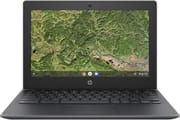 HP Chromebook 11A G8 EE | |
| Price | List Price: $225.00 Amazon Prices: |
| Model number | 16W64UT#ABA |
| Performance Rating | 2.3 |
| Chromebook Plus | No |
| Processor | Dual-core 1.60 Ghz (max 2.40 Ghz) AMD A4-9120C APU with Radeon R4 Graphics |
| RAM | 4 GB |
| Internal Storage | 32 GB eMMC |
| Screen Size | 11.6" |
| Screen Resolution | 1366x768 |
| Screen Type | WLED Backlit |
| Touch Screen | No |
| Stylus / Pen | No Stylus Support |
| Dimensions width x length x thickness | 11.6 x 8.1 x 0.74 inches (294.64 x 205.74 x 18.8 mm) |
| Weight | 3.02 lbs (1.37 kg) |
| Backlit Keyboard | No |
| Webcam | 720p HD |
| WiFi | 802.11 a/b/g/n/ac (2x2) |
| Bluetooth | Bluetooth 4.2 |
| Ethernet | No |
| Cellular Modem | No |
| HDMI | No HDMI |
| USB Ports | 2 USB 2.0, 2 USB-C (power delivery, data transfer, DisplayPort) |
| Thunderbolt Ports | No |
| Card Reader | microSD Card Reader |
| Battery | 2 cell, 47.36 WHr, Li-ion |
| Battery Life | 10.0 hours |
| Fanless | Yes |
| Auto Update Expiration Date | June, 2029 |
Related Chromebooks
-
 HP Chromebook 14 (AMD)The HP Chromebook 14 (AMD) is a fanless 14-inch Chromebook built on the AMD A4-9120C APU with…
 -
 Acer Chromebook 311 (AMD)The Acer Chromebook 311 (CB311-10H) is an 11.6-inch ChromeOS laptop on an AMD A4-9120C with 4GB of…
 -
 ASUS Chromebook C203XAThe ASUS Chromebook C203XA is a rugged 11.6-inch education laptop with a MediaTek MT8173C, an…
 -
 HP Chromebook 11a (ARM)The HP Chromebook 11a offers an 11.6-inch anti-glare display, 720p HD webcam, and up to 15 hours of…
 -
 Acer Chromebook Spin 11 CP311The Acer Chromebook Spin 11 combines functionality and portability with its 11.6-inch touch IPS…
 -
 Lenovo Flex 3 ChromebookThe Lenovo Flex 3 Chromebook is a fanless 11.6-inch convertible with an IPS touchscreen, a MediaTek…
A bumpered shell around soldered entry-level parts

HP put this chassis through MIL-STD 810G testing, which covers drops from 122cm (about four feet, higher than desk height), bumps and vibration, and operation in temperature extremes. Metal-reinforced corners and large rubber bumpers around the perimeter take the impact, and the textured plastic body hides fingerprints and light scratches. The keyboard is spill-resistant and uses an anchored skirt, so the keycaps do not come off under a determined thumbnail.
The AMD A4-9120C is a dual-core chip running at 1.6GHz base with turbo up to 2.4GHz, paired with AMD Radeon R4 integrated graphics for video playback and document work. Memory is 4GB of DDR4-1866 alongside 32GB of eMMC storage, both soldered down, which was the standard education configuration at this price. Chrome OS keeps up with browsing, Google Classroom, learning apps, and video calls; past 10-15 open Chrome tabs the 4GB ceiling shows up as tab reloads and slower switching. The system is fanless, so it makes no noise at all in a quiet room.
Both USB-C ports carry power, DisplayPort output, and data, so the machine can drive a projector or a classroom display on one port while charging on the other. The two USB 2.0 Type-A ports suit a mouse or a keyboard; they are slower than USB 3.0 for pulling files off a flash drive. Wireless comes as WiFi 5 (802.11ac) with 2x2 MIMO plus Bluetooth 4.2; for a wired connection, a USB Ethernet adapter works through either USB-C port. The microSD slot is the only way to add storage past the 32GB on board, which matters on a machine this small. The 720p webcam and the built-in microphone are adequate for a video call rather than a recording. Battery is a 2-cell 47Wh pack rated at 10 hours, stretching toward 13 hours on light use, charged by a 45W USB-C adapter through either port.
Security patches continue until June 2029, on soldered parts
Chrome OS updates run until June 2029. A machine still on a working battery gets security patches and current Chrome releases for years yet, and the workload it was bought for has not changed: documents, a browser, a video call, and school or work web apps.
The ceilings are fixed, though. RAM and storage are soldered, so 4GB and 32GB are permanent and a microSD card is the only expansion path. Tab reloads at 10-15 tabs will stay. Shoppers looking at what is on sale now can sort by specs, price, and AUE date in the Chromebook Comparison Chart.
Frequently Asked Questions
How long will this Chromebook receive Chrome OS updates?
Until June 2029, under Google’s Auto Update policy. Until that date the machine keeps getting security patches and current Chrome releases.
Can I upgrade the RAM or storage?
No. The 4GB of RAM and the 32GB of eMMC storage are soldered to the motherboard, so both are fixed for the life of the machine. The microSD slot is the one way to add capacity for files and media.
Is it still usable for video calls and remote learning?
Yes. Google Meet, Zoom, and similar platforms run on it, with the 720p webcam and the built-in microphone covering a call rather than a recording. The 47Wh battery is rated at 10 hours, enough for a school day of classes without a charger.
How much abuse was the chassis designed to take?
It met MIL-STD 810G testing standards, which include drops from 122cm (about 4 feet). The keyboard is spill-resistant with pick-resistant keys, and metal-reinforced corners take the impact from bumps and drops.
Can it drive an external monitor?
Both USB-C ports support DisplayPort output, so a USB-C to HDMI or USB-C to DisplayPort adapter gets you a second screen. The AMD Radeon R4 graphics support extended desktop mode alongside the built-in display.
Did the base model have a touchscreen?
No. The standard model shipped a non-touch 11.6-inch HD display with WLED backlighting and an anti-glare coating; a touchscreen was a separate configuration from HP.
How did the 11A G8 EE compare to the Intel-based HP Chromebook 11 G8 EE?
The “11A” designation marks the AMD processor (A4-9120C); the “11” model used an Intel Celeron N4020. The AMD version has USB 2.0 Type-A ports where the Intel one has USB 3.1, and the Intel model offered slightly more storage options. On basic tasks the two performed similarly at comparable prices.