
HP Chromebook 14a (2021)
Updated on

HP built the 14a as its entry-level Chrome OS laptop, pairing a 14-inch display with an Intel Celeron N4020 at a low price. It arrived in 2021 aimed at students, casual users, and anyone who mostly browses the web, answers email, and edits documents. Performance sits at the bottom of the range, and the laptop is built to cover those everyday tasks rather than anything heavier. Chrome OS updates run until June 2029.
| Pros | Cons |
|---|---|
| Strong battery life, around 10 hours in real-world testing (Milo B.) | HD resolution (1366x768) lacks sharpness on 14” screen |
| Lightweight design at 3.2 lbs | No HDMI port for external displays |
| Fast charging: 0-50% in 45 minutes (HP claim) | Only 4GB RAM limits multitasking capability |
| Comfortable keyboard with good key travel | Grainy 720p webcam quality |
| Two USB-C ports with charging support | Some variants lack touchscreen |
| Affordable pricing often under $200 on sale | 32GB eMMC storage fills up quickly |
Related Videos
HP Chromebook 14a (2021) Comparison Chart
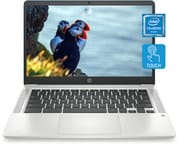 HP Chromebook 14a (2021) | HP Chromebook 14a (2021) | HP Chromebook 14a (2021) | HP Chromebook 14a (2021) | HP Chromebook 14a (2021) | |
| Price | List Price: $339.99 Amazon Prices: | List Price: $269.99 Amazon Prices: Loading prices... | List Price: $339.99 Amazon Prices: Loading prices... | List Price: $339.99 Amazon Prices: | List Price: $339.99 Amazon Prices: |
| Model number | 14a-na0150nr / 4A4Z5UA | 14a-na0023nr / 4M110UA | 14a-na0160nr / 4A4Z6UA | 14a-na0130nr / 4A4Z3UA | 14a-na0140nr / 4A4Z4UA |
| Performance Rating | 3.1 | 3.1 | 3.1 | 3.1 | 3.1 |
| Chromebook Plus | No | No | No | No | No |
| Processor | Dual-core 1.10 Ghz (max 2.80 Ghz) Intel Celeron Processor N4020 | Dual-core 1.10 Ghz (max 2.80 Ghz) Intel Celeron Processor N4020 | Dual-core 1.10 Ghz (max 2.80 Ghz) Intel Celeron Processor N4020 | Dual-core 1.10 Ghz (max 2.80 Ghz) Intel Celeron Processor N4020 | Dual-core 1.10 Ghz (max 2.80 Ghz) Intel Celeron Processor N4020 |
| RAM | 4 GB | 4 GB | 4 GB | 4 GB | 4 GB |
| Internal Storage | 32 GB eMMC | 32 GB eMMC | 32 GB eMMC | 32 GB eMMC | 32 GB eMMC |
| Screen Size | 14" | 14" | 14" | 14" | 14" |
| Screen Resolution | 1366x768 | 1366x768 | 1920x1080 | 1366x768 | 1366x768 |
| Screen Type | BrightView, 220 nits | BrightView, 220 nits | BrightView, 220 nits | BrightView, 220 nits | BrightView, 220 nits |
| Touch Screen | Yes | No | No | Yes | Yes |
| Stylus / Pen | No Stylus Support | No Stylus Support | No Stylus Support | No Stylus Support | No Stylus Support |
| Dimensions width x length x thickness | 12.8 x 8.6 x 0.7 inches (325.12 x 218.44 x 17.78 mm) | 12.8 x 8.6 x 0.7 inches (325.12 x 218.44 x 17.78 mm) | 12.8 x 8.6 x 0.7 inches (325.12 x 218.44 x 17.78 mm) | 12.8 x 8.6 x 0.7 inches (325.12 x 218.44 x 17.78 mm) | 12.8 x 8.6 x 0.7 inches (325.12 x 218.44 x 17.78 mm) |
| Weight | 3.2 lbs (1.45 kg) | 3.2 lbs (1.45 kg) | 3.2 lbs (1.45 kg) | 3.2 lbs (1.45 kg) | 3.2 lbs (1.45 kg) |
| Backlit Keyboard | No | No | No | No | No |
| Webcam | 720p HD | 720p HD | 720p HD | 720p HD | 720p HD |
| WiFi | Wi-Fi 5 (802.11ac) | Wi-Fi 5 (802.11ac) | Wi-Fi 5 (802.11ac) | Wi-Fi 5 (802.11ac) | Wi-Fi 5 (802.11ac) |
| Bluetooth | Bluetooth 5.0 | Bluetooth 5.0 | Bluetooth 5.0 | Bluetooth 5.0 | Bluetooth 5.0 |
| Ethernet | No | No | No | No | No |
| Cellular Modem | No | No | No | No | No |
| HDMI | No HDMI | No HDMI | No HDMI | No HDMI | No HDMI |
| USB Ports | 1 USB 3, 2 USB-C | 1 USB 3, 2 USB-C | 1 USB 3, 2 USB-C | 1 USB 3, 2 USB-C | 1 USB 3, 2 USB-C |
| Thunderbolt Ports | No | No | No | No | No |
| Card Reader | Card Reader | Card Reader | Card Reader | Card Reader | Card Reader |
| Battery | 2 cell, 47 Wh, Li-ion | 2 cell, 47 Wh, Li-ion | 2 cell, 47 Wh, Li-ion | 2 cell, 47 Wh, Li-ion | 2 cell, 47 Wh, Li-ion |
| Battery Life | 14.0 hours | 14.0 hours | 14.0 hours | 14.0 hours | 14.0 hours |
| Fanless | No | No | No | No | No |
| Auto Update Expiration Date | June, 2029 | June, 2029 | June, 2029 | June, 2029 | June, 2029 |
Related Chromebooks
-
 HP Chromebook x360 14aThe HP Chromebook x360 14a is a 14-inch convertible Chromebook with an Intel Celeron N4020, a…
 -
 HP Chromebook x360 14bThe HP Chromebook x360 14b is a 14-inch convertible Chromebook with an Intel Celeron N4000, 4GB of…
 -
 ASUS Chromebook CM14 FlipThe ASUS Chromebook CM14 Flip is a fanless 14-inch convertible Chromebook with a MediaTek Kompanio…
 -
 Lenovo 14e Chromebook (Gen 3)The Lenovo 14e Chromebook Gen 3 is a 14-inch education laptop sold in Intel N100 and N200 builds…
 -
 Lenovo IdeaPad Slim 3 ChromebookThe Lenovo IdeaPad Slim 3 Chromebook 14 pairs a fanless MediaTek Kompanio 520 processor with a…
 -
 ASUS Chromebook Flip CX1 (Touchscreen)The ASUS Chromebook Flip CX1 is a 14-inch Full HD convertible with a 360-degree touchscreen, an…
Entry-level parts around a 14-hour battery

The plastic chassis comes in several colors, including Ceramic White, Forest Teal, and Mineral Silver. At 12.82 x 8.6 x 0.7 inches and 3.24 pounds, the laptop balances portability against a 14-inch screen. Build quality feels solid despite the all-plastic construction, with minimal flex in the keyboard deck during typing. HP’s micro-edge bezels keep the frame tight around the screen, though the HD (1366x768) resolution means individual pixels can be visible during close viewing.
The Intel Celeron N4020 dual-core processor paired with 4GB of RAM handles Chrome OS capably for basic tasks. Web browsing with a handful of tabs, Google Docs editing, video streaming, and casual Android app usage all run smoothly enough. However, users who frequently open 10+ browser tabs or run multiple Android apps simultaneously will notice slowdowns. The integrated Intel UHD 600 graphics can decode 4K video for streaming services, though the display itself maxes out at 1366x768. The 32GB eMMC storage provides adequate space when combined with Google Drive cloud storage, but users who prefer keeping files locally may find themselves managing storage carefully.
Both USB-C ports support charging, so you are not locked to one side of the laptop for power. The single USB-A 3.0 port handles older peripherals like mice and USB drives. A microSD card slot enables storage expansion, and the combo headphone/microphone jack works with standard headsets. Notable omissions include HDMI output (external monitor users will need a USB-C adapter) and Ethernet, making WiFi 5 the only networking option. Bluetooth 5.0 connects wireless peripherals reliably.
Keys have decent travel and tactile feedback, which makes extended typing sessions comfortable. Milo B. was not a fan of the trackpad and would give it the lowest grade. The 720p webcam and dual microphones handle video calls adequately but produce grainy footage in anything other than well-lit environments. HP’s partnership with Bang & Olufsen brings branded speakers that output clear, if somewhat thin, audio that’s acceptable for casual media consumption but won’t replace external speakers for music enjoyment.
HP rates the laptop for up to 14 hours on a single charge. Milo B.’s testing showed approximately 10 hours of continuous use with screen brightness at comfortable levels and WiFi connected. The 47 Wh battery combined with Chrome OS’s efficiency means most users can easily get through a full work or school day without hunting for outlets. HP Fast Charge capability adds convenience by recovering 50% battery in roughly 45 minutes, helpful for quick top-ups between classes or meetings.
Reviewer Insights

Milo B.’s Perspective
Milo B. (AlikLab) tested the FHD variant with its 1080p IPS display. In his 11-minute review, he highlights the display as the standout feature, noting it’s rare to find a 1080p IPS panel in a sub-$300 Chromebook. He measured actual battery life at approximately 10 hours under normal usage, with the added benefit of fast charging that fills the battery from empty to full in about 2 hours.
Milo notes the dual B&O speakers, one on each side, and says “the sound on this chromebook is pretty good,” and he finds the spacious keyboard comfortable for extended typing. He identifies several drawbacks: he wished it had an HDMI port for connecting to a TV, and the 720p webcam is “a bit grainy” (though still usable). He was notably down on the trackpad, saying he is “not a big fan of the trackpad” and would “give it the lowest grade.” He would recommend the HP Chromebook 14a, especially on sale (he points to a roughly $229 deal), with the value case weaker at full MSRP.
NotebookCheck Analysis
According to NotebookCheck, the HP Chromebook 14a earned a 72% overall score, positioning it as “average” within its category. Their analysis describes it as “a good choice for anyone looking for an inexpensive Chromebook that can do simple tasks, like browsing the web, sending email or watching online videos.” They note the all-day battery life and attractive, portable design as primary strengths while acknowledging that performance doesn’t match similarly priced Windows alternatives like the Acer Aspire 5.
Customer Reviews
Across 1,077 ratings on Amazon, the HP Chromebook 14a (2021) averages 4.5 stars, with 73% of ratings at five stars and a smaller 5% sitting at one star. Jesse, a verified buyer, called it his first laptop and wrote that he has “gotten past 13 hours on battery life, really good for a work and school computer,” while verified buyer Barbara Crouthamel summed up the value angle with “the price is unbeatable and it’s just so user friendly.”
Monica, a verified buyer who rated it four stars, found it “Basic, light weight laptop but super slow,” noted the display is “not as crisp” as she was used to, and wished for a second USB-C port so she could charge and use an adapter at the same time; she also found the touchpad and keyboard feel “clunky.” The harshest review comes from verified buyer Brionna, who gave three stars after the unit stopped working: “I have only had this for 4 months and now it won’t turn on or charge I have tried everything and nothing has help.”
Read more owner reviews on Amazon.
Light web work on a tight budget
K-12 students are the clearest fit, since Chrome OS ties into Google Classroom and educational tools and the design survives being stuffed into a backpack. College students can benefit if their coursework primarily involves web-based applications, document editing, and research, though those in design, engineering, or media programs should look elsewhere. Remote workers handling email, spreadsheets, and video calls will find it capable for light workloads.
Casual home users who want a dedicated Netflix machine, email checker, or web browser get the same simplicity. Chrome OS needs no driver updates or antivirus, and it is approachable for someone who does not want to manage an operating system at all, and the 14-inch display leaves plenty of room for larger text.
Gamers, creative professionals, and heavy multitaskers should skip it. Chrome OS lacks native game support beyond Android apps, Photoshop and Premiere do not run here, and the 4GB of RAM cannot hold dozens of browser tabs or several demanding applications at once. Push past that and you get slowdowns and tab reloading.
Worth buying on sale, and worth hunting for the FHD screen
The Celeron N4020 and 4GB of RAM cover homework, email, social media, and web browsing on a second machine, and the battery lasts a school or work day. High-resolution work and quick multitasking are beyond it. Discounted to the $150-$200 range, the laptop is much easier to justify than at list. Look for an FHD variant for the sharper display, and plan on cloud storage rather than fighting the 32GB of internal capacity. Updates and security patches continue until June 2029. Newer Chromebooks with later AUE dates will last longer, and this one still serves anyone who wants the cheaper machine today. To see how it stacks up against other options, the Chromebook Comparison Chart lets you sort and filter by specs side by side.
Frequently Asked Questions
Can the RAM or storage be upgraded on the HP Chromebook 14a?
No. The 4GB RAM is soldered to the motherboard, and the 32GB eMMC storage cannot be replaced. You can add space with a microSD card, an external USB drive, or Google Drive.
How long will the HP Chromebook 14a (2021) receive updates?
The HP Chromebook 14a (2021) with Intel Celeron N4020 will receive Chrome OS updates until June 2029. After this Auto Update Expiration (AUE) date, the device will continue to function but won’t receive new security patches or feature updates.
Does the HP Chromebook 14a have a touchscreen?
Some variants have a touchscreen and some do not. The model number is what tells them apart, so check it carefully before buying. Touch variants typically cost slightly more and make Android apps easier to use.
Can I connect an external monitor to the HP Chromebook 14a?
Yes, though you will need a USB-C to HDMI adapter, since there is no dedicated HDMI port. The USB-C ports support video output, allowing connection to external displays. The Intel UHD 600 graphics can drive external monitors at resolutions up to 4K.
Is the HP Chromebook 14a good for students?
Yes. Google Docs, Google Classroom, Zoom calls, and web research all run without issue, and the battery covers an entire school day without charging. Students who need demanding software or heavy multitasking should look at a higher-spec device.
What’s the difference between HD and FHD variants?
HD variants feature 1366x768 resolution while FHD variants offer 1920x1080 resolution on the same 14-inch display. FHD models provide noticeably sharper text and images, which helps with extended reading and detailed work.