
HP Chromebook 14a (ne Series)
Updated on

The HP Chromebook 14a (ne Series) delivers essential computing functionality in an affordable 14-inch package for users who need a straightforward device for web browsing, schoolwork, and everyday tasks. Built around the Intel Celeron N4500 dual-core processor and 4GB of memory, this Chromebook handles basic productivity needs while offering WiFi 6 connectivity and an impressive ChromeOS support window extending through June 2033. The micro-edge display maximizes screen real estate in a compact form factor, and the upward-firing speakers provide better audio positioning than many budget competitors. While the 1366x768 TN panel and minimal RAM constrain the experience for demanding users, the HP Chromebook 14a-ne serves its intended purpose well as an entry-level machine for students and casual users.
Pros and Cons of the HP Chromebook 14a (ne Series)
| Pros | Cons |
|---|---|
| WiFi 6 and Bluetooth 5.3 for modern wireless connectivity | Low-resolution 1366x768 TN display with poor vertical viewing angles |
| Long ChromeOS support through June 2033 | Only 4GB RAM limits multitasking capability |
| Full-size HDMI port for easy external display connection | No keyboard backlighting |
| Quality keyboard with good tactile feedback | 64GB eMMC storage fills quickly |
| Upward-firing speakers provide decent audio | 720p webcam quality is mediocre for video calls |
| Fingerprint-resistant textured plastic finish | TN panel shows color washout when tilted |
Related Videos
HP Chromebook 14a (ne Series) Comparison Chart
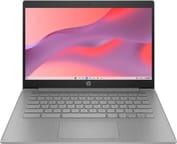 HP Chromebook 14a (ne Series) | |
| Price | List Price: Amazon Prices: Loading prices... Best Buy: Loading price... |
| Model number | 14a-ne1013dx |
| Performance Rating | 3.1 |
| Chromebook Plus | No |
| Processor | Dual-core 1.10 Ghz (max 2.80 Ghz) Intel Celeron Processor N4500 |
| RAM | 4 GB |
| Internal Storage | 64 GB eMMC |
| Screen Size | 14" |
| Screen Resolution | 1366x768 |
| Screen Type | TN |
| Touch Screen | No |
| Stylus / Pen | No Stylus Support |
| Dimensions width x length x thickness | 12.85 x 8.94 x 0.72 inches (326.39 x 227.08 x 18.29 mm) |
| Weight | 3.35 lbs (1.52 kg) |
| Backlit Keyboard | No |
| Webcam | 720p |
| WiFi | Wi-Fi 6 (802.11ax) |
| Bluetooth | Bluetooth 5.3 |
| Ethernet | No |
| Cellular Modem | No |
| HDMI | Full-Size HDMI |
| USB Ports | 2 USB 3, 1 USB-C 1x USB-C 3.1 with Power Delivery and DisplayPort 1.4, 2x USB-A 3.0 |
| Thunderbolt Ports | No |
| Card Reader | No Card Reader |
| Battery | 2 cell, 47Wh, Li-polymer |
| Battery Life | 10 hours |
| Fanless | No |
| Auto Update Expiration Date | June, 2033 |
Related Chromebooks
-
 HP Chromebook 14a (Intel N100)The HP Chromebook 14a with Intel N100 processor offers excellent keyboard and trackpad quality,…
 -
 HP Chromebook x360 14b (2024)The HP Chromebook x360 14b series offers versatile 2-in-1 convertible designs with 360-degree…
 -
 ASUS Chromebook C424The ASUS Chromebook C424 boasts a crisp 14-inch FHD anti-glare display, durable spill-resistant…
 -
 Acer Chromebook 314 (CB314-4H/4HT)A budget-friendly 14-inch Chromebook with Intel Alder Lake-N processors, WiFi 6E, and software…
 -
 ASUS Chromebook C425The ASUS Chromebook C425 boasts a crisp 14-inch 1080p IPS display, a backlit keyboard, and fanless…
 -
 Acer Chromebook 314The Acer Chromebook 314 combines a crisp 1920x1080 IPS display with a robust 12.5-hour battery life…
Detailed Insights into the HP Chromebook 14a (ne Series)

The HP Chromebook 14a-ne measures 12.85 x 8.94 x 0.72 inches and weighs 3.35 pounds, making it reasonably portable for a 14-inch notebook. HP opted for an all-plastic construction with a distinctive textured finish that resists fingerprints while providing a secure grip. The micro-edge display design minimizes bezels on the sides and top, giving the screen a more modern appearance despite its budget positioning. Build quality is solid for the price point, with the chassis maintaining rigidity during normal handling.
At the heart of this Chromebook is the Intel Celeron N4500, a dual-core processor running at 1.1GHz with boost capability up to 2.8GHz. Combined with Intel UHD Graphics and 4GB of soldered RAM, the system handles typical Chromebook workloads including web browsing with multiple tabs, document editing in Google Workspace, and streaming video content. The 64GB eMMC storage provides adequate space for the operating system and apps, though users storing significant local files will need to rely on Google Drive or external storage. Performance is appropriate for the entry-level market, though the limited memory becomes noticeable when running multiple Android apps alongside browser tabs.
Connectivity options are better than expected for a budget Chromebook. WiFi 6 support ensures compatibility with modern networks and improved performance in congested wireless environments. Bluetooth 5.3 handles peripherals and audio devices reliably. The port selection includes one USB-C 3.1 port supporting Power Delivery and DisplayPort 1.4, two USB-A 3.0 ports, a full-size HDMI 1.4b output, and a headphone/microphone combo jack. The HDMI port is particularly welcome at this price point, allowing easy connection to external monitors or projectors without adapters. Users who need a wired network connection can use a USB Ethernet adapter with the USB-A ports.
Reviewer Insights on the HP Chromebook 14a (ne Series)

Chrome Unboxed’s Analysis
Chrome Unboxed reviewed a related HP Chromebook 14A model (N100 variant) that shares the same chassis and design language. The reviewer praised HP’s approach to the plastic construction: “If you’re going to go plastic, you know, get creative. Why not?” referring to the unique textured finish. The keyboard received particular acclaim, with the reviewer noting “HP does a great job on keyboards… even on their more affordable keyboards of just having great feel, great clickiness.” The trackpad was highlighted as remaining smooth and responsive even in humid conditions.
However, the display drew significant criticism. “This is a 1366x768 TN panel… I don’t have a lot of love for panels like this,” the reviewer stated, noting the color washout at vertical viewing angles typical of TN technology. The upward-firing speakers were noted as providing decent sound with surprisingly good low-end response. The webcam impressed for its class, delivering better dynamic range and sharpness than expected from a 720p sensor. Overall, the reviewer characterized the HP Chromebook 14A line as offering “a good keyboard, a good trackpad, a good camera, decent internals” while cautioning buyers to wait for sales rather than paying full price.
Customer Reviews of the HP Chromebook 14a (ne Series)
Best Buy customers have rated the HP Chromebook 14a 4.6 out of 5 stars based on over 1,274 reviews, indicating strong satisfaction among buyers. The most praised aspects include the reliable performance for basic tasks, the quality of the keyboard for typing, and the overall value at the sale price point. Customers particularly appreciate the lightweight design for students carrying the device to classes.
Common customer feedback notes the display resolution and viewing angles as acceptable for the price but not impressive. Some users report the 4GB RAM can feel limiting when switching between multiple applications, though this is expected at the entry-level tier. The battery life generally meets HP’s 10-hour claim for typical browsing and productivity workloads.
Overall, customer sentiment is positive for buyers who understand this is a budget-focused device. Most reviewers recommend the HP Chromebook 14a for students, casual users, and anyone needing a secondary device for web-based tasks without demanding requirements.
Conclusion
The HP Chromebook 14a (ne Series) delivers exactly what budget Chromebook buyers need: reliable performance for everyday web-based tasks, good input devices for comfortable typing, and connectivity options that exceed expectations at this price tier. The WiFi 6 support, HDMI output, and ChromeOS updates through 2033 provide meaningful value that justifies the investment for users with modest computing requirements.
This Chromebook is well-suited for students at any level who primarily work in Google Workspace, families needing an additional device for children’s schoolwork, and casual users who mainly browse the web and stream content. Those who require a higher-resolution display, need to run multiple demanding applications simultaneously, or expect premium build materials should look at Chromebook Plus options or higher-tier devices.
For those comparing options, see our Chromebook Comparison Chart to find the best match for your needs.
Frequently Asked Questions
What processor does the HP Chromebook 14a-ne1013dx use?
The HP Chromebook 14a-ne1013dx is powered by the Intel Celeron N4500 processor, featuring 2 cores and 2 threads with a base clock of 1.1GHz and boost up to 2.8GHz. This processor handles web browsing, document editing, and video streaming efficiently and scores approximately 1,807 on PassMark’s CPU benchmark.
Can I upgrade the RAM in the HP Chromebook 14a-ne1013dx?
No, the HP Chromebook 14a-ne1013dx uses soldered memory that cannot be upgraded after purchase. The 4GB RAM configuration is fixed, so choose the model that meets your needs at the time of purchase.
What ports does the HP Chromebook 14a-ne1013dx have?
The HP Chromebook 14a-ne1013dx includes 1 USB-C 3.1 port with Power Delivery and DisplayPort 1.4 support, 2 USB-A 3.0 ports, 1 full-size HDMI 1.4b port, and a headphone/microphone combo jack. The USB-C port can be used for charging and connecting to external displays.
How long will the HP Chromebook 14a-ne1013dx receive updates?
Google has set the Auto Update Expiration (AUE) date for June 2033, meaning this Chromebook will receive ChromeOS updates, security patches, and new features for over 7 more years. This extended support window provides excellent long-term value.
What’s included in the box with the HP Chromebook 14a-ne1013dx?
The HP Chromebook 14a-ne1013dx comes with the Chromebook laptop, a 45W USB Type-C power adapter, and setup instructions. The USB-C charger allows for relatively quick charging and can be used with other USB-C devices.
Does the HP Chromebook 14a-ne1013dx support Android apps?
Yes, the HP Chromebook 14a-ne1013dx fully supports Android apps through the Google Play Store. You can download and run most Android applications, though performance may vary with demanding apps due to the 4GB RAM limitation.
Is the HP Chromebook 14a-ne1013dx good for students?
Yes, the HP Chromebook 14a-ne1013dx is well-suited for student use. The quality keyboard is comfortable for typing assignments, Google Workspace runs smoothly for schoolwork, and the 10-hour battery life lasts through a full school day. The lightweight design at 3.35 pounds makes it easy to carry between classes.