
HP Chromebook 15
Updated on

Note: The HP Chromebook 15 is discontinued and no longer sold new, but Google extended its Chrome OS Auto Update Expiration to June 2028 (originally June 2025), so existing units still receive updates for now. Extended-support updates may reduce Android app support.
The Chromebook 15 arrived in early 2019 as the first Chromebook with an integrated number pad. For anyone entering spreadsheet or financial data all day, that dedicated keypad saved constant trips to the number row. HP built it on the design language of the Chromebook x360 14, stretching the chassis to take a 15.6-inch touchscreen while keeping the aluminum-and-plastic construction and 0.7-inch profile. The result prioritized screen size and data entry over portability.
| Pros | Cons |
|---|---|
| First Chromebook with integrated number pad (essential for spreadsheet work) | Display brightness measured at only 160 nits: inadequate for outdoor use |
| Excellent backlit keyboard with responsive tactile feedback | All configurations limited to 4GB RAM: insufficient for a $400+ device |
| Solid build quality with aluminum lid and chassis | Mediocre speaker quality despite B&O branding |
| Versatile port selection including dual USB-C, USB-A, and microSD | Overpriced at $449 MSRP; better value at discounted prices around $379 |
| Thin and light for a 15-inch laptop at 0.7 inches and 4 pounds | Display shows slight yellowish tint |
| Claimed 13-hour battery life for all-day productivity | Non-glass trackpad (functional but not premium) |
Related Videos
HP Chromebook 15 Comparison Chart
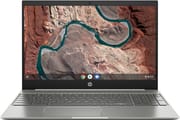 HP Chromebook 15 | |
| Price | List Price: $449.99 Amazon Prices: |
| Model number | 15-de0010nr / 6JA25UA#ABA |
| Performance Rating | 2.6 |
| Chromebook Plus | No |
| Processor | Dual-core 2.30 Ghz Intel Pentium Gold Processor 4417U |
| RAM | 4 GB |
| Internal Storage | 64 GB eMMC |
| Screen Size | 15.6" |
| Screen Resolution | 1920x1080 |
| Screen Type | IPS |
| Touch Screen | Yes |
| Stylus / Pen | No Stylus Support |
| Dimensions width x length x thickness | 14.11 x 9.69 x 0.7 inches (358.39 x 246.13 x 17.78 mm) |
| Weight | 3.99 lbs (1.81 kg) |
| Backlit Keyboard | Yes |
| Webcam | HP Wide Vision HD |
| WiFi | 802.11 a/b/g/n/ac (2x2) |
| Bluetooth | Bluetooth 4.2 |
| Ethernet | No |
| Cellular Modem | No |
| HDMI | No HDMI |
| USB Ports | 1 USB 3, 2 USB-C (5 Gb/s signaling rate, Power Delivery 3.0, HP Sleep and Charge) |
| Thunderbolt Ports | No |
| Card Reader | microSD Card Reader |
| Battery | 3 cell, 60 WHr, Lithium-ion |
| Battery Life | 13.0 hours |
| Fanless | Yes |
| Auto Update Expiration Date | June, 2028 |
Related Chromebooks
-
 Acer Chromebook 15The Acer Chromebook 15 stands out with a 15.6" FHD IPS touch display, backlit keyboard, and up to…
 -
 HP Chromebook 15a (15a-nb0013dx)The HP Chromebook 15a (15a-nb0013dx) is a fanless 15.6-inch Chromebook with an Intel N200, 8GB of…
 -
 Acer Chromebook 315The Acer Chromebook 315 (CB315-4H) is a fanless 15.6-inch FHD IPS Chromebook with an Intel Celeron…
 -
 ASUS Chromebook C523The ASUS Chromebook C523 is a fanless 15.6-inch Chromebook with an anti-glare display, an Intel…
 -
 HP Chromebook 14 (AMD)The HP Chromebook 14 (AMD) is a fanless 14-inch Chromebook built on the AMD A4-9120C APU with…
 -
 Lenovo Flex 3 ChromebookThe Lenovo Flex 3 Chromebook is a fanless 11.6-inch convertible with an IPS touchscreen, a MediaTek…
A 15-inch chassis built around a full number pad
An aluminum lid and chassis sit on a plastic bottom panel, the same construction HP used on the Chromebook x360 14. At 0.7 inches thick and 4 pounds, it stayed reasonably portable for a 15.6-inch laptop. The silver-gray color scheme was unremarkable, but the tight panel gaps and solid hinge showed care in the fit and finish.
The full-size keyboard with its integrated number pad was a first for any Chromebook, and HP fitted the keypad without cramping the main key layout or shrinking the key spacing. The backlit keys had good travel and firm tactile feedback for long typing sessions. The trackpad was plastic rather than glass, and it tracked smoothly and accurately.
A 160-nit panel that struggles anywhere bright
The 15.6-inch Full HD (1920x1080) IPS touchscreen gave good color reproduction and wide viewing angles. At this size, Full HD landed at a comfortable pixel density for everyday work without straining the processor, and touch worked reliably for Chrome OS gestures and occasional Android app use.
Chrome Unboxed’s testing measured the display at only 160 nits of brightness. As the reviewer noted, “It honestly doesn’t matter how good your colors, sharpness or viewing angles are if your screen isn’t bright enough.” That left it poorly suited to outdoor use or a desk near a bright window. The panel also carried a slight yellowish cast that pulled at color accuracy.
Adequate speed and two USB-C ports
The Intel Pentium Gold 4417U was a dual-core, four-thread chip, and it handled web browsing, document editing, and media playback without issue. HP also sold a Core i3 build at a higher price, though the two processors felt much the same in day-to-day Chrome OS use.
The two USB-C ports handled Power Delivery 3.0 charging, data transfer, and display output with the right adapter. A USB-A 3.0 port provided legacy device compatibility and could be used with a USB Ethernet adapter for wired networking, while the microSD card slot allowed storage expansion. The headphone/microphone combo jack rounded out the physical connections. Wireless was Wi-Fi 5 (802.11ac) 2x2 MIMO and Bluetooth 4.2, capable standards for 2019.
Chrome Unboxed praised the number pad and panned the 4GB ceiling
Chrome Unboxed praised the number pad as “this Chromebook’s clear claim to fame,” particularly for users who regularly work with numerical data. The backlit keyboard earned positive marks for its responsive feel and comfortable typing experience.
The 4GB RAM ceiling across all models drew pointed criticism: “We’re getting to the point where only budget-minded Chromebooks should offer 4GB of RAM, honestly.” For a device priced at $449 or higher, this constraint felt out of step with the market. The B&O-branded speakers also disappointed, delivering what the reviewer called “B&O branding without B&O sound.”
The reviewer ended on a condition: “Don’t pay full price for this Chromebook and I think you’ll walk away satisfied. If you do need a Chromebook with a number pad and find a sale on the HP Chromebook 15, I think you’ll enjoy it.” The device sold at discounted prices around $379, but its MSRP placed it in competition with better-equipped alternatives.
All-day runtime from a 60 Wh cell
HP’s 13-hour claim held under light use. Runtime shifted with display brightness and workload, but the efficient Pentium chip and the large cell made a full day of typing and browsing realistic. The fanless design also meant silent operation and no moving parts to wear out.
Update support ends in June 2028
Security updates and features continue until the extended Auto Update Expiration (AUE) in June 2028. Once they stop, an unsupported system carries the usual security risk for anything sensitive. Google provides official guidance on AUE dates and what they mean for device owners.
The HP Chromebook 15a and ASUS Chromebook CX15 cover the same large-screen brief with newer processors, more RAM, and longer support windows. The number pad that set this one apart has since appeared on other 15-inch and larger models. To weigh current alternatives side by side, the Chromebook Comparison Chart lets you filter and sort by screen size, processor, and other specs.
Frequently Asked Questions
Can I still buy an HP Chromebook 15?
No. The 15-de0010nr was discontinued and is no longer sold new, replaced by newer models in HP’s lineup. Its Auto Update Expiration is June 2028 (extended from June 2025), so existing units stay supported, but a new purchase is better spent on a current-generation model with a longer support window.
Why was the HP Chromebook 15 significant?
It was the first Chromebook with an integrated number pad, which mattered to anyone working in spreadsheets or accounting software. The feature has since appeared on other large-format Chromebooks.
What was this Chromebook’s biggest weakness?
The dim screen. Chrome Unboxed’s testing measured only 160 nits, which made the screen hard to read outdoors or in a bright room. The 4GB RAM across all configurations drew criticism too, given the price.
Is my HP Chromebook 15 still safe to use after its end of life date?
Its Auto Update Expiration (AUE) date is June 2028 (extended from June 2025), so security updates continue until then. After that, online banking or confidential work on it carries increased risk, and moving to a supported device is the safer call.
What processors were available in this Chromebook?
Either an Intel Pentium Gold 4417U or an Intel Core i3-8130U. The two felt much the same on typical Chrome OS tasks, since the system runs efficiently on lower-powered hardware.
Could you upgrade the RAM or storage on the HP Chromebook 15?
No. Both the 4GB of RAM and the 64GB of eMMC storage were soldered to the motherboard. The microSD card slot was the only way to add space for media files and documents.