
HP Chromebook Plus 15a
Updated on

The HP Chromebook Plus 15a offers a spacious 15.6-inch display and full numeric keypad for users who prioritize screen real estate and productivity over portability. Powered by the Intel Core i3-N305 processor with 8 cores and 8GB of LPDDR5 memory, this Chromebook Plus certified device handles everyday computing tasks with responsive performance. The 1080p webcam works seamlessly with Google’s AI-powered video call enhancements, while the solid build quality belies its all-plastic construction. With auto update support extending through June 2033 and battery life approaching 11 hours in real-world testing, the HP Chromebook Plus 15a targets home users, students, and office workers who want a large-screen Chromebook without paying premium prices.
Pros and Cons of the HP Chromebook Plus 15a
| Pros | Cons |
|---|---|
| Spacious 15.6-inch Full HD display | Screen brightness limited to 250 nits |
| Excellent keyboard with full numeric keypad | No touchscreen or convertible design |
| Solid build quality at competitive price | Cramped character key layout due to numpad |
| 1080p webcam with privacy shutter | No HDMI port (requires USB-C adapter) |
| Good battery life (10+ hours) | Keyboard is not backlit |
| Smooth trackpad and responsive performance | All-plastic construction feels less premium |
Related Videos
HP Chromebook Plus 15a Comparison Chart
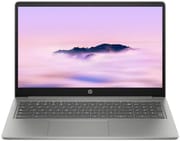 HP Chromebook Plus 15a | HP Chromebook Plus 15a | |
| Price | List Price: $549 Amazon Prices: Best Buy: Loading price... | List Price: $659 Amazon Prices: |
| Model number | 15a-nb0033dx | 15a-nb0097nr |
| Performance Rating | 7.1 | 7.1 |
| Chromebook Plus | Yes | Yes |
| Processor | Octa-core 1.80 Ghz (max 3.80 Ghz) Intel Core i3-N305 | Octa-core 1.80 Ghz (max 3.80 Ghz) Intel Core i3-N305 |
| RAM | 8 GB | 8 GB |
| Internal Storage | 128 GB UFS | 128 GB UFS |
| Screen Size | 15.6" | 15.6" |
| Screen Resolution | 1920x1080 | 1920x1080 |
| Screen Type | IPS | IPS |
| Touch Screen | No | No |
| Stylus / Pen | No Stylus Support | No Stylus Support |
| Dimensions width x length x thickness | 14.28 x 9.51 x 0.78 inches (362.71 x 241.55 x 19.81 mm) | 14.28 x 9.51 x 0.78 inches (362.71 x 241.55 x 19.81 mm) |
| Weight | 3.81 lbs (1.73 kg) | 3.81 lbs (1.73 kg) |
| Backlit Keyboard | No | No |
| Webcam | 1080p | 1080p |
| WiFi | Wi-Fi 6 (802.11ax) | Wi-Fi 6 (802.11ax) |
| Bluetooth | Bluetooth 5.3 | Bluetooth 5.3 |
| Ethernet | No | No |
| Cellular Modem | No | No |
| HDMI | No HDMI | No HDMI |
| USB Ports | 1 USB 3, 2 USB-C 2x USB-C with Power Delivery and DisplayPort 1.4, 1x USB-A with Sleep and Charge | 1 USB 3, 2 USB-C 2x USB-C with Power Delivery and DisplayPort 1.4, 1x USB-A with Sleep and Charge |
| Thunderbolt Ports | No | No |
| Card Reader | microSD Card Reader | microSD Card Reader |
| Battery | 3 cell, 54Wh, Li-polymer | 3 cell, 54Wh, Li-polymer |
| Battery Life | 10 hours | 10 hours |
| Fanless | No | No |
| Auto Update Expiration Date | June, 2033 | June, 2033 |
Related Chromebooks
-
 Acer Chromebook Plus 516 GEThe Acer Chromebook Plus 516 GE is a gaming-focused Chromebook with a stunning 16-inch 2560x1600…
 -
 ASUS Chromebook Plus CX15 (CX1505)The ASUS Chromebook Plus CX15 is one of the first models to feature Intel's Twin Lake Core 3 N355…
 -
 Samsung Galaxy Chromebook Plus 15.6"The thinnest and lightest 15.6-inch Chromebook Plus with a stunning AMOLED display, delivering…
 -
 Acer Chromebook Plus 515The Acer Chromebook Plus 515 delivers premium performance with a 15.6-inch FHD touchscreen, Intel…
 -
 HP Chromebook Plus x360 14cThe HP Chromebook Plus x360 14c combines a 12th-gen Intel Core i3-1215U processor with a 16:10…
 -
 Acer Chromebook Plus 516 (CB516-1H)A 16-inch Chromebook Plus with Intel Core i3-1315U, offering a spacious display and solid…
Detailed Insights into the HP Chromebook Plus 15a

The HP Chromebook Plus 15a measures 14.28 x 9.51 x 0.78 inches and weighs 3.81 pounds, making it relatively portable for a 15.6-inch laptop. The all-plastic chassis uses recycled aluminum and ocean-bound plastics, though TechRadar notes that the construction “comes close to rivalling some of the best MacBook Pro devices in terms of its finely machined construction.” The grey and black color scheme presents a professional appearance suitable for office or educational environments. The hinge secures the display firmly with minimal wobble, though it doesn’t open as wide as some competitors.
At the heart of this Chromebook lies the Intel Core i3-N305 processor with 8 efficiency cores capable of boosting to 3.8 GHz. This chip delivers responsive ChromeOS performance for web browsing, document editing, and video streaming. TechRadar’s testing showed surprisingly good gaming performance, noting they “managed to play Asphalt Legends Unite on high graphics settings at 60fps with hardly a hiccup.” The 8GB of LPDDR5 RAM handles multitasking across multiple Chrome tabs and Android apps without stuttering, and the processor provides enough headroom for creative tasks like music production on Chromebook with cloud-based DAWs. The 128GB UFS storage provides faster read speeds than traditional eMMC.
Connectivity includes WiFi 6 (802.11ax) wireless and Bluetooth 5.3 for reliable network and peripheral connections. The port selection provides two USB-C ports with Power Delivery and DisplayPort 1.4 support, one USB-A port with Sleep and Charge functionality, a microSD card reader, and a 3.5mm combo audio jack. The lack of an HDMI port means users needing external displays must use a USB-C adapter or hub. There is no Ethernet port either, so anyone requiring a wired connection will need a USB Ethernet adapter. Both USB-C ports can be used for charging, providing flexibility in cable management depending on outlet location.
Reviewer Insights on the HP Chromebook Plus 15a

Chrome Unboxed
Chrome Unboxed tested the HP Chromebook Plus 15a with a focus on the larger form factor experience. The reviewer highlighted that “HP’s take on the larger form factor comes with some slight advantages” over competitors, particularly praising the keyboard and trackpad combination. They specifically noted “the excellent keyboard and trackpad combo that comes with a full numeric keypad makes for a really productive experience.” However, the review also pointed out significant limitations: “that screen comes with its aggravations however as HP stuck with the anti-glare non-touch screen that can only hit 250 nits of brightness.”
Chrome Unboxed’s assessment acknowledges the device performs well for its intended purpose while noting the Core i3-N305 is less powerful than the i3-1215U found in some competing models like the Acer Chromebook Plus 515. The review emphasizes that the device is often available at significant discounts in the $300-$400 range, making it a compelling value proposition despite the MSRP feeling “a little bit off” for an all-plastic construction.
TechRadar
TechRadar awarded the HP Chromebook Plus 15a a solid 4 out of 5 stars across all categories. The review praises the build quality, noting “the whole body feels solid, yet it’s also quite light and thin for a device this size.” Battery testing showed impressive endurance at 10 hours and 41 minutes during continuous video playback, though short of HP’s claimed 13 hours. “The display remains clearly visible across a wide range of view angles and lighting conditions” was highlighted as a key strength, despite the limited 250-nit maximum brightness.
The review identifies the keyboard layout as both a strength and weakness. While the keys themselves feel premium with minimal play, the inclusion of a numeric keypad means “the layout of the character keys is somewhat squeezed” which took time to adapt to and was never entirely comfortable for the reviewer. Overall, TechRadar concludes this Chromebook “doesn’t do a lot wrong” and represents good value especially at discounted prices.
ITPro
ITPro’s review by Stuart Andrews takes a more critical perspective, calling the HP Chromebook Plus 15a “about as basic as a Chromebook Plus can get.” The business-focused review notes the device meets minimum Chromebook Plus requirements without exceeding them. “It’s a functional productivity device you can pick up for peanuts,” Andrews writes, acknowledging the value proposition while questioning the display and performance for professional use.
The review criticizes the screen for struggling with “low brightness and color reproduction” and notes the webcam image appears “fuzzy even in daylight.” Connectivity limitations including USB 3.2 Gen 1 speeds and the lack of HDMI are highlighted as drawbacks for business users. However, ITPro acknowledges the solid build quality and practical keyboard layout as positives for those prioritizing reliability over premium features.
Reviewer Consensus
Across multiple reviews, the consensus points to the large display, excellent keyboard with numeric keypad, and solid build quality as primary strengths, while limited screen brightness, cramped character key spacing, and basic feature set appear consistently as areas for improvement. All reviewers agree the device delivers better value when purchased on sale below its MSRP.
Customer Reviews of the HP Chromebook Plus 15a
Best Buy customers have rated the HP Chromebook Plus 15a 4.6 out of 5 stars based on 470 reviews, indicating strong overall satisfaction. The most praised aspects include the responsive performance, comfortable keyboard for extended typing sessions, and the spacious display that makes web browsing and document work more enjoyable. Buyers particularly appreciate how quiet the system runs during typical use and the reliable WiFi connectivity.
However, some customers note the screen brightness falls short in brightly lit rooms or near windows, confirming the 250-nit limitation mentioned in professional reviews. A few users express disappointment at the lack of keyboard backlighting, which makes typing in dim environments more challenging. The non-touch display receives mixed feedback, with some preferring it for reduced fingerprints while others miss the functionality.
Overall, the customer sentiment is positive, with most buyers finding the HP Chromebook Plus 15a delivers good value for everyday computing needs. The combination of a large screen, productive keyboard, and reliable Chromebook Plus certified performance satisfies users seeking a straightforward laptop for web-based work, streaming, and light productivity tasks.
Conclusion
The HP Chromebook Plus 15a stands out as a practical choice for users who prioritize screen size and keyboard comfort over cutting-edge features. Its combination of the spacious 15.6-inch display, full numeric keypad, and solid build quality makes it well-suited for home office work, student assignments, and everyday web browsing. The Intel Core i3-N305 provides responsive performance for ChromeOS tasks, while the 1080p webcam handles video calls capably with Chromebook Plus AI enhancements.
That said, users who need a bright display for outdoor use, value convertible functionality, or prioritize a backlit keyboard might want to consider alternatives. The Acer Chromebook Plus 515 offers similar specifications with a slightly brighter display, while the HP Chromebook x360 14 provides touchscreen and tent mode flexibility in a more portable package.
For those comparing options, see our Chromebook Comparison Chart to find the best match for your needs.
Frequently Asked Questions
What processor does the HP Chromebook Plus 15a use?
The HP Chromebook Plus 15a is powered by the Intel Core i3-N305 processor, featuring 8 efficiency cores and 8 threads with a base clock of 1.8 GHz and boost speeds up to 3.8 GHz. This processor scores approximately 9,577 on PassMark’s CPU benchmark, making it well-suited for everyday productivity, web browsing, streaming, and light multitasking.
Can I upgrade the RAM or storage in the HP Chromebook Plus 15a?
No, the HP Chromebook Plus 15a uses soldered memory and UFS storage that cannot be upgraded after purchase. The 8GB LPDDR5 RAM and 128GB UFS storage are fixed configurations. However, you can expand storage using the built-in microSD card reader or cloud storage services like Google Drive.
What ports does the HP Chromebook Plus 15a have?
The HP Chromebook Plus 15a includes 2x USB-C ports with Power Delivery charging and DisplayPort 1.4 video output, 1x USB-A port with Sleep and Charge functionality, a microSD card reader for expandable storage, and a 3.5mm combo headphone/microphone jack. Note that there is no HDMI port, so connecting to external displays requires a USB-C adapter or hub.
How long will the HP Chromebook Plus 15a receive updates?
The HP Chromebook Plus 15a (15a-nb0 series) will receive automatic updates through June 2033 according to Google’s Auto Update Expiration policy. This provides approximately 8 years of security updates and new ChromeOS features from the device’s release date, ensuring long-term software support.
Does the HP Chromebook Plus 15a have a touchscreen?
No, the HP Chromebook Plus 15a features a non-touch 15.6-inch Full HD (1920x1080) IPS display. The screen uses an anti-glare coating which reduces fingerprints and reflections, but does not support touch input. If you need touchscreen functionality, consider the HP Chromebook Plus x360 series which offers convertible designs with touch displays.
What is the battery life of the HP Chromebook Plus 15a?
HP rates the Chromebook Plus 15a at up to 13.25 hours of battery life, while independent testing by TechRadar achieved 10 hours and 41 minutes during continuous video playback. Real-world mixed use including web browsing, document editing, and video calls typically yields 9-11 hours depending on screen brightness and workload intensity.
Is the HP Chromebook Plus 15a good for students?
Yes, the HP Chromebook Plus 15a is well-suited for students thanks to its large 15.6-inch display for comfortable reading and research, excellent keyboard with numeric keypad for data entry and calculations, long battery life for all-day classes, and support for Android apps through the Google Play Store. The Chromebook Plus certification ensures it meets Google’s standards for AI features and performance in educational settings.