
HP Chromebook x360 14b
Updated on

The 360-degree hinge folds the HP Chromebook x360 14b and its 14-inch touchscreen into laptop, tent, stand, and tablet positions, so one machine covers typing documents, watching video, and writing notes on the glass. An Intel Celeron N4000 with 4GB of RAM runs Chrome OS browsing, email, and streaming at the budget end of the 14-inch class. The chassis runs without a fan, so it stays silent no matter what the processor is doing.
| Pros | Cons |
|---|---|
| Excellent typing experience with sturdy, responsive keys (HomeTechHacker) | HD 1366x768 display appears grainy compared to Full HD alternatives (Papa Culture) |
| Large, responsive trackpad with superior click mechanism (HomeTechHacker) | Plastic chassis and trackpad texture feel budget-oriented (Papa Culture) |
| Rated 12.5 hours of battery, enough for a full day of classes or meetings | Heavier at 3.48 lbs compared to some 14-inch competitors |
| 360-degree hinge covers tablet mode for note-taking and entertainment | No keyboard backlight on the 14b-ca0010nr configuration |
| Fanless design runs silent | 32GB of eMMC cannot be upgraded, so offline apps compete for room |
| Dual USB-C ports with DisplayPort support for external monitors | No HDMI port, so a monitor with only HDMI input needs an adapter |
Related Videos
HP Chromebook x360 14b Comparison Chart
 HP Chromebook x360 14b | |
| Price | List Price: $379.99 Amazon Prices: Loading prices... |
| Model number | 14b-ca0010nr / 7NV95UA |
| Performance Rating | 3.1 |
| Chromebook Plus | No |
| Processor | Dual-core 1.10 Ghz (max 2.60 Ghz) Intel Celeron N4000 Processor |
| RAM | 4 GB |
| Internal Storage | 32 GB eMMC |
| Screen Size | 14" |
| Screen Resolution | 1366x768 |
| Screen Type | WLED-backlit |
| Touch Screen | Yes |
| Stylus / Pen | No Stylus Support |
| Dimensions width x length x thickness | 12.76 x 8.9 x 0.74 inches (324.1 x 226.06 x 18.8 mm) |
| Weight | 3.48 lbs (1.58 kg) |
| Backlit Keyboard | No |
| Webcam | HP Wide Vision HD Camera |
| WiFi | 802.11 a/b/g/n/ac (2x2) |
| Bluetooth | Bluetooth 5.0 |
| Ethernet | No |
| Cellular Modem | No |
| HDMI | No HDMI |
| USB Ports | 2 USB 3, 2 USB-C (with DisplayPort 1.2) |
| Thunderbolt Ports | No |
| Card Reader | microSD Card Reader |
| Battery | 2 cell, 47 Wh, Li-ion |
| Battery Life | 12.5 hours |
| Fanless | No |
| Auto Update Expiration Date | June, 2029 |
Related Chromebooks
-
 HP Chromebook x360 14aThe HP Chromebook x360 14a is a 14-inch convertible Chromebook with an Intel Celeron N4020, a…
 -
 HP Chromebook 14a (2021)The HP Chromebook 14a (2021) pairs a 14-inch touchscreen with a Celeron N4020, 4GB of RAM, 32GB of…
 -
 ASUS Chromebook Flip CX1 (Touchscreen)The ASUS Chromebook Flip CX1 is a 14-inch Full HD convertible with a 360-degree touchscreen, an…
 -
 Acer Chromebook 314The Acer Chromebook 314 is a 14-inch budget Chromebook with a 1920x1080 IPS display, an Intel…
 -
 Lenovo IdeaPad Slim 3 ChromebookThe Lenovo IdeaPad Slim 3 Chromebook 14 pairs a fanless MediaTek Kompanio 520 processor with a…
 -
 Samsung Galaxy Chromebook Go 14"The Samsung Galaxy Chromebook Go 14 is a budget 14-inch Chromebook with an Intel Celeron N4500, a…
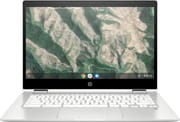
A white plastic convertible with ports on both sides

The keyboard deck is sturdy enough for comfortable typing, and the hinges feel solid through the full rotation into tablet mode. At 12.76 x 8.90 x 0.74 inches and 3.48 pounds, the weight sits evenly in laptop mode and is manageable as a tablet for short stretches rather than a full afternoon.
The 14-inch WLED-backlit touchscreen runs at 1366x768, a resolution that shows its limits in text clarity and in how much of a document fits on screen next to a Full HD panel. Touch response is accurate, which makes tablet mode useful for browsing, annotating documents, and casual Android gaming. Brightness is adequate indoors and fades in a bright room. The B&O-tuned speakers do fine for video calls and casual media, but they will not replace a Bluetooth speaker for music.
Both USB-C ports carry DisplayPort 1.2, so an external monitor or the charger can go on either side, and the two USB-A 3.0 ports still take older peripherals without a dongle. Wired networking runs through a USB Ethernet adapter in one of those USB-A ports. The microSD reader is the practical answer to the small eMMC, holding media files and downloads that would otherwise fill the drive. Wi-Fi is 802.11ac with a 2x2 antenna arrangement, and Bluetooth 5.0 holds steady with wireless accessories.
Reviewer Insights

Papa Culture Podcast on the keyboard and the screen
Papa Culture Podcast reviewed the HP Chromebook x360 14b series hands-on and praised the keyboard as “really great” with tactile feedback superior to more expensive x360 models. The reviewer found that the Celeron-class processor handles everyday browsing and Android apps without struggle, though CPU usage occasionally spikes during system updates or heavy background tasks. The reviewer counted the fanless design as a benefit for buyers who want silent operation.
The display and the trackpad are where that review put HP’s cost cutting. Papa Culture Podcast called the screen “definitely much more grainy” than expected, lacking the vibrancy of premium Chromebooks, and found the plastic trackpad texture “slightly irritating on fingertips over time” compared to glass trackpads on higher-end devices. The same review still landed on “a solid budget Chromebook at the price that I paid”, recommending it particularly for users who value a quality typing experience.
Ten-plus tabs and a 13.5-hour battery, per HomeTechHacker
HomeTechHacker spent several months using the machine daily and describes it as “lightning fast and responsive” for typical Chromebook workloads. That review calls the keyboard and trackpad “excellent and superior to all Chromebooks I’ve used”, with the extremely large trackpad singled out for its reliable click mechanism, and reports managing 10+ browser tabs without slowdown plus some basic video editing.
HomeTechHacker hit the rated 13.5-hour battery life in regular use and valued having USB Type-A ports alongside USB-C. The 3.7-pound weight came out heavier than competing models, and the reviewer dismissed the B&O speaker branding as “marketing hype” with audio quality merely “okay” and said the plastic white top cheapens the overall look and feel. The reviewer remained “very happy” with the purchase, especially when factoring in sale prices.
Customer Reviews
Across 2,729 ratings on Amazon, the HP Chromebook x360 14b averages 4.6 stars, with 79 percent of raters leaving five stars and 4 percent leaving one. Owners most often bought it as an affordable everyday machine for browsing, streaming, and school, and several mention picking it up for their kids. Cynthia Wood, a verified buyer who owns three of them, wrote that her youngest “loves it and uses it with ease” and called it a “Fast processing” computer with a touch screen her family enjoys. Battery life and the convertible touchscreen come up repeatedly: verified buyer Paul D. wrote “Battery life is really long” and called it a “Perfect solution for when I travel,” and verified buyer Jen said the “battery life is impressive, lasting all day on a single charge.”
Verified buyer chetalee rated it four stars and reported a hardware failure: “the touchpad stopped working after less than a year,” along with screen resolution that “isn’t the best” and is most noticeable in tablet mode. Verified buyer Thrifty_Mom warns that “There are several variations of this same Chromebook that look nearly identical but are very different,” noting that the white-keyboard model she bought has 4GB of RAM and ships without a stylus or backlit keyboard, so check the exact configuration before ordering. Read more owner reviews on Amazon.
Worth the money for the keyboard and the battery
The keyboard, the all-day battery, and the hinge are the strengths, and the 1366x768 panel and the plastic shell are the compromises. Students and anyone who wants a second machine for browsing and media get a fair deal. Anyone who spends the day reading small text should look at a sharper panel. Chrome OS updates run through June 2029. To see how it stacks up against other options, visit our Chromebook Comparison Chart.
Frequently Asked Questions
How long will the HP Chromebook x360 14b receive Chrome OS updates?
Model 14b-ca0010nr receives Chrome OS updates until June 2029 under Google’s Auto Update Expiration policy. Security patches, new features, and system improvements continue until that date.
Can I expand the storage on the HP Chromebook x360 14b?
The 32GB of internal eMMC cannot be upgraded, but the built-in microSD card reader takes the overflow. Most owners add a 128GB or 256GB card for downloads, media files, and offline content. Chrome OS works primarily from cloud storage, so the internal capacity is there for apps and cached files.
Is the HP Chromebook x360 14b good for students?
Yes. HomeTechHacker and Papa Culture Podcast both rate the keyboard highly for extended typing, the battery covers a day of classes without a charger, and the 360-degree hinge flips the screen flat for handwriting notes. Running without a fan keeps it quiet in a library. Our picks for students cover the alternatives.
Does the HP Chromebook x360 14b support external monitors?
Yes. Both USB-C ports support DisplayPort 1.2, so a USB-C to HDMI or USB-C to DisplayPort cable drives a display at up to 4K resolution. The Chromebook has no HDMI port of its own, so a monitor with only an HDMI input needs an adapter.
How does the HP Chromebook x360 14b perform for everyday tasks?
The Intel Celeron N4000 with 4GB of RAM handles web browsing with 10+ tabs, Google Docs editing, video streaming, and Android apps. Papa Culture Podcast noted slowdown during heavy background activity such as system updates, while HomeTechHacker called day-to-day use “lightning fast and responsive” for its target use cases.
Does the HP Chromebook x360 14b have a backlit keyboard?
No. Model 14b-ca0010nr ships without keyboard backlighting, one of the cost-saving measures on this budget model. If you frequently work in low light, consider a model from our list of Chromebooks with backlit keyboards.