
HP Fortis G1i 14 inch Chromebook
Updated on

The HP Fortis G1i 14 inch Chromebook is an education laptop for K-12 classrooms where hardware takes a beating. Its durability package covers reinforced corners, a spill-resistant keyboard rated to withstand up to 350ml of liquid, and a textured chassis that improves grip for younger hands. The Intel Processor N150 in the base configurations carries everyday classroom work: Google Workspace, web research, and educational apps. Configurations run from a basic 4GB/32GB model up to a cellular-equipped variant with LTE Advanced connectivity, so IT administrators can vary specs across a school district deployment. Automatic updates run through June 2035, well past the 2025 launch.
Pros and Cons
| Pros | Cons |
|---|---|
| Rugged design with reinforced corners and spill-resistant keyboard | Base models limited to 1366x768 HD resolution on a 14-inch screen |
| WiFi 6E and Bluetooth 5.3 for modern wireless connectivity | No keyboard backlighting on any configuration |
| Optional LTE Advanced for always-connected learning | eMMC storage on base models is slower than UFS or NVMe |
| Updates through June 2035 | HD webcam only, with no sharper option in the lineup |
| HDMI port built in for projector connections | 4GB RAM models will struggle with heavier multitasking |
| Touchscreen available on multiple variants | No card reader for expandable storage |
HP Fortis G1i 14 inch Chromebook Comparison Chart
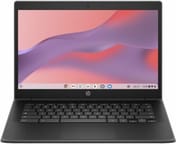 HP Fortis G1i 14 inch Chromebook | HP Fortis G1i 14 inch Chromebook | HP Fortis G1i 14 inch Chromebook | HP Fortis G1i 14 inch Chromebook | |
| Price | List Price: Amazon Prices: Loading prices... | List Price: Amazon Prices: Loading prices... | List Price: Amazon Prices: Loading prices... | List Price: Amazon Prices: Loading prices... |
| Model number | B69S8UT#ABA | B69S7UT#ABA | B69S6UT#ABA | B6AX4UT#ABA |
| Performance Rating | 2.8 | 1.7 | 1.7 | 2.8 |
| Chromebook Plus | No | No | No | No |
| Processor | Quad-core 3.60 Ghz Intel Processor N150 | Quad-core 3.60 Ghz Intel Processor N150 | Quad-core 3.60 Ghz Intel Processor N150 | Quad-core 3.60 Ghz Intel Processor N150 |
| RAM | 8 GB | 4 GB | 4 GB | 8 GB |
| Internal Storage | 64 GB eMMC | 32 GB eMMC | 32 GB eMMC | 64 GB eMMC |
| Screen Size | 14" | 14" | 14" | 14" |
| Screen Resolution | 1366x768 | 1366x768 | 1366x768 | 1920x1080 |
| Screen Type | SVA | SVA | SVA | IPS |
| Touch Screen | Yes | Yes | No | Yes |
| Stylus / Pen | No Stylus Support | No Stylus Support | No Stylus Support | No Stylus Support |
| Dimensions width x length x thickness | 12.9 x 9 x 0.86 inches (327.66 x 228.6 x 21.84 mm) | 12.9 x 9 x 0.86 inches (327.66 x 228.6 x 21.84 mm) | 12.9 x 9 x 0.86 inches (327.66 x 228.6 x 21.84 mm) | 12.9 x 9 x 0.86 inches (327.66 x 228.6 x 21.84 mm) |
| Weight | 3.6 lbs (1.64 kg) | 3.6 lbs (1.64 kg) | 3.6 lbs (1.64 kg) | 3.6 lbs (1.64 kg) |
| Backlit Keyboard | No | No | No | No |
| Webcam | HD | HD | HD | HD |
| WiFi | Wi-Fi 6E (802.11ax) | Wi-Fi 6E (802.11ax) | Wi-Fi 6E (802.11ax) | Wi-Fi 6E (802.11ax) |
| Bluetooth | Bluetooth 5.3 | Bluetooth 5.3 | Bluetooth 5.3 | Bluetooth 5.3 |
| Ethernet | No | No | No | No |
| Cellular Modem | No | No | No | LTE Advanced (Qualcomm Snapdragon X12) |
| HDMI | Full-Size HDMI | Full-Size HDMI | Full-Size HDMI | Full-Size HDMI |
| USB Ports | 2 USB 3, 2 USB-C 2x USB-C with Power Delivery and DisplayPort 1.2, 2x USB-A 3.2 Gen 1 (powered) | 2 USB 3, 2 USB-C 2x USB-C with Power Delivery and DisplayPort 1.2, 2x USB-A 3.2 Gen 1 (powered) | 2 USB 3, 2 USB-C 2x USB-C with Power Delivery and DisplayPort 1.2, 2x USB-A 3.2 Gen 1 (powered) | 2 USB 3, 2 USB-C 2x USB-C with Power Delivery and DisplayPort 1.2, 2x USB-A 3.2 Gen 1 (powered) |
| Thunderbolt Ports | No | No | No | No |
| Card Reader | No Card Reader | No Card Reader | No Card Reader | No Card Reader |
| Battery | 47Wh | 47Wh | 47Wh | 47Wh |
| Battery Life | 10 hours | 10 hours | 10 hours | 10 hours |
| Fanless | No | No | No | No |
| Auto Update Expiration Date | June, 2035 | June, 2035 | June, 2035 | June, 2035 |
Related Chromebooks
-
 HP Chromebook 14a (ne Series)The HP Chromebook 14a (ne series) is a 14-inch ChromeOS laptop on an Intel Celeron N4500 with 4GB…
 -
 HP Elite c640 G3 ChromebookThe HP Elite c640 G3 Chromebook is a 14-inch business Chromebook with an Intel Core i5-1245U vPro,…
 -
 ASUS Chromebook C424The ASUS Chromebook C424 boasts a crisp 14-inch FHD anti-glare display, durable spill-resistant…
 -
 Acer Chromebook 314 (CB314-4H/4HT)A budget-friendly 14-inch Chromebook with Intel Alder Lake-N processors, WiFi 6E, and software…
 -
 ASUS Chromebook C423The ASUS Chromebook C423 pairs a 14-inch 1366x768 display with a dual-core Celeron N3350, 4GB of…
 -
 Acer Gateway Chromebook 314The Acer Gateway Chromebook 314 is a 14-inch ChromeOS laptop on Acer's Chromebook 314 chassis with…
A 350ml spill rating and HDMI without an adapter

The chassis measures 12.9 x 9.0 x 0.86 inches and weighs approximately 3.6 pounds, a size and weight students can carry between classrooms. The textured lid and palm rest provide more grip than a smooth plastic shell, and the reinforced rubber corners are designed to absorb impacts from the drops that happen in school environments. HP rates the spill-resistant keyboard to handle up to 350ml of liquid, roughly a tipped water bottle. Two USB-C ports carry Power Delivery and DisplayPort 1.2, alongside two USB-A 3.2 ports, a full-size HDMI output, and a combo headphone/microphone jack. The built-in HDMI port matters in a classroom, where connecting to a projector or interactive whiteboard should not send a teacher hunting for adapters. There is no Ethernet port, though the USB-A and USB-C ports support USB Ethernet adapters for schools that prefer wired network connections during device provisioning or testing.
The Intel Processor N150 in the base configurations is a quad-core chip clocked up to 3.6 GHz, which covers Chrome OS workloads. HP’s official specifications list higher-end configurations with the Intel Processor N250, which adds a higher boost clock of 3.8 GHz and pairs with faster UFS storage and up to 16GB of RAM. Paired with 8GB of RAM, the N150 keeps up with Google Docs, Slides, Classroom, and a handful of browser tabs. The 4GB models feel more constrained during heavier multitasking, so schools deploying for older students should look at the 8GB configurations.
WiFi 6E (802.11ax) and Bluetooth 5.3 ship on every configuration, which helps in a school where dozens of devices compete for the same airspace. The optional LTE Advanced variant adds a Qualcomm Snapdragon X12 modem for cellular data, so a student without reliable WiFi at home can still get online anywhere with cellular coverage.
Reviewer Insights

According to Android Central, HP announced the Fortis G1i alongside the Fortis G1m as part of a student-focused Chromebook and notebook lineup. The publication described the device as a “ruggedized” partner students can keep with them and highlighted HP’s emphasis on durability and easy manageability for schools, noting the company says it will keep the software updated.
The lid contains a magnet that triggers the Hall effect sensor when closed. The Chromebook magnet trick works on it, using external magnets to put devices to sleep as a harmless prank. Update support through 2035 and a configuration range that spans the basic 4GB/32GB unit to the LTE model let a school district standardize on a single platform while tailoring specs to different grade levels and use cases.
A district deployment device with a dated screen
The rugged construction, the port selection with built-in HDMI, and WiFi 6E suit K-12 deployments where devices need to survive years of student use while staying current with Chrome OS updates through 2035. The optional LTE variant addresses the homework gap for students without reliable home internet.
An individual buyer shopping for a personal Chromebook can get a sharper display for the money. The 1366x768 resolution on base models is low for a 14-inch screen, and no configuration offers keyboard backlighting for work in a dim room. Starry Hope’s Chromebook Comparison Chart sets the Fortis G1i beside education options from Acer, Lenovo, and other manufacturers.
Frequently Asked Questions
How long will the HP Fortis G1i 14 inch Chromebook receive updates?
Chrome OS automatic updates run until June 2035, covering security patches, feature updates, and ongoing support from Google.
What processor does the HP Fortis G1i 14 inch Chromebook use?
The base configurations use the Intel Processor N150, a quad-core chip with a boost clock of 3.6 GHz that scores approximately 5,478 on PassMark’s CPU benchmark. Higher-end configurations upgrade to the Intel Processor N250, which boosts up to 3.8 GHz and pairs with faster UFS storage.
What ports does the HP Fortis G1i 14 inch Chromebook have?
Two USB-C ports with Power Delivery and DisplayPort 1.2 support, two USB-A 3.2 Gen 1 ports, a full-size HDMI port, a headphone/microphone combo jack, and a Kensington security lock slot. The built-in HDMI port connects a classroom projector without an adapter.
Is the HP Fortis G1i 14 inch Chromebook good for schools?
Yes. It is built for K-12 education environments, with reinforced corners, a spill-resistant keyboard rated for up to 350ml of liquid, and a textured chassis for better grip. The range of configurations from basic 4GB/32GB to LTE-equipped models lets school IT departments tailor deployments to different grade levels and budgets.
Does the HP Fortis G1i 14 inch Chromebook have a touchscreen?
It depends on the configuration. Several variants include a touchscreen display, while the most basic model (4GB/32GB non-touch) does not. The model number identifies which one you are looking at.
Can the HP Fortis G1i 14 inch Chromebook connect to cellular networks?
The LTE variant (model B6AX4UT#ABA) carries a Qualcomm Snapdragon X12 modem for LTE Advanced cellular connectivity, so a student can reach mobile data when WiFi is unavailable. The standard WiFi-only models have no cellular hardware.
Can I run Linux apps on the HP Fortis G1i 14 inch Chromebook?
Yes. Chrome OS’s built-in Linux development environment runs Linux apps alongside Chrome and Android apps, which suits older students learning programming or needing specific development tools.