
Lenovo 500e Yoga Chromebook (Gen 4)
Updated on

The Lenovo 500e Yoga Chromebook Gen 4 is a rugged 12.2-inch 2-in-1 convertible built for classroom use. Intel’s Alder Lake N100 processor runs it without a fan, rubber bumpers and a spill-resistant keyboard absorb the knocks, and a garaged USI stylus plus an optional world-facing camera cover note-taking and photo work. Wi-Fi 6 handles school networks, and the Auto Update Expiration date of June 2033 leaves a district years of runway before the fleet drops off support.
| Pros | Cons |
|---|---|
| Rugged education-focused build with rubber bumpers and MIL-STD-810H certification | 4GB base configuration limits multitasking capability |
| Garaged USI stylus charges to 90% in just 15 seconds | 32GB base storage requires cloud storage reliance |
| 300-nit bright display (uncommon in education Chromebooks) | No keyboard backlight option available |
| 360-degree convertible hinge for laptop, tablet, and tent modes | No Ethernet port, so wired connections need a USB adapter |
| Fanless Intel N100 operation means completely silent use | eMMC storage slower than SSD alternatives |
| Auto Update Expiration until June 2033: over 7 years of support | Only a 720p webcam |
Related Videos
Lenovo 500e Yoga Chromebook (Gen 4) Comparison Chart
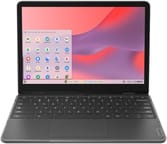 Lenovo 500e Yoga Chromebook (Gen 4) | Lenovo 500e Yoga Chromebook (Gen 4) | Lenovo 500e Yoga Chromebook (Gen 4) | |
| Price | List Price: $340.00 Amazon Prices: Loading prices... | List Price: $599.99 Amazon Prices: Loading prices... | List Price: $414.99 Amazon Prices: Loading prices... |
| Model number | 82W4000AUS | 82W4000BUS | 82W4001SUS |
| Performance Rating | 3.5 | 4.8 | 4.8 |
| Chromebook Plus | No | No | No |
| Processor | Quad-core 3.40 Ghz (max 3.40 Ghz) Intel Processor N100 | Quad-core 3.40 Ghz (max 3.40 Ghz) Intel Processor N100 | Quad-core 3.40 Ghz (max 3.40 Ghz) Intel Processor N100 |
| RAM | 4 GB | 8 GB | 8 GB |
| Internal Storage | 32 GB eMMC | 128 GB eMMC | 64 GB eMMC |
| Screen Size | 12.2" | 12.2" | 12.2" |
| Screen Resolution | 1920x1200 | 1920x1200 | 1920x1200 |
| Screen Type | IPS | IPS | IPS |
| Touch Screen | Yes | Yes | Yes |
| Stylus / Pen | Supported | Supported | Supported |
| Dimensions width x length x thickness | 11.3 x 8.19 x 0.74 inches (287.02 x 208.03 x 18.8 mm) | 11.3 x 8.19 x 0.74 inches (287.02 x 208.03 x 18.8 mm) | 11.3 x 8.19 x 0.74 inches (287.02 x 208.03 x 18.8 mm) |
| Weight | 2.9 lbs (1.32 kg) | 2.9 lbs (1.32 kg) | 2.9 lbs (1.32 kg) |
| Backlit Keyboard | No | No | No |
| Webcam | 720p HD | 720p HD | 720p HD |
| WiFi | Wi-Fi 6 (802.11ax) | Wi-Fi 6 (802.11ax) | Wi-Fi 6 (802.11ax) |
| Bluetooth | Bluetooth 5.1 | Bluetooth 5.1 | Bluetooth 5.1 |
| Ethernet | No | No | No |
| Cellular Modem | No | No | No |
| HDMI | Full-Size HDMI | Full-Size HDMI | Full-Size HDMI |
| USB Ports | 2 USB 3, 1 USB-C | 2 USB 3, 1 USB-C | 2 USB 3, 1 USB-C |
| Thunderbolt Ports | No | No | No |
| Card Reader | No Card Reader | No Card Reader | No Card Reader |
| Battery | 47Whr, Li-ion | 47Whr, Li-ion | 47Whr, Li-ion |
| Battery Life | Unknown | Unknown | Unknown |
| Fanless | Yes | Yes | Yes |
| Auto Update Expiration Date | June, 2033 | June, 2033 | June, 2033 |
Related Chromebooks
-
 Lenovo Flex 3i Chromebook 12.2"The Lenovo Flex 3i Chromebook 12.2 is a fanless 2-in-1 with a 12.2-inch 1920x1200 IPS touchscreen,…
 -
 Lenovo 300e Yoga Chromebook Gen 4The Lenovo 300e Yoga Chromebook Gen 4 is a rugged 11.6-inch education convertible with a MediaTek…
 -
 Samsung Galaxy Chromebook 2 360A budget convertible with a sharp 2560x1600 display well above its price class, paired with…
 -
 Acer Chromebook 311An 11.6-inch Chromebook with an Intel Celeron N4000, 4GB of RAM, a fanless chassis, and up to 10…
 -
 Acer Chromebook Spin 311The Acer Chromebook Spin 311 (CP311-3H) is an 11.6-inch convertible on an eight-core MediaTek…
 -
 ASUS Chromebook Flip C214The ASUS Chromebook Flip C214 is a rugged 11.6-inch education convertible with an Intel Celeron…
Built to survive a classroom, with a screen brighter than the segment norm

The graphite gray chassis incorporates rubber bumpers around the edges that absorb drops and impacts common in school environments, while the spill-resistant keyboard features a drain hole that channels liquids away from internal components. Anti-pry key caps prevent curious students from removing keys. The 360-degree hinge enables multiple usage modes: traditional laptop, tablet for reading and annotating, tent for watching videos, and stand for presentations.
The 12.2-inch IPS touchscreen delivers a 1920x1200 resolution in a 16:10 aspect ratio, providing extra vertical space that proves useful for document work and web browsing. The 300-nit panel is bright enough to use near windows and in well-lit classrooms. The screen supports 45% NTSC color gamut, which is adequate for typical educational content though not optimized for color-critical work. Gorilla Glass protection guards against scratches from stylus use and student handling.
The single USB-C 3.2 Gen 2 port takes charging, data, and display output up to 4K, and the two USB-A 3.2 Gen 1 ports take mice and flash drives. There is also an HDMI 1.4 port for classroom projectors, Wi-Fi 6 with Bluetooth 5.1, and optional LTE on some configurations. Like most Chromebooks, there is no built-in Ethernet port, so a USB Ethernet adapter is needed for wired connections. A Kensington Nano security slot allows physical locking in school carts and labs. The included 65W USB-C charger can restore the 47Whr battery from 0% to 80% in approximately one hour, and Lenovo claims up to 12 hours of runtime per charge.
Reviewer Insights

MergeDroid’s Perspective
MergeDroid provided an in-depth unboxing and hands-on examination of the 500e Yoga Gen 4, noting its strong similarities to the Lenovo Flex 3i 12.2” while highlighting the education-specific enhancements. “I’ve been wanting to get my hands on one of these for a while… it looks to share a lot of its DNA with one of my favorite Chromebooks, the Lenovo Flex 3i 12.2”,” the reviewer explained. On the shell, MergeDroid said: “It has got what feels like a more rugged build… it almost feels more rubbery in these sort of bumpers on the side.” MergeDroid confirmed the fanless Intel N100 operation makes the device completely silent, and demonstrated the garaged stylus functionality, noting that “Lenovo say it will charge to 90% in just 15 seconds and that on a full charge it should allow up to 45 minutes of use.”
Chrome Unboxed’s Preview
When Lenovo unveiled the 500e Yoga Gen 4 at the FETC conference in January 2023, Chrome Unboxed covered the announcement with enthusiasm about the new Intel Alder Lake N-series processors. The preview characterized the new generation of Intel-powered Chromebooks as devices that should “take education laptops to an entirely new level.” The 300-nit display received particular attention, with Chrome Unboxed writing that the panel’s 300 nits of brightness is “uncommon for EDU devices and a ‘sight for sore eyes.’” The publication positioned the 500e Yoga as the premium option in Lenovo’s education lineup, combining the 2-in-1 convertible design with optional features like the USI 2.0 garaged stylus and 5MP world-facing camera.
A classroom 2-in-1 worth the 8GB upgrade
Schools and districts should specify one of the 8GB RAM configurations, which leave more headroom for multitasking than the 4GB base. Individual buyers seeking an inexpensive rugged Chromebook for students may find the 4GB/32GB base model sufficient for basic tasks, though the 8GB/64GB variant at around $415 offers better long-term value. The fanless design keeps it silent in a quiet study hall, and Wi-Fi 6 matches the wireless gear most schools now run. Schools weighing several Chromebook options side by side can use the Chromebook Comparison Chart to see how this model stacks up against the broader field.
Frequently Asked Questions
Is the 500e Yoga Gen 4 built for students?
Yes. Rubber bumpers, a spill-resistant keyboard with drainage, and anti-pry key caps all target classroom wear, and the 360-degree hinge plus garaged stylus cover reading and note-taking. Pick the 8GB RAM configuration for students who keep many browser tabs open.
How long will the 500e Yoga Gen 4 receive Chrome OS updates?
The 500e Yoga Chromebook Gen 4 has an Auto Update Expiration (AUE) date of June 2033. This means Google will provide Chrome OS updates, security patches, and new features until June 2033, offering approximately 7.5 years of support from 2026. This support timeline covers multi-year school deployments.
Can the RAM or storage be upgraded in the 500e Yoga Gen 4?
No, both the RAM and storage are soldered and cannot be upgraded after purchase. The RAM is low-power DDR5 memory that is integrated into the system, and the storage uses eMMC which is also soldered. Schools and buyers should carefully select the appropriate configuration at purchase: 4GB RAM with 32GB storage, 8GB with 64GB, or 8GB with 128GB storage.
Does the 500e Yoga Gen 4 have a backlit keyboard?
No, the 500e Yoga Gen 4 does not include keyboard backlighting. This is one area where the education-focused design differs from consumer Chromebooks like the similar Lenovo Flex 3i 12.2”, which does offer a backlit keyboard option. The keyboard is spill-resistant with anti-pry key caps but uses standard non-backlit keys.
What ports are available on the 500e Yoga Gen 4?
The 500e Yoga Gen 4 includes one USB-C 3.2 Gen 2 port for charging, data, and display output; two USB-A 3.2 Gen 1 ports for peripherals; one HDMI 1.4 port for connecting to monitors and projectors; a combo headphone/microphone jack; and a Kensington Nano security slot. The USB-C port supports the included 65W fast charger that can charge to 80% in one hour.
How does the garaged stylus work on the 500e Yoga Gen 4?
The 500e Yoga Gen 4 features a rechargeable USI 2.0 stylus that stores inside the chassis when not in use. The stylus charges automatically in its garage and reaches 90% charge in just 15 seconds, providing up to 45 minutes of use on a full charge. This eliminates concerns about separate stylus storage or dead batteries, as the pen is always ready when pulled from its garage.