
Lenovo Chromebook 300e (2nd Gen)
Updated on

Note: This product has been discontinued and is no longer sold new. The MediaTek MT8173C variant (model 81QC) this page covers received a Google Auto Update Expiration (AUE) extension to June 2027, so an existing unit still receives ChromeOS security updates until then. This page is a reference for owners and the schools that deployed it.
The Lenovo Chromebook 300e (2nd Gen) arrived in 2019 as an education-focused device designed to withstand the rigors of classroom use. Built around the MediaTek MT8173C processor with 4GB of RAM and 32GB of eMMC storage, this 11.6-inch convertible targeted students and teachers who needed a durable, portable machine for daily schoolwork. With its rugged construction, 360-degree hinge, and approachable price point under $300, the 300e 2nd Gen carved out a solid niche in the education Chromebook market.
Pros and Cons
| Pros | Cons |
|---|---|
| Military-grade durability with rubber bumpers and drop resistance up to 75cm | Limited to 4GB RAM and 32GB storage with no upgrade path |
| Excellent battery life (up to 16 hours in testing) | MediaTek processor less powerful than Intel alternatives |
| Spill-resistant keyboard handles up to 330ml of liquid | Performance slows noticeably with 20+ browser tabs |
| 360-degree convertible hinge with multiple usage modes | Textured surface attracts fingerprints and oils |
| Good keyboard feel with satisfying key travel | No keyboard backlight for low-light environments |
| Fanless design for silent operation in classrooms | Thick at 20mm compared to consumer-focused models |
Related Videos
Lenovo Chromebook 300e (2nd Gen) Comparison Chart
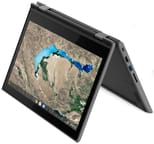 Lenovo Chromebook 300e (2nd Gen) | |
| Price | List Price: $279.99 Amazon Prices: |
| Model number | 81QC0006US |
| Performance Rating | 2.6 |
| Chromebook Plus | No |
| Processor | Quad-core 1.70 Ghz (max 2.10 Ghz) MediaTek MT8173C |
| RAM | 4 GB |
| Internal Storage | 32 GB eMMC |
| Screen Size | 11.6" |
| Screen Resolution | 1366x768 |
| Screen Type | IPS |
| Touch Screen | Yes |
| Stylus / Pen | No Stylus Support |
| Dimensions width x length x thickness | 11.41 x 8.03 x 0.8 inches (289.81 x 203.96 x 20.32 mm) |
| Weight | 2.9 lbs (1.32 kg) |
| Backlit Keyboard | No |
| Webcam | 720p |
| WiFi | 802.11ac (2x2) |
| Bluetooth | Bluetooth 4.1 |
| Ethernet | No |
| Cellular Modem | No |
| HDMI | Full-Size HDMI |
| USB Ports | 1 USB 3, 1 USB-C (USB-C port is USB 3.1 Gen 2 with DisplayPort 1.2 support) |
| Thunderbolt Ports | No |
| Card Reader | SD |
| Battery | 3 cell, 42 WHr, Li-Polymer |
| Battery Life | 10.0 hours |
| Fanless | Yes |
| Auto Update Expiration Date | June, 2027 |
Related Chromebooks
-
 Lenovo Flex 3 ChromebookThe Lenovo Flex 3 Chromebook is a fanless 11.6-inch convertible with an IPS touchscreen, a MediaTek…
 -
 Acer Chromebook Spin 11 CP311The Acer Chromebook Spin 11 combines functionality and portability with its 11.6-inch touch IPS…
 -
 Lenovo 300e Yoga Chromebook Gen 4The Lenovo 300e Yoga Chromebook Gen 4 is a rugged 11.6-inch education convertible with a MediaTek…
 -
 Acer Chromebook 311An 11.6-inch Chromebook with an Intel Celeron N4000, 4GB of RAM, a fanless chassis, and up to 10…
 -
 ASUS Chromebook Flip CR1The ASUS Chromebook Flip CR1 (CR1100FKA) is a rugged 11.6-inch education convertible on an Intel…
 -
 Samsung Chromebook Plus v2The Samsung Chromebook Plus v2 is a fanless 12.2-inch convertible Chromebook with an Intel Celeron…
Design and Durability
Lenovo designed the 300e 2nd Gen to survive student life. The chassis incorporates rubber bumpers along the edges that protect against drops from desk height (up to 75cm or about 29.5 inches), while the mechanically anchored keyboard resists spills up to 330ml. Three distinct surface textures across the device provide both grip and visual interest, though as Android Central’s Ara Wagoner noted, these textures tend to collect oils and fingerprints, requiring frequent cleaning.
The 360-degree hinge enables four usage modes: laptop, tablet, tent, and stand. This flexibility proves particularly useful in classroom settings where students might need to share their screen or use touch-based applications. At 2.9 pounds and 20mm thick, the 300e is bulkier than consumer Chromebooks, but that extra heft houses the protective features that make it classroom-ready.
Performance
The MediaTek MT8173C is a quad-core ARM SoC (two Cortex-A72 plus two Cortex-A53 cores) that handles basic educational tasks competently. Cross-platform CPU benchmarks for the MT8173C variant are scarce because the chip does not run the Windows test suites most laptop reviewers reach for; ITechGuides’ benchmark numbers for the 300e (514 in Cinebench 20 vs a 459 processor average) were measured on the Intel Celeron N4000 Windows variant of the 300e and do not translate directly to this MediaTek SKU. ITechGuides’ qualitative observations from the same hands-on (smooth performance up to about 14 simultaneous Chrome tabs, noticeable slowdown closer to 21) carry over more cleanly because that ceiling is driven mostly by the shared 4GB of RAM rather than the CPU.
For the target use case of Google Docs, educational web apps, and light browsing, the 300e delivers acceptable performance. However, users expecting to run Android apps heavily or maintain many Chrome tabs simultaneously may find the 4GB RAM limitation frustrating. The fanless design ensures silent operation, a genuine advantage in quiet classroom environments.
Battery Life
Battery performance stands out as one of the 300e’s strongest attributes. ITechGuides measured 16 hours and 18 minutes during video playback testing, with more realistic web browsing scenarios lasting about 13.5 hours. Under heavy load with 4K video playback, the battery still managed over 7 hours.
Android Central’s testing aligned with these findings, reporting a solid 10-hour day of typical mixed usage. For students, this means the 300e reliably lasts through a full school day without needing to find an outlet, even with moderate to heavy use.
Display and Audio
The 11.6-inch IPS touchscreen offers a 1366x768 resolution with 10-point multi-touch support. While the resolution and pixel density fall short of modern standards, the IPS panel provides reasonable viewing angles and color accuracy for classroom tasks. The touch interface works well in tablet mode for apps designed around touch input.
A small but useful design choice on this generation was the addition of Lenovo’s “enhanced touch” feature, which lets the panel register input from a standard No. 2 graphite pencil thanks to the digitizer’s tuning. It is not a pressure-sensitive stylus, but it gave classrooms a way to do quick stylus-style interaction without buying an active pen for every device. Lenovo’s own product manager walked through the feature in the BETT hands-on linked in the Related Videos block above.
Audio output comes from dual speakers positioned on the bottom of the chassis. Sound quality is adequate for video playback and video calls but lacks the punch needed for media consumption or music production in noisy environments.
Ports and Connectivity
For a sub-$300 education Chromebook in 2019, the 300e (2nd Gen) carried a usable port layout. The left side houses a USB-C 3.1 Gen 2 port that handles charging, DisplayPort 1.2 video output, and data, along with an HDMI Type-A port for connecting to a classroom projector or TV without needing a dongle. The right side holds a USB-A 3.0 port, a microSD card reader for cheap storage expansion, the 3.5mm combo headphone/microphone jack, and a Kensington lock slot for cart and lab security.
Wireless connectivity is dual-band Wi-Fi 5 (802.11ac 2x2) plus Bluetooth 4.1. There is no Ethernet jack and no cellular option, which is in line with how Lenovo positioned the 300e for managed school deployments where Wi-Fi infrastructure is the assumption. The webcam is a 720p front-facing camera intended for video calls rather than content capture; unlike the 500e Yoga in the same lineup, the 300e (2nd Gen) does not include a world-facing rear camera.
Where It Sat in Lenovo’s Education Lineup
Lenovo introduced the 100e / 300e / 500e naming scheme to make it easy for school district buyers to pick a tier: the 100e (2nd Gen) was the entry-level Intel Celeron clamshell, the 300e was the convertible “step up” with the enhanced-touch screen, and the 500e (2nd Gen) was the top-of-line yoga convertible with an Intel CPU, a stylus garage, and a world-facing camera for AR and document capture. The 2nd Gen 300e under review here is the MediaTek MT8173C variant (model 81QC), built around an ARM SoC to hit a lower price and longer battery life than the 500e while keeping the same 360-degree convertible form factor.
Confusingly, Lenovo also sold an x86 version of the 300e Chromebook 2nd Gen under different model codes (the Intel Celeron N4020 / N4120 and AMD A4-9120C variants appear under 82CE and 81MB SKU codes), so any owner researching their device should check the chassis sticker for the model number before matching specs against this page. The 300e line continued into the 300e Yoga Gen 4 in subsequent years, each generation with its own product page in our catalog.
ChromeOS Support Through June 2027
The MediaTek 2nd Gen 300e (model 81QC) carries a Google Auto Update Expiration (AUE) of June 2027, an extension from its original schedule. Until that date the device still receives ChromeOS security patches, Chrome browser updates, and new platform features on Google’s normal cadence. After June 2027, Chrome OS will keep booting and the device will keep running the apps it already had, but Google will stop shipping updates, and over time the Google Play Store may stop offering app updates as developers raise their minimum Android API levels.
For schools and owners who still have working units, the MediaTek 81QC remains a serviceable daily Chromebook through its June 2027 support window: classroom web apps, Google Workspace, document work, and trusted-site browsing all stay current as long as the security updates keep arriving. Planning past that date is where the ARM platform limitation bites. ChromeOS Flex is x86_64-only, and the MrChromebox firmware project that gives many older Chromebooks a second life as Linux laptops only supports Intel and AMD models, not the MediaTek MT8173C in the 81QC. The AMD A4-9120C variant of the 300e (2nd Gen) sits in a friendlier position for aftermarket reuse because it ships with an x86 CPU. So once June 2027 passes, the 81QC has fewer second-life options than its x86 siblings, and owners should plan a replacement around that date rather than count on a Linux conversion.
Reviewer Insights
Android Central
Ara Wagoner’s November 2019 review awarded the 300e 2nd Gen 4.5 out of 5 stars, praising it as “a school Chromebook you should bring home.” The review highlighted the keyboard quality in particular: “Typing feels great, especially for a sub-$300 Chromebook: the keys have a good travel distance, don’t feel too mushy.” Wagoner positioned the 300e as taking “much of the same specs and form factor from the handy, helpful C330, adds rubber bumpers, drop resistance, and a spill-resistant keyboard.”
ITechGuides
ITechGuides’ long-form review covers both the MediaTek and the Intel Celeron N4000 Windows variants of the 300e and runs detailed battery and multitasking tests. Their Cinebench 20 numbers are from the Intel N4000 unit (see the Performance section above for the caveat), but their overall verdict applies to the line as a whole: “The Lenovo 300e is definitely one Chromebook that hits the mark of education-focused devices out there. Whether a teacher or a student, this Chromebook is a great blend of portability, durability, and performance.”
Who This Was For
The Lenovo Chromebook 300e (2nd Gen) targeted K-12 education environments where durability, manageability, and value mattered more than raw performance. Schools purchasing devices for student use found the combination of MIL-SPEC construction, spill resistance, and manageable price point compelling. Individual buyers looking for an affordable convertible Chromebook for basic tasks also found the 300e a reasonable choice during its active lifespan. For those weighing current options side by side, the Chromebook Comparison Chart covers the full catalog with sortable specs.