
Lenovo Flex 3i Chromebook 12.2"
Updated on

Lenovo released the Flex 3i Chromebook 12.2” in 2023 as a budget 2-in-1 convertible. It pairs the Intel Processor N100 with a 1920x1200 IPS touchscreen, runs without a fan, and weighs 2.76 pounds. Lenovo rates the 47Wh battery at up to 12 hours.
| Pros | Cons |
|---|---|
| 12.2” 1920x1200 IPS touchscreen in a 16:10 shape | Only 4GB RAM limits heavy multitasking |
| 8-12 hours of battery life on mixed use | Single USB-C port constrains charging flexibility |
| 2.76 lbs and 0.72 inches thick | No backlit keyboard for low-light use |
| Full-size HDMI, two USB-A ports, and microSD | No USI stylus support despite touchscreen |
| Fanless, so it runs silent | Android Digest found the keyboard mushy to type on |
| $299-349 price range | 64GB base storage fills up quickly |
Related Videos
Lenovo Flex 3i Chromebook 12.2" Comparison Chart
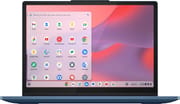 Lenovo Flex 3i Chromebook 12.2" | Lenovo Flex 3i Chromebook 12.2" | |
| Price | List Price: $349.00 Amazon Prices: Loading prices... Best Buy: Loading price... | List Price: $379.00 Amazon Prices: |
| Model number | 82XH0001US | 4GB/128GB/Intel N100 |
| Performance Rating | 3.5 | 3.5 |
| Chromebook Plus | No | No |
| Processor | Quad-core 3.40 Ghz (max 3.40 Ghz) Intel Processor N100 | Quad-core 3.40 Ghz (max 3.40 Ghz) Intel Processor N100 |
| RAM | 4 GB | 4 GB |
| Internal Storage | 64 GB eMMC | 128 GB eMMC |
| Screen Size | 12.2" | 12.2" |
| Screen Resolution | 1920x1200 | 1920x1200 |
| Screen Type | IPS | IPS |
| Touch Screen | Yes | Yes |
| Stylus / Pen | No Stylus Support | No Stylus Support |
| Dimensions width x length x thickness | 11.18 x 8.27 x 0.72 inches (283.97 x 210.06 x 18.29 mm) | 11.18 x 8.27 x 0.72 inches (283.97 x 210.06 x 18.29 mm) |
| Weight | 2.76 lbs (1.25 kg) | 2.76 lbs (1.25 kg) |
| Backlit Keyboard | No | No |
| Webcam | 720p HD | 720p HD |
| WiFi | Wi-Fi 6 (802.11ax) | Wi-Fi 6 (802.11ax) |
| Bluetooth | Bluetooth 5.1 | Bluetooth 5.1 |
| Ethernet | No | No |
| Cellular Modem | No | No |
| HDMI | Full-Size HDMI | Full-Size HDMI |
| USB Ports | 2 USB 3, 1 USB-C (USB-C supports Power Delivery and DisplayPort) | 2 USB 3, 1 USB-C (USB-C supports Power Delivery and DisplayPort) |
| Thunderbolt Ports | No | No |
| Card Reader | microSD Card Reader | microSD Card Reader |
| Battery | 47Wh, Li-ion | 47Wh, Li-ion |
| Battery Life | 12.0 hours | 12.0 hours |
| Fanless | Yes | Yes |
| Auto Update Expiration Date | June, 2031 | June, 2031 |
Related Chromebooks
-
 Lenovo 500e Yoga Chromebook (Gen 4)The Lenovo 500e Yoga Chromebook Gen 4 offers a versatile 12.2'' touch IPS display and a garaged USI…
 -
 Lenovo 300e Yoga Chromebook Gen 4The Lenovo 300e Yoga Chromebook Gen 4 is a rugged 11.6-inch education convertible with a MediaTek…
 -
 Samsung Galaxy Chromebook 2 360A budget convertible with a sharp 2560x1600 display well above its price class, paired with…
 -
 Acer Chromebook 712The Acer Chromebook 712 (C871) is a 12-inch education Chromebook with an Intel Celeron 5205U, a 3:2…
 -
 ASUS Chromebook Flip C214The ASUS Chromebook Flip C214 is a rugged 11.6-inch education convertible with an Intel Celeron…
 -
 Acer Chromebook 311An 11.6-inch Chromebook with an Intel Celeron N4000, 4GB of RAM, a fanless chassis, and up to 10…
Full-size HDMI and a 16:10 panel in a 2.76-pound shell

The chassis is all plastic in a blue and gray finish, and the hinges carry the 360-degree design through tablet, tent, and laptop modes. The footprint measures 11.18 x 8.27 x 0.72 inches, compact enough to slip easily into a backpack or bag. A 720p webcam sits above the screen, and there is a combo headphone and microphone jack on the side.
The 12.2-inch IPS panel runs at 1920x1200. That 16:10 aspect ratio gives more vertical room than a 16:9 screen of the same diagonal, which helps with web pages and documents. Brightness reaches about 300 nits, enough for indoor lighting but not for direct sun. Touch input tracks accurately, which matters because the hinge folds the screen flat against the keyboard.
The port list covers two USB-A 3.2 ports, one USB-C 3.2 Gen 2 port with Power Delivery and DisplayPort, a full-size HDMI port, a microSD card slot, and the combo audio jack. With only one USB-C port, you cannot charge and run a USB-C peripheral such as a USB Ethernet adapter at the same time.
The fanless design means no noise at all, which suits libraries and classrooms. The Intel N100 produces little heat and the chassis stays cool during typical use. Published reviews put battery life at 8-10 hours of mixed use, and longer on lighter work such as document editing or video streaming.
Reviewer Insights

Lon Seidman’s Perspective
Lon Seidman from Lon.TV called the Flex 3i “overall a great Chromebook here and one that I would recommend.” He praised the snappy web browsing performance and demonstrated Android apps and Xbox cloud gaming running on it. His testing confirmed support for Linux applications and, noting the HDMI port is rated at 1.4, found that driving dual 4K 60Hz displays via both HDMI and USB-C was doable in his testing. Lon highlighted the comprehensive port selection as a major selling point and appreciated the fanless, silent operation. His one stated downside was the lack of an active pen for the 2-in-1, which he called “the only thing I see lacking here.”
MergeDroid’s Perspective
MergeDroid’s review compared the Flex 3i against the previous generation and declared it “my favorite small Chromebook to use right now.” MergeDroid noted the screen is “nice and bright” with a Lenovo-claimed 300 nits, while still framing it as a budget device rather than a premium one.
Android Digest’s Perspective
Android Digest focused on real-world usability, particularly praising the 12.2” form factor for tablet mode. The reviewer was “shocked at how good this display really really looked” and emphasized the value when it can be found under $300. However, they noted the device “might slow down a little bit” under heavier, more demanding use and described the keyboard as feeling “a little mushy” to type on, though still acceptable for the price.
Ben Schoon’s Perspective (9to5Google)
In his 9to5Google review, Ben Schoon described the Flex 3i as “the perfect use case here is for an at-home browsing machine. Online shopping, taking a video call, and general browsing all just work super well.” He praised the sharp display, solid build quality, and physical webcam shutters paired with a keyboard shortcut for muting the microphone. His main concern was the 4GB RAM limitation, writing that any task requiring “more than five or six tabs” bogs down the processor and RAM.
Ara Wagoner’s Perspective (Android Police)
Ara Wagoner’s Android Police review noted tab switching delays of 15-30 seconds with just 8 tabs open and ultimately rated it 7/10, stating that “what should have been the next king of budget Chromebooks instead whiffs on the performance needed for even light-duty work.” However, she praised the excellent 11-14 hour battery life and the larger, brighter display with reduced bezels compared to predecessors.
Customer Reviews
Across 84 ratings on Amazon, the Lenovo Flex 3i Chromebook 12.2” averages 4.4 stars, with 71 percent of reviewers leaving five stars and a smaller cluster (about 6 percent) at one star. Buyers praise the 2-in-1 design and the setup process. Verified buyer Cece W wrote “This touchscreen laptop works great! Fast high speed and good battery life!”, and verified buyer markS76, replacing an older 2-in-1 that broke in a fall, titled a five-star review “Love Lenovo products and this one is budget friendly.”
Battery life draws the most complaints. Verified buyer Resse C gave it four stars and noted “The battery life is Les than 2hrs, which is not ideal,” while still finding it light and easy to use for home work. One verified buyer, Bob123, reported a unit that failed early, writing “Cannot turn on in less than 2 month. The battery is fully charged and AC cord is connected.” Other buyers point out that ChromeOS is not Windows, so the machine suits web browsing, movies, and light schoolwork rather than spreadsheets or gaming. Read more owner reviews on Amazon.
A quiet browsing machine capped by 4GB of RAM
The Flex 3i fits at-home use, school work, and travel where weight matters more than speed. The N100 keeps a handful of tabs moving, the fanless chassis makes no noise, and the 16:10 panel is comfortable for reading and video calls. The plastic build holds up well for the price, and the port list saves you from carrying a dock.
The 4GB of RAM sets the ceiling. Ben Schoon hit it past five or six tabs and Ara Wagoner noted 15-30 second tab switches at eight, so anyone running many tabs or demanding web apps will feel it. The missing backlit keyboard makes typing in the dark harder, and there is no USI stylus support to pair with the touchscreen and hinge.
At $299-349, this is a machine for modest computing needs, for anyone who will not push past a handful of tabs. Buyers who need multitasking headroom should step up to an 8GB RAM Chromebook and give up something else to get it. To see how it stacks up against other options side by side, visit the Chromebook Comparison Chart.
Frequently Asked Questions
How long will the Lenovo Flex 3i Chromebook 12.2” receive updates?
Google’s Auto Update Expiration (AUE) policy lists June 2031 for this model, which was released in 2023. Until that date it keeps getting ChromeOS security updates and new features.
Can the RAM or storage be upgraded on the Lenovo Flex 3i Chromebook?
No. The 4GB of RAM and the 64GB or 128GB of eMMC storage are soldered to the motherboard. The microSD card slot is the way to add space for files, photos, and downloaded media, and Google Drive covers the rest.
Is the Lenovo Flex 3i Chromebook good for students?
For K-12 and light college coursework, yes. The weight and the battery make it easy to carry between classes, and the 360-degree hinge folds it into a tablet for note-taking. See our picks for student use. Students who keep many tabs open or run demanding web apps will find 4GB of RAM limiting.
Can I connect the Lenovo Flex 3i Chromebook to an external monitor?
Yes, through the full-size HDMI port or the USB-C port with DisplayPort support. Both can drive 4K at 60Hz, and Lon Seidman ran two 4K 60Hz displays at once using both ports. Because there is only one USB-C port, using it for a display means charging over it is off the table.
Does the Lenovo Flex 3i Chromebook support stylus or pen input?
No. The touchscreen and 360-degree hinge are there, but the machine does not support USI (Universal Stylus Initiative) pens or any other active stylus. A basic capacitive stylus works for navigation without pressure sensitivity or palm rejection. Drawing and handwritten notes call for a Chromebook with USI support.
How does the Lenovo Flex 3i compare to the HP Chromebook x360?
Both compete in the budget 2-in-1 segment with similar Intel processor options and 4GB RAM configurations. The Flex 3i brings the wider port selection, including full-size HDMI, and the 1920x1200 display. Some HP x360 models include a backlit keyboard, which the Flex 3i lacks. Price and availability usually settle the choice.