
Lenovo IdeaPad Gaming Chromebook
Updated on

Released in late 2022, the Lenovo IdeaPad Gaming Chromebook marked Lenovo’s entry into the gaming Chromebook market and helped establish cloud gaming as a legitimate use case for Chrome OS. This device is no longer in production and has been discontinued, but it remains an important milestone in Chromebook history. Powered by a 12th Gen Intel Core i5-1235U processor and featuring a 16-inch WXQGA display with a 120Hz refresh rate, it delivered a cloud gaming experience that reviewers consistently praised. It is one of the models Google later upgraded to Chromebook Plus through a Chrome OS update, and it shipped with GeForce NOW and Amazon Luna preinstalled.
| Pros | Cons |
|---|---|
| 120Hz 2560x1600 display with excellent color accuracy (NotebookCheck) | Display drops to 60Hz on battery power with no override option (Chrome Unboxed) |
| Cloud gaming performance: 136 FPS in Cyberpunk 2077 via GeForce NOW (PCWorld) | No full-size HDMI port on a 16-inch chassis (Chrome Unboxed) |
| Excellent keyboard with 1.5mm travel and 100% antighosting for gaming (9to5Google) | Mediocre touchpad with poor responsiveness and requires excessive click pressure (9to5Google) |
| Tremendous battery life during cloud gaming sessions (9to5Google) | Plastic bottom chassis exhibits noticeable flex (Chrome Unboxed, PCWorld) |
| 4-zone RGB backlit keyboard with full numeric keypad (Chrome Unboxed) | 8GB RAM is soldered and non-upgradeable (NotebookCheck) |
| Professional design suitable for both work and gaming environments (Chrome Unboxed) | No touchscreen limits Android app usability |
Related Videos
Lenovo IdeaPad Gaming Chromebook Comparison Chart
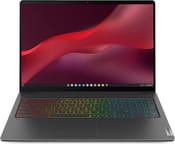 Lenovo IdeaPad Gaming Chromebook | |
| Price | List Price: $699.99 Amazon Prices: |
| Model number | 82V8000CUX |
| Performance Rating | 9.0 |
| Chromebook Plus | Yes |
| Processor | Deca-core 3.30 Ghz (max 4.40 Ghz) Intel Core i5-1235U |
| RAM | 8 GB |
| Internal Storage | 256 GB SSD |
| Screen Size | 16" |
| Screen Resolution | 2560x1600 |
| Screen Type | IPS |
| Touch Screen | No |
| Stylus / Pen | No Stylus Support |
| Dimensions width x length x thickness | 14.03 x 9.96 x 0.79 inches (356.36 x 252.98 x 20.07 mm) |
| Weight | 4.01 lbs (1.82 kg) |
| Backlit Keyboard | Yes |
| Webcam | 1080p FHD |
| WiFi | Wi-Fi 6E (802.11ax) |
| Bluetooth | Bluetooth 5.1 |
| Ethernet | No |
| Cellular Modem | No |
| HDMI | No HDMI |
| USB Ports | 2 USB 3, 2 USB-C (USB-C power delivery and DisplayPort 1.4) |
| Thunderbolt Ports | No |
| Card Reader | microSD Card Reader |
| Battery | 71 Whr, Li-ion |
| Battery Life | 11.0 hours |
| Fanless | No |
| Auto Update Expiration Date | June, 2032 |
Related Chromebooks
-
 Acer Chromebook Plus 516 (CB516-1H)The Acer Chromebook Plus 516 (CB516-1H) is a 16-inch Chromebook Plus with an Intel Core i3-1315U, a…
 -
 Acer Chromebook Plus 516 GEThe Acer Chromebook Plus 516 GE is a cloud-gaming Chromebook with a 16-inch 2560x1600 120Hz…
 -
 HP Chromebook Plus 15aThe HP Chromebook Plus 15a delivers a spacious 15.6-inch Full HD display, Intel Core i3-N305…
 -
 ASUS Chromebook Flip CX5 (CX5601)A large 16-inch 2-in-1 convertible Chromebook Plus with Thunderbolt 4 connectivity and a garaged…
 -
 Lenovo Chromebook Plus 2-in-1 14The Lenovo Chromebook Plus 2-in-1 14 is an aluminum 360-degree convertible with an Intel Core 3…
 -
 Lenovo IdeaPad Flex 5i Chromebook PlusThe Lenovo IdeaPad Flex 5i Chromebook Plus is a 14-inch convertible Chromebook Plus on Intel's Core…
Detailed Insights into the Lenovo IdeaPad Gaming Chromebook

The design of the Lenovo IdeaPad Gaming Chromebook strikes an interesting balance between gaming aesthetics and professional functionality. As Chrome Unboxed noted, “there’s not a ton of gaming aesthetic going on on the outside, and I kind of like that… you also can get work done on it and take it to the office and not feel a little ridiculous.” The anodized aluminum lid provides a premium feel and solid build quality, while the plastic bottom chassis, unfortunately, exhibits more flex than expected for a device of this size and price point. At 4.01 pounds, it’s portable enough for a 16-inch laptop, though certainly not the lightest option available.
The 16-inch 2560x1600 IPS display is the crown jewel of this Chromebook. NotebookCheck’s testing revealed excellent color accuracy with a Delta-E of just 1.28 for colors, full sRGB coverage, and a maximum brightness of 366 nits. The 120Hz refresh rate transforms cloud gaming, and PCWorld demonstrated this dramatically by achieving 136 FPS in Cyberpunk 2077 at Ultra settings with ray-tracing enabled through GeForce NOW Ultimate. However, there’s a significant caveat: the display drops to 60Hz when running on battery power, and there’s currently no software setting to override this behavior. For gaming on the go, this limitation means you’ll want to stay plugged in.
The keyboard and input experience shows Lenovo’s typical strengths and some unexpected weaknesses. The keyboard itself is excellent, with 1.5mm of travel and 100% antighosting for both typing and gaming. The 4-zone RGB backlighting adds gaming flair without being obnoxious, and the inclusion of a full-size numeric keypad is appreciated. However, every review noted issues with the touchpad, which 9to5Google described as producing “unsmooth movement out of the cursor” and requiring too much pressure to click. For cloud gaming, you’ll likely want to connect an external mouse regardless, but it’s a disappointing weak point for general productivity use.
Connectivity options include dual USB-C ports with DisplayPort and power delivery support, two USB-A 3.2 ports, a microSD card slot, and a 3.5mm audio jack. The omission of a full-size HDMI port is frustrating on a 16-inch chassis marketed toward gamers. Wi-Fi 6E with Intel AX211 and Bluetooth 5.1 handle wireless connectivity, which is critical for maintaining stable cloud gaming connections. The upward-firing speakers deliver surprisingly good audio with decent stereo separation, and the 1080p webcam with privacy shutter handles video calls competently.
Reviewer Insights on the Lenovo IdeaPad Gaming Chromebook

Chrome Unboxed’s Perspective
Chrome Unboxed provided one of the most comprehensive first looks at the IdeaPad Gaming Chromebook, with Robby Payne expressing genuine enthusiasm about its potential as a cloud gaming machine while appreciating its versatility. He compared it favorably to the Acer 516 GE, noting that both target the high-refresh-rate gaming market but execute differently. “Lenovo makes great keyboards… lots of travel, lots of nice response and clickiness,” he observed, while testing the typing and gaming feel extensively. The RGB backlighting impressed him with its brightness, noting it was even more visible than Acer’s implementation. However, he was candid about the shortcomings, particularly the battery refresh rate limitation: “It feels like it goes down to like a 60Hz [on battery]… hopefully that’s an update that comes to Chrome OS.” He also expressed disappointment about the lack of HDMI and the flexible plastic bottom chassis, but ultimately came down in its favor for cloud gaming enthusiasts.
Booredatwork’s Perspective
Thunder E from Booredatwork focused his review on actual cloud gaming demonstrations, showing the IdeaPad Gaming Chromebook running demanding titles like Cyberpunk 2077, Destiny 2, and The Witcher 3 through NVIDIA GeForce Now. His perspective highlighted the practical benefits of cloud gaming: “Because it’s a gaming Chromebook, I get to access the gaming platforms I want… whether it’s Xbox Game Pass or GeForce Now.” He emphasized the battery life advantage, noting that since the internal hardware doesn’t have to work as hard as a local GPU would, gamers can enjoy longer sessions. “I can game the way I want and I can also do it for quite a long amount of time,” he concluded, positioning the device as an excellent entry point into cloud gaming.
NotebookCheck’s Technical Analysis
NotebookCheck’s review delivered the most rigorous technical evaluation, awarding the device an 83.4% score. Their testing revealed the display’s color accuracy and the curious limitation where Chrome OS restricts virtualized applications to 60Hz rather than the full 120Hz capability. They appreciated the serviceable design with accessible internals for storage upgrades, though noted the 8GB RAM is soldered and non-upgradeable. Their verdict: “On paper, a 16-inch Chromebook with a 1600p full sRGB 120 Hz display sounds overkill,” but the execution proves worthwhile for both cloud gaming and productivity use cases.
9to5Google’s User Experience Focus
9to5Google described the IdeaPad Gaming Chromebook as a device that “really hits the nail on the head” for cloud gaming, praising it as “a cloud gaming dream.” Their review called the battery life “absolutely tremendous” during cloud gaming sessions. They also praised the keyboard’s gaming-focused features including the 100% antighosting, though they shared the consensus criticism of the trackpad, which they found difficult to click and drag.
PCWorld’s Performance Testing
PCWorld awarded a 3.5/5 star rating and focused on demonstrating the potential of cloud gaming through benchmarks. Their most striking finding: “You’d have to spend thousands for similar performance from a Windows laptop rendering the game locally,” after achieving 136 FPS in Cyberpunk 2077 at Ultra settings with ray-tracing via GeForce NOW Ultimate. However, they noted the plastic build quality and mushy keyboard action as areas needing improvement, along with a small touchpad that’s cramped for larger hands.
Conclusion
The Lenovo IdeaPad Gaming Chromebook represented a significant step forward for gaming on Chrome OS when it launched in 2022. While this model has been discontinued and is no longer available new, it helped prove that cloud gaming could be a viable use case for Chromebooks, a vision that has become even more relevant now that Steam support has ended and cloud gaming is the primary path forward. The 16-inch 2560x1600 120Hz display elevated the cloud gaming experience, and the keyboard and audio quality supported extended gaming sessions. The device continues to receive Chrome OS updates through June 2032.
For those still interested in gaming Chromebooks, newer models from Acer and ASUS have built upon the foundation that devices like this one established. If you find a used or refurbished IdeaPad Gaming Chromebook at a reasonable price, it still works for cloud gaming. The limitations noted by reviewers (the mediocre trackpad, the display’s 60Hz limitation on battery power, the lack of HDMI, and the non-upgradeable 8GB RAM) apply, but for cloud gaming enthusiasts, these trade-offs were manageable at its original $699 price point and remain so on the secondary market.
To see how this Chromebook stacks up against other models, check out our Chromebook Comparison Chart for a side-by-side look at specs and features.
Frequently Asked Questions
Is the Lenovo IdeaPad Gaming Chromebook still available?
No, the Lenovo IdeaPad Gaming Chromebook has been discontinued and is no longer available new from retailers. It was released in late 2022 and helped establish cloud gaming as a use case for Chromebooks. You may find used or refurbished units on the secondary market, and it continues to receive Chrome OS updates through June 2032.
Is the Lenovo IdeaPad Gaming Chromebook good for cloud gaming?
Yes, the Lenovo IdeaPad Gaming Chromebook excelled at cloud gaming when it was available. PCWorld achieved 136 FPS in Cyberpunk 2077 at Ultra settings with ray-tracing through GeForce NOW Ultimate. The 120Hz 2560x1600 display provides excellent color accuracy and smooth motion. The device came with GeForce NOW and Amazon Luna preinstalled.
Can I upgrade the RAM on the IdeaPad Gaming Chromebook?
No, the 8GB LPDDR4x RAM is soldered to the motherboard and cannot be upgraded. NotebookCheck confirmed this limitation in their technical review. The 256GB NVMe SSD is accessible through the bottom panel if storage upgrades become necessary.
Does the 120Hz display work on battery power?
The display drops to 60Hz when running on battery power to conserve energy, and there’s currently no software setting to override this behavior. Chrome Unboxed noted this limitation during testing. For the full 120Hz experience during cloud gaming, you’ll need to keep the device plugged in.
What ports does the IdeaPad Gaming Chromebook have?
The device includes two USB-C ports (with DisplayPort 1.4 and power delivery), two USB-A 3.2 ports, a microSD card slot, and a 3.5mm audio combo jack. Notable omissions include HDMI and Ethernet ports, which Chrome Unboxed specifically criticized for a 16-inch gaming-focused device.
How long will the IdeaPad Gaming Chromebook receive updates?
According to Google’s Auto Update Expiration (AUE) policy, the Lenovo IdeaPad Gaming Chromebook 16 will receive Chrome OS updates until June 2032, providing approximately 10 years of software support from its 2022 release date.
How does the battery life hold up during cloud gaming?
9to5Google found the battery life “absolutely tremendous” during cloud gaming. For general productivity tasks, Lenovo rates the battery life at 11 hours. Since cloud gaming offloads processing to remote servers, the battery lasts significantly longer than traditional gaming laptops.