
Samsung Galaxy Chromebook Plus 15.6"
Published on

The Samsung Galaxy Chromebook Plus 15.6” represents Samsung’s triumphant return to premium ChromeOS hardware, delivering what many thought impossible: a 15.6-inch display in a chassis that weighs just 2.58 pounds and measures only 11.8mm thick. Powered by the Intel Core 3 100U processor with 8GB of LPDDR5X RAM and 256GB of UFS storage, this Chromebook Plus certified machine handles everyday productivity, media consumption, and even light gaming with ease. The showstopper is undoubtedly the gorgeous AMOLED display, offering vibrant colors and deep blacks that rival devices costing significantly more. Whether you’re a student looking for a large-screen Chromebook that won’t weigh down your backpack or a professional who values screen real estate without sacrificing portability, the Galaxy Chromebook Plus delivers a compelling package.
Pros and Cons of the Samsung Galaxy Chromebook Plus 15.6”
| Pros | Cons |
|---|---|
| Remarkably thin (11.8mm) and light (2.58 lbs) for a 15.6-inch laptop | No touchscreen despite premium positioning |
| Stunning AMOLED display with 400 nits brightness and 100% DCI-P3 coverage | Speakers are downward-firing and disappointingly quiet |
| Excellent port selection including full-size HDMI | Battery life drops to 5-6 hours at maximum display brightness |
| Large glass trackpad with smooth, precise tracking | Webcam quality is mediocre for video calling despite 1080p resolution |
| Includes 12-month Gemini Advanced subscription ($240 value) | Numeric keypad missing standard right-side function keys |
| Solid build quality with no chassis flex | No biometric authentication (fingerprint or face unlock) |
Related Videos
Samsung Galaxy Chromebook Plus 15.6" Comparison Chart
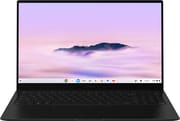 Samsung Galaxy Chromebook Plus 15.6" | |
| Price | List Price: $699 Amazon Prices: Best Buy: Loading price... |
| Model number | XE550XGA-KC1US |
| Performance Rating | 9.0 |
| Chromebook Plus | Yes |
| Processor | Hexa-core 1.20 Ghz (max 4.70 Ghz) Intel Core 3 100U |
| RAM | 8 GB |
| Internal Storage | 256 GB UFS |
| Screen Size | 15.6" |
| Screen Resolution | 1920x1080 |
| Screen Type | AMOLED |
| Touch Screen | No |
| Stylus / Pen | No Stylus Support |
| Dimensions width x length x thickness | 13.99 x 8.89 x 0.46 inches (355.35 x 225.81 x 11.68 mm) |
| Weight | 2.58 lbs (1.17 kg) |
| Backlit Keyboard | Yes |
| Webcam | 1080p |
| WiFi | Wi-Fi 6E (802.11ax) |
| Bluetooth | Bluetooth 5.3 |
| Ethernet | No |
| Cellular Modem | No |
| HDMI | Full-Size HDMI |
| USB Ports | 1 USB 3, 2 USB-C 2x USB-C 3.2 Gen 2 with DisplayPort and Power Delivery, 1x USB-A 3.2 Gen 1, full-size HDMI |
| Thunderbolt Ports | No |
| Card Reader | microSD Card Reader |
| Battery | 4 cell, 4405mAh, Li-ion |
| Battery Life | 13 hours |
| Fanless | No |
| Auto Update Expiration Date | June, 2034 |
Related Chromebooks
-
 ASUS Chromebook Plus CX15 (CX1505)The ASUS Chromebook Plus CX15 is one of the first models to feature Intel's Twin Lake Core 3 N355…
 -
 HP Chromebook Plus 15aThe HP Chromebook Plus 15a delivers a spacious 15.6-inch Full HD display, Intel Core i3-N305…
 -
 Acer Chromebook Plus 516 (CB516-1H)A 16-inch Chromebook Plus with Intel Core i3-1315U, offering a spacious display and solid…
 -
 Acer Chromebook Plus 516 GEThe Acer Chromebook Plus 516 GE is a gaming-focused Chromebook with a stunning 16-inch 2560x1600…
 -
 Acer Chromebook Plus 515The Acer Chromebook Plus 515 delivers premium performance with a 15.6-inch FHD touchscreen, Intel…
 -
 ASUS Chromebook Flip CX5 (CX5601)A large 16-inch 2-in-1 convertible Chromebook Plus with Thunderbolt 4 connectivity and a garaged…
Detailed Insights into the Samsung Galaxy Chromebook Plus 15.6”

The Samsung Galaxy Chromebook Plus measures 13.99 x 8.89 x 0.46 inches and weighs just 2.58 pounds, making it the thinnest and lightest 15.6-inch Chromebook ever made. The all-metal construction feels premium and rigid, with no discernible flex in the keyboard deck during normal use. Samsung has managed to include a full-size HDMI port, two USB-C 3.2 Gen 2 ports with DisplayPort and Power Delivery, one USB-A 3.2 Gen 1 port, a microSD card reader, and a 3.5mm headphone jack despite the incredibly thin profile. The hinge is well-balanced, allowing single-handed lid opening while keeping the laptop stable during typing. The Neptune Blue colorway adds a distinctive touch that sets it apart from the sea of silver laptops.
Performance comes from the Intel Core 3 100U processor featuring 6 cores and 8 threads, with a base clock of 1.2 GHz that boosts up to 4.7 GHz. This chip scores approximately 13,118 on PassMark’s CPU benchmark and delivers Octane 2.0 scores above 90,000 according to Chrome Unboxed, placing it firmly in the upper tier of Chromebook performance. The 8GB of LPDDR5X RAM handles multitasking with numerous browser tabs, Android apps, and Linux applications without breaking a sweat. The 256GB UFS storage provides fast read and write speeds for app installations and file access, though the non-upgradeable nature means you’ll want to rely on cloud storage for large media libraries.
Connectivity options include WiFi 6E (802.11ax) wireless for the fastest available network speeds and Bluetooth 5.3 for peripheral connections. The USB-C ports support up to 4K 60Hz display output, and according to Lon Seidman, you can drive up to three external 4K monitors simultaneously for a total of four displays. Storage expansion is limited to the microSD card slot since the internal storage cannot be upgraded after purchase. The inclusion of WiFi 6E ensures compatibility with the latest router technology, though real-world performance will depend on your network infrastructure.
Reviewer Insights on the Samsung Galaxy Chromebook Plus 15.6”

Chrome Unboxed’s Perspective
Chrome Unboxed tested the Samsung Galaxy Chromebook Plus extensively over two weeks and came away impressed by the engineering achievement. They noted that “the 15.6 in size married up with a 2.58 lb weight and 11.8 mm thickness just kind of feels a bit impossible.” The AMOLED display earned particular praise for its 400-nit brightness and deep blacks, making it excellent for media consumption.
However, the review did identify some compromises Samsung made to achieve this thin profile. “The downward facing speakers are mediocre at best and far too quiet to be coming from a 15.6 in laptop,” they observed. The numeric keypad was also criticized for “missing the all-important keys on the right,” making quick calculations without looking down “basically impossible.” Despite these issues, Chrome Unboxed felt the device succeeds at its core promise: “it really does marry up the big screen experience with a smaller device’s portability.”
Lon Seidman’s Perspective
Lon Seidman focused on the display quality and multimedia capabilities in his detailed review. He confirmed that “it is OLED so it’s got very nice deep blacks a really nice contrast ratio great color… it meets all of the standards for DCI P3.” The multi-monitor support impressed him, noting the ability to run four total displays with the included ports.
The review tested Steam gaming through the Linux layer, finding that “it is actually possible to load up some PC games on here and play them just not all that well but older games like halflife 2 and others should actually run quite well.” Lon also highlighted a shorter-than-expected 8-year update window compared to the 10 years most new Chromebooks receive, which is worth considering for long-term ownership. Overall, he found the laptop to be an excellent choice for users who prioritize portability and display quality over raw gaming performance.
9to5Google’s Perspective
9to5Google positioned the Samsung Galaxy Chromebook Plus as a device that “introduces a new era of ChromeOS hardware.” They praised the new Quick Insert key for rapid access to AI features and tools, calling it one of the features that “sets this Chromebook apart from the others out there.”
The reviewer did express disappointment about the lack of touchscreen: “I was really hoping for a touchscreen at this price point although considering how thin the lid of the laptop is it might have been better to exclude it.” They also noted the speakers “are barely loud enough to overpower a small window air conditioning unit.” The review concluded that while the hardware is premium, the value proposition should be carefully considered: “At $700 you’re getting into used or refurbished MacBook Air territory which objectively will offer more versatility for intense tasks.”
Tech Spurt’s Perspective
Tech Spurt tested the Galaxy Chromebook Plus for real-world battery life and found it more impressive than expected. “Main highlights here are certainly the battery life… the portability… and of course you got those excellent AI type Shenanigans,” they summarized.
The review called out the lack of biometric security: “The Galaxy Chromebook plus could really use a fingerprint sensor or at least support Face Unlock… having to type in your PIN or password every time… gets kind of tedious.” They also noted that the chassis “is prone to light scratching” and high-end Android games tend to crash or perform poorly. Still, for general productivity and web browsing, Tech Spurt found the 9-10 hours of real-world battery life to be excellent and the 45W fast charging convenient for topping up during breaks.
Tom’s Guide
According to Tom’s Guide, the Samsung Galaxy Chromebook Plus “is the thinnest and lightest 15-inch Chromebook ever made, offering a gorgeous OLED display and long battery life in a remarkably portable chassis.” They awarded it 4 out of 5 stars, praising the introduction of the helpful new Quick Insert key and the comfortable full-sized keyboard with numpad.
The review achieved over 10 hours and 41 minutes of battery life in their standardized testing, validating Samsung’s 13-hour claim under typical usage conditions. They highlighted that “Samsung has achieved something special here by making a large-screen laptop that feels as portable as a tablet.” The main downsides noted were the lack of touchscreen support and limited port selection compared to some competitors.
NotebookCheck
According to NotebookCheck, the Samsung Galaxy Chromebook Plus “clearly positions itself as a ‘premium Chromebook’ and leaves a mixed, yet overall high-quality impression.” They scored it 81%, praising the “excellent AMOLED display, which impresses with brilliant colors and deep contrasts.”
The technical review identified power consumption as a concern: “The battery life can prove to be an Achilles heel, especially when the bright display and keyboard illumination require a significant amount of energy, causing the battery to drain faster than expected.” They also noted the display’s high reflectivity could be problematic in bright environments. Despite these issues, NotebookCheck concluded: “If you can live with the compromises in battery life under full load and the mediocre webcam, you will get a brilliant piece of technology.”
Reviewer Consensus
Across all reviews, the consensus points to the extraordinary portability and stunning AMOLED display as the primary strengths, while the lack of touchscreen, mediocre speakers, and absence of biometric authentication appear consistently as areas for improvement. Reviewers agree that battery life varies significantly based on display brightness, with claims of 13 hours achievable at moderate brightness but dropping to 5-6 hours at maximum. The inclusion of a full-size HDMI port in such a thin chassis impressed all reviewers, though the webcam quality disappointed despite its 1080p resolution.
Customer Reviews of the Samsung Galaxy Chromebook Plus 15.6”
Best Buy customers have rated the Samsung Galaxy Chromebook Plus 4.6 out of 5 stars based on 77 reviews. The most praised aspects include the stunning display quality, lightweight design, and fast performance for everyday tasks. Buyers particularly appreciate how easy it is to carry such a large-screen Chromebook without feeling the weight.
However, some customers note the lack of touchscreen as a surprise given the premium positioning. Others mention the speakers could be louder for watching videos without headphones. A few reviews mention shorter-than-expected battery life when using the display at high brightness levels.
Overall, the customer sentiment is strongly positive, with most buyers finding the Samsung Galaxy Chromebook Plus an excellent choice for anyone who wants a large display without the typical bulk and weight that comes with 15-inch laptops. The combination of a large, clear screen and lightweight design also makes it worth considering when setting up a Chromebook for seniors.
Conclusion
The Samsung Galaxy Chromebook Plus 15.6” stands out as the best choice for users who prioritize a large, beautiful display in the lightest possible package. Its combination of the stunning AMOLED panel and remarkably thin, light chassis makes it uniquely suited for students, travelers, and anyone who values portability without wanting to compromise on screen size. The Intel Core 3 100U provides solid performance for productivity tasks, web browsing, and media consumption.
That said, users who need a touchscreen for note-taking or creative work should consider alternatives like the Acer Chromebook Plus 516 GE or the HP Dragonfly Pro Chromebook. Those who prioritize speakers for media consumption without headphones might also want to look at devices with better audio systems.
For those comparing options, see our Chromebook Comparison Chart to find the best match for your needs.
Frequently Asked Questions
What processor does the Samsung Galaxy Chromebook Plus 15.6” use?
The Samsung Galaxy Chromebook Plus 15.6” is powered by the Intel Core 3 100U processor, featuring 6 cores (2 Performance-cores + 4 Efficient-cores) and 8 threads with a base clock of 1.2 GHz that boosts up to 4.7 GHz. This processor handles everyday productivity tasks, web browsing, Android apps, and even light Linux applications efficiently, scoring approximately 13,118 on PassMark’s CPU benchmark.
Can I upgrade the RAM or storage in the Samsung Galaxy Chromebook Plus?
No, the Samsung Galaxy Chromebook Plus uses soldered LPDDR5X memory and UFS storage that cannot be upgraded after purchase. The 8GB RAM and 256GB storage are fixed configurations. If you need additional storage, you can use the microSD card slot for expansion or rely on cloud storage solutions.
What ports does the Samsung Galaxy Chromebook Plus 15.6” have?
The Samsung Galaxy Chromebook Plus includes two USB-C 3.2 Gen 2 ports with DisplayPort and Power Delivery support, one USB-A 3.2 Gen 1 port, a full-size HDMI port for easy monitor connections, a microSD card slot, and a 3.5mm headphone/microphone combo jack. The USB-C ports can drive up to three external 4K displays at 60Hz simultaneously.
Does the Samsung Galaxy Chromebook Plus have a touchscreen?
No, the Samsung Galaxy Chromebook Plus does not have a touchscreen. Samsung chose to omit touch functionality to maintain the ultra-thin 11.8mm profile and keep the weight down to 2.58 pounds. If you need touch support for note-taking or drawing, consider alternatives like the Acer Chromebook Plus 516 GE.
What is the battery life of the Samsung Galaxy Chromebook Plus?
Samsung rates the Galaxy Chromebook Plus at up to 13 hours of battery life. In real-world testing, reviewers found it achieves 9-10 hours of typical use with moderate brightness settings. However, using the AMOLED display at maximum brightness can reduce battery life to 5-6 hours. The included 45W charger provides fast charging when you need a quick top-up.
When does the Samsung Galaxy Chromebook Plus stop receiving updates?
The Samsung Galaxy Chromebook Plus (XE550XGA) has an Auto Update Expiration (AUE) date of June 2034. This means Google will provide ChromeOS updates, including security patches and new features, until that date. This provides approximately 10 years of software support from the device’s 2024 release.
Is the Samsung Galaxy Chromebook Plus good for gaming?
The Samsung Galaxy Chromebook Plus handles Android games from the Play Store well for casual gaming. For PC gaming through Steam via the Linux layer, reviewers found that older titles like Half-Life 2 run acceptably, but demanding modern games will struggle. Cloud gaming services like GeForce NOW work well thanks to the WiFi 6E connectivity and responsive display. It’s not a gaming-focused device, but it can handle light gaming duties adequately.