
ACEMAGIC M1A Pro AI
Published on

The ACEMAGIC M1A Pro AI is a compact workstation built around a discrete graphics card instead of an integrated GPU. It combines Intel’s 14-core Core i9-13900HK with a discrete Intel Arc A770 carrying 16GB of GDDR6, then wraps both in an armored cube with a front control dial and a triple-fan cooling stack. The configuration listed here ships with 32GB of dual-channel DDR5-5200 and a 1TB PCIe 4.0 NVMe SSD, with two SO-DIMM slots and a second M.2 bay left open for upgrades. Connectivity covers a front USB4 port, three DisplayPort 1.4 outputs plus HDMI 2.0, WiFi 6E, and 2.5 Gigabit Ethernet. For a creator running Blender or Premiere, a developer compiling large projects, or anyone experimenting with local AI models that need VRAM of their own, this box aims to replace a small tower without the desk footprint.
Pros and Cons
| Pros | Cons |
|---|---|
| Discrete Intel Arc A770 with 16GB GDDR6 for GPU compute, AV1 encode, and gaming | 54W CPU power limit in a tight chassis caps sustained multi-core output |
| 14-core i9-13900HK (PassMark ~27,195) for heavy multitasking and content work | Intel Arc drivers and older-game support still trail NVIDIA |
| USB4 (40Gbps) plus 3x DP 1.4 and HDMI 2.0 drive up to four 4K displays | WiFi 6E and Bluetooth 5.2 are a step behind the RTX-5060 sibling’s WiFi 7 |
| Dual DDR5-5200 SO-DIMM slots and 2x M.2 2280 PCIe 4.0 for upgrades | 13th-gen chip is roughly 2.5 years old, with no on-package NPU |
| Front dial toggles Silent, Balanced, and Beast power profiles | A 6.5-inch armored cube is bigger and heavier than a hide-behind-monitor mini PC |
| Six USB-A ports, 2.5GbE, WiFi 6E, Bluetooth 5.2, and an SD reader cover a full desk without a hub | Larger and louder under load than a typical mini PC |
ACEMAGIC M1A Pro AI Comparison Chart
 ACEMAGIC M1A Pro AI | |
| Price | List Price: $1199.00 Amazon Prices: |
| Version | 32GB/1TB/Arc A770 |
| Performance Rating | 5.7 |
| Operating System | Windows 11 Pro |
| Processor | Fourteen-core 2.60 Ghz (max 5.40 Ghz) Intel Core i9-13900HK |
| GPU | Dedicated Intel Arc A770 |
| RAM | 32 GB DDR5, 2-channel (Dual-channel DDR5-5200 (SO-DIMM)) |
| Internal Storage | 1 TB NVMe SSD |
| Dimensions width x length x thickness | 6.56 x 6.57 x 6.33 inches (166.62 x 166.88 x 160.78 mm) |
| Weight | unknown |
| WiFi | Wi-Fi 6E (802.11ax) |
| Bluetooth | Bluetooth 5.2 |
| Ethernet | 1 Ethernet port at 2.5 Gbps |
| HDMI | 1 Full-Size HDMI Port |
| DisplayPort | 3 DisplayPorts (3x DP 1.4 (4K60)) |
| VGA | No VGA Ports |
| USB Ports | 6 USB 3, 1 USB-C (1 USB4) Front: 2x USB-A (10Gbps), 1x USB4-C (40Gbps, PD). Rear: 1x USB-A (10Gbps), 3x USB-A (5Gbps) |
| Thunderbolt Ports | No |
| OCuLink | No |
| Internal SATA Ports | No SATA ports |
| Card Reader | SD |
| Headphone Jack | combo |
| Fanless | No |
| VESA Mount | No |
| In the Box | Mini PC, power adapter, HDMI cable, user manual |
| Expandability | 2x DDR5-5200 SO-DIMM slots, 2x M.2 2280 PCIe 4.0 NVMe slots |
Related Mini PCs
-
 ACEMAGIC M1 (Ryzen 7 7735HS)The 7735HS refresh of the ACEMAGIC M1 puts eight Zen 3+ cores, Radeon 680M graphics, and 24GB of…
 -
 ACEMAGIC M1The ACEMAGIC M1 is a 5-inch square Windows 11 Pro box sold in two very different Intel builds: a…
 -
 GEEKOM AX8 MaxThe GEEKOM AX8 Max pairs AMD's Ryzen 7 8745HS and Radeon 780M graphics with an aluminum chassis,…
 -
 GEEKOM GT1 MegaThe GEEKOM GT1 Mega pairs Intel's 16-core Core Ultra 9 185H and Arc graphics with up to 64GB of…
 -
 GMKtec K10The GMKtec K10 pairs an Intel Core i9-13900HK (14 cores, 20 threads) with 8 USB ports, a COM port,…
 -
 MINISFORUM NAD9The MINISFORUM NAD9 is a Core i9-12900H mini PC with two 2.5-inch SATA bays plus an M.2 NVMe slot,…
A cube sized around a desktop-class GPU

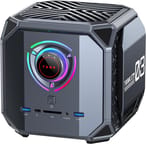
The M1A Pro AI measures roughly 6.56 x 6.57 x 6.33 inches. Cooling the discrete Arc A770 alongside a 45W-class mobile i9 takes room, and ACEMAGIC uses a top-mounted X-pattern ventilation grille, side mesh intakes, and what it markets as three independent cooling systems. The gunmetal chassis has an aggressive, armored look with a circular control dial on the front face ringed by RGB lighting. That dial switches between Silent, Balanced, and Beast power modes, so you can hold noise down for desk work or unlock the full power envelope for a render.
The Intel Core i9-13900HK is a Raptor Lake mobile chip with 6 performance cores, 8 efficiency cores, 20 threads, and boost clocks up to 5.4GHz. Its PassMark CPU Mark of roughly 27,195 puts it in strong workstation territory for compiling, virtualization, and multi-app workloads. The discrete Intel Arc A770 is a desktop-class Alchemist GPU on an MXM module with 16GB of GDDR6 on a 256-bit bus, landing roughly in the same performance band as an NVIDIA RTX 4060. That combination covers 1080p gaming, GPU-accelerated video editing, AV1 hardware encoding, and local AI image or language models that will not fit in an integrated GPU’s shared memory. ACEMAGIC positions the Arc’s XMX AI engines for Stable Diffusion and inference work, though those are vendor claims rather than measured results, and the practical ceiling is set by the 54W CPU power limit and the compact chassis, which cap sustained CPU-plus-GPU load below what a full tower manages.
Wireless is WiFi 6E and Bluetooth 5.2, and wired networking is a single 2.5 Gigabit Ethernet port. The front panel carries two 10Gbps USB-A ports, a USB4 Type-C port with 40Gbps bandwidth, DisplayPort Alt Mode, and power delivery, plus an SD card reader and a 3.5mm audio jack. The rear adds one more 10Gbps USB-A port and three 5Gbps USB-A ports for peripherals. Three DisplayPort 1.4 connectors and one HDMI 2.0 handle video, each good for 4K at 60Hz, and together they drive up to four simultaneous displays before you use the USB4 port’s display capability. Storage and memory both stay user-serviceable, with two DDR5-5200 SO-DIMM slots and two M.2 2280 PCIe 4.0 NVMe slots inside.
Reviewer Insights

No independent hands-on review of the Intel Core i9-13900HK paired with the discrete Intel Arc A770 has been published, so this page reports specifications rather than measured benchmarks. TechPowerUp reviewed an ACEMAGIC “Tank M1A Pro+”, but that unit uses the AMD Ryzen AI Max+ 395 with Radeon 8060S integrated graphics and 128GB of soldered memory, a different and more expensive machine, so its numbers do not describe this Arc A770 box.
The i9-13900HK is a proven 2023-era part that remains fast for productivity, and the Arc A770 is a discrete GPU with a large VRAM pool, so the M1A Pro AI should behave like a compact system with midrange-desktop graphics and strong multi-core CPU performance. Intel’s Arc drivers have improved a great deal but can still stumble on some older DirectX titles and niche creative apps. The 54W CPU envelope in a small chassis also means sustained all-core work will throttle sooner than it would in a tower.
Buy it for Arc-friendly creative work, not for NVIDIA-locked apps
The ACEMAGIC M1A Pro AI suits someone who wants desktop-class graphics and a high-core-count CPU in a box that fits on a desk instead of under one. The 16GB Arc A770 opens up GPU-accelerated video work, AV1 encoding, 1080p gaming, and local AI experiments that an integrated-graphics mini PC cannot run, and the upgradeable DDR5 and dual M.2 slots mean you are not locked into the shipping configuration. USB4, quad-display output, WiFi 6E, and 2.5GbE round it out as a creator and small-office workstation.
Workloads that live entirely in DirectX gaming or NVIDIA-optimized apps run better on the RTX-5060 version of this same chassis or a small-tower gaming PC, because the Arc GPU’s driver history still counts against it there. Buyers who need the latest CPU efficiency and an on-package NPU for local AI features should note that the 13th-gen i9 is a couple of generations old, and anyone wanting a tiny, silent mini PC will find this armored cube larger and louder under load.
For those comparing options, see Starry Hope’s Mini PC Comparison Chart to weigh the M1A Pro AI against other compact systems.
Frequently Asked Questions
What processor and graphics does the ACEMAGIC M1A Pro AI use?
The M1A Pro AI pairs the Intel Core i9-13900HK, a 14-core (6 performance plus 8 efficiency), 20-thread mobile processor that boosts to 5.4GHz and scores roughly 27,195 on PassMark’s CPU benchmark, with a discrete Intel Arc A770 graphics card carrying 16GB of GDDR6 on a 256-bit bus. That discrete GPU sits in the mid-range band and is what enables GPU compute, video editing, and gaming on this box.
Can I upgrade the RAM and storage in the ACEMAGIC M1A Pro AI?
Yes. Memory uses two DDR5-5200 SO-DIMM slots in dual-channel mode, and the listed configuration ships with 32GB. Storage runs through two M.2 2280 PCIe 4.0 NVMe slots, one of which holds the included 1TB SSD, so you can add a second drive without removing the first.
How many displays can the ACEMAGIC M1A Pro AI drive?
The rear provides three DisplayPort 1.4 outputs and one HDMI 2.0 port, each capable of 4K at 60Hz, for up to four simultaneous displays. The front USB4 Type-C port also supports DisplayPort Alt Mode, giving you an additional video path when needed.
What ports does the ACEMAGIC M1A Pro AI have?
The front panel includes two 10Gbps USB-A ports, one USB4 Type-C port (40Gbps with DisplayPort Alt Mode and power delivery), an SD card reader, and a 3.5mm audio jack. The rear adds one 10Gbps USB-A port, three 5Gbps USB-A ports, three DisplayPort 1.4 outputs, one HDMI 2.0 port, and a 2.5 Gigabit Ethernet jack. Wireless is WiFi 6E and Bluetooth 5.2.
Is the ACEMAGIC M1A Pro AI good for gaming?
The discrete Arc A770 with 16GB of VRAM handles 1080p gaming comfortably and many titles at 1440p, beyond what an integrated-graphics mini PC manages. Intel’s Arc drivers have improved considerably but can still be inconsistent with some older DirectX 9 to 11 games, so newer titles generally run better than legacy ones.
What are the performance modes on the ACEMAGIC M1A Pro AI?
A dial on the front face switches between three power profiles: Silent mode limits temperature and fan noise, Balanced mode targets everyday use, and Beast mode unlocks the full power envelope for demanding, sustained workloads. The trade-off is noise, since Beast mode drives the fans harder to keep the CPU and GPU fed.
What operating system and warranty does the ACEMAGIC M1A Pro AI come with?
The M1A Pro AI ships with Windows 11 Pro pre-installed and carries a 2-year manufacturer warranty. The box includes the mini PC, a power adapter, an HDMI cable, and a user manual.