
GEEKOM GT1 Mega
Updated on

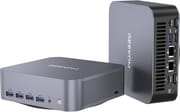
The GEEKOM GT1 Mega builds a compact desktop around Intel’s Core Ultra 9 185H, a 16-core, 22-thread chip with Intel Arc graphics. The I/O runs deep for a 5.3 by 5.2 inch box: eight USB ports including dual USB4, two 2.5GbE network jacks, dual HDMI, an SD card reader, and Wi-Fi 7. It ships with DDR5 (expandable to 64GB) and two M.2 slots, and the box includes a VESA mount. GEEKOM also sells the same machine as the GT13 Max, a Core Ultra 9 185H build with 16GB of DDR5 and a 1TB SSD; the chassis, ports, and radios match the GT1 Mega.
Reviewers ran it through video editing, multi-monitor work, and 1080p gaming, and the frame rates held up in lighter titles. The cooler gets loud in performance mode, CPU temperatures climb under sustained load, and Intel’s Arc iGPU trails AMD’s Radeon 780M/890M in some titles, so this is not a machine for high-frame-rate AAA gaming.
| Pros | Cons |
|---|---|
| 16-core Core Ultra 9 185H handles video editing and heavy multitasking | Fan gets loud in performance mode (reviewers measured 52-54 dBA) |
| Eight USB ports, dual USB4, and dual 2.5GbE in a 1.5 pound chassis | CPU runs hot under sustained load (80-101C across reviews) |
| DDR5 expandable to 64GB; two M.2 slots | Arc iGPU trails AMD’s Radeon for gaming in several titles |
| Full-size SD card reader and VESA mount in the box | Internal upgrades require disassembly |
| Wi-Fi 7 and Bluetooth 5.4 | Owners report Wi-Fi speeds below Wi-Fi 7’s potential |
| Drives up to four displays via dual HDMI and dual USB4 | Priced at the high end of its class |
Related Videos
GEEKOM GT1 Mega Comparison Chart
4 configurations
| Configuration | Processor | RAM | Storage | Performance | List price | Amazon price | Compare |
|---|---|---|---|---|---|---|---|
| 32GB/1TB/Intel Core Ultra 7 155H | Core Ultra 7 155H | 32 GB | 1 TB | 5.6 | $799.00 | Details
| |
| 32GB/2TB/Intel Core Ultra 9 185H | Core Ultra 9 185H | 32 GB | 2 TB | 5.9 | $1179.00 | Details
| |
| 32GB/1TB/Intel Core Ultra 9 185H | Core Ultra 9 185H | 32 GB | 1 TB | 5.9 | $1199.00 | Loading... | Details
|
| 16GB/1TB/Intel Core Ultra 9 185H (GT13 Max) | Core Ultra 9 185H | 16 GB | 1 TB | 5.5 | $849.00 | Loading... | Details
|
Specs shared by every configuration
| Operating System | Windows 11 Pro |
|---|---|
| GPU | Integrated Intel Arc graphics |
| Dimensions width x length x thickness | 5.32 x 5.2 x 1.63 inches (135.13 x 132.08 x 41.4 mm) |
| Weight | 1.5 lbs (0.68 kg) |
| WiFi | Wi-Fi 7 (802.11be) |
| Bluetooth | Bluetooth 5.4 |
| Ethernet | 2 Ethernet ports at 2.5 Gbps |
| HDMI | 2 Full-Size HDMI Ports |
| DisplayPort | No DisplayPort |
| VGA | No VGA Ports |
| USB Ports | 1 USB 2.0, 5 USB 3, 2 USB-C (2 USB4) (DisplayPort over USB-C 4.0) |
| Thunderbolt Ports | 2 |
| OCuLink | No |
| Internal SATA Ports | No SATA ports |
| Card Reader | SD Card Reader |
| Headphone Jack | combo |
| Fanless | No |
| VESA Mount | Yes |
| In the Box | 1 x GT1 MEGA Mini PC, 1 x HDMI Cable, 1 x Power Adapter, 1 x VESA Mount, 1 x User Guide, 1 x Thank You Card |
| Expandability | RAM expandable up to 64GB, storage expandable with M.2 2280 PCIe Gen 4 x4 SSD (up to 2TB) and M.2 2242 SATA SSD (up to 1TB). |
Related Mini PCs
-
 GEEKOM GT15 Max AIThe GEEKOM GT15 Max AI puts an Intel Core Ultra 9 285H (99 TOPS across CPU, GPU, and NPU) in a…
 -
 GEEKOM A7 MaxThe GEEKOM A7 Max pairs an AMD Ryzen 9 7940HS with dual USB4, dual 2.5GbE, one filled DDR5 slot…
 -
 ACEMAGIC M1 (Ryzen 7 7735HS)The 7735HS refresh of the ACEMAGIC M1 puts eight Zen 3+ cores, Radeon 680M graphics, and 24GB of…
 -
 ACEMAGIC M1The ACEMAGIC M1 is a 5-inch square Windows 11 Pro box sold in two very different Intel builds: a…
 -
 ACEMAGICIAN W1The ACEMAGICIAN W1 is a 5-inch mini PC built on the AMD Ryzen 7 H 255 with Radeon 780M graphics,…
 -
 Beelink SER9 MaxThe Beelink SER9 Max puts an AMD Ryzen 7 H 255 with Radeon 780M graphics, or a Zen 5 Ryzen AI 7 H…
Three BIOS power profiles set the ceiling
Cinebench R23 multi-core scores run from about 15,600 in the default profile (Robtech) up to roughly 18,800 to 19,100 in performance mode (Britec09 and Hubwood), because the BIOS exposes three power profiles that ETA Prime documented as Quiet at 35W, Normal at 45W, and Performance at 65W. Geekbench 6 multi-core lands between 12,400 and 14,200 across reviewers. That is enough for the Adobe and DaVinci Resolve work several reviewers put it to; Hubwood said it “could easily replace your desktop PC.”
Britec09 watched the CPU hit 94C in Cinebench with thermal-throttling and power-limit flags raised, and Robtech recorded a 101C peak; fan noise climbed to 52 to 54 dBA in performance mode (Hubwood, Robtech) against the low 40s in quieter profiles. Power draw sits near 9 to 15W at idle and 65 to 102W under load.
Graphics come from Intel’s integrated Arc GPU. At 1080p with upscaling, reviewers measured playable frame rates in lighter and well-optimized titles (Robtech: 134 FPS in Counter-Strike 2; Hubwood: 61 FPS in Cyberpunk 2077 with XeSS; ETA Prime: 62 FPS in Shadow of the Tomb Raider), but demanding games fall off fast (Robtech logged 23 FPS in God of War Ragnarok). Storage runs through two M.2 slots; Britec09 measured the bundled 2TB Gen4 SSD at around 5,045 MB/s reads.
What reviewers found
Robtech
Robtech focused on the I/O, counting eight USB ports and calling that “a new record for a mini this size,” alongside the dual 2.5GbE jacks and SD reader. He logged 15,644 in Cinebench R23 multi-core (17,890 in performance mode) and 134 FPS in Counter-Strike 2 at 1080p, and concluded the GT1 Mega “makes a very good video editing workstation.” His complaints were the loud fan in performance mode, a 101C CPU peak, and glued-on rubber feet that make the case awkward to open.
ETA Prime
ETA Prime walked through GEEKOM’s three power profiles (35W quiet, 45W normal, 65W performance) and measured 12,862 in Geekbench 6 multi-core and 3,925 in 3DMark Time Spy. In gaming he saw roughly 62 FPS in Shadow of the Tomb Raider and about 70 FPS in Spider-Man Remastered, both at 1080p medium with upscaling. His verdict: “the GT1 Mega is a great performer, but it’s definitely expensive,” adding that “GEEKOM has really stepped up their game when it comes to designing these mini PCs.”
Joe Ritter
Joe Ritter called the GT1 Mega “a really powerful little beast” and “a connectivity monster,” crediting the dual USB4, dual 2.5GbE, dual HDMI, and four-display support. In 1080p gaming he measured GTA V running above 60 FPS and Doom Eternal in the 50 to 60 FPS range. His overall verdict was that “the GEEKOM GT1 Mega is a fantastic solution” for anyone who wants a compact, high-performance Windows PC.
Hubwood
Hubwood ran the deepest benchmark suite: 19,120 in Cinebench R23 multi-core, 14,157 in Geekbench 6 multi-core, and 4,016 in 3DMark Time Spy, with 1080p game results like 137 FPS in Counter-Strike 2 and 61 FPS in Cyberpunk 2077 using upscaling. He praised the “superb build quality, a good cooling system, a vast variety of ports” and said it “could easily replace your desktop PC,” while measuring 84C and 52 dBA in performance mode versus 80C and 41 dBA in quiet mode. On gaming he was even-handed: “most certainly not a gaming machine per se, but some casual or even triple-A gaming is absolutely possible.”
TechHut
TechHut called it “a crazy performant machine” and “probably one of the better gaming machines for a mini PC” he had used, measuring 13,537 in Geekbench 6 multi-core and 112 FPS in Fortnite at 1080p low. His gripes were practical: the chassis is hard to open (the rubber foot pads have to be peeled off), he saw minor display artifacts on multi-monitor setups, and complex DaVinci Resolve Fusion effects caused stuttering.
Britec09
Britec09 confirmed the workstation numbers (18,809 in Cinebench R23 multi-core, the bundled 2TB Gen4 SSD reading around 5,045 MB/s) but ran into the thermal ceiling, watching the CPU hit 94C with throttling and power-limit flags during Cinebench. He also hit a build problem: the internal Wi-Fi cable, he said, “is very tight and very small,” and it snapped as he pulled it during disassembly. On gaming he cautioned that “if you’re pushing that mini PC to play AAA listed games you may be a bit disappointed.”
Customer Reviews
The most common thread in the GT1 Mega’s Amazon reviews, positive and negative alike, is setup friction and how GEEKOM’s support handled it. Several verified buyers hit a wall during the first-time Windows or Linux install. A verified buyer, K. Wallace, who installed an extra SSD and dual-booted Ubuntu, wrote that “Geekom email support was quick and helpful, responding with good advice in a day or so” and that the unit “blows my old NUC out of the water.” Verified buyer Paul B. titled his review “Update customer service contacted me and was very helpful,” after support eventually followed up on a first-install file error. On performance, owners are largely satisfied: verified buyer Mark, on his second GEEKOM mini PC, runs dual monitors over a USB-C dock “without a hitch,” though he flags that “While it has Wifi 7 the speeds aren’t where they should be.”
One verified buyer (“Amazon Customer”) could not get past setting a PIN during initialization, said a follow-up support call “went ignored,” and returned the unit for an HP mini PC; that reviewer later updated to credit GEEKOM with “EXCELLENT customer service” and a portable-monitor offer. A verified buyer in Japan left a 1-star review reporting an intermittent power problem traced to a poor power-connector contact, and returned the unit. Read more owner reviews on Amazon.
Best fit is content work on a crowded desk
Video editors who can use the SD reader and USB4, anyone keeping two networks separate on the dual 2.5GbE ports, and desks that fill all four display outputs get the most out of it. The 2TB Gen4 SSD in the top build and the second M.2 2242 bay give a working editor room before an external drive is needed.
Look elsewhere for high-frame-rate AAA gaming, for a machine that stays quiet at full tilt, or for the cheapest box in the category. To weigh it against other models, use Starry Hope’s Mini PC Comparison Tool.
Frequently Asked Questions
Can I upgrade the RAM and storage on the GEEKOM GT1 Mega?
DDR5 memory goes up to 64GB, and storage uses one M.2 2280 PCIe Gen 4 slot (up to 2TB) plus a second M.2 2242 slot for a SATA SSD (up to 1TB). Opening the case means peeling off the rubber foot pads first, which reviewers found fiddly.
Does the GT1 Mega support multiple monitors?
Up to four at once, through the dual HDMI 2.0 ports and the dual USB4 ports, which carry DisplayPort output.
Is the GT1 Mega suitable for gaming?
For light and well-optimized games, yes. With the integrated Intel Arc GPU and 1080p upscaling, reviewers measured playable frame rates in titles like Counter-Strike 2, Fortnite, and GTA V. It is not built for high-end AAA gaming; demanding titles drop off without lowered settings.
How noisy is the GT1 Mega during operation?
Reviewers measured around 52 to 54 dBA in the 65W performance BIOS profile, versus the low 40s in the quieter 35W profile, so the power mode you pick decides how much you hear it.
What connectivity options does the GT1 Mega offer?
Eight USB ports in total (five USB-A at USB 3.2, one USB 2.0, and two USB4 Type-C at 40Gbps), dual 2.5Gb Ethernet, Wi-Fi 7, Bluetooth 5.4, dual HDMI 2.0, and a full-size SD card reader.
Can the GT1 Mega be mounted behind a monitor?
Yes. A VESA mount is included in the box.
Is the GEEKOM GT13 Max the same as the GT1 Mega?
Yes. GEEKOM sells the GT13 Max as a Core Ultra 9 185H configuration with 16GB of DDR5 and a 1TB SSD in the same chassis, with the same dual USB4, dual HDMI 2.0, dual 2.5GbE, SD reader, and Wi-Fi 7. Display output for up to four screens runs through the two HDMI and two USB4 ports; GEEKOM’s port list shows no separate DisplayPort jack.
Does the GT1 Mega come with an operating system pre-installed?
Yes, Windows 11 Pro ships on it.
How much power does the GT1 Mega use?
At idle it draws roughly 10 to 15 watts. Under gaming or heavy load it pulls about 65 to 80 watts, with brief peaks above 100 watts in the performance profile.