
GMKtec K10
Updated on

The GMKtec K10 runs a 13th Gen Intel Core i9-13900HK, a 14-core, 20-thread chip that reaches 5.4GHz. That places it closer to a workstation than to a casual desktop replacement. It ships with 32GB of DDR5 and three M.2 NVMe slots, which makes it appealing to content creators, developers, and other people who work with large files. Prices start around $600, and the footprint is small enough to mount behind a monitor.
Pros and cons
| Pros | Cons |
|---|---|
| Powerful 14-core Intel Core i9-13900HK processor with 5.4GHz turbo | Integrated Iris Xe GPU unsuitable for modern gaming |
| Three M.2 NVMe slots supporting up to 24TB total storage | No USB-C Power Delivery |
| Tool-less access for easy RAM and storage upgrades | No OCuLink or Thunderbolt for an external GPU |
| Supports up to 96GB DDR5 RAM for demanding workloads | Footprint of 7.4 x 7 x 1.5 inches needs desk or VESA space |
| Quiet operation at 30dB idle, 39dB under load | SSD lacks thermal pad (can reach 79C under heavy use) |
| Extensive port selection with 8 USB ports and COM port | No USB4 support |
Related Videos
GMKtec K10 Comparison Chart
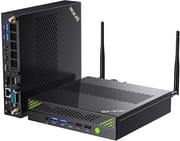 GMKtec K10 | GMKtec K10 | |
| Price | List Price: $599.99 Amazon Prices: | List Price: $659.99 Amazon Prices: |
| Version | --- | --- |
| Performance Rating | 5.7 | 5.7 |
| Operating System | Windows 11 Pro | Windows 11 Pro |
| Processor | Fourteen-core 2.60 Ghz (max 5.40 Ghz) Intel Core i9-13900HK | Fourteen-core 2.60 Ghz (max 5.40 Ghz) Intel Core i9-13900HK |
| GPU | Integrated Intel Iris Xe Graphics | Integrated Intel Iris Xe Graphics |
| RAM | 32 GB DDR5 | 32 GB DDR5 |
| Internal Storage | 1 TB | 2 TB |
| Dimensions width x length x thickness | 7.42 x 7.01 x 1.53 inches (188.47 x 178.05 x 38.86 mm) | 7.42 x 7.01 x 1.53 inches (188.47 x 178.05 x 38.86 mm) |
| Weight | 2.35 lbs (1.07 kg) | 2.35 lbs (1.07 kg) |
| WiFi | Wi-Fi 6 (802.11ax) | Wi-Fi 6 (802.11ax) |
| Bluetooth | Bluetooth 5.2 | Bluetooth 5.2 |
| Ethernet | 1 Ethernet port at 2.5 Gbps | 1 Ethernet port at 2.5 Gbps |
| HDMI | 2 Full-Size HDMI Ports | 2 Full-Size HDMI Ports |
| DisplayPort | 1 DisplayPort (1.4 (8K @ 60Hz)) | 1 DisplayPort (1.4 (8K @ 60Hz)) |
| VGA | No VGA Ports | No VGA Ports |
| USB Ports | 4 USB 2.0, 4 USB 3, 1 USB-C USB-C supports DP Alt Mode (no PD) | 4 USB 2.0, 4 USB 3, 1 USB-C USB-C supports DP Alt Mode (no PD) |
| Thunderbolt Ports | No | No |
| OCuLink | No | No |
| Internal SATA Ports | No SATA ports | No SATA ports |
| Card Reader | No Card Reader | No Card Reader |
| Headphone Jack | 3.5mm combo | 3.5mm combo |
| Fanless | No | No |
| VESA Mount | Yes | Yes |
| In the Box | -- | -- |
| Expandability | -- | -- |
Related Mini PCs
-
 GMKtec K12The GMKtec K12 is a 1.5-liter mini PC with an AMD Ryzen 7 H 255 (Radeon 780M graphics), three M.2…
 -
 GEEKOM AX8 MaxThe GEEKOM AX8 Max pairs AMD's Ryzen 7 8745HS and Radeon 780M graphics with an aluminum chassis,…
 -
 GMKtec Nucbox K8 PLUSThe GMKtec NucBox K8 Plus runs an AMD Ryzen 7 8845HS with Radeon 780M graphics, dual DDR5 slots (up…
 -
 HP Pro Mini 400 G9The HP Pro Mini 400 G9 is a one-liter business desktop with a 14th Gen Intel Core i5-14500T, two…
 -
 GEEKOM GT1 MegaThe GEEKOM GT1 Mega pairs Intel's 16-core Core Ultra 9 185H and Arc graphics with up to 64GB of…
 -
 ACEMAGIC M1 (Ryzen 7 7735HS)The 7735HS refresh of the ACEMAGIC M1 puts eight Zen 3+ cores, Radeon 680M graphics, and 24GB of…
Three M.2 slots and a COM port in a 7.4-inch shell
A metal chassis wraps the whole machine at 188.6 x 178 x 38.9mm (roughly 7.4 x 7 x 1.5 inches) and just over a kilogram, and the bundled VESA bracket mounts it behind a monitor. The front panel carries USB ports and the audio jack for easy access; the rear hosts dual HDMI 2.0 ports, DisplayPort 1.4 capable of 8K output, 2.5 Gigabit Ethernet, and the external WiFi antenna connections. The COM port on the back handles serial equipment for industrial and embedded work, which would otherwise need a USB adapter.
The Intel Core i9-13900HK carries a PassMark CPU Mark around 27,000. ETA PRIME’s testing covered video editing in DaVinci Resolve and audio latency. Cooling comes from dual fans in a turbofan layout, measured at around 30dB at idle and climbing to 39 to 43dB under sustained load. The SSD can reach 79C during extended operations, because GMKtec did not fit a thermal pad on the drive slot.
WiFi 6 comes from an Intel AX201 module with external antennas, and the 2.5G Ethernet port carries network-intensive tasks. Two of the three M.2 slots run at PCIe Gen 4 x4 and the third at Gen 3 x3, which theoretically allows up to 24TB of NVMe storage. The dual-channel DDR5 memory runs at 5200MHz and can go to 96GB, though the 32GB it ships with should satisfy most workloads. Windows 11 arrives as a clean installation, free of bloatware.
Reviewer Insights
ETA PRIME on where the Iris Xe graphics run out
In ETA PRIME’s run, the Core i9-13900HK delivered on the CPU side while the Iris Xe integrated graphics showed their limitations in demanding games: “Still a good performer on the CPU side, but the Iris XE integrated graphics, not so much.” The benchmarks demonstrated strong Cinebench and Geekbench scores, placing the K10 solidly in workstation territory. He also ran audio-latency and video-editing tests, and he concluded that the K10 represents “a pretty impressive mini PC” for users focused on CPU-intensive tasks rather than gaming.
Last Rax rates it a fit for home labs and media centers
The tool-less access panel was the first thing Last Rax covered, commenting that “the top cover is also really easy to remove with a single thumb screw securing it.” Thermal testing in the same video showed the system maintaining reasonable temperatures with measured fan noise at 30dB idle and 39dB under full load, and the clean Windows installation and the I/O got a mention as selling points. The final assessment praised the K10 as “good value if you’re looking for a powerful, quiet, and compact system” that would fit well in a home lab or serve as a capable media center.
TechRadar rated it 4.25 out of 5 for workplace use
TechRadar’s Alastair Jennings scored it 4.25 out of 5 and noted that “as a powerful workplace mini PC, there’s a lot to like about the GMKtec NucBox K10,” highlighting its suitability for office tasks and multimedia work. The review praised the tool-less upgradability, quiet operation, and extensive storage expansion options while acknowledging limitations like the lack of USB-C Power Delivery and the weaker integrated graphics.
Customer Reviews
Across 427 ratings on Amazon, the GMKtec K10 averages 4.5 stars, with 81% of buyers leaving five stars and a smaller tail of roughly 9% sitting at one or two stars. The strongest praise comes from owners running the Core i9-13900HK configuration for everyday and light creative work. Vince, a verified buyer, wrote that his “new GMK Core i9-13900HK (NucBox_K10) has put a smile on my face,” noting it replaced an aging machine for “research, email, entertainment, surfing, and some gaming” and came preloaded with Windows 11 Pro.
The complaints are about after-sale support rather than the hardware. Erin T., a verified buyer who bought the i9 32GB/1TB model, summed it up bluntly in a four-star review titled “I9, 32/1TB, Sweet PC, Performs well. Support is non-existent.” She wrote that the “Device works exceptionally well, support is non-existent,” describing a failed attempt to swap the NVMe drive because “their website instructions and files didn’t work” and the support line went unanswered. Read more owner reviews on Amazon.
A quiet i9 desktop for CPU-bound work
Content creation, software development, home lab experimentation, and general productivity all sit inside what the Core i9-13900HK can handle. The COM port and the headroom for 96GB of memory suit professional and enthusiast setups that need serial hardware or large in-memory workloads, and the storage expansion covers the rest.
The Iris Xe graphics cannot handle modern AAA titles, and the lack of USB4, Oculink, or Thunderbolt means there is no path to adding external graphics acceleration later. Buyers who want workstation-class CPU performance and gaming capability should consider the GMKtec K12, which offers an OCuLink port for external GPU connectivity. For CPU performance and quiet operation in the $600-700 price range, this one earns its keep. Starry Hope’s Mini PC Comparison Chart lines it up against other models.
Frequently Asked Questions
Can the GMKtec K10 be used for gaming?
The Intel Iris Xe integrated graphics can handle older titles and esports games at lower settings, but they cannot run modern AAA games like Cyberpunk 2077 at playable framerates. For gaming, consider GMKtec’s newer models like the NucBox K11 which features an AMD Radeon 780M GPU.
How much RAM can the GMKtec K10 support?
Up to 96GB of DDR5 across two SO-DIMM slots. It ships with 32GB of DDR5-5200 dual-channel memory, and the tool-less access panel makes the upgrade straightforward.
What storage expansion options does the K10 offer?
Three M.2 2280 NVMe slots, two of them at PCIe Gen 4 x4 and the third at Gen 3 x3, for up to 24TB of total NVMe storage. The included SSD (1TB or 2TB depending on configuration) occupies one slot, leaving two available for expansion.
How loud is the GMKtec K10 during operation?
Measured noise sits at approximately 30dB at idle, which is barely audible in a typical room environment. Under full CPU load it climbs to 39-43dB. The dual-fan cooling system with turbofan design balances thermal management with acoustic comfort.
Does the GMKtec K10 support multiple monitors?
Yes, up to four displays simultaneously using the dual HDMI 2.0 ports (4K @ 60Hz), DisplayPort 1.4 (8K @ 60Hz), and USB-C with DisplayPort Alt Mode. That covers multi-monitor productivity setups and ultrawide displays.
What is the purpose of the COM port on the K10?
The RS-232 COM port enables connectivity with industrial equipment, laboratory instruments, embedded systems, and legacy hardware that still relies on serial communication. That suits industrial automation, data acquisition systems, and IoT development work, which would otherwise need an external USB adapter.
Is the GMKtec K10 suitable for video editing?
Yes. ETA PRIME’s testing covered DaVinci Resolve editing and color grading, and the 14-core i9-13900HK handles encoding and rendering efficiently. Support for up to 96GB of RAM allows for complex projects with multiple 4K timelines, and audio latency tests also passed.