
BMAX B10 Power
Published on

The BMAX B10 Power is a palm-sized Windows desktop for programming, office work, and multi-monitor setups, built around a 14-core Intel Core i9-13905H. It weighs under a pound and fits in a 4.4 x 5 inch footprint.
Pros and Cons
| Pros | Cons |
|---|---|
| 14-core, 20-thread Core i9-13905H boosts to 5.4GHz | 24GB of LPDDR5 is soldered and cannot be upgraded |
| Second M.2 2280 NVMe slot is free for more storage | Gigabit Ethernet only, no 2.5GbE |
| Three display outputs: HDMI 2.1, DisplayPort 1.4, USB-C | No USB4 or Thunderbolt port, even though the chip supports Thunderbolt 4 |
| Under a pound, with a mounting bracket in the box | Iris Xe graphics date to 2020 and trail Radeon 780M class iGPUs in games |
| One-key Windows recovery built in | Two of the four USB-A ports are USB 2.0 |
| BMAX holds the processor at about 40 watts, well under the chip’s 115W turbo ceiling |
BMAX B10 Power Comparison Chart
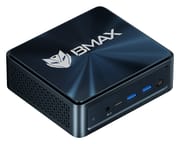 BMAX B10 Power | |
| Price | List Price: $699.99 Amazon Prices: Loading prices... |
| Version | 24GB/1TB/Core i9-13905H |
| Performance Rating | 5.7 |
| Operating System | Windows 11 Pro |
| Processor | Fourteen-core Intel Core i9-13905H |
| GPU | Integrated Intel Iris Xe Graphics |
| RAM | 24 GB LPDDR5, 2-channel (LPDDR5-4400, soldered) |
| Internal Storage | 1 TB NVMe SSD |
| Dimensions width x length x thickness | 4.41 x 4.96 x 2.05 inches (112.01 x 125.98 x 52.07 mm) |
| Weight | 0.86 lbs (0.39 kg) |
| WiFi | Wi-Fi 6 (802.11ax) |
| Bluetooth | Bluetooth 5.3 |
| Ethernet | 1 Ethernet port at 1 Gbps |
| HDMI | 1 Full-Size HDMI Port |
| DisplayPort | 1 DisplayPort (DisplayPort 1.4) |
| VGA | No VGA Ports |
| USB Ports | 2 USB 2.0, 2 USB 3, 1 USB-C Front: 2x USB-A 3.2, full-function USB-C. Rear: 2x USB-A 2.0 |
| Thunderbolt Ports | No |
| OCuLink | No |
| Internal SATA Ports | No SATA ports |
| Card Reader | No Card Reader |
| Headphone Jack | combo |
| Fanless | No |
| VESA Mount | No |
| In the Box | Mini PC, power adapter, 1.5m HDMI cable, metal mounting bracket, user manual |
| Expandability | RAM: 24GB LPDDR5-4400 soldered (not upgradeable). Storage: second M.2 2280 NVMe slot free |
Related Mini PCs
-
 BMAX B8A ProA small AMD desktop on the Ryzen 7 8745HS for office work and light gaming, with DDR5 in two…
 -
 BOSGAME P3 ProThe fastest chip in BOSGAME's P3 family, an eight-core Ryzen 9 7940HS with Radeon 780M graphics, in…
 -
 ACEMAGICIAN AD08 Mini PCThe ACEMAGICIAN AD08 is a compact mini PC sold with Intel Core i9-11900H, i9-12900H, or i7-11700B…
 -
 ACEMAGIC AM08 Pro Mini PCThe ACEMAGIC AM08 Pro packs a Ryzen 9 6900HX, Radeon 680M, and 32GB of DDR5 into a small upright…
 -
 Beelink EQR6The Beelink EQR6 is a quiet, compact mini PC sold in several AMD configs (Ryzen 9 6900HX down to…
 -
 Beelink EQR7The Beelink EQR7 pairs an AMD Ryzen 7 7735U with a built-in power supply, dual Gigabit Ethernet,…
Ports and networking

The front panel carries a clear-CMOS pinhole, a 3.5mm headset jack, the USB-C port, two USB-A 3.2 ports, and the power button. The back holds the DC input, DisplayPort, HDMI, two USB-A 2.0 ports, and the Ethernet jack. BMAX calls the USB-C port “full feature,” which on this machine means data plus video output.
Wireless is WiFi 6 with Bluetooth 5.3. The single RJ45 port runs at 1Gbps, so file copies to a 2.5GbE NAS top out near 115MB/s. Keep the keyboard and mouse on the rear USB 2.0 pair and use the front USB 3.2 ports for drives.
Fast 14-core CPU, older graphics, fixed 24GB memory

The Core i9-13905H is a 13th-gen Raptor Lake laptop chip that Intel launched in early 2023. It has 6 performance cores and 8 efficient cores (20 threads), boosts to 5.4GHz, and scores 29,709 in PassMark’s CPU Mark. That puts it level with the i9-13900H and close to 2024 chips such as the Ryzen AI 9 365 in multi-threaded work. Unlike Intel Core Ultra and AMD Ryzen AI chips, it has no NPU for on-device AI features. BMAX says its “Space Capsule” cooler, with dual copper heat pipes and a turbo fan, holds a steady 40W processor power limit.
Graphics come from Intel Iris Xe with 96 execution units at up to 1.5GHz, the same GPU design Intel first shipped in 2020.
Memory is 24GB of LPDDR5 at 4400MT/s on a 128-bit bus, about 70GB/s of bandwidth. The i9-13905H supports LPDDR5X-6400, so this memory runs below the chip’s rated speed. A lab of several virtual machines can outgrow 24GB, and local AI models need more memory and more bandwidth than this box has. The 1TB NVMe SSD sits in one of two M.2 2280 PCIe 4.0 x4 slots.
Choosing between the B10 Power and the MINISFORUM NAB9S
The MINISFORUM NAB9S runs a Core i9-13900HK, another 14-core, 20-thread 13th-gen chip with the same Iris Xe graphics. Its memory goes in two DDR4 SO-DIMM slots that Minisforum rates at 32GB, so it can be replaced later. It also has two 2.5GbE ports and Wi-Fi 6E. The 32GB/1TB version lists at $775, against $699.99 for the B10 Power.
Our verdict
The B10 Power suits programming, office work, heavy browser use, and three-screen desks. Its Core i9-13905H scores 29,709 in PassMark, level with the i9-13900H, and HDMI 2.1, DisplayPort 1.4, and USB-C drive three displays at 4K 60Hz. The free second M.2 slot leaves room for more storage, and the whole box weighs under a pound with a mounting bracket included.
Skip it if you expect to need more than 24GB for virtual machines or local AI, since the memory is soldered, or if your network runs at 2.5GbE. The NAB9S covers both with SO-DIMM slots and two 2.5GbE ports. For games, the Iris Xe graphics trail Radeon 780M machines such as the Beelink SER8. The Mini PC Comparison Chart lists more options.
Frequently Asked Questions
Can I upgrade the RAM in the BMAX B10 Power?
The 24GB of LPDDR5-4400 is soldered to the motherboard, so it cannot be upgraded. If you expect to need more, choose a mini PC with SO-DIMM slots.
Can I add a second SSD to the BMAX B10 Power?
Yes, in the free second M.2 2280 slot, which takes a PCIe 4.0 x4 NVMe drive. There is no 2.5-inch SATA bay.
How many monitors does the BMAX B10 Power support?
It supports three displays through HDMI 2.1, DisplayPort 1.4, and the USB-C port, and BMAX rates triple 4K output at 60Hz.
Does the BMAX B10 Power have Thunderbolt or USB4?
No. Intel rates the i9-13905H for Thunderbolt 4, but BMAX does not list USB4 or Thunderbolt for the USB-C port. An external GPU enclosure that needs Thunderbolt will not run at full speed, if at all.
Is the BMAX B10 Power good for gaming?
Only lighter games. BMAX lists online gaming among the uses for its Iris Xe graphics but gives no resolution or settings for it. Iris Xe scores well below Radeon 780M class graphics in PassMark’s G3D test, and this box has no slot for a graphics card.
Can the BMAX B10 Power run Linux?
BMAX ships it with Windows 11 Pro and says it is compatible with Ubuntu Linux.
How do I reset Windows on the BMAX B10 Power?
BMAX builds in a one-key recovery system that restores Windows to factory settings without a USB drive.