
FREAPP M6GE
Updated on

Note: This product has been discontinued and is no longer available for purchase new.
The FREAPP M6GE was a compact desktop computer running Windows 11 Pro, powered by the Intel Celeron N5095 processor with four cores reaching up to 2.9GHz. It shipped with 16GB of DDR4 RAM and a 512GB M.2 SATA SSD in a chassis under four inches square. Two USB Type-C ports sit on the case, one of them limited to power delivery, which is two more than the Beelink Mini S carries on the same processor.
| Pros | Cons |
|---|---|
| 16GB DDR4 RAM included | Few independent reviews of this model |
| Two USB-C ports (one data, one power) | No VESA mount for behind-monitor placement |
| Compact 3.94” x 3.94” footprint | Only Wi-Fi 5 and Bluetooth 4.2 |
| NVMe expansion slot for additional storage | Single HDMI output limits display options |
| Windows 11 Pro pre-installed | No 2.5” drive bay for additional storage |
| Actively cooled for sustained performance | Second USB-C port is power delivery only |
FREAPP M6GE Comparison Chart
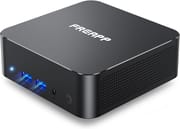 FREAPP M6GE | |
| Price | List Price: $159.99 Amazon Prices: |
| Version | 16GB/512GB/Intel N5095 |
| Performance Rating | 4.8 |
| Operating System | Windows 11 Pro |
| Processor | Quad-core 2.00 Ghz (max 2.90 Ghz) Intel Celeron Processor N5095 |
| GPU | Integrated Intel UHD Graphics |
| RAM | 16 GB |
| Internal Storage | 512 GB |
| Dimensions width x length x thickness | 3.94 x 3.94 x 0.98 inches (100.08 x 100.08 x 24.89 mm) |
| Weight | 0.76 lbs (0.35 kg) |
| WiFi | Wi-Fi 5 (802.11ac) |
| Bluetooth | Bluetooth 4.2 |
| Ethernet | 1 Ethernet port at 1 Gbps |
| HDMI | 1 Full-Size HDMI Port |
| DisplayPort | No DisplayPort |
| VGA | No VGA Ports |
| USB Ports | 2 USB 2.0, 2 USB 3, 2 USB-C (1 full featured USB-C and one USB-C power only) |
| Thunderbolt Ports | No |
| OCuLink | No |
| Internal SATA Ports | No SATA ports |
| Card Reader | No Card Reader |
| Headphone Jack | combo |
| Fanless | No |
| VESA Mount | No |
| In the Box | -- |
| Expandability | Storage expandable up to 2TB with separate Nvme PCIE 3.0 SSD (not included) |
Related Mini PCs
-
 Beelink EQ14The Beelink EQ14 is a budget Intel N150 mini PC with 16GB of DDR4, two M.2 slots (up to 8TB), dual…
 -
 BOSGAME E2The BOSGAME E2 is a budget mini PC with an AMD Ryzen 5 3550H (Radeon Vega 8), 16GB of DDR4 (to…
 -
 CHUWI LarkBox X (2023)The CHUWI LarkBox X (2023) is an ultra-compact Intel N100 mini PC with 12GB of soldered LPDDR5, a…
 -
 HIGOLE GOLE 2 PROThe HIGOLE GOLE 2 PRO is a Celeron N5095 mini PC with a built-in 5.5-inch touchscreen and battery,…
 -
 ACEMAGIC S1 Mini PCThe ACEMAGIC S1 is a compact Intel N95 mini PC with 16GB of DDR4, dual M.2 slots, dual gigabit…
 -
 Beelink Mini S13A roughly $200 mini PC built around the Intel N150 with 16GB DDR4, dual M.2 PCIe 2280 slots, dual…
Celeron cores with 16GB of memory behind them
The Intel Celeron N5095 runs four cores at a 2.0GHz base clock with burst speeds to 2.9GHz, which covers web browsing, document editing, and media playback. Integrated Intel UHD Graphics drives 4K output at 60Hz, enough for a home theater setup or basic multimedia work on a large display.
The 16GB of DDR4 leaves room to run multiple applications simultaneously. A pre-installed 512GB M.2 2242 SATA SSD holds Windows and the usual desktop software, and a dedicated NVMe PCIe 3.0 slot takes a second drive of up to 2TB. That slot is the main way to grow storage after purchase.
The chassis measures 3.94 inches square and 0.98 inches thick, small enough to sit behind a keyboard or beside a television. There is no VESA mounting pattern and no internal bay for 2.5-inch drives, so placement depends on a flat surface. A fan handles cooling, which holds temperatures steady under sustained load at the cost of audible noise.
Ports built around a single HDMI output
Only one of the two USB Type-C ports carries data; the second handles power delivery. The split gives flexible power options and leaves one full-featured Type-C connection free, though buyers expecting two working data ports will find the second one closed off.
Two USB 3.0 ports, two USB 2.0 ports, and one HDMI output at 4K@60Hz handle wired peripherals and display. Wireless runs on dual-band Wi-Fi 5 across 2.4GHz and 5GHz with Bluetooth 4.2, both functional but a generation behind current parts. Gigabit Ethernet covers the cases where wireless throughput falls short.
HDMI is the only dedicated video output, and USB-C video output is not confirmed for this model, so it is best treated as a single-display machine. The similarly priced Beelink Mini S includes dual HDMI outputs, which makes a two-monitor setup simpler there.
Everyday desktop work and 4K media playback
Email, web browsing, and document work all run at a reasonable pace on this hardware, which makes home office duty the comfortable fit. The pre-installed Windows 11 Pro license brings BitLocker encryption, remote desktop, and domain join, which carries weight for small business deployments that need those features.
As a home theater PC the machine streams from major services and plays locally stored media at 4K resolution. Its small footprint allows discreet placement near a television, and the single HDMI output keeps the connection simple. Older titles and casual indie games are playable, while anything leaning on modern GPU acceleration is beyond the Intel UHD Graphics.
Server and storage projects run into the expansion limits. The NVMe slot tops out at 2TB, there is no 2.5-inch bay, and two USB 3.0 ports cap how many external drives can attach at full speed. Network-attached storage and home automation setups need more drive options than this chassis provides.
Best suited to buyers comfortable without vendor support
FREAPP is a small name in the mini PC market, and independent professional reviews of this model are scarce. That leaves the performance claims unverified by a third party and gives buyers no track record to judge long-term reliability against.
Warranty and customer support may not match what established manufacturers like Beelink, GEEKOM, or Intel provide. Buyers who can troubleshoot on their own get the specification for the money. Anyone who wants a support channel behind the purchase can look at the Beelink Mini S, which uses the identical processor with far wider review coverage and established support channels.
Frequently Asked Questions
What processor does the FREAPP M6GE use?
Four cores of the Intel Celeron N5095, running at a 2.0GHz base frequency and bursting to 2.9GHz.
Can I upgrade the RAM in the FREAPP M6GE?
It ships with 16GB DDR4 RAM. Upgrades depend on the internal configuration, which may use soldered memory given the compact form factor. Check the manufacturer specifications first if that matters to you.
Does the FREAPP M6GE support dual monitors?
Treat it as a single-display machine. Its single HDMI port is the only dedicated video output, the second USB-C port is reserved for power, and USB-C video output is not confirmed for this model.
Can I add more storage to the FREAPP M6GE?
Yes. There is a dedicated NVMe PCIe 3.0 slot supporting drives up to 2TB, though no 2.5-inch drive bay for SATA storage.
Is the FREAPP M6GE suitable for gaming?
Light gaming with older titles and casual indie games works. The Intel UHD Graphics in the N5095 is not suitable for modern AAA games or demanding 3D applications.
Does the FREAPP M6GE support 4K displays?
Yes. The HDMI port carries 4K output at 60Hz, so 4K televisions and monitors are supported.
What operating system comes with the FREAPP M6GE?
Windows 11 Pro comes pre-installed, with features such as BitLocker encryption, remote desktop, and domain join.
Can I mount the FREAPP M6GE behind a monitor?
Not without help. The chassis does not include VESA mounting holes, so a third-party adapter or mounting solution is required.
To explore and compare a more comprehensive range of Mini PCs to find the one that best fits your specific needs, be sure to use Starry Hope’s Mini PC Comparison Tool to find the Best Mini PC.