
GEEKOM XT13 Pro
Updated on

The GEEKOM XT13 Pro is a small metal-chassis mini PC built on Intel’s Core i9-13900H, a 14-core, 20-thread chip that boosts to 5.4 GHz. This page covers the i9 configuration; GEEKOM also sells the XT13 Pro with a Core i7-13620H (the variant below), and the older XT12 Pro and the IT13 / Mini IT13 are separate models. It pairs the CPU with DDR4 (upgradeable to 64GB), a PCIe Gen 4 NVMe SSD, and a SATA M.2 slot, and adds USB4, dual HDMI, and 2.5GbE in a VESA-mountable case.
It is built for CPU work: multitasking, video encoding, and home-server duty. The integrated Intel Iris Xe graphics are the weak point, handling only light or older games, and the two recurring complaints from reviewers are a CPU that hits 100C and throttles under sustained load and a DDR4 (rather than DDR5) memory choice at this price.
| Pros | Cons |
|---|---|
| 14-core Core i9-13900H, strong CPU performance for the size | CPU hits 100C and throttles under sustained load |
| Metal case with a VESA mount included | DDR4 memory, not DDR5 |
| Fast PCIe Gen 4 NVMe SSD (reviewers measured ~7,000 MB/s reads) | Bluetooth range is poor (reviewers saw under 2 meters) |
| Dual USB4 ports (Power Delivery, DisplayPort, eGPU-capable) | Fan gets loud in performance mode |
| DDR4 to 64GB, plus a second SATA M.2 slot | SD card slot is on the board but blocked by the chassis |
| Dual HDMI, 2.5GbE, Wi-Fi 6E | Iris Xe graphics are weak for gaming and GPU work |
| Genuine-brand SSD (Acer N7000) | Priced high for the spec |
Related Videos
GEEKOM XT13 Pro Comparison Chart
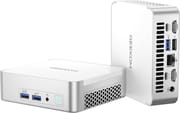 GEEKOM XT13 Pro | GEEKOM XT13 Pro | |
| Price | List Price: $679.00 Amazon Prices: | List Price: $949.00 Amazon Prices: Loading prices... |
| Version | 32GB/1TB/Intel i7-13620H | 32GB/2TB/Intel i9-13900H |
| Performance Rating | 8.6 | 9.4 |
| Operating System | Windows 11 Pro | Windows 11 Pro |
| Processor | Deca-core 3.60 Ghz (max 4.90 Ghz) Intel Core i7-13620H | Fourteen-core 4.10 Ghz (max 5.40 Ghz) Intel Core i9-13900H |
| GPU | Integrated Intel UHD Graphics | Integrated Intel Iris Xe Graphics |
| RAM | 32 GB | 32 GB |
| Internal Storage | 1 TB | 2 TB |
| Dimensions width x length x thickness | 4.61 x 4.37 x 1.52 inches (117.09 x 111 x 38.61 mm) | 4.61 x 4.37 x 1.52 inches (117.09 x 111 x 38.61 mm) |
| Weight | 1.3 lbs (0.59 kg) | 1.3 lbs (0.59 kg) |
| WiFi | Wi-Fi 6E (802.11ax) | Wi-Fi 6E (802.11ax) |
| Bluetooth | Bluetooth 5.2 | Bluetooth 5.2 |
| Ethernet | 1 Ethernet port at 2.5 Gbps | 1 Ethernet port at 2.5 Gbps |
| HDMI | 2 Full-Size HDMI Ports | 2 Full-Size HDMI Ports |
| DisplayPort | No DisplayPort | No DisplayPort |
| VGA | No VGA Ports | No VGA Ports |
| USB Ports | 1 USB 2.0, 3 USB 3, 2 USB 4, 2 USB-C (USB4 ports support Power Delivery and DisplayPort) | 1 USB 2.0, 3 USB 3, 2 USB 4, 2 USB-C (USB4 ports support Power Delivery and DisplayPort) |
| Thunderbolt Ports | No | No |
| OCuLink | No | No |
| Internal SATA Ports | 1 SATA port | 1 SATA port |
| Card Reader | No Card Reader | No Card Reader |
| Headphone Jack | combo | combo |
| Fanless | No | No |
| VESA Mount | Yes | Yes |
| In the Box | XT13 Pro Mini PC, User Guide, VESA Mount, HDMI Cable, Power Adapter | XT13 Pro Mini PC, User Guide, VESA Mount, HDMI Cable, Power Adapter |
| Expandability | Supports up to 64GB DDR4 RAM, 2TB PCIe Gen 4x4 SSD, and 1TB M.2 2242 SATA SSD | Supports up to 64GB DDR4 RAM, 2TB PCIe Gen 4x4 SSD, and 1TB M.2 2242 SATA SSD |
Related Mini PCs
-
 GEEKOM A5The GEEKOM A5 is a compact AMD Ryzen 7 5800H (or 5825U) mini PC with Radeon Vega 8 graphics, DDR4…
 -
 GEEKOM A8The GEEKOM A8 is a compact AMD mini PC sold with Ryzen 8000-series chips (up to the Ryzen 9 8945HS)…
 -
 ACEMAGIC M1The ACEMAGIC M1 is a 5-inch square Windows 11 Pro box sold in two very different Intel builds: a…
 -
 AYANEO Retro Mini PC AM02The AYANEO Retro Mini PC AM02 channels classic NES aesthetics into a modern mini PC with a unique…
 -
 Beelink SER7 Mini PCPacked with an AMD Ryzen 7 7840HS, Radeon 780M GPU, and dual M.2 SSD slots, the Beelink SER7 Mini…
 -
 GMKtec Nucbox K8 PLUSThe GMKtec NucBox K8 Plus runs an AMD Ryzen 7 8845HS with Radeon 780M graphics, dual DDR5 slots (up…
How the XT13 Pro performs
The Core i9-13900H is a 14-core, 20-thread chip, and how hard it runs depends entirely on cooling. In Cinebench R23 multi-core, Robtech measured about 11,900 stock and 12,900 in performance mode (a roughly 20% gain the older XT12 Pro could not unlock), while Tech Notice pushed it near 15,000 after repasting the cooler. All three reviewers watched the CPU hit 100C and thermal-throttle under sustained load, with Robtech recording 118W peak draw and 46 dBA of fan noise in performance mode. The bundled Acer NVMe SSD is genuinely fast: Tech Notice measured around 7,100 MB/s reads.
Graphics are the weak point. The integrated Intel Iris Xe is a last-generation part (JuanBagnell noted it predates Intel’s Arc iGPUs), fine for light or older games but not modern titles; Robtech saw esports run well (around 90 FPS in Counter-Strike 2, 200 in Valorant at 1080p low) while demanding games like Hellblade dropped into single digits for JuanBagnell. The two USB4 ports can drive an external GPU if you want real gaming.
Expansion is a strength held back by one design flaw. There is a PCIe Gen 4 NVMe slot plus a second M.2 SATA slot, DDR4 upgradeable to 64GB, and four-screw access to the internals. The catch every reviewer flagged: the motherboard has an SD card reader, but the chassis has no cutout for it, so it is unusable without modification. Bluetooth range was also poor (Robtech measured reliable connection only under two meters).
What reviewers found
Robtech
Robtech framed it as a real step up from the XT12 Pro, crediting the new performance mode that “pushes it 20% ahead” in multi-core (Cinebench R23 around 12,900). He praised the metal case and storage speed but was blunt about the flaws: the CPU hits 100C and throttles, the fan reaches 46 dBA in performance mode, and “the Bluetooth range of the XT13 Pro is really poor.”
Tech Notice
Tech Notice called it “the best mini PC that Geekom does right now” and measured Cinebench R23 around 15,000 (a 25% jump over the predecessor) after repasting, with the Acer SSD reading ~7,100 MB/s. His main criticisms were thermal: the CPU “instantly” hit 100C and throttled, and he argued a vapor-chamber cooler and DDR5 belonged at this price. He also flagged the blocked SD slot.
JuanBagnell
JuanBagnell at SomeGadgetGuy called it “another mini monster” with excellent CPU performance but “a bit weak on gaming,” since the Iris Xe is the last Intel generation before Arc. He liked the simple four-screw access and quiet fans under render loads, and pointed buyers who want stronger integrated graphics or a better NPU toward GEEKOM’s AMD A8. His recurring gripes matched the others: DDR4 instead of DDR5 and the inaccessible SD slot.
Customer Reviews of the GEEKOM XT13 Pro
Across 18 ratings on Amazon, the GEEKOM XT13 Pro averages 3.9 stars, and the spread tells the real story: 56% of ratings are five stars while 21% sit at one or two. Owners who had a good unit praise the speed, the compact size, and the quiet operation. Andre B, a verified buyer, wrote “the size is so nice it will fit almost anywhere you can think of putting it” and added that more than a year on, “it is running as fast and quite as the day I got it.” A verified programmer using the handle Kindle Customer called it “very powerful” and singled out the portability.
The low-star reviews cluster around one specific problem: units that stop powering on after a few weeks or months. A verified buyer using the name rogue01 wrote “Seven weeks after receiving this computer it shut down while I was using it and wouldn’t turn back on,” and another verified owner, Kevin Hu, reported “it died on me two weeks ago. The power won’t turn on.” Support experiences were mixed in these cases. Some buyers described slow, email-only support out of Asia, while a reviewer using the name fox said that after the unit failed at nine months, GEEKOM reached out and gave a full refund, which earned back a five-star rating for the service alone. If you buy one, the reviews suggest watching it closely during the early weeks and keeping your warranty paperwork.
Who should consider the GEEKOM XT13 Pro?
The XT13 Pro suits people who want strong multi-core CPU performance in a small, well-connected box: multitasking, video encoding, home-server duty, and multi-monitor desks, with dual USB4 if you ever add an external GPU. The fast Acer SSD and easy four-screw upgrades are real pluses, and owner reviews back the day-to-day speed.
It is a weaker pick if you want gaming or GPU-accelerated creative work (the Iris Xe graphics are a generation behind), quiet sustained performance (the CPU throttles at 100C and the fan gets loud), DDR5, or a usable SD reader. GEEKOM’s AMD models like the A8 or A8 Max offer stronger integrated graphics for similar money. The buyer reports of units failing in the first weeks or months are also worth weighing, so test inside the return window. To compare other models, see Starry Hope’s Mini PC Comparison Tool.
Frequently Asked Questions
Can the GEEKOM XT13 Pro handle gaming?
The XT13 Pro can run light and older games but is not designed as a gaming PC. Its Intel Iris Xe Graphics can handle casual gaming or less demanding titles, but modern AAA games may require significant quality reductions to run smoothly. For a better gaming experience, you can connect an external GPU via the USB 4 ports.
Is the RAM in the XT13 Pro upgradeable?
Yes, the XT13 Pro supports up to 64GB of DDR4 RAM. It comes pre-installed with 32GB, but you can easily upgrade it by accessing the internal components through the chassis.
Does the XT13 Pro support dual monitors?
Yes. The XT13 Pro has dual HDMI 2.0 ports for two monitors, and both USB4 ports also carry DisplayPort, so you can run more displays beyond that.
What storage expansion options are available?
The XT13 Pro offers two M.2 slots: one for PCIe Gen 4 NVMe SSDs and another for SATA SSDs. This allows you to expand storage significantly, with support for up to 2TB of PCIe SSD and 1TB of SATA SSD.
Does the XT13 Pro include Wi-Fi and Bluetooth?
The XT13 Pro supports Wi-Fi 6E for fast and reliable wireless connectivity. It also includes Bluetooth 5.2, but some users have reported limited range. If you experience connectivity issues, using a Bluetooth dongle may improve performance.
Is the XT13 Pro noisy during operation?
The XT13 Pro operates quietly in default mode, making it suitable for office or home environments. However, in performance mode, the fan noise increases noticeably, especially during heavy workloads.
Can the XT13 Pro be mounted behind a monitor?
Yes, the XT13 Pro is VESA-mount compatible, and the necessary mounting hardware is included in the box. This makes it easy to attach the Mini PC to the back of a monitor or TV for a clean, space-saving setup.
What operating system comes with the XT13 Pro?
The XT13 Pro comes pre-installed with Windows 11 Pro, providing a modern and secure operating system for productivity and entertainment.
Does the XT13 Pro have an SD card slot?
Technically, the XT13 Pro includes an SD card slot on the motherboard, but the case design blocks it. This makes it inaccessible without modifications, which is a notable design flaw.
How does the XT13 Pro handle heat management?
The XT13 Pro includes a cooling system with a small fan and heat pipes. While it manages SSD temperatures effectively, the CPU can reach 100°C under heavy workloads, leading to thermal throttling. This is something to consider if you plan to use the Mini PC for sustained high-performance tasks.