
GMKtec K12
Updated on

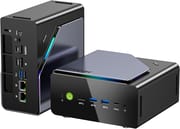
The GMKtec K12 represents a significant departure from the company’s previous compact designs, stepping up to a larger 1.5-liter chassis to accommodate some genuinely impressive features. At the heart of this gaming-focused mini PC is the AMD Ryzen 7 H 255 processor (essentially a rebadged 8745HS with 8 Zen 4 cores) paired with the capable Radeon 780M integrated graphics. What makes the K12 stand out in a crowded market is its dedicated OCuLink port for connecting external GPUs, along with three M.2 storage slots that can accommodate up to 24TB of NVMe storage. For users who need serious expandability in a desktop-replacement mini PC, the K12 delivers where most competitors fall short.
Pros and Cons of the GMKtec K12
| Pros | Cons |
|---|---|
| Dedicated OCuLink port for eGPU expansion with better performance than USB4 | Larger 1.5L volume compared to typical mini PCs |
| Triple M.2 2280 PCIe Gen4 storage slots for massive expansion | Fan noise higher than average (33-46 dBA under load) |
| Dual 2.5GbE Ethernet ports for networking flexibility | No integrated NPU for AI workloads |
| USB4 and USB-C 10Gbps with DisplayPort and Power Delivery | Bluetooth range limited to approximately 3.7 meters |
| Vapor chamber cooling keeps CPU temperatures manageable | Secondary M.2 slots run at PCIe x2 speeds |
| Three selectable TDP modes (45W/54W/65W) for performance tuning | Zen 4 architecture is 20-25% slower than newer Zen 5 chips |
Related Videos
GMKtec K12 Comparison Chart
 GMKtec K12 | |
| Price | List Price: $569.99 Amazon Prices: Loading prices... |
| Version | --- |
| Perfomance Rating | 9.1 |
| Operating System | Windows 11 Pro |
| Processor | Octa-core 3.80 Ghz (max 5.10 Ghz) AMD Ryzen 7 8745HS |
| GPU | Integrated AMD Radeon 780M |
| RAM | 32 GB DDR5 SO-DIMM |
| Internal Storage | 512 GB |
| Dimensions width x length x thickness | 6.1 x 5.9 x 3.1 inches (154.94 x 149.86 x 78.74 mm) |
| Weight | 2.07 lbs (0.94 kg) |
| WiFi | Wi-Fi 6E (802.11ax) |
| Bluetooth | Bluetooth 5.2 |
| Ethernet | 2 Ethernet ports at 2.5 Gbps |
| HDMI | 1 Full-Size HDMI Port |
| DisplayPort | 1 DisplayPort (DisplayPort 1.4, plus additional DP via USB-C front and USB4 rear) |
| VGA | No VGA Ports |
| USB Ports | 2 USB 2.0, 3 USB 3, 1 USB 4, 1 USB-C |
| Thunderbolt Ports | No |
| Internal SATA Ports | No SATA ports |
| Card Reader | No Card Reader |
| Headphone Jack | 3.5mm combo jack |
| Fanless | No |
| VESA Mount | Yes |
| In the Box | 19V 120W power adapter, HDMI cable, VESA mount bracket, user manual |
| Expandability | RAM: 2x SO-DIMM DDR5-5600 slots (max 64GB); Storage: 3x M.2 2280 PCIe 4.0 slots; OCuLink port for external GPU; Vapor chamber + dual-fan cooling with RGB |
Related Mini PCs
-
 GMKtec Nucbox K8 PLUSCompact yet powerful, the GMKtec Nucbox K8 PLUS boasts an AMD Ryzen 7 8845HS processor, Radeon 780M…
 -
 GMKtec Nuxbox M7 ProCompact yet powerful, the GMKtec Nuxbox M7 Pro features an AMD Ryzen 7 7735HS processor, up to 64GB…
 -
 ACEMAGIC M1The ACEMAGIC M1 packs Intel's powerful i9 processors into an incredibly compact 5-inch cube.…
 -
 AYANEO Retro Mini PC AM02The AYANEO Retro Mini PC AM02 channels classic NES aesthetics into a modern mini PC with a unique…
 -
 Beelink SER7 Mini PCPacked with an AMD Ryzen 7 7840HS, Radeon 780M GPU, and dual M.2 SSD slots, the Beelink SER7 Mini…
 -
 BOSGAME P5 Mini PCThe BOSGAME P5 Mini PC, featuring an AMD Ryzen 7 6800H with Radeon 680M graphics, 32GB DDR5 RAM,…
Detailed Insights into the GMKtec K12

The K12’s industrial design marks a clear evolution for GMKtec, featuring a metal wrap-around chassis that gives the unit a more premium look and feel compared to previous all-plastic designs. The device measures 6.1 x 5.9 x 3.1 inches and weighs just over 2 pounds, making it larger than the typical sub-liter mini PC but still compact enough for desk placement or VESA mounting behind a monitor. Dual fans with RGB lighting (controlled via a dedicated button) work alongside a vapor chamber cooling system to keep thermals in check, though Robtech measured idle fan noise at 33 dBA and load noise reaching 40-46 dBA, which is louder than some competitors like the Beelink SER9. The build includes rubber feet on one side panel for stable vertical orientation, a thoughtful touch for those tight on desk space.
Performance from the AMD Ryzen 7 H 255 processor delivers exactly what you’d expect from this Hawk Point chip, which is essentially a rebranded Ryzen 7 8745HS designed for the Chinese market. With 8 Zen 4 cores running at 3.8GHz base and boosting to 4.9GHz, you get solid multi-threaded performance that Wccftech measured at around 16,000 points in Cinebench R23 multi-core testing. The Radeon 780M integrated graphics with 12 compute units handles 1080p gaming surprisingly well, with Ryan Adapts noting that Battlefield 2042 ran “completely fine” on the integrated GPU. Wccftech’s more structured testing showed Cyberpunk 2077 hitting 62 FPS at 1080p medium with FSR enabled, while Forza Horizon 5 reached 94 FPS at high settings. The three TDP modes (45W Silent, 54W Balanced, and 65-70W Performance) let you tune the power/noise balance to your preference.
Connectivity is where the K12 truly shines compared to the competition. The front panel offers a USB-C 10Gbps port with DisplayPort alt-mode and Power Delivery, two USB 5Gbps Type-A ports, and a 3.5mm audio jack. Around back you’ll find the star of the show: a dedicated OCuLink port that provides PCIe Gen4 x4 bandwidth directly to an external GPU, bypassing the bandwidth limitations of USB4 or Thunderbolt connections. Tech Guy Beau demonstrated pairing the K12 with a GMK GP1 eGPU dock containing an AMD 7600 MXT, noting that “OCuLink is better in the case that it has considerably better performance” than USB4. Additional rear ports include USB4 at 40Gbps, HDMI 2.1 supporting 4K at 120Hz, DisplayPort 1.4, dual 2.5 Gigabit Ethernet ports using Realtek controllers, and two USB 2.0 ports. WiFi 6E via MediaTek RZ616 and Bluetooth 5.2 round out the wireless connectivity, though Robtech measured Bluetooth range at only about 12 feet.
Reviewer Insights on the GMKtec K12

Robtech’s Perspective
Robtech provides one of the most detailed technical examinations of the K12, including a full teardown revealing the internal layout. He notes that “GMKtec’s K12 is a big boy, much larger than previous GMKtec minis” but acknowledges that this size enables unique features like “three 2280 M.2 Gen4 slots.” His testing revealed that the three storage slots and OCuLink port are the standout differentiators, though he cautions that two of the M.2 slots run at PCIe x2 speeds rather than full x4. His noise measurements showed the unit running louder than competitors at idle, leading to his recommendation that users “stick to Balanced as I don’t think the performance boost is worth the extra fan noise” when choosing TDP modes.
Tech Guy Beau’s Perspective
Tech Guy Beau focuses heavily on the eGPU capabilities, demonstrating real-world gaming with an external GPU connected via OCuLink. He describes the AMD 255H processor as “like the GOAT, like actually the GOAT CPU of all time,” referencing its use in popular handheld gaming devices like the ROG Ally and Legion Go. His enthusiasm for the OCuLink implementation is clear: “What makes this thing very special beyond that… Is it has an OCuLink port.” He demonstrates the dual 2.5G Ethernet ports and vertical stand capability, presenting the K12 as an ideal foundation for building a high-performance gaming setup with expandability.
Ryan Adapts’ Perspective
Ryan Adapts offers a more casual user perspective, sharing the surprising anecdote that he “actually forgot this thing was running in my office… it’s been like that for three weeks and I’ve never noticed.” This speaks to the effective thermal management when the system isn’t under heavy load. He emphasizes the storage expansion capabilities, noting that “this does have the ability to expand the storage. It has three M.2 PCIe 4 slots” that can accommodate up to 24TB total. His gaming test with Battlefield 2042 on integrated graphics exceeded expectations: “It played Battlefield 6 completely fine. I mean, how cool is that?” One practical note: he found that Secure Boot was disabled by default in the BIOS and needed to be enabled for some games to run.
According to NotebookCheck, the K12 represents an “incremental update over its predecessor” with the larger chassis enabling additional ports and storage slots. Their testing notes that “performance is very close to the two-year old Ryzen 7 7840HS while being 20 to 25 percent slower than the Zen 5 Ryzen AI 9 HX 370,” which potential buyers should consider if maximum CPU performance is the priority. The review awards a 74% score, praising the triple PCIe4 NVMe SSD support and OCuLink but criticizing the louder cooling system and lack of NPU support.
TechRadar is more enthusiastic, awarding 4.5 out of 5 stars and calling the K12 “a sensible investment.” Their review emphasizes the content creation potential: “As an office machine, the GMKtec K12 is exceptional.” They praise the balance of power and upgradability, concluding that it offers “a level of future-proofing that few other machines of this size or type can offer.”
Wccftech focuses on value, noting the $409 starting price for the barebone unit makes it competitive. Their thermal testing found the “CPU staying below 70C across all tests” with the dual-fan cooling setup, and they highlight FSR3 and AFMF2 support for gaming: “With features such as AFMF2, Anti-Lag 2, and FSR3, it makes for a perfect table-top experience.”
Customer Reviews of the GMKtec K12
Amazon customers have responded positively to the K12, with the product earning a 4.5-star rating from over 750 reviews. Users frequently praise the combination of performance and expandability, with many highlighting the triple M.2 slots as a major selling point for those tired of the single storage slot limitations common in cheaper mini PCs. The Radeon 780M graphics performance for casual gaming and media consumption receives consistent praise, with customers noting smooth 4K video playback and surprisingly capable 1080p gaming without needing to connect an external GPU.
Common praise centers on the OCuLink port’s potential for eGPU setups, with customers viewing it as future-proofing their purchase for more demanding games down the road. Several reviews mention the quiet operation during light workloads like web browsing and office work, though some customers who push the system harder note increased fan noise under sustained loads. The dual 2.5GbE ports receive appreciation from users running home servers or NAS setups who need the networking bandwidth.
The primary concerns from customers involve the larger size compared to ultra-compact mini PCs and occasional reports of higher-than-expected fan noise during gaming. Some technically-minded reviewers note that the Ryzen 7 H 255 is essentially a rebadged older processor rather than cutting-edge silicon, though most conclude the performance is more than adequate for the asking price. At $569.99 for the 32GB/512GB configuration, customers generally consider the value proposition strong given the feature set.
Conclusion
The GMKtec K12 carves out a distinct niche in the mini PC market by prioritizing expandability and eGPU compatibility over ultra-compact sizing. For users who want a compact desktop replacement with room to grow, the triple M.2 slots, dedicated OCuLink port, and dual 2.5GbE networking provide flexibility that’s rare at this price point. The AMD Ryzen 7 H 255 and Radeon 780M combination delivers solid performance for productivity and casual gaming, with the OCuLink option available when integrated graphics reach their limits.
This is an ideal choice for content creators who need fast storage access, home server enthusiasts who value the dual Ethernet ports, or gamers building a compact system with eGPU expansion in mind. Those prioritizing absolute silence or the smallest possible footprint should look elsewhere, as the K12 trades compactness for its impressive feature set. Similarly, users who need cutting-edge AI features like local LLM acceleration will find the lack of NPU limiting compared to newer Zen 5 processors.
At $569.99 for the 32GB/512GB configuration (or $409 barebone for those who want to supply their own RAM and storage, keeping in mind that DDR5 prices have risen sharply), the K12 represents strong value for its feature set. For those looking to compare options, Starry Hope’s Mini PC Comparison Chart provides a valuable resource for evaluating the K12 against alternatives in its class.
Frequently Asked Questions
What is OCuLink and why does the GMKtec K12 include it?
OCuLink is a high-speed interface that provides PCIe Gen4 x4 bandwidth directly to external devices, most commonly external GPUs. The K12 includes a dedicated OCuLink port that offers better performance than USB4 or Thunderbolt for eGPU connections because it bypasses the overhead and bandwidth limitations of those protocols. This makes the K12 particularly attractive for users who want to game at higher settings by connecting a desktop graphics card via an external enclosure.
How does the AMD Ryzen 7 H 255 compare to the 8745HS?
The AMD Ryzen 7 H 255 (also called 255H) is essentially the same processor as the 8745HS, rebadged for certain markets. Both feature 8 Zen 4 cores, 16 threads, 3.8GHz base clock, 4.9GHz boost, and Radeon 780M integrated graphics. The only notable difference is the H 255 designation doesn’t include an NPU (Neural Processing Unit), which affects on-device AI acceleration capabilities but doesn’t impact gaming or general productivity performance.
Can I upgrade the RAM and storage in the GMKtec K12?
Yes, the K12 is highly upgradeable. It features two SO-DIMM DDR5-5600 RAM slots supporting up to 64GB total, and three M.2 2280 PCIe Gen 4.0 NVMe slots that can accommodate up to 24TB of storage combined. One M.2 slot runs at full x4 speed while the other two operate at x2, so you’ll want to install your primary drive in the fastest slot for optimal performance.
How loud is the GMKtec K12 during normal use?
The K12’s noise levels vary significantly based on workload and TDP mode. During idle or light tasks, measured noise sits around 33 dBA, which is louder than some competitors. Under load, noise can reach 40-46 dBA depending on the selected performance profile. One reviewer noted leaving the system running for three weeks without noticing it, suggesting the fans are reasonably quiet during typical office work, but gaming or heavy workloads will be audible.
What games can the GMKtec K12 play on integrated graphics?
The Radeon 780M integrated graphics handles 1080p gaming quite well for an iGPU. Testing shows Cyberpunk 2077 running at 62 FPS on medium settings with FSR, Forza Horizon 5 at 94 FPS on high settings, and Dota 2 at 147 FPS on high settings. Battlefield 2042 is also playable. For demanding AAA titles at maximum settings, you’ll want to connect an external GPU via the OCuLink port, but casual and competitive gaming works fine on the integrated graphics.
Does the GMKtec K12 support multiple monitors?
Yes, the K12 supports up to four displays simultaneously. You can connect monitors via HDMI 2.1 (4K at 120Hz), DisplayPort 1.4, the front USB-C port with DisplayPort alt-mode, and the rear USB4 port which also supports video output. This makes the K12 well-suited for multi-monitor productivity setups without requiring additional hardware.
Is the GMKtec K12 good for running Linux?
The K12 is compatible with Linux, and Learn Linux TV has published a full review covering Linux installation and compatibility. The AMD Ryzen processor and Radeon graphics generally have good Linux driver support. The dual Ethernet ports and multiple storage slots make it particularly attractive for home server or NAS applications running Linux distributions. WiFi 6E via the MediaTek RZ616 chipset works with recent Linux kernels.