
GMKtec M3 Ultra
Updated on

The GMKtec M3 Ultra represents a compelling option for users seeking laptop-class performance in an ultra-compact desktop form factor. Powered by the Intel Core i7-12700H processor with 14 cores and 20 threads, this mini PC delivers workstation-level computing power while fitting comfortably in the palm of your hand. The system targets professionals, content creators, and power users who need reliable performance for productivity tasks, light content creation, and multi-monitor workflows without sacrificing desk space or portability.
Pros and Cons of the GMKtec M3 Ultra
| Pros | Cons |
|---|---|
| Powerful 14-core i7-12700H with 4.7GHz boost | Integrated graphics limit gaming potential |
| Premium CNC-machined aluminum chassis | Fan noise noticeable at higher power modes |
| Triple 4K display output via dual HDMI + USB-C | Only one USB-C port (no Thunderbolt) |
| 2.5GbE networking for fast file transfers | Uses DDR4 rather than newer DDR5 standard |
| Dual M.2 slots with PCIe 4.0 support | Thermal throttling possible at 45W mode |
| RAM upgradable to 64GB | Barebone option requires separate RAM/SSD purchase |
Related Videos
GMKtec M3 Ultra Comparison Chart
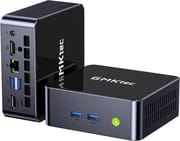 GMKtec M3 Ultra | GMKtec M3 Ultra | GMKtec M3 Ultra | GMKtec M3 Ultra | |
| Price | List Price: $429.99 Amazon Prices: Loading prices... | List Price: $479.99 Amazon Prices: Loading prices... | List Price: $629.99 Amazon Prices: Loading prices... | List Price: $629.99 Amazon Prices: Loading prices... |
| Version | 16GB/512GB | 16GB/1TB | 32GB/1TB | 32GB/2TB |
| Performance Rating | 8.2 | 8.2 | 8.9 | 8.9 |
| Operating System | Windows 11 Pro | Windows 11 Pro | Windows 11 Pro | Windows 11 Pro |
| Processor | Fourteen-core 3.50 Ghz (max 4.70 Ghz) Intel Core i7-12700H | Fourteen-core 3.50 Ghz (max 4.70 Ghz) Intel Core i7-12700H | Fourteen-core 3.50 Ghz (max 4.70 Ghz) Intel Core i7-12700H | Fourteen-core 3.50 Ghz (max 4.70 Ghz) Intel Core i7-12700H |
| GPU | Integrated Intel UHD Graphics | Integrated Intel UHD Graphics | Integrated Intel UHD Graphics | Integrated Intel UHD Graphics |
| RAM | 16 GB DDR4 SO-DIMM | 16 GB DDR4 SO-DIMM | 32 GB DDR4 SO-DIMM | 32 GB DDR4 SO-DIMM |
| Internal Storage | 512 GB | 1 TB | 1 TB | 2 TB |
| Dimensions width x length x thickness | 4.17 x 4.49 x 1.67 inches (105.92 x 114.05 x 42.42 mm) | 4.17 x 4.49 x 1.67 inches (105.92 x 114.05 x 42.42 mm) | 4.17 x 4.49 x 1.67 inches (105.92 x 114.05 x 42.42 mm) | 4.17 x 4.49 x 1.67 inches (105.92 x 114.05 x 42.42 mm) |
| Weight | 0.95 lbs (0.43 kg) | 0.95 lbs (0.43 kg) | 0.95 lbs (0.43 kg) | 0.95 lbs (0.43 kg) |
| WiFi | Wi-Fi 6 (802.11ax) | Wi-Fi 6 (802.11ax) | Wi-Fi 6 (802.11ax) | Wi-Fi 6 (802.11ax) |
| Bluetooth | Bluetooth 5.2 | Bluetooth 5.2 | Bluetooth 5.2 | Bluetooth 5.2 |
| Ethernet | 1 Ethernet port at 2.5 Gbps | 1 Ethernet port at 2.5 Gbps | 1 Ethernet port at 2.5 Gbps | 1 Ethernet port at 2.5 Gbps |
| HDMI | 2 Full-Size HDMI Ports | 2 Full-Size HDMI Ports | 2 Full-Size HDMI Ports | 2 Full-Size HDMI Ports |
| DisplayPort | No DisplayPort | No DisplayPort | No DisplayPort | No DisplayPort |
| VGA | No VGA Ports | No VGA Ports | No VGA Ports | No VGA Ports |
| USB Ports | 1 USB 2.0, 3 USB 3, 1 USB-C 3x USB 3.2 Gen2 (10Gbps), 1x USB 2.0, 1x USB-C (DP alt mode) | 1 USB 2.0, 3 USB 3, 1 USB-C 3x USB 3.2 Gen2 (10Gbps), 1x USB 2.0, 1x USB-C (DP alt mode) | 1 USB 2.0, 3 USB 3, 1 USB-C 3x USB 3.2 Gen2 (10Gbps), 1x USB 2.0, 1x USB-C (DP alt mode) | 1 USB 2.0, 3 USB 3, 1 USB-C 3x USB 3.2 Gen2 (10Gbps), 1x USB 2.0, 1x USB-C (DP alt mode) |
| Thunderbolt Ports | No | No | No | No |
| Internal SATA Ports | No SATA ports | No SATA ports | No SATA ports | No SATA ports |
| Card Reader | No Card Reader | No Card Reader | No Card Reader | No Card Reader |
| Headphone Jack | combo | combo | combo | combo |
| Fanless | No | No | No | No |
| VESA Mount | Yes | Yes | Yes | Yes |
| In the Box | Power adapter (100W), HDMI cable, VESA mounting bracket with screws, user manual, warranty card | Power adapter (100W), HDMI cable, VESA mounting bracket with screws, user manual, warranty card | Power adapter (100W), HDMI cable, VESA mounting bracket with screws, user manual, warranty card | Power adapter (100W), HDMI cable, VESA mounting bracket with screws, user manual, warranty card |
| Expandability | RAM upgradable to 64GB via 2x DDR4 SO-DIMM slots (3200MHz), dual M.2 SSD slots supporting up to 8TB total storage | RAM upgradable to 64GB via 2x DDR4 SO-DIMM slots (3200MHz), dual M.2 SSD slots supporting up to 8TB total storage | RAM upgradable to 64GB via 2x DDR4 SO-DIMM slots (3200MHz), dual M.2 SSD slots supporting up to 8TB total storage | RAM upgradable to 64GB via 2x DDR4 SO-DIMM slots (3200MHz), dual M.2 SSD slots supporting up to 8TB total storage |
Related Mini PCs
-
 GMKtec K1Compact, powerful, and user-upgradable, the GMKtec K1 Mini PC packs a punch with an AMD Ryzen 7…
 -
 GMKtec M6 UltraA value-packed mini PC featuring AMD Ryzen 5 7640HS with Zen 4 performance, dual 2.5G Ethernet,…
 -
 ASUS NUC 14 ProThe ASUS NUC 14 Pro marks ASUS's debut as the new steward of the legendary NUC line, pairing…
 -
 MINISFORUM UM680/UM760/UM870 SlimCompact yet powerful, the MINISFORUM UM680/UM760/UM870 Slim Series packs AMD Ryzen processors, up…
 -
 Beelink SER6 MAXExperience powerful multitasking with the Beelink SER6 MAX Mini PC, featuring an AMD Ryzen 9…
 -
 GEEKOM Mini IT13Meet the GEEKOM Mini IT13: a space-efficient powerhouse with up to an Intel Core i9-13900H, 64GB…
Detailed Insights into the GMKtec M3 Ultra

The M3 Ultra showcases GMKtec’s commitment to build quality with its CNC-machined aluminum chassis featuring a sandblasted finish that feels premium and professional. The compact dimensions of approximately 4.5 inches square by 1.7 inches tall make it easy to mount behind a monitor using the included VESA bracket, or simply tuck away on a desk. Reviewers consistently praise the solid construction, noting that the metal sides provide effective heat dissipation while the overall design aesthetic elevates it above typical budget mini PCs.
The Intel Core i7-12700H processor represents a significant step up from the entry-level N100 chips found in many mini PCs, offering 6 performance cores and 8 efficiency cores for a total of 14 cores and 20 threads. This hybrid architecture excels at multi-threaded workloads like video rendering, compilation tasks, and running multiple applications simultaneously. The processor can boost up to 4.7GHz when needed, though the 45W TDP means thermals and fan noise become factors during sustained heavy loads. Testing by reviewers shows the system handles 4K H.264 video editing smoothly thanks to Intel QuickSync hardware acceleration.
Connectivity options cover most professional needs with dual HDMI 2.0 ports supporting 4K@60Hz output, plus a USB-C port with DisplayPort alt mode for triple-display configurations. The 2.5 Gigabit Ethernet port provides substantially faster wired networking than standard Gigabit connections, which proves valuable for NAS access, large file transfers, and video production workflows. WiFi 6 and Bluetooth 5.2 round out the wireless connectivity, while the mix of USB 3.2 Gen2 and USB 2.0 ports offers flexibility for peripherals and storage devices.
Reviewer Insights on the GMKtec M3 Ultra

Critical Tech’s Perspective
Critical Tech positions the M3 Ultra as standing “at the top of the company’s compact PC lineup,” designed for users who want “the performance of a high-end laptop CPU in a desktop form factor small enough to fit in the palm of a hand.” The review highlights the premium build quality featuring CNC-machined metal with a sandblasted finish, and notes the effective cooling system that maintains around 35dB noise levels under typical workloads. Gaming tests showed respectable results for integrated graphics, with League of Legends running at 168 FPS and Genshin Impact at 63 FPS at 1080p settings.
Robtech’s Perspective
Robtech provides detailed thermal and acoustic testing, noting that “the Nucbox M3 is a pretty nice looking mini PC, and doesn’t sting on the materials.” The review emphasizes the BIOS-level power management allowing users to choose between 28W, 35W, and 45W modes to balance noise and performance. For content creators, the reviewer confirms “4K video editing on this box is fine… it’s pretty responsive scrubbing across the timeline,” making it a solid choice for video work. The 35W setting is recommended as the sweet spot between performance and acoustics.
TechRadar
According to TechRadar, the M3 Ultra is a “surprisingly powerful compact mini PC” that makes “the ideal option for day-to-day office work.” They awarded it 4.5 out of 5 stars, praising the powerful CPU and flexible upgradeability while noting thermal constraints under heavy loads.
NotebookCheck
NotebookCheck’s technical review gives the M3 Ultra a 70% rating, highlighting the excellent build quality with aluminum and plastic construction, low DPC latencies suitable for audio work, and stable CPU performance. They note that with the i7-12700H, “it offers solid computing power that significantly outperforms entry-level CPUs” while pointing out the weak integrated GPU and immature fan control as areas for improvement.
WCCFtech
WCCFtech awards the M3 Ultra their “Great Value” designation, emphasizing the excellent price-to-performance ratio starting at just $299 for the barebone version. They praise the strong multi-threaded performance and comprehensive I/O connectivity while noting the Iris Xe graphics are dated compared to newer Intel Arc solutions.
Across all reviews, a clear consensus emerges: the M3 Ultra excels as a productivity powerhouse for office work, content creation, and multi-tasking scenarios, but those seeking gaming performance should look elsewhere. The value proposition is particularly strong at the entry-level configurations.
Customer Reviews of the GMKtec M3 Ultra
Amazon customers rate the GMKtec M3 Ultra highly with an average of 4.4 out of 5 stars across hundreds of reviews, reflecting general satisfaction with the product’s performance and build quality. Many users praise the system’s ability to replace much larger desktop computers while providing ample power for office applications, web browsing, and even light photo and video editing. The compact size and included VESA mount receive particular appreciation from those seeking to minimize desk clutter or create clean workstation setups.
Common praise centers on the upgrade flexibility, with customers noting the dual SO-DIMM RAM slots and dual M.2 SSD slots allow for meaningful performance customization over time. Several reviewers mention successfully upgrading to 64GB RAM for memory-intensive workloads or adding a second SSD for expanded storage. The 2.5 Gigabit Ethernet also receives positive mentions from users connecting to network storage or running home servers.
On the critical side, some customers mention fan noise becoming noticeable during demanding tasks, particularly when the system runs at higher power settings. A few users wish for USB4 or Thunderbolt connectivity for external GPU options, though this remains an edge case for most buyers. Buyers planning memory upgrades should also keep an eye on current DRAM pricing trends before budgeting for a 64GB configuration. Overall, the value proposition resonates strongly with buyers who understand this is a productivity-focused machine rather than a gaming system.
Conclusion
The GMKtec M3 Ultra successfully delivers workstation-class performance in a remarkably compact package, making it an excellent choice for professionals who need serious computing power without sacrificing desk space. The combination of the 14-core i7-12700H processor, triple 4K display support, and 2.5GbE networking addresses the needs of content creators, developers, and business users who demand more than entry-level mini PCs can provide. The premium CNC-machined aluminum chassis adds a touch of quality that sets it apart from plastic-bodied competitors.
Those seeking a capable machine for office productivity, video editing, software development, or running multiple applications simultaneously will find the M3 Ultra more than adequate. The ability to configure up to 64GB RAM and expand storage to 8TB ensures the system can grow with your needs. However, gamers and those requiring discrete graphics should look elsewhere, as the integrated Iris Xe graphics limit performance in demanding 3D applications. Users needing more graphics power might consider the GMKtec M7 Ultra, which features an OCuLink port for external GPU support.
The pricing structure offers flexibility, with barebone options starting around $299 for those who prefer to supply their own RAM and storage, while fully configured models with 32GB RAM and 2TB storage run around $630. This positions the M3 Ultra competitively against both traditional desktop systems and laptop alternatives. For those looking to compare options, Starry Hope’s Mini PC Comparison Chart provides a valuable resource for evaluating the M3 Ultra against similar systems.
Frequently Asked Questions
Can the GMKtec M3 Ultra support triple monitors?
Yes, the M3 Ultra supports up to three displays simultaneously through its dual HDMI 2.0 ports and USB-C port with DisplayPort alt mode. All three outputs can drive 4K resolution at 60Hz, making it ideal for productivity setups requiring extended screen real estate. See our triple monitor setup guide for tips on configuring multi-display workstations.
What is the maximum RAM capacity of the GMKtec M3 Ultra?
The M3 Ultra supports up to 64GB of DDR4 RAM using two SO-DIMM slots running at 3200MHz in dual-channel mode. This makes it suitable for memory-intensive tasks like video editing, virtual machines, and software development.
Is the GMKtec M3 Ultra suitable for gaming?
The M3 Ultra handles casual and older games reasonably well with its Intel Iris Xe integrated graphics. Tests show League of Legends running at over 160 FPS and lighter titles performing smoothly at 1080p. However, demanding AAA games will struggle, so dedicated gamers should consider systems with discrete graphics.
How loud is the GMKtec M3 Ultra under load?
At idle and light workloads, the M3 Ultra operates quietly around 29-35 dBA. Under sustained heavy load at the 45W power setting, fan noise increases to approximately 45 dBA. The BIOS allows adjusting between 28W, 35W, and 45W power modes to balance performance and noise levels.
Does the GMKtec M3 Ultra include a VESA mount?
Yes, the M3 Ultra includes a VESA mounting bracket and screws in the box, allowing you to attach the mini PC to the back of a compatible monitor. This creates a clean, space-saving setup that essentially turns your monitor into an all-in-one computer.
What storage expansion options does the M3 Ultra offer?
The M3 Ultra features two M.2 SSD slots: one 2280 slot supporting PCIe 4.0 NVMe drives and one 2242 slot supporting either PCIe or SATA drives. Combined, you can install up to 8TB of fast solid-state storage. There is no 2.5-inch SATA bay.
Is the GMKtec M3 Ultra good for video editing?
The M3 Ultra handles 4K video editing well, particularly with H.264 footage thanks to Intel QuickSync hardware acceleration. Reviewers report responsive timeline scrubbing and smooth playback. For professional workflows with heavy effects or 8K footage, a more powerful system may be preferred, but for most content creators the M3 Ultra provides capable performance.