
GMKtec M8
Updated on

The GMKtec M8 represents a compelling option in the crowded mini PC market, targeting users who need solid productivity performance with unusual expansion capabilities. Built around AMD’s Ryzen 5 PRO 6650H processor with 6 cores and 12 threads, this compact machine delivers enough power for everyday office tasks, multimedia playback, and even light content creation. What sets the M8 apart from similarly-priced competitors is its OCuLink port, which enables external GPU connectivity for users who occasionally need more graphics horsepower. At around $360, it positions itself as a practical choice for home offices, small businesses, and anyone looking to reduce desktop clutter without sacrificing connectivity.
Pros and Cons of the GMKtec M8
| Pros | Cons |
|---|---|
| OCuLink port enables external GPU expansion | RAM is soldered at 16GB (not upgradeable) |
| Dual 2.5GbE networking for NAS and file servers | Integrated graphics limited for demanding creative work |
| USB4 40Gbps with DisplayPort and Power Delivery | Fan noise noticeable under heavy loads |
| Compact metal construction with good thermals | No VESA bracket included (sold separately) |
| Two M.2 2280 slots for up to 16TB storage | DisplayPort via USB-C may have compatibility issues |
| WiFi 6E exceeds gigabit speeds in testing | Older Zen 3+ architecture lacks NPU |
Related Videos
GMKtec M8 Comparison Chart
 GMKtec M8 | GMKtec M8 | |
| Price | List Price: $359.99 Amazon Prices: Loading prices... | List Price: $389.99 Amazon Prices: Loading prices... |
| Version | 16GB/512GB | 16GB/1TB |
| Performance Rating | 7.0 | 7.0 |
| Operating System | Windows 11 Pro | Windows 11 Pro |
| Processor | Hexa-core 3.30 Ghz (max 4.50 Ghz) AMD Ryzen 5 PRO 6650H | Hexa-core 3.30 Ghz (max 4.50 Ghz) AMD Ryzen 5 PRO 6650H |
| GPU | Integrated Intel UHD Graphics | Integrated Intel UHD Graphics |
| RAM | 16 GB | 16 GB |
| Internal Storage | 512 GB | 1 TB |
| Dimensions width x length x thickness | 4.37 x 4.21 x 2.48 inches (111 x 106.93 x 62.99 mm) | 4.37 x 4.21 x 2.48 inches (111 x 106.93 x 62.99 mm) |
| Weight | 1.09 lbs (0.5 kg) | 1.09 lbs (0.5 kg) |
| WiFi | Wi-Fi 6E (802.11ax) | Wi-Fi 6E (802.11ax) |
| Bluetooth | Bluetooth 5.2 | Bluetooth 5.2 |
| Ethernet | 2 Ethernet ports at 2.5 Gbps | 2 Ethernet ports at 2.5 Gbps |
| HDMI | 1 HDMI Port | 1 HDMI Port |
| DisplayPort | 1 DisplayPort | 1 DisplayPort |
| VGA | No VGA Ports | No VGA Ports |
| USB Ports | 1 USB 2.0, 3 USB 3, 1 USB 4, 1 USB-C | 1 USB 2.0, 3 USB 3, 1 USB 4, 1 USB-C |
| Thunderbolt Ports | No | No |
| Internal SATA Ports | No SATA ports | No SATA ports |
| Card Reader | No Card Reader | No Card Reader |
| Headphone Jack | combo | combo |
| Fanless | No | No |
| VESA Mount | Yes | Yes |
| In the Box | Mini PC, power adapter (100W), HDMI cable, user manual | Mini PC, power adapter (100W), HDMI cable, user manual |
| Expandability | RAM is soldered LPDDR5-6400 (NOT upgradeable). Storage: 2x M.2 2280 slots (1x PCIe 3.0, 1x PCIe 4.0). Removable WLAN module. | RAM is soldered LPDDR5-6400 (NOT upgradeable). Storage: 2x M.2 2280 slots (1x PCIe 3.0, 1x PCIe 4.0). Removable WLAN module. |
Related Mini PCs
-
 GMKtec NucBox M6The GMKtec NucBox M6 offers impressive performance with its AMD Ryzen 5 6600H processor and Radeon…
 -
 GMKtec NucBox M2Harness the power of the GMKtec NucBox M2 Mini PC with its Intel Core i7-11390H processor, zippy…
 -
 ACEMAGICIAN AM06 Pro Mini PCPacking a powerful AMD Ryzen 7 5700U and Radeon RX Vega8 Graphics, the ACEMAGICIAN AM06 Pro Mini PC…
 -
 Beelink SER5 (5500U)The Beelink SER5 (5500U) is a budget-friendly mini PC powered by the AMD Ryzen 5 5500U processor.…
 -
 Beelink SER5 Pro Mini PCThe Beelink SER5 Pro Mini PC packs a powerful AMD Ryzen 7 punch with 16GB RAM and a 1TB SSD. Ideal…
 -
 Getorli GT103The Getorli GT103 delivers solid everyday performance with its AMD Ryzen 5 7430U processor, dual…
Detailed Insights into the GMKtec M8

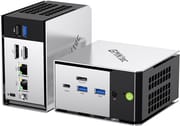
The GMKtec M8 borrows design elements from GMKtec’s premium EVO-X1 series, featuring a metal chassis that feels substantially more premium than budget plastic alternatives. Measuring approximately 4.4 by 4.2 by 2.5 inches and weighing just over a pound, it occupies minimal desk space while providing excellent port accessibility. The front panel houses USB4, two USB 3.2 Gen2 ports, the OCuLink connector, and a 3.5mm audio jack, while the rear accommodates HDMI 2.0, DisplayPort 1.4, another USB 3.2 port, a USB 2.0 port, and dual 2.5GbE LAN ports. This port selection rivals machines costing significantly more.
The AMD Ryzen 5 PRO 6650H delivers capable performance for its class, achieving a PassMark CPU Mark score around 18,000. In real-world use, the M8 handles Microsoft Office applications, web browsing, 4K video playback, and even basic video editing in tools like CapCut with ease. Benchmark testing shows Cinebench R23 multi-thread scores around 9,500 and Geekbench 6 multi-core scores near 7,800. The integrated Radeon 660M graphics proves adequate for older titles and retro gaming emulation up to PS2 and some Wii U games at playable framerates, though modern AAA titles struggle at anything above low settings.
Connectivity stands out as the M8’s strongest suit, with the OCuLink port being the headliner feature. This PCIe 4.0 x4 interface allows connection to external GPU enclosures for users who occasionally need dedicated graphics performance. The dual 2.5GbE ports delivered their rated speeds in testing, making the M8 suitable for NAS applications or network-intensive workflows. WiFi 6E performance exceeded gigabit speeds in range testing, and Bluetooth 5.2 handled peripherals without issue. USB4 provides 40Gbps throughput with DisplayPort alt mode and power delivery, though some reviewers noted compatibility quirks with certain USB-C monitors.
Reviewer Insights on the GMKtec M8

NotebookCheck’s Perspective
NotebookCheck awarded the GMKtec M8 a 71% score, positioning it as an “average” but well-balanced option. Their review praised the relatively cool operating temperatures and easy serviceability for storage upgrades. They noted that “the NucBox M8 isn’t trying to be the fastest mini PC” but rather targets accessibility through competitive pricing while maintaining adequate capability for standard business applications. The OCuLink support was highlighted as uncommon in this price bracket. Their main criticisms focused on the fan’s pulsing behavior under load and the lack of an integrated NPU for AI workloads.
TechRadar’s Perspective
TechRadar was considerably more enthusiastic, awarding 4.5 out of 5 stars and declaring themselves “really surprised by just how powerful the GMKtec NucBox M8 is.” The reviewer found it “fast and capable for all Microsoft applications, such as Word, Excel, and PowerPoint” and praised the ultra-compact form factor. For light multimedia editing, the reviewer noted it handled “mobile phone video editing in CapCut without issue,” though Premiere Pro work with mirrorless camera footage struggled due to limited GPU power. They emphasized the OCuLink option and substantial storage upgrade potential as key differentiators.
Lon Seidman’s Perspective
Lon Seidman provided practical insights from hands-on testing, concluding that “you give up upgradeable memory, but for a reasonable price you get unusually fast I/O for the class.” His testing confirmed smooth 4K/60 web browsing with only occasional, barely perceptible dropped frames in YouTube playback. Linux compatibility was excellent, with Ubuntu detecting all hardware without issues. He noted the fan becomes audible in performance mode but remained “not among the loudest tested.” Gaming tests showed Cyberpunk 2077 managed around 30 fps at 1080p low settings, while PS2 emulation ran at full speed.
The reviewer consensus centers on the M8 being an excellent value proposition for its primary use case: productivity and office work in a compact package. All three reviews highlighted the non-upgradeable RAM as the main limitation, while praising the unusual combination of OCuLink, USB4, and dual 2.5GbE at this price point.
Customer Reviews of the GMKtec M8
Amazon customers have rated the GMKtec M8 at 4.3 out of 5 stars across 94 reviews, reflecting generally positive sentiment with some reservations. Purchasers frequently praise the build quality, noting that the metal construction feels premium for the price point. Many reviewers specifically cite the dual Ethernet ports and OCuLink capability as deciding factors, with several using the system for home server and NAS applications. The compact footprint draws consistent praise from users replacing larger desktop towers.
The most common complaints center on fan noise under load, with some users finding it more noticeable than expected for such a small system. A few reviews mention disappointment upon learning the RAM cannot be upgraded, suggesting better product descriptions would help set expectations. Some users experienced initial setup quirks with Windows activation or driver installations, though GMKtec’s customer support receives positive mentions for resolving issues promptly. The included HDMI cable is appreciated as a thoughtful inclusion that many competitors omit.
Overall, customers view the M8 as delivering good value at its price point, particularly for those prioritizing connectivity options over raw performance. Users who understand the soldered RAM limitation before purchase express the highest satisfaction, while those expecting upgradeable memory report some disappointment.
Conclusion
The GMKtec M8 earns its place in the competitive mini PC landscape by offering unusual expansion capabilities at a mainstream price. For home office users, small businesses, and anyone running a compact workstation, the combination of Ryzen 5 PRO performance, OCuLink for occasional GPU needs, and dual 2.5GbE networking provides genuine flexibility that many alternatives lack. The WiFi 6E and USB4 support future-proof the connectivity, while two M.2 slots allow substantial storage expansion over time.
However, the M8 isn’t for everyone. The soldered 16GB RAM represents a hard ceiling that may frustrate power users down the road, and the integrated Radeon 660M graphics won’t satisfy anyone with serious creative or gaming ambitions without connecting an external GPU. If you prioritize upgradeable memory or need more graphics power out of the box, alternatives like the GMKtec G3 Plus or Beelink SER5 Pro may better suit your needs.
At around $360, the GMKtec M8 delivers excellent value for users who understand what they’re getting: a capable, well-connected compact PC that handles everyday tasks with room to grow through storage and external GPU expansion. For those looking to compare options, Starry Hope’s Mini PC Comparison Chart provides a valuable resource for evaluating the M8 against alternatives in its class.
Frequently Asked Questions
Can I upgrade the RAM in the GMKtec M8?
No, the RAM in the GMKtec M8 is soldered LPDDR5-6400 memory that cannot be upgraded. The 16GB configuration is the maximum available, so buyers should consider whether this meets their long-term needs before purchasing.
What is OCuLink and why does the M8 include it?
OCuLink is a PCIe 4.0 x4 interface that allows direct connection to external GPU enclosures. The M8 includes this port to enable users who occasionally need more graphics power to connect a dedicated GPU without being limited by USB bandwidth, making it suitable for gaming or creative work when needed.
How many displays can the GMKtec M8 support?
The GMKtec M8 supports up to three displays simultaneously through its HDMI 2.0, DisplayPort 1.4, and USB4 (with DisplayPort alt mode) connections. All ports support 4K resolution, with the HDMI and DisplayPort also supporting 8K output.
Is the GMKtec M8 compatible with Linux?
Yes, the GMKtec M8 works well with Linux distributions. Testing by Lon Seidman confirmed that Ubuntu detected all hardware without issues, including WiFi, Bluetooth, and Ethernet. The AMD Ryzen platform has strong open-source driver support.
How loud is the GMKtec M8 during operation?
The M8’s dual-fan cooling system produces noise levels between 33-41 dB depending on workload. The BIOS offers quiet and balanced modes for reduced noise, though reviewers note the fan becomes audible during performance-intensive tasks. It’s not among the loudest mini PCs tested but isn’t silent either.
Does the GMKtec M8 include a VESA mounting bracket?
No, the GMKtec M8 does not include a VESA mounting bracket in the box. While the unit is VESA-compatible, the mounting bracket must be purchased separately. The package includes the mini PC, power adapter, HDMI cable, and user manual.
What storage expansion options does the GMKtec M8 offer?
The M8 includes two M.2 2280 slots: one running at PCIe 3.0 speeds and one at PCIe 4.0 speeds. This allows for up to 16TB of total NVMe storage with currently available drives. There is no 2.5-inch SATA bay, so all storage expansion must be through M.2 drives.