
HP Elite Mini 800 G9
Published on
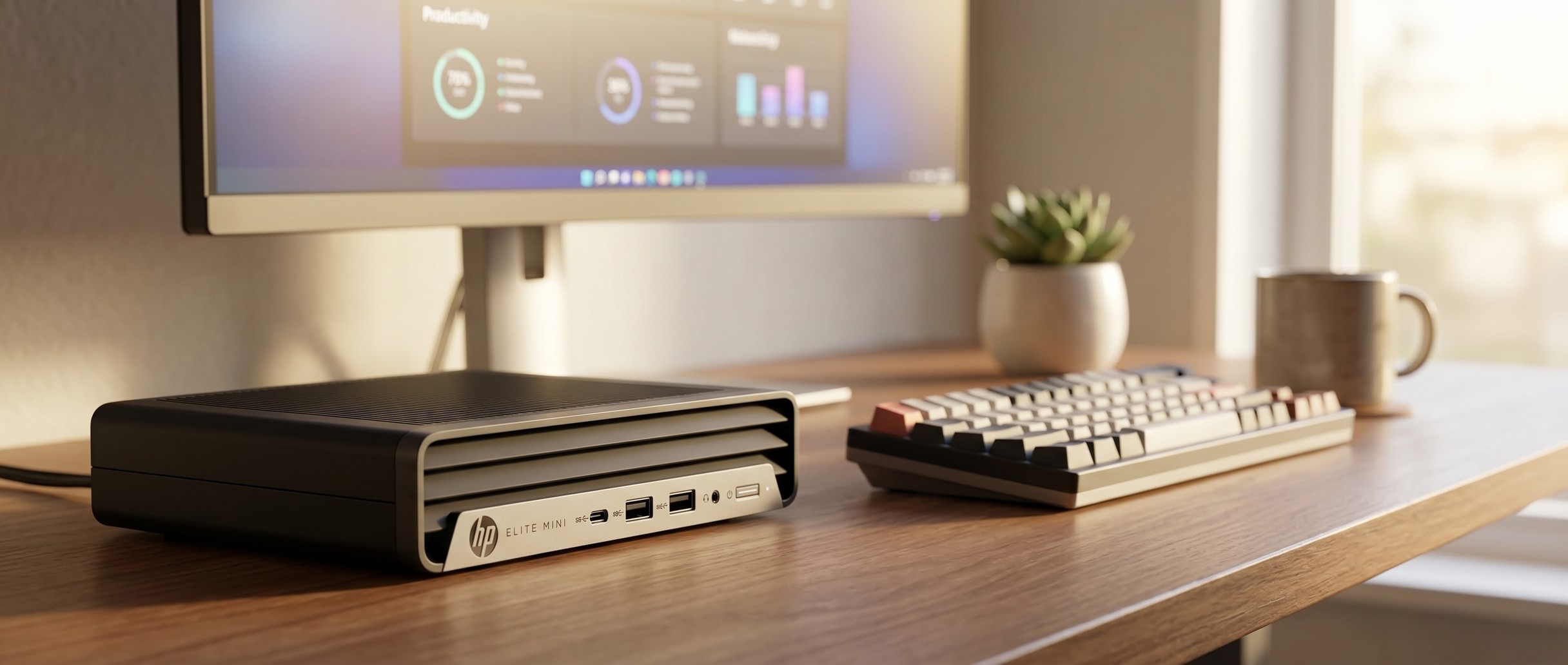
The HP Elite Mini 800 G9 puts a desktop-class 24-core Intel Core i9-14900T into a chassis no bigger than a stack of paperbacks. It is full desktop Raptor Lake silicon in low-power T-suffix form, paired with DDR5-5600 memory, dual M.2 storage, and HP’s vPro-backed Sure suite of firmware security. At 3.1 lb on a VESA mount, the machine is aimed at IT departments deploying an i9 behind every monitor on the floor, and at fleet buyers and AutoCAD operators who need 24 cores in that footprint. It is also a business product priced like one, the I/O is conservative for 2026 (no Thunderbolt, no USB4, only Gigabit Ethernet), and the supplied 120W brick is the limit of how much sustained power the chassis can dissipate.
Cores per liter against dated ports
| Pros | Cons |
|---|---|
| 24-core Intel Core i9-14900T (8P + 16E) hits roughly 38,500 PassMark in a 1-liter chassis | 35W base TDP means sustained boost falls well short of the i9-14900T’s 5.5GHz peak |
| DDR5-5600 dual-channel SODIMM, up to 64GB user-upgradable | Intel UHD Graphics 770 only; no discrete GPU option and no OCuLink |
| Two M.2 2280 PCIe Gen4 slots for storage flexibility | I/O is conservative for 2026: no Thunderbolt, no USB4, single Gigabit Ethernet |
| Enterprise-grade build with HP vPro, Sure Start, and Sure Recover firmware security | Business pricing for a 1-liter desktop |
| VESA-mountable 3.1 lb chassis hides behind any monitor | WiFi 6 (not WiFi 6E or WiFi 7) on listed configurations |
| Ships with HP keyboard, mouse, and 120W adapter, ready to deploy | Only one front USB-C; rear DisplayPort uses 1.4 rather than the newer DP 2.1 |
HP Elite Mini 800 G9 Comparison Chart
 HP Elite Mini 800 G9 | HP Elite Mini 800 G9 | HP Elite Mini 800 G9 | |
| Price | List Price: $1,349.00 Amazon Prices: Loading prices... | List Price: $1,419.00 Amazon Prices: Loading prices... | List Price: $1,629.00 Amazon Prices: Loading prices... |
| Version | 16GB/512GB/i9-14900T | 16GB/1TB/i9-14900T | 32GB/1TB/i9-14900T |
| Performance Rating | 6.3 | 6.3 | 6.7 |
| Operating System | Windows 11 Pro | Windows 11 Pro | Windows 11 Pro |
| Processor | Twenty-four-core 1.10 Ghz (max 5.50 Ghz) Intel Core i9-14900T | Twenty-four-core 1.10 Ghz (max 5.50 Ghz) Intel Core i9-14900T | Twenty-four-core 1.10 Ghz (max 5.50 Ghz) Intel Core i9-14900T |
| GPU | Integrated Intel UHD Graphics 770 | Integrated Intel UHD Graphics 770 | Integrated Intel UHD Graphics 770 |
| RAM | 16 GB DDR5 SO-DIMM, 2-channel (DDR5-5600 SODIMM, dual-channel) | 16 GB DDR5 SO-DIMM, 2-channel (DDR5-5600 SODIMM, dual-channel) | 32 GB DDR5 SO-DIMM, 2-channel (DDR5-5600 SODIMM, dual-channel) |
| Internal Storage | 512 GB PCIe NVMe SSD | 1 TB PCIe NVMe SSD | 1 TB PCIe NVMe SSD |
| Dimensions width x length x thickness | 6.97 x 6.89 x 1.35 inches (177.04 x 175.01 x 34.29 mm) | 6.97 x 6.89 x 1.35 inches (177.04 x 175.01 x 34.29 mm) | 6.97 x 6.89 x 1.35 inches (177.04 x 175.01 x 34.29 mm) |
| Weight | 3.13 lbs (1.42 kg) | 3.13 lbs (1.42 kg) | 3.13 lbs (1.42 kg) |
| WiFi | Wi-Fi 6 (802.11ax) | Wi-Fi 6 (802.11ax) | Wi-Fi 6 (802.11ax) |
| Bluetooth | Bluetooth 5.2 | Bluetooth 5.2 | Bluetooth 5.2 |
| Ethernet | 1 Ethernet port at 1 Gbps | 1 Ethernet port at 1 Gbps | 1 Ethernet port at 1 Gbps |
| HDMI | 1 Full-Size HDMI Port | 1 Full-Size HDMI Port | 1 Full-Size HDMI Port |
| DisplayPort | 2 DisplayPorts (Rear: 2x DisplayPort 1.4) | 2 DisplayPorts (Rear: 2x DisplayPort 1.4) | 2 DisplayPorts (Rear: 2x DisplayPort 1.4) |
| VGA | No VGA Ports | No VGA Ports | No VGA Ports |
| USB Ports | 5 USB 3, 1 USB-C Front: 1x USB-C 20Gbps, 2x USB-A 10Gbps (1 charging). Rear: 3x USB-A 10Gbps. | 5 USB 3, 1 USB-C Front: 1x USB-C 20Gbps, 2x USB-A 10Gbps (1 charging). Rear: 3x USB-A 10Gbps. | 5 USB 3, 1 USB-C Front: 1x USB-C 20Gbps, 2x USB-A 10Gbps (1 charging). Rear: 3x USB-A 10Gbps. |
| Thunderbolt Ports | No | No | No |
| OCuLink | No | No | No |
| Internal SATA Ports | No SATA ports | No SATA ports | No SATA ports |
| Card Reader | No Card Reader | No Card Reader | No Card Reader |
| Headphone Jack | combo | combo | combo |
| Fanless | No | No | No |
| VESA Mount | Yes | Yes | Yes |
| In the Box | HP Elite Mini 800 G9, 120W external power adapter, HP Wired Desktop 320K keyboard, HP Wired Desktop 125 mouse | HP Elite Mini 800 G9, 120W external power adapter, HP Wired Desktop 320K keyboard, HP Wired Desktop 125 mouse | HP Elite Mini 800 G9, 120W external power adapter, HP Wired Desktop 320K keyboard, HP Wired Desktop 125 mouse |
| Expandability | Up to 64GB DDR5-5600 (2x SODIMM). 2x M.2 2280 PCIe Gen4. Optional rear Flex Port (HDMI, DP, VGA, or USB-C). | Up to 64GB DDR5-5600 (2x SODIMM). 2x M.2 2280 PCIe Gen4. Optional rear Flex Port (HDMI, DP, VGA, or USB-C). | Up to 64GB DDR5-5600 (2x SODIMM). 2x M.2 2280 PCIe Gen4. Optional rear Flex Port (HDMI, DP, VGA, or USB-C). |
Related Mini PCs
-
 HP EliteDesk 8 Mini G1iHP's 1-liter EliteDesk 8 Mini G1i puts an Arrow Lake-S desktop chip, three M.2 Gen4 slots,…
 -
 HP Elite Mini 805 G8HP's 1-liter Elite Mini 805 G8 pairs a 6-core AMD Ryzen 5 PRO 5650G with DDR4 memory, dual M.2…
 -
 ACEMAGIC F5AA one-liter AMD Ryzen AI 9 HX 470 mini PC with Radeon 890M graphics, dual USB4, an OCuLink eGPU…
 -
 GEEKOM A9 MaxA 0.8-liter metal Ryzen AI 9 mini PC for creators and developers, with memory and storage you can…
 -
 ACEMAGIC K1 (Intel Core i5-12600H)The Intel version of ACEMAGIC's K1 pairs the 12-core Core i5-12600H with triple 4K output, seven…
 -
 ASUS NUC 14 ProThe ASUS NUC 14 Pro pairs Intel Core Ultra processors with a toolless chassis, two DDR5 SODIMM…
A 35W desktop i9 in a 1-liter chassis

The 800 G9 measures 6.97 by 6.89 by 1.35 inches and weighs 3.13 pounds, which puts it squarely in the ServeTheHome TinyMiniMicro 1-liter size class alongside the Lenovo ThinkCentre M-series and Dell OptiPlex Micro. The chassis is the same textured-black HP business styling used across the Elite/EliteDesk line: ridged top panel for passive airflow, ventilated sides, a silver HP front bezel with chrome HP logo, and a single optional Flex Port cutout on the rear that can be configured at order time with HDMI, DisplayPort, VGA, or USB-C. The standard rear cluster carries 1x HDMI 2.1, 2x DisplayPort 1.4, 3x USB-A 10Gbps, the RJ-45 Gigabit jack, and the DC barrel. Front controls are a recessed power button with status LED, a combo 3.5mm jack, 2x USB-A 10Gbps (one charging), and a single USB-C 20Gbps. VESA mounting is supported out of the box.
Inside, the i9-14900T is the same Raptor Lake Refresh silicon that powers HP’s mid-tower workstations, derated to a 35W base power envelope for the 1L chassis (with a 106W maximum turbo power that the cooler will only sustain in short bursts). You get 8 Performance cores plus 16 Efficient cores for 24 cores and 32 threads, with up to 5.5GHz on the P-cores and a 36MB shared L3 cache. PassMark places the 14900T around 38,500 on its multi-thread CPU benchmark, comparable to a Ryzen 9 7945HX laptop chip. Workloads where that count pays off are heavy spreadsheet recalculation, compilation, virtualization with several VMs running concurrently, or running multiple browser-based SaaS apps under a Citrix/Horizon session without slowdowns. Sustained creator workloads (long 4K renders, heavy Blender scenes) will hit thermal limits before they hit clock limits, but the chip’s E-core density means background work stays smooth.
WiFi 6 (Intel AX211 in the configurations listed by HP and consistent across all three Amazon SKUs), Bluetooth 5.2, and a single Gigabit Ethernet port make up the wireless and wired loadout, the weakest column on the spec sheet. The optional rear Flex Port can be ordered with a 2.5GbE NIC instead of a video output, which is the workaround HP suggests for higher-throughput LAN environments. HP documents two M.2 2280 PCIe Gen4 slots inside the chassis, both of which can take full-size NVMe drives. Memory is 2x SODIMM DDR5-5600, officially supporting up to 64GB. There is no 2.5-inch SATA bay on the i9 configurations (the larger heatsink reclaims that space), no OCuLink, and no Thunderbolt; the front USB-C is a USB 3.2 Gen 2x2 port at 20 Gbps rather than 40 Gbps USB4.
Reviewer Insights

ServeTheHome’s long-running Project TinyMiniMicro series benchmarks each generation of HP, Lenovo, and Dell 1-liter desktops against each other, and this chassis has been through it. Those reviews found the chassis one of the better-cooled 1-liter designs, with the chip dropping to its long-term sustained power floor (typically 35-45W on the T-suffix parts) without thermally throttling under load, but that none of the configurations meaningfully outrun what an equivalent Lenovo ThinkCentre M90q can do at the same TDP. The 14th-generation update swaps in newer i7-14700T and i9-14900T parts on the same motherboard, with the same I/O loadout as the earlier 13th-generation models that ServeTheHome’s video reviews covered, so those platform reviews still describe this machine.
For the i9-14900T specifically, third-party benchmarks of the bare chip (PassMark, NotebookCheck, and the various HP partner spec sheets) suggest that the 1-liter chassis cooler is the binding constraint rather than the silicon. Multi-threaded workloads see roughly a 15-20% performance gap between the 35W i9-14900T running in this chassis and the same 14900T mounted in a larger 65W desktop. No hands-on review of the 14th-gen i9-14900T SKU sold in these Amazon listings could be verified, so the figures come from HP’s published QuickSpecs and the platform reviews of the same chassis with prior-generation processors.
Customer Reviews
Across 67 ratings on Amazon, the HP Elite Mini 800 G9 averages 4.2 stars, with about 69% leaving five stars and roughly 17% landing at one or two stars. The positive reviews cluster on speed and small footprint. A verified buyer named TOM called it a “Great mini computer with 64 GB RAM, 4 TB SSD file, 24 core Intel processor, Windows 11 pro, works perfectly,” and Marc A, also verified, bought it to replace a 12-year-old machine and reported “perfect size, performance.” Verified buyer MJL gave it four stars and ran two monitors off it, though most of the complaint there was about Windows 11 defaulting to OneDrive rather than the hardware.
A one-star verified reviewer, SC, said both units they ordered arrived defective and unable to boot, writing that “The vendor is using non original HP memory and Hd’s, inferior quality causing these issues.” A two-star verified reviewer, EUDE, warned that using the F11 recovery option installed “a Chinese version of Windows 11 Home Edition” that was single-language and could not be changed. If you order this configuration, those reviews suggest checking the unit on arrival and being cautious with the built-in recovery partition.
Read more owner reviews on Amazon.
A fleet workstation with dated I/O
The 14th-gen i9-14900T build earns its price in fleet deployments, where 24 Intel desktop cores sit behind every monitor on a VESA mount with HP’s enterprise security stack intact. DDR5 memory, dual M.2 storage, and vPro-grade firmware management make it a credible workstation for engineering, CAD, finance, and developer tooling roles that keep all 24 cores busy.
Consumer 1L mini PCs in the GMKtec and Beelink tiers offer USB4, faster Ethernet, WiFi 7, OCuLink, and a more generous out-of-box ports loadout for less money, at the cost of HP’s fleet-management story and Pro-level firmware features. Creators who need GPU horsepower will be better served by a mini PC with integrated AMD Radeon 880M or 890M graphics, or by stepping up to an HP Z2 Mini G1a for workstation-class GPU performance.
The Mini PC Comparison Chart lines these specs up against other mini PCs.
Frequently Asked Questions
What processor does the 800 G9 use?
The Intel Core i9-14900T: a 14th-generation Raptor Lake Refresh chip with 8 Performance cores plus 16 Efficient cores (24 cores, 32 threads), a 1.1GHz base clock, a 5.5GHz max turbo, 36MB of L3 cache, and a 35W base power envelope (106W maximum turbo power). PassMark places it around 38,500 on its multi-thread CPU benchmark. HP sells the same chassis with i5, i7, and earlier 13th-generation processors as separate SKUs.
Can I upgrade the RAM and storage?
Yes. There are 2 SODIMM slots that accept DDR5-5600 memory up to 64GB total, and 2 internal M.2 2280 PCIe Gen4 slots for NVMe storage, all reachable through the tool-less chassis. The i9-14900T configurations have no 2.5-inch SATA bay because the larger CPU cooler reclaims that space, so bulk SATA storage means looking at the i5 or i7 SKUs or attaching external USB storage.
Which ports are on the front and rear?
Front: 1x USB-C 20Gbps, 2x USB-A 10Gbps (one with charging support), 1x combo 3.5mm audio jack, plus the power button. Rear: 1x HDMI 2.1, 2x DisplayPort 1.4, 3x USB-A 10Gbps, 1x RJ-45 Gigabit Ethernet, and the DC power input. There is a configurable rear Flex Port that can ship as additional HDMI, DisplayPort, VGA, USB-C, or a 2.5GbE NIC depending on the SKU ordered. Note that none of the standard configurations include Thunderbolt or USB4.
Which WiFi and Bluetooth versions does it support?
The Amazon SKUs covered here all list WiFi 6 (802.11ax) and Bluetooth 5.2 via the Intel AX211 wireless card. HP’s manufacturer page for the base i7-13700T configuration of the same chassis lists WiFi 6E and Bluetooth 5.3, so the card may be either generation depending on the SKU and order date. The chassis supports both. There is no built-in cellular option.
Does it support VESA mounting?
Yes, on the back of any standard 75x75 or 100x100 monitor mount, which is how most enterprise deployments use it. HP also sells an optional vertical stand and a separate flat-surface tray for desk deployments.
What’s included in the box?
The Amazon SKUs ship with the chassis, a 120W external power adapter, an HP Wired Desktop 320K keyboard, and an HP Wired Desktop 125 mouse. The keyboard and mouse models can vary by SKU and may be omitted on some configurations sold direct from HP, so check the listing details before ordering if peripherals matter to your deployment.
Will the 1-liter chassis throttle the i9-14900T?
It will not sustain the full 106W maximum turbo power for very long. The chip boosts briefly, then settles into its 35W base power envelope under sustained multi-threaded load. Independent platform reviews of the 800 G9 chassis with prior-generation i9 parts have measured roughly a 15-20% sustained performance gap versus the same chip in a larger desktop tower. That is the expected and intended behavior for a T-suffix part in a 1L mini PC, and it lines up with what Lenovo’s M90q and Dell’s OptiPlex Micro deliver at the same power envelope.