
KAMRUI E3B
Updated on

The KAMRUI E3B Mini PC is a compact computing solution designed for users seeking versatility and performance in a small form factor. Powered by the AMD Ryzen 7 PRO 5850U processor with eight cores and 16 threads, it offers a balance of efficiency and speed, making it suitable for multitasking, office work, and light gaming. The device comes pre-installed with Windows 11 Pro, offering modern features and security enhancements. With 16GB of DDR4 RAM, expandable up to 64GB, and a 512GB NVMe SSD, the E3B provides a solid foundation for general computing tasks. However, its internal storage speed may present limitations for more demanding workflows.
The Mini PC supports triple 4K displays via HDMI, DisplayPort, and USB-C, making it ideal for multi-monitor setups. Connectivity options include Wi-Fi 6, Bluetooth 5.2, and a 1Gbps Ethernet port, ensuring fast and reliable networking. Its compact design, VESA mount compatibility, and quiet cooling system make it a convenient choice for home and office environments.
| Pros | Cons |
|---|---|
| Equipped with a powerful AMD Ryzen 7 PRO 5850U processor | Internal SSD has slow read/write speeds, limiting performance in data-heavy tasks |
| Expandable RAM up to 64GB for future-proofing | Not suitable for intensive video editing or creative workflows |
| Supports triple 4K displays for multitasking and productivity | No card reader for additional storage options |
| Includes Wi-Fi 6 and Bluetooth 5.2 for modern connectivity | Limited M.2 slots for storage upgrades (one NVMe/SATA, one SATA only) |
| Compact design with VESA mount compatibility | Fan-based cooling may not appeal to users seeking fanless systems |
| Generous array of 6 USB 3.0 ports and 1 USB-C port |
KAMRUI E3B Comparison Chart
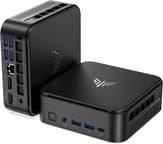 KAMRUI E3B | KAMRUI E3B | KAMRUI E3B | KAMRUI E3B | KAMRUI E3B | |
| Price | List Price: $399.95 Amazon Prices: Loading prices... | List Price: $369.99 Amazon Prices: Loading prices... | List Price: $379.93 Amazon Prices: Loading prices... | List Price: $339.99 Amazon Prices: Loading prices... | List Price: $349.00 Amazon Prices: Loading prices... |
| Version | 16GB/512GB/Ryzen 7 PRO 5875U | 16GB/512GB/Ryzen 7 PRO 5875U | 32GB/512GB/Ryzen 7 5825U | 32GB/512GB/Ryzen 5 7430U | 16GB/512GB/Ryzen 5 7430U |
| Performance Rating | 6.9 | 6.9 | 7.7 | 7.4 | 6.7 |
| Operating System | Windows 11 Pro | Windows 11 Pro | Windows 11 Pro | Windows 11 Pro | Windows 11 Pro |
| Processor | Octa-core 1.90 Ghz (max 4.40 Ghz) AMD Ryzen 7 PRO 5850U | Octa-core 1.90 Ghz (max 4.40 Ghz) AMD Ryzen 7 PRO 5850U | Octa-core 2.00 Ghz (max 4.50 Ghz) AMD Ryzen 7 5825U | Hexa-core 2.30 Ghz (max 4.30 Ghz) AMD Ryzen 5 7430U | Hexa-core 2.30 Ghz (max 4.30 Ghz) AMD Ryzen 5 7430U |
| GPU | Integrated Radeon RX Vega8 Graphics | Integrated Radeon RX Vega8 Graphics | Integrated Radeon RX Vega8 Graphics | Integrated Radeon RX Vega8 Graphics | Integrated Radeon RX Vega8 Graphics |
| RAM | 16 GB | 16 GB | 32 GB | 32 GB | 16 GB |
| Internal Storage | 512 GB | 512 GB | 512 GB | 512 GB | 512 GB |
| Dimensions width x length x thickness | 5.04 x 5.04 x 1.63 inches (128.02 x 128.02 x 41.4 mm) | 5.04 x 5.04 x 1.63 inches (128.02 x 128.02 x 41.4 mm) | 5.04 x 5.04 x 1.63 inches (128.02 x 128.02 x 41.4 mm) | 5.04 x 5.04 x 1.63 inches (128.02 x 128.02 x 41.4 mm) | 5.04 x 5.04 x 1.63 inches (128.02 x 128.02 x 41.4 mm) |
| Weight | unknown | unknown | unknown | unknown | unknown |
| WiFi | Wi-Fi 6 (802.11ax) | Wi-Fi 6 (802.11ax) | Wi-Fi 6 (802.11ax) | Wi-Fi 6 (802.11ax) | Wi-Fi 6 (802.11ax) |
| Bluetooth | Bluetooth 5.2 | Bluetooth 5.2 | Bluetooth 5.2 | Bluetooth 5.2 | Bluetooth 5.2 |
| Ethernet | 1 Ethernet port at 1 Gbps | 1 Ethernet port at 1 Gbps | 1 Ethernet port at 1 Gbps | 1 Ethernet port at 1 Gbps | 1 Ethernet port at 1 Gbps |
| HDMI | 1 Full-Size HDMI Port | 1 Full-Size HDMI Port | 1 Full-Size HDMI Port | 1 Full-Size HDMI Port | 1 Full-Size HDMI Port |
| DisplayPort | 1 DisplayPort (Supports 4K@60Hz) | 1 DisplayPort (Supports 4K@60Hz) | 1 DisplayPort (Supports 4K@60Hz) | 1 DisplayPort (Supports 4K@60Hz) | 1 DisplayPort (Supports 4K@60Hz) |
| VGA | No VGA Ports | No VGA Ports | No VGA Ports | No VGA Ports | No VGA Ports |
| USB Ports | 6 USB 3, 1 USB-C (USB-C supports DisplayPort) | 6 USB 3, 1 USB-C (USB-C supports DisplayPort) | 6 USB 3, 1 USB-C (USB-C supports DisplayPort) | 6 USB 3, 1 USB-C (USB-C supports DisplayPort) | 6 USB 3, 1 USB-C (USB-C supports DisplayPort) |
| Thunderbolt Ports | No | No | No | No | No |
| Internal SATA Ports | No SATA ports | No SATA ports | No SATA ports | No SATA ports | No SATA ports |
| Card Reader | No Card Reader | No Card Reader | No Card Reader | No Card Reader | No Card Reader |
| Headphone Jack | combo | combo | combo | combo | combo |
| Fanless | No | No | No | No | No |
| VESA Mount | Yes | Yes | Yes | Yes | Yes |
| In the Box | E3B Mini PC, Power Adapter & Cable, User Manual, VESA Mount with Screws, HDMI Cable | E3B Mini PC, Power Adapter & Cable, User Manual, VESA Mount with Screws, HDMI Cable | E3B Mini PC, Power Adapter & Cable, User Manual, VESA Mount with Screws, HDMI Cable | E3B Mini PC, Power Adapter & Cable, User Manual, VESA Mount with Screws, HDMI Cable | E3B Mini PC, Power Adapter & Cable, User Manual, VESA Mount with Screws, HDMI Cable |
| Expandability | Expandable RAM up to 64GB | Expandable RAM up to 64GB | Expandable RAM up to 64GB | Expandable RAM up to 64GB | Expandable RAM up to 64GB |
Related Mini PCs
-
 KAMRUI AM02 Mini PCPowerful AMD Ryzen 7 with Radeon RX Vega 10 Graphics, the KAMRUI AM02 Mini PC excels in…
 -
 KAMRUI AM02 Pro Mini PCThe KAMRUI AM02 Pro Mini PC, with an AMD Ryzen 7 5700U and Radeon RX Vega 8, offers a powerful yet…
 -
 ACEMAGIC K1The ACEMAGIC K1 packs AMD Ryzen 7 7730U power into a compact 5-inch square chassis. With triple 4K…
 -
 ACEMAGICIAN Kron Mini K1The ACEMAGICIAN Kron Mini K1 packs AMD Ryzen 7 7730U performance into a compact 5-inch chassis with…
 -
 GEEKOM A5 (2025 Edition)The GEEKOM A5 2025 Edition delivers exceptional value with its AMD Ryzen 5 7430U processor,…
 -
 GEEKOM Mini IT12Boasting a 12th Gen Intel CPU and up to 1TB NVMe storage, the GEEKOM Mini IT12 Mini PC is a…
Detailed Features of the KAMRUI E3B Mini PC
The KAMRUI E3B Mini PC is built around the AMD Ryzen 7 PRO 5850U processor, a high-performance chip with eight cores and 16 threads, capable of easily handling multitasking and demanding applications. The processor operates at a base clock speed of 1.9 GHz and can boost up to 4.4 GHz, making it suitable for tasks ranging from web browsing and office productivity to light gaming and media consumption. Paired with Radeon RX Vega8 Graphics, the E3B delivers smooth visuals for 4K video playback and casual gaming, though it may not be ideal for intensive 3D rendering or AAA gaming titles.
One of the standout features of the E3B is its expandability. The device comes with 16GB of DDR4 RAM, which can be expanded to 64GB across two channels, allowing users to future-proof their setup. Storage is handled by a 512GB NVMe SSD, ensuring fast boot times and quick access to files, though the internal SSD’s slower read/write speeds may impact performance in data-heavy tasks like video editing. For additional storage, the Mini PC includes two M.2 slots support NVMe and SATA drives, and the other is limited to SATA.
Connectivity is another strong point of the KAMRUI E3B. It supports triple 4K displays via HDMI, DisplayPort, and USB-C, making it an excellent choice for multitasking or professional workflows requiring multiple screens. With Wi-Fi 6, Bluetooth 5.2, and a 1Gbps Ethernet port, the Mini PC ensures fast and reliable networking. The compact design, measuring just 5.04 x 5.04 x 1.63 inches, includes a VESA mount, allowing users to attach it to the back of a monitor or a wall for a clutter-free workspace.
What Reviewers Are Saying About the KAMRUI E3B Mini PC
Review by korguenkomodo (Watch the full review on YouTube)
In his detailed review, korguenkomodo highlights the strengths and weaknesses of the KAMRUI E3B Mini PC, offering a balanced perspective on its performance and usability. He praises the Mini PC for its hardware capabilities, including the AMD Ryzen 7 5825U processor (a close variant of the 5850U listed in the product specs), which delivers solid performance for general tasks. The reviewer notes that the device handles activities like web browsing, streaming multiple YouTube videos, and file transfers from external drives without issues, maintaining smooth performance and a cool temperature thanks to its effective cooling system.
However, korguenkomodo points out a significant drawback: the slow read/write speeds of the internal SSD. This limitation becomes apparent during demanding tasks like video editing, where a project that took just 9 minutes to render on a MacBook M2 required 35 minutes on the E3B. While the processor and graphics are capable, the storage bottleneck impacts workflows requiring high-speed data access. He suggests that users with basic computing needs or those willing to upgrade the storage could still find the Mini PC a viable option.
The reviewer also highlights the design and connectivity of the E3B. He describes the Mini PC as compact and visually appealing, with a clean aesthetic and a robust array of ports, including USB-C, HDMI, and multiple USB 3.0 ports. Its support for triple 4K displays and Wi-Fi 6 are standout features, making it a versatile choice for multitasking or professional setups. In conclusion, korguenkomodo recommends the device for general use but advises against it for intensive creative workflows due to the storage limitations.
What Customers Are Saying About the KAMRUI E3B Mini PC
Customer feedback for the KAMRUI E3B Mini PC reflects a mix of positive experiences and constructive criticism. Many users appreciate its compact design and strong performance for everyday tasks like web browsing, streaming, and office work. The expandable RAM and support for triple 4K displays are frequently mentioned as standout features, particularly for those setting up multi-monitor workstations.
However, some customers echo concerns about the internal SSD’s slower read/write speeds, which can hinder performance during tasks like video editing or large file transfers. A few users have also noted that while the cooling system is effective, the fan noise can be noticeable under heavy loads. Overall, the Mini PC is well-received by users who prioritize general productivity and multitasking, but those with more demanding needs may find its limitations a drawback.
Conclusion: Who Should Consider the KAMRUI E3B Mini PC?
The KAMRUI E3B Mini PC is a versatile option for users seeking a compact, capable device for general computing tasks. Its AMD Ryzen 7 PRO 5850U processor, expandable RAM, and triple 4K display support make it ideal for professionals, students, and home office users who need a reliable and space-saving solution. Its Wi-Fi 6 and Bluetooth 5.2 connectivity also ensure smooth integration into modern setups.
That said, users with intensive creative workflows, such as video editing or 3D rendering, might find the internal SSD’s slower speeds a limiting factor. Gamers or those requiring fanless systems may also want to explore other options. For those who need a balance of performance, expandability, and compact design, the KAMRUI E3B offers a solid choice. To explore more Mini PCs and compare features, visit Starry Hope’s Mini PC Comparison Tool.
Frequently Asked Questions
Can the RAM on the KAMRUI E3B be upgraded?
Yes, the KAMRUI E3B comes with 16GB of DDR4 RAM but is expandable up to 64GB. You can add two 32GB RAM sticks to maximize its memory capacity, making it a great option for users who want to future-proof their setup.
Does the KAMRUI E3B support multiple monitors?
Absolutely! The Mini PC supports triple 4K displays via its HDMI, DisplayPort, and USB-C ports. This feature is perfect for multitasking, productivity, or professional workflows that require multiple screens.
Is the internal storage expandable?
The KAMRUI E3B includes two M.2 slots for storage expansion. One slot supports both NVMe and SATA drives, while the other is limited to SATA. However, it does not support 2.5” SATA drives or have a card reader.
Does the KAMRUI E3B come with Wi-Fi and Bluetooth?
Yes, it features Wi-Fi 6 for fast and reliable wireless connectivity and Bluetooth 5.2 for connecting peripherals like headphones, keyboards, and mice.
Is the KAMRUI E3B fanless?
The KAMRUI E3B uses a fan-based cooling system. While it is effective at keeping the device cool, some users may notice fan noise during heavy workloads.
What is included in the box?
The package includes the KAMRUI E3B Mini PC, a power adapter and cable, a user manual, a VESA mount with screws, and an HDMI cable for easy setup.
Can I use the KAMRUI E3B for gaming?
The Mini PC is equipped with Radeon RX Vega8 Graphics, which can handle light gaming and older titles. However, it may not perform well with modern AAA games or intensive 3D graphics.
How does the KAMRUI E3B handle video editing?
While the processor and graphics are capable, the slow internal SSD speeds can cause delays during video editing or large file transfers. Upgrading the storage may improve performance for such tasks.