
KAMRUI Essenx E1
Updated on

The KAMRUI Essenx E1 is a compact and versatile Mini PC designed for users seeking a balance between performance and portability. Powered by the Intel Processor N97 or Intel Processor N150, this device features four cores and a maximum clock speed of 3.60 GHz, making it suitable for everyday computing tasks such as web browsing, office work, and media consumption. It comes pre-installed with Windows 11 Pro, offering a modern and secure operating system experience immediately.
With up to 16GB of DDR4 RAM and 512GB M.2 NVMe SSD, the KAMRUI Essenx E1 ensures smooth multitasking and fast storage performance. Its small footprint (3.94 x 3.94 x 1.18 inches) makes it ideal for tight spaces, and the included VESA mount allows for convenient placement behind a monitor or on a wall. Connectivity options include dual HDMI ports for multi-display setups, USB 3.0 and USB 2.0 ports, and support for Wi-Fi 5 and Bluetooth 4.2. This Mini PC is practical for home offices, media centers, or light productivity tasks.
| Pros | Cons |
|---|---|
| Compact and lightweight design, ideal for small spaces | Limited to single-channel RAM, which may impact performance |
| Pre-installed with Windows 11 Pro for a modern OS experience | Bluetooth 4.2 is outdated compared to newer versions |
| Dual HDMI ports support multi-monitor setups | Lacks a built-in SD card reader |
| Expandable storage with M.2 NVMe PCIe3.0/SATA SSD support (up to 2TB) | No support for 2.5-inch SATA drives |
| Includes VESA mount for flexible installation | Wi-Fi 5 is slower than the latest Wi-Fi 6 standard |
| Quiet operation with active cooling | Limited to one Ethernet port with 1Gbps speed |
| 16GB DDR4 RAM and 512GB SSD provide solid performance for daily tasks | Not suitable for heavy gaming or demanding workloads |
KAMRUI Essenx E1 Comparison Chart
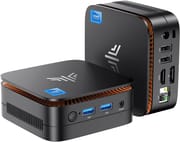 KAMRUI Essenx E1 | KAMRUI Essenx E1 | KAMRUI Essenx E1 | KAMRUI Essenx E1 | |
| Price | List Price: $189.99 Amazon Prices: | List Price: $299.97 Amazon Prices: Loading prices... | List Price: $459.99 Amazon Prices: Loading prices... | List Price: $256.49 Amazon Prices: Loading prices... |
| Version | 8GB/256GB/Intel N150 | 16GB/512GB/Intel N97 | 16GB/512GB/Intel N150 | 16GB/1TB/Intel N150 |
| Performance Rating | 4.3 | 5.0 | 4.9 | 4.9 |
| Operating System | Windows 11 Pro | Windows 11 Pro | Windows 11 Pro | Windows 11 Pro |
| Processor | Quad-core 3.60 Ghz Intel Processor N150 | Quad-core 3.60 Ghz (max 3.60 Ghz) Intel Processor N97 | Quad-core 3.60 Ghz Intel Processor N150 | Quad-core 3.60 Ghz Intel Processor N150 |
| GPU | Integrated Intel UHD Graphics | Integrated Intel UHD Graphics | Integrated Intel UHD Graphics | Integrated Intel UHD Graphics |
| RAM | 8 GB | 16 GB | 16 GB | 16 GB |
| Internal Storage | 256 GB | 512 GB | 512 GB | 1 TB |
| Dimensions width x length x thickness | 3.94 x 3.94 x 1.18 inches (100.08 x 100.08 x 29.97 mm) | 3.94 x 3.94 x 1.18 inches (100.08 x 100.08 x 29.97 mm) | 3.94 x 3.94 x 1.18 inches (100.08 x 100.08 x 29.97 mm) | 3.94 x 3.94 x 1.18 inches (100.08 x 100.08 x 29.97 mm) |
| Weight | unknown | unknown | unknown | unknown |
| WiFi | Wi-Fi 5 (802.11ac) | Wi-Fi 5 (802.11ac) | Wi-Fi 5 (802.11ac) | Wi-Fi 5 (802.11ac) |
| Bluetooth | Bluetooth 4.2 | Bluetooth 4.2 | Bluetooth 4.2 | Bluetooth 4.2 |
| Ethernet | 1 Ethernet port at 1 Gbps | 1 Ethernet port at 1 Gbps | 1 Ethernet port at 1 Gbps | 1 Ethernet port at 1 Gbps |
| HDMI | 2 Full-Size HDMI Ports | 2 Full-Size HDMI Ports | 2 Full-Size HDMI Ports | 2 Full-Size HDMI Ports |
| DisplayPort | No DisplayPort | No DisplayPort | No DisplayPort | No DisplayPort |
| VGA | No VGA Ports | No VGA Ports | No VGA Ports | No VGA Ports |
| USB Ports | 2 USB 2.0, 2 USB 3 2 x USB 3.0, 2 x USB 2.0 | 2 USB 2.0, 2 USB 3 2 x USB 3.0, 2 x USB 2.0 | 2 USB 2.0, 2 USB 3 2 x USB 3.0, 2 x USB 2.0 | 2 USB 2.0, 2 USB 3 2 x USB 3.0, 2 x USB 2.0 |
| Thunderbolt Ports | No | No | No | No |
| Internal SATA Ports | No SATA ports | No SATA ports | No SATA ports | No SATA ports |
| Card Reader | No Card Reader | No Card Reader | No Card Reader | No Card Reader |
| Headphone Jack | combo | combo | combo | combo |
| Fanless | No | No | No | No |
| VESA Mount | Yes | Yes | Yes | Yes |
| In the Box | Mini PC, 1x Mounting Bracket, 1*HDMI Cable, 1*Power Adapter, 1*Instruction Manual | Mini PC, 1x Mounting Bracket, 1*HDMI Cable, 1*Power Adapter, 1*Instruction Manual | Mini PC, 1x Mounting Bracket, 1*HDMI Cable, 1*Power Adapter, 1*Instruction Manual | Mini PC, 1x Mounting Bracket, 1*HDMI Cable, 1*Power Adapter, 1*Instruction Manual |
| Expandability | 1 x DDR SO-DIMM Slot, 1 x M.2 2280 Slot. | 1 x DDR SO-DIMM Slot, 1 x M.2 2280 Slot. | 1 x DDR SO-DIMM Slot, 1 x M.2 2280 Slot. | 1 x DDR SO-DIMM Slot, 1 x M.2 2280 Slot. |
Related Mini PCs
-
 KAMRUI AK1 Plus Mini PCThe KAMRUI AK1 Plus Mini PC boasts a sleek design with Intel N95 processing, 4K support, and…
 -
 KAMRUI Essenx E2Compact yet powerful, the KAMRUI Essenx E2 Mini PC features upgradeable RAM (up to 16GB),…
 -
 Beelink Mini SThe Beelink Mini S Mini PC packs a punch with its Intel Celeron quad-core processor, dual 4K HDMI…
 -
 Bmax B3With the Bmax B3 Mini PC, multitask with ease using the Intel Celeron N5095, dual HDMI, and…
 -
 CHUWI HeroBox (2023)The CHUWI HeroBox Mini PC packs a punch with Windows 11, DDR5 RAM, WiFi 6, and Bluetooth 5.2. Ideal…
 -
 GMKtec NucBox 5Packing a punch, the GMKtec NucBox 5 Mini PC combines Intel Celeron N5105 performance with 8GB RAM…
Detailed Look at the KAMRUI Essenx E1 Mini PC
The KAMRUI Essenx E1 is engineered for users who value a compact yet capable computing solution. Its Intel Processor N97, with four cores and a maximum clock speed of 3.60 GHz, is well-suited for light to moderate workloads such as document editing, streaming, and web browsing. Paired with 16GB of DDR4 RAM, the device ensures smooth multitasking, although its single-channel memory configuration may slightly limit performance compared to dual-channel setups. The Intel UHD Graphics provides sufficient power for basic graphical tasks, including 4K video playback, but it is not designed for intensive gaming or professional-grade graphics work.
Storage is another highlight of the KAMRUI Essenx E1. The 512GB M.2 NVMe SSD delivers fast boot times and quick access to files, and the device supports expandability with an additional M.2 slot that accommodates SSDs up to 2TB. This flexibility makes it a practical choice for users who may need more storage in the future. However, the lack of support for 2.5-inch SATA drives or a built-in SD card reader might be a drawback for those who rely on these storage options.
Connectivity is robust for a device of this size. The dual HDMI Type-A ports allow for multi-monitor setups, which can enhance productivity for office tasks or provide an immersive media experience. The inclusion of Wi-Fi 5 and Bluetooth 4.2 ensures wireless connectivity, while the single Gigabit Ethernet port offers a stable wired connection. Additionally, the VESA mount included in the box makes it easy to attach the Mini PC to the back of a monitor or a wall, keeping your workspace clutter-free. While it lacks modern features like Wi-Fi 6 or Bluetooth 5.0, the KAMRUI Essenx E1 offers a well-rounded package for everyday use.
What Customers Are Saying About the KAMRUI Essenx E1
Customer feedback for the KAMRUI Essenx E1 highlights its practicality and performance for everyday tasks. Many users appreciate its compact size, noting that it fits seamlessly into small workspaces or entertainment setups. The inclusion of a VESA mount has been particularly praised for keeping desks tidy by mounting the Mini PC behind a monitor.
Another common point of satisfaction is the fast boot times and smooth multitasking enabled by the 16GB of RAM and 512GB NVMe SSD. Customers have reported that the device easily handles tasks like web browsing, video streaming, and light office work. However, some users have mentioned that the single-channel RAM configuration may limit performance for more demanding applications.
On the downside, a few customers have expressed disappointment with the lack of a built-in SD card reader and the absence of Wi-Fi 6. Others noted that while the Intel UHD Graphics is sufficient for basic tasks, it is unsuitable for gaming or heavy graphical workloads. Overall, the KAMRUI Essenx E1 has been well-received by users who prioritize affordability, compactness, and functionality for everyday use.
Conclusion: Who Should Consider the KAMRUI Essenx E1?
The KAMRUI Essenx E1 is a solid choice for users who need a compact, affordable Mini PC for light to moderate workloads. Its small size, VESA mount compatibility, and quiet operation make it ideal for home offices, media centers, or even as a secondary PC for casual use. The pre-installed Windows 11 Pro and expandable storage options add to its appeal for users who want a ready-to-use and future-proof device.
However, this Mini PC may not best fit users with more demanding needs. Gamers, video editors, or professionals requiring high-performance hardware might find the Intel Processor N97 and Intel UHD Graphics insufficient for their workloads. Additionally, those who rely on modern wireless standards or specific connectivity options like SD card readers may want to explore other Mini PCs like the KAMRUI Essenx E2.
For users looking to compare the KAMRUI Essenx E1 with other Mini PCs, Starry Hope’s Mini PC Comparison Tool is a helpful resource to find the best fit for their needs.
Frequently Asked Questions
Can the RAM in the KAMRUI Essenx E1 be upgraded?
Yes, the KAMRUI Essenx E1 has one DDR SO-DIMM slot, allowing you to upgrade the RAM. However, keep in mind that it supports only single-channel memory, which may limit performance compared to dual-channel configurations.
What type of storage expansion does the KAMRUI Essenx E1 support?
The Mini PC includes an M.2 2280 slot that supports both NVMe PCIe 3.0 and SATA SSDs with capacities of up to 2TB. Unfortunately, it does not support 2.5-inch SATA drives or have a built-in SD card reader.
Does the KAMRUI Essenx E1 support dual monitors?
Yes, the device features two HDMI Type-A ports, allowing you to connect two monitors simultaneously. This makes it a great choice for multitasking or creating an extended display setup.
Is the KAMRUI Essenx E1 suitable for gaming?
The KAMRUI Essenx E1 is not designed for gaming. Its Intel UHD Graphics can handle basic graphical tasks and 4K video playback but lacks the power needed for modern gaming or graphically intensive applications.
What’s included in the box with the KAMRUI Essenx E1?
The package includes the Mini PC itself, a VESA mounting bracket, an HDMI cable, a power adapter, and an instruction manual. These accessories make it easy to set up and integrate into your workspace.
Does the KAMRUI Essenx E1 have Wi-Fi and Bluetooth?
Yes, the Mini PC supports Wi-Fi 5 and Bluetooth 4.2 for wireless connectivity. While these are functional, they are not the latest standards, so users requiring faster speeds or better range may need to look for alternatives.
Is the KAMRUI Essenx E1 fanless?
No, the KAMRUI Essenx E1 uses active cooling, meaning it has a fan. However, the device operates quietly, making it suitable for environments where noise is a concern.
Can this Mini PC handle heavy workloads like video editing or 3D rendering?
The KAMRUI Essenx E1 is best suited for light to moderate tasks such as web browsing, office work, and media playback. It is not designed for heavy workloads like video editing, 3D rendering, or gaming due to its Intel Processor N97 and integrated graphics.