
KAMRUI Pinova P1
Published on

The KAMRUI Pinova P1 delivers a compact AMD-powered desktop experience for users who need a simple, space-saving machine for everyday computing. Powered by the AMD Ryzen 3 3250U with Radeon Vega 3 integrated graphics, this mini PC handles web browsing, office productivity, video conferencing, and 4K media playback without the bulk or power draw of a traditional desktop. Its standout feature is triple 4K display support through HDMI 2.0, DisplayPort 1.4, and USB-C, making it particularly appealing for multi-monitor productivity setups. Whether you’re setting up a home office workstation, building a silent home theater PC, or replacing an aging desktop for general use, the Pinova P1 offers a remarkably small footprint at a budget-friendly entry point.
Pros and Cons of the KAMRUI Pinova P1
| Pros | Cons |
|---|---|
| Triple 4K 60Hz display output via HDMI, DP, and USB-C | Ryzen 3 3250U is a 2019-era processor outpaced by modern alternatives |
| Seven USB ports total including six USB 3.2 Gen 1 Type-A | WiFi 5 and Bluetooth 4.2 are dated wireless standards |
| Dual M.2 2280 storage slots with up to 4TB capacity | RAM is soldered at 16GB with no upgrade path |
| Compact 5-inch square form factor with VESA mount support | Not suitable for gaming beyond very light or older titles |
| Low 15W TDP for quiet, energy-efficient operation | Lesser-known brand with mixed long-term reliability reports |
| Gigabit Ethernet and dual-band WiFi for flexible networking | Documentation quality and customer support are inconsistent |
KAMRUI Pinova P1 Comparison Chart
 KAMRUI Pinova P1 | |
| Price | List Price: Amazon Prices: Loading prices... |
| Version | 16GB/512GB |
| Perfomance Rating | 4.8 |
| Operating System | Windows 11 Pro |
| Processor | Dual-core 2.60 Ghz (max 3.50 Ghz) AMD Ryzen 3 3250U |
| GPU | Integrated Radeon RX Vega 3 Graphics |
| RAM | 16 GB DDR4 |
| Internal Storage | 512 GB M.2 SSD |
| Dimensions width x length x thickness | 5.04 x 5.04 x 2 inches (128.02 x 128.02 x 50.8 mm) |
| Weight | 1.79 lbs (0.81 kg) |
| WiFi | Wi-Fi 5 (802.11ac) |
| Bluetooth | Bluetooth 4.2 |
| Ethernet | 1 Ethernet port at 1 Gbps |
| HDMI | 1 Full-Size HDMI Port |
| DisplayPort | 1 DisplayPort |
| VGA | No VGA Ports |
| USB Ports | 6 USB 3, 1 USB-C |
| Thunderbolt Ports | No |
| Internal SATA Ports | No SATA ports |
| Card Reader | No Card Reader |
| Headphone Jack | combo |
| Fanless | No |
| VESA Mount | Yes |
| In the Box | KAMRUI Pinova P1 Mini PC, power adapter, HDMI cable, VESA mounting bracket with screws, user manual |
| Expandability | 16GB DDR4 RAM (soldered, not upgradeable), dual M.2 2280 slots for NVMe/SATA SSDs (up to 4TB total storage) |
Related Mini PCs
-
 KAMRUI Pinova P2 Mini PCThe KAMRUI Pinova P2 Mini PC delivers solid performance with its AMD Ryzen 3 4300U processor and…
 -
 KAMRUI AK1 Pro Mini PCHarness the power and versatility of the KAMRUI AK1 Pro Mini PC, boasting an Intel Celeron N5105,…
 -
 ASUS NUC 14 EssentialThe ASUS NUC 14 Essential continues Intel's legendary NUC line under ASUS's stewardship, offering…
 -
 DreamQuest Q5The DreamQuest Q5 is a compact mini PC featuring Intel's 12th Gen N95 processor with high-speed…
 -
 Beelink SER3The Beelink SER3 offers a compact form factor with AMD Ryzen 3 3200U power, dual 4K HDMI output,…
 -
 Bmax B4 PlusThe BMAX B4 Plus Mini PC delivers Intel N100 performance with a unique 2.5-inch SATA expansion bay…
Detailed Insights into the KAMRUI Pinova P1

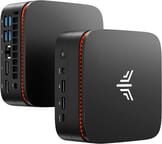
The KAMRUI Pinova P1 measures just 5.04 x 5.04 x 2.0 inches and weighs 1.79 pounds, making it small enough to disappear behind a monitor with the included VESA mounting bracket. The plastic chassis features distinctive orange ventilation grilles that give it a bit more personality than the typical black box mini PC. The front panel houses two USB 3.2 Gen 1 Type-A ports, one USB-C port with display output capability, a 3.5mm combo audio jack, and the power button. The rear provides four more USB 3.2 Gen 1 Type-A ports, HDMI 2.0, DisplayPort 1.4, Gigabit Ethernet, and the DC power input, adding up to a generous seven USB ports for a machine in this class.
At the heart of the system sits the AMD Ryzen 3 3250U, a dual-core, four-thread mobile processor with a base clock of 2.6 GHz and boost up to 3.5 GHz. With a PassMark CPU Mark score of approximately 4,913, it lands squarely in entry-level territory, handling web browsing, Microsoft Office, email, and video streaming with ease. The integrated Radeon Vega 3 graphics support hardware-accelerated 4K video decoding, ensuring smooth Netflix and YouTube playback even at high resolutions. Real-world performance is adequate for multitasking with a dozen browser tabs and a few office applications open simultaneously, though heavy workloads like video editing or large spreadsheets will expose the dual-core limitations.
Connectivity covers the essentials without frills. Dual-band WiFi 5 (802.11ac) handles wireless duties at 2.4 GHz and 5 GHz, though the absence of WiFi 6 means you won’t take full advantage of newer routers. Bluetooth 4.2 connects peripherals like keyboards, mice, and headphones. Amazon reviewers noted that wired Ethernet delivers noticeably better performance than the WiFi connection for tasks like streaming and downloads. Storage expansion is handled through dual M.2 2280 slots supporting both NVMe and SATA drives, with the manufacturer’s spec sheet indicating a maximum combined capacity of 4TB.
Customer Reviews of the KAMRUI Pinova P1

Amazon customers have rated the KAMRUI Pinova P1 4.5 out of 5 stars based on 444 reviews. The most frequently praised aspects include fast boot times, quiet operation under load, and strong value for the price point. Multiple buyers highlight the system’s effectiveness for running dual monitors, handling Twitch streaming and Discord simultaneously, and serving as a compact point-of-sale terminal in retail environments. One reviewer described discovering an unadvertised bottom compartment for additional storage expansion, suggesting the chassis has room for hardware tweaks.
However, some customers note shortcomings in documentation and customer support. One reviewer gave the hardware high marks but criticized the “difficult to read” manual and unresponsive email support when attempting to set up a Linux dual-boot configuration, which required manual BIOS adjustments. WiFi performance drew occasional complaints, with users recommending a wired Ethernet connection for the best experience. A few reviews appear to reference different KAMRUI models within the same listing, so not all feedback may apply specifically to the Ryzen 3250U variant.
Overall, the customer sentiment is positive, with most buyers finding the KAMRUI Pinova P1 delivers solid everyday performance for home office, media consumption, and light business use at a price that undercuts more established mini PC brands.
Conclusion
The KAMRUI Pinova P1 fills a specific niche as an ultra-compact, entry-level desktop replacement for users whose computing needs center on productivity and media playback. Its triple 4K display support, seven USB ports, and dual M.2 storage slots offer flexibility that belies its tiny footprint and price point. The included VESA mount makes it easy to create a clean, clutter-free workspace by tucking the PC behind a monitor.
That said, the aging Ryzen 3 3250U processor, WiFi 5, and Bluetooth 4.2 make it hard to recommend over newer alternatives for anyone whose needs might grow. Users who want better single-threaded performance and more modern wireless standards should consider Intel N100-based mini PCs like the Beelink Mini S12 Pro or BMAX B4 Plus, which offer similar pricing with newer, more efficient processors. The soldered RAM also means you’re locked into 16GB with no upgrade path.
For those comparing options, see our Mini PC Comparison Chart to find the best match for your needs.
Frequently Asked Questions
What processor does the KAMRUI Pinova P1 use?
The KAMRUI Pinova P1 is powered by the AMD Ryzen 3 3250U, a dual-core, four-thread mobile processor with a base clock of 2.6 GHz and boost up to 3.5 GHz. It features integrated Radeon Vega 3 graphics and a 15W TDP. This processor scores approximately 4,913 on PassMark’s CPU Mark benchmark, making it suitable for everyday office tasks, web browsing, and 4K media playback.
Can I upgrade the RAM in the KAMRUI Pinova P1?
No, the KAMRUI Pinova P1 comes with 16GB of DDR4 RAM that is soldered to the motherboard and cannot be upgraded after purchase. The 16GB configuration is sufficient for everyday productivity tasks, web browsing, and media consumption.
What ports does the KAMRUI Pinova P1 have?
The KAMRUI Pinova P1 features seven USB ports: two USB 3.2 Gen 1 Type-A and one USB 3.2 Gen 1 Type-C on the front, plus four USB 3.2 Gen 1 Type-A on the rear. Video output includes HDMI 2.0, DisplayPort 1.4, and the USB-C port (with display capability) for triple 4K 60Hz monitor support. It also has Gigabit Ethernet, a 3.5mm combo audio jack, and a DC power input.
Can I add more storage to the KAMRUI Pinova P1?
Yes, the KAMRUI Pinova P1 has dual M.2 2280 slots that support both NVMe and SATA SSDs, with a maximum combined capacity of 4TB. The system ships with a 512GB SSD in one slot, leaving the second slot free for additional storage. This makes it easy to expand capacity as your needs grow.
How many monitors can the KAMRUI Pinova P1 support?
The KAMRUI Pinova P1 supports up to three monitors simultaneously at 4K 60Hz resolution. Display outputs include HDMI 2.0, DisplayPort 1.4, and the front USB-C port with display output capability. This makes it a versatile choice for multi-monitor productivity setups, digital signage, or home office configurations.
Is the KAMRUI Pinova P1 good for gaming?
The KAMRUI Pinova P1 is not designed for gaming. Its AMD Ryzen 3 3250U processor with integrated Radeon Vega 3 graphics can handle very light or older titles, but it will struggle with modern games. Amazon customers report lag with even simple games. If gaming is a priority, consider a mini PC with a more powerful processor like a Ryzen 5 or Intel Core i5.
What’s included in the box with the KAMRUI Pinova P1?
The KAMRUI Pinova P1 comes with the mini PC unit, a power adapter, an HDMI cable, a VESA mounting bracket with screws for behind-monitor installation, and a user manual. The VESA mount lets you attach the PC directly to the back of a compatible monitor for a clean, space-saving setup.