
MINISFORUM M1 Pro
Updated on

The MINISFORUM M1 Pro is a premium mini PC that combines Intel’s latest Core Ultra 5 125H processor with cutting-edge features like WiFi 7 and OCuLink connectivity. This compact powerhouse delivers desktop-class performance in a form factor that fits comfortably in your hand, making it an excellent choice for professionals who need serious computing power without sacrificing desk space. With its all-aluminum construction and thoughtful port selection, the M1 Pro positions itself as a versatile workstation for creative professionals, developers, and enthusiasts who want the flexibility to add an external GPU down the line.
Pros and Cons of the MINISFORUM M1 Pro
| Pros | Cons |
|---|---|
| Premium all-metal aluminum construction feels solid and durable | Higher price than comparable AMD-based mini PCs |
| OCuLink port for lossless external GPU expansion (adapter included) | No SD card reader for quick media transfers |
| WiFi 7 and Bluetooth 5.4 for cutting-edge wireless connectivity | OCuLink adapter uses one M.2 slot when installed |
| Quiet operation at approximately 33dB under normal use | Internal speakers and microphone are subpar quality |
| Dual USB4 ports with 40Gbps throughput and DisplayPort Alt Mode | Fan noise increases noticeably in performance mode |
| Support for up to 128GB DDR5 RAM and dual PCIe 4.0 NVMe drives | Integrated graphics limited for demanding AAA games |
Related Videos
MINISFORUM M1 Pro Comparison Chart
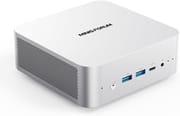 MINISFORUM M1 Pro | |
| Price | List Price: $619.90 Amazon Prices: Loading prices... |
| Version | 32GB/1TB/Intel Core Ultra 5 125H |
| Performance Rating | 8.5 |
| Operating System | Windows 11 Pro |
| Processor | Fourteen-core 3.60 Ghz (max 4.50 Ghz) Intel Core Ultra 5 Processor 125H |
| GPU | Integrated Intel UHD Graphics |
| RAM | 32 GB |
| Internal Storage | 1 TB |
| Dimensions width x length x thickness | 4.96 x 5.04 x 2.07 inches (125.98 x 128.02 x 52.58 mm) |
| Weight | 1.32 lbs (0.6 kg) |
| WiFi | Wi-Fi 7 (802.11be) |
| Bluetooth | Bluetooth 5.4 |
| Ethernet | 1 Ethernet port at 2.5 Gbps |
| HDMI | 1 Full-Size HDMI Port |
| DisplayPort | 1 DisplayPort (DP 1.4) |
| VGA | No VGA Ports |
| USB Ports | 1 USB 2.0, 2 USB 3, 2 USB 4 2x USB4 (40 Gbps) with DisplayPort Alt Mode, one supports Power Delivery |
| Thunderbolt Ports | No |
| Internal SATA Ports | No SATA ports |
| Card Reader | No Card Reader |
| Headphone Jack | combo |
| Fanless | No |
| VESA Mount | Yes |
| In the Box | Mini PC, 120W power adapter with AC cord, HDMI cable, VESA mounting bracket with screws, OCuLink adapter (M.2 to OCuLink), thermal pad and bracket for second SSD, user manual |
| Expandability | RAM upgradable to 128GB via 2x DDR5-5600 SO-DIMM slots. Storage expandable via 2x M.2 2280 PCIe 4.0 x4 slots with RAID 0/1 support. OCuLink port available for external GPU via included adapter. |
Related Mini PCs
-
 MINISFORUM X1 Lite-255The MINISFORUM X1 Lite-255 packs AMD's powerful 8-core Ryzen 7 255 processor with Radeon 780M…
 -
 MINISFORUM UM880 PlusThe MINISFORUM UM880 Plus delivers desktop-class performance in a 5-inch cube with the AMD Ryzen 7…
 -
 BOSGAME P3 LiteThe BOSGAME P3 Lite packs AMD Ryzen 7 6800H power with Radeon 680M graphics into a compact…
 -
 BOSGAME P6The BOSGAME P6 packs desktop-class AMD Ryzen 9 6900HX performance into a compact 539g chassis. With…
 -
 GEEKOM IT15The GEEKOM IT15 packs Intel's latest Arrow Lake processor into a compact NUC-style chassis. With…
 -
 GMKtec Nucbox M7The GMKtec Nucbox M7 packs an AMD Ryzen 7 PRO 6850H processor with OCuLink support for external…
Detailed Insights into the MINISFORUM M1 Pro

The MINISFORUM M1 Pro features a premium aluminum chassis that measures just under 5 inches square and about 2 inches thick, weighing only 1.32 pounds. The build quality is immediately apparent when you pick it up, with solid metal construction on the top and sides that aids in heat dissipation while providing a sleek, professional appearance. The bottom panel is plastic, which some reviewers noted feels slightly less premium, but this design choice helps with weight reduction and accessibility for upgrades. Port layout is well-organized with most connections on the back panel, keeping cables neat when the unit is mounted behind a monitor using the included VESA bracket.
Performance from the Intel Core Ultra 5 125H processor is impressive for this class of device, delivering 14 cores and 18 threads with boost speeds up to 4.5GHz. The integrated Intel Arc graphics handles everyday tasks, video editing, and even retro gaming emulation through PS3 and Xbox 360 era titles without breaking a sweat. TechPowerUp’s testing showed strong benchmark results with a Cinebench 2024 multi-core score of 1,009 points and excellent power efficiency at just 10.3W average idle consumption. For users who need more graphics horsepower, the standout feature is the OCuLink port, which provides a direct PCIe 4.0 x4 connection to an external GPU enclosure without the bandwidth limitations of Thunderbolt.
Connectivity options on the M1 Pro are comprehensive and forward-looking with WiFi 7 and Bluetooth 5.4 ensuring fast wireless performance. The dual USB4 ports support 40Gbps data transfer and DisplayPort Alt Mode for connecting high-resolution displays, while the 2.5 Gigabit Ethernet port provides reliable wired networking. With two M.2 2280 slots supporting PCIe Gen 4 NVMe drives and up to 128GB of DDR5 RAM through dual SO-DIMM slots, this mini PC offers substantial upgrade headroom for users who want to grow their system over time.
Reviewer Insights on the MINISFORUM M1 Pro

Robtech’s Perspective
Robtech provides a thorough technical analysis of the M1 Pro-125H, describing it as “one of the more decent value propositions from Intel’s Meteor Lake lineup.” His review highlights the premium metal build quality and WiFi 7 support as standout features, though he notes that Intel’s pricing makes AMD alternatives more competitive for value-focused buyers. Robtech particularly appreciates the compact 120W power supply and included OCuLink adapter, stating that “it’s basically a copy of the Minisforum AIX1… except the CPU, of course, which has been swapped from AMD to Intel.” He recommends the M1 Pro for Intel enthusiasts and Adobe suite users who benefit from Intel’s Quick Sync technology, while suggesting value-oriented buyers consider AMD options.
Family Pop TV’s Perspective
Family Pop TV focuses on the M1 Pro’s versatility and eGPU potential, calling it “the most versatile Mini PC I’ve tested so far” at its price point. The review emphasizes the OCuLink port as “a direct line to the GPU, no bottlenecks, no compromises,” noting how it transforms this compact system into a full gaming rig when paired with a desktop graphics card. At approximately 33dB during typical operation, the M1 Pro earned praise for quiet performance. The reviewer concludes it’s highly recommended for professionals and modular-build enthusiasts who want a system that can grow with their needs.
Chase Brogan’s Perspective
Chase Brogan evaluates the M1 Pro primarily through the lens of gaming and emulation, emphasizing that “this is all metal. There’s no cheap plastic on here. Very durable, very sleek design.” His testing demonstrates smooth performance across retro gaming platforms including PS3, Xbox 360, and GameCube emulation. While noting that modern AAA titles benefit from an external GPU setup, he considers the M1 Pro “more than capable of the majority of gaming” right out of the box. The efficient and quiet cooling system receives particular praise for maintaining performance without excessive noise.
TechPowerUp Professional Review
According to TechPowerUp, the M1 Pro received an Editor’s Choice award with a perfect 5/5 star rating. Their comprehensive testing found that “the M1 Pro performs like a full desktop, handling work, creative, and entertainment tasks smoothly.” The review highlights the OCuLink port as a feature “rarely found on mini PCs of this class” and notes excellent power efficiency with just 10.3W idle consumption and 48.5 dBA peak noise under load. The only significant criticisms were the absence of an SD card reader and the midrange sustained write performance of the bundled SSD.
Customer Reviews of the MINISFORUM M1 Pro
Customer feedback on Amazon has been largely positive, with the M1 Pro earning a 4.5-star rating from over 113 reviews. Buyers consistently praise the premium build quality and compact form factor, with many noting how the aluminum construction feels substantial and professional compared to plastic competitors. The performance from the Intel Core Ultra 5 125H processor receives frequent mentions, with users reporting smooth multitasking and snappy responsiveness for productivity workloads.
The OCuLink feature generates particular enthusiasm among tech-savvy buyers who appreciate the upgrade path it provides. Several reviews mention successfully pairing the M1 Pro with external GPU enclosures for gaming and creative work, transforming the compact system into a formidable workstation. The included accessories, particularly the VESA mount and OCuLink adapter, are frequently cited as value-adds that competitors often charge extra for.
Common criticisms mirror professional reviews, with some users noting that fan noise becomes noticeable during intensive tasks and that the price positions the M1 Pro at the premium end of the mini PC market. A few buyers mention that Intel-based systems can’t match AMD alternatives for pure gaming value, though those choosing the M1 Pro typically prioritize the Intel platform for specific software compatibility or the OCuLink expansion capability.
Conclusion
The MINISFORUM M1 Pro-125H is an excellent choice for users who want Intel’s latest Core Ultra platform in a compact, well-built package with genuine upgrade potential. Its standout feature remains the OCuLink port, which provides a clear path to adding desktop-class graphics performance without the bandwidth compromises of Thunderbolt solutions. Creative professionals working with Adobe applications, developers who need quick compile times, and enthusiasts building modular computing setups will find the M1 Pro particularly appealing.
Those primarily focused on gaming value or maximum performance per dollar should consider AMD-based alternatives, as Intel’s mobile chip pricing remains less competitive in pure benchmarks. However, for users who prioritize the Intel ecosystem, WiFi 7 connectivity, and the flexibility of lossless eGPU expansion, the M1 Pro delivers a compelling package. For those looking to compare options, Starry Hope’s Mini PC Comparison Chart provides a valuable resource for evaluating the M1 Pro against other systems in its class.
Frequently Asked Questions
What is the OCuLink port on the MINISFORUM M1 Pro and why does it matter?
OCuLink is a high-bandwidth connection standard that provides a direct PCIe 4.0 x4 link to an external GPU. Unlike Thunderbolt or USB4 which share bandwidth with other functions, OCuLink offers dedicated graphics bandwidth without bottlenecks. This means you can pair the M1 Pro with an external graphics card enclosure and achieve near-desktop gaming performance when needed, while still enjoying the compact form factor for everyday use.
Can I upgrade the RAM and storage in the MINISFORUM M1 Pro?
Yes, the M1 Pro is highly upgradeable. It features two DDR5-5600 SO-DIMM slots supporting up to 128GB of RAM, and two M.2 2280 PCIe Gen 4 x4 slots for NVMe SSDs with RAID 0/1 support. The included thermal pad and bracket for the second SSD slot make adding storage straightforward. Note that using the OCuLink adapter requires one M.2 slot.
How does the Intel Core Ultra 5 125H compare to AMD alternatives for mini PCs?
The Intel Core Ultra 5 125H offers 14 cores and 18 threads with strong single-threaded performance and Intel Arc integrated graphics. While AMD alternatives like the Ryzen 7 8845HS often provide better value for pure gaming benchmarks, Intel shines in applications that leverage Quick Sync for video encoding and specific creative software optimized for Intel platforms. The choice often comes down to your primary workload and whether you value the OCuLink expansion option.
How many displays can the MINISFORUM M1 Pro support?
The M1 Pro can drive up to four displays simultaneously. It features one HDMI 2.1 port, one DisplayPort 1.4, and two USB4 ports that both support DisplayPort Alt Mode. This makes it suitable for multi-monitor productivity setups or creative workstations requiring multiple screens.
Is the MINISFORUM M1 Pro suitable for gaming?
The M1 Pro handles casual gaming, esports titles, and retro emulation through PS3 and Xbox 360 era games quite well on its integrated Intel Arc graphics. For demanding modern AAA titles at high settings, you’ll get better results by connecting an external GPU via the OCuLink port. This modular approach lets you enjoy the compact form factor for everyday use while having desktop-class gaming performance available when you want it.
How loud is the MINISFORUM M1 Pro during operation?
Under typical workloads, the M1 Pro operates at approximately 33dB, which reviewers describe as very quiet. During intensive tasks, TechPowerUp measured peak noise at 48.5dB with the stock fan profile. This is audible but still reasonable for a high-performance mini PC. The system uses dual fans with copper heat pipes for cooling.
What comes in the box with the MINISFORUM M1 Pro?
The M1 Pro includes a comprehensive accessory package: the mini PC itself, a 120W power adapter with AC cord, HDMI cable, VESA mounting bracket with screws for monitor mounting, an OCuLink adapter (M.2 to OCuLink) for external GPU connections, a thermal pad and bracket for installing a second SSD, and a user manual. The inclusion of the OCuLink adapter is particularly notable as many competitors charge extra for this accessory.