
MINISFORUM X1 Lite-255
Updated on

The MINISFORUM X1 Lite-255 represents a compelling entry in the high-performance mini PC market, built around AMD’s Ryzen 7 255 processor with integrated Radeon 780M graphics. This compact machine measures just 130 x 126 x 47.2mm (roughly 5 x 5 x 2 inches) and weighs only 0.67kg, making it one of the more portable options in the performance mini PC category. What sets it apart from typical budget mini PCs is its impressive connectivity options, including dual USB4 ports and an included OCuLink adapter for external GPU expansion. Whether you’re looking for a capable home office workstation, a compact gaming system, or a versatile HTPC, the X1 Lite-255 aims to deliver desktop-class performance without the desktop-sized footprint.
Pros and Cons of the MINISFORUM X1 Lite-255
| Pros | Cons |
|---|---|
| Powerful 8-core Zen 4 CPU delivers excellent multi-threaded performance | Limited to 5 USB ports total (may need a hub) |
| Radeon 780M handles 1080p gaming surprisingly well | OCuLink adapter uses one of only two M.2 slots |
| Dual USB4 ports with DisplayPort Alt Mode support | Can reach 92C under sustained heavy loads |
| Included OCuLink adapter enables future eGPU expansion | No dedicated NPU for AI acceleration |
| Ultra-compact 0.84L chassis with quality aluminum construction | Barrel jack power instead of USB-C Power Delivery |
| Support for up to 128GB DDR5 RAM | Bluetooth range could be better |
Related Videos
MINISFORUM X1 Lite-255 Comparison Chart
 MINISFORUM X1 Lite-255 | MINISFORUM X1 Lite-255 | MINISFORUM X1 Lite-255 | MINISFORUM X1 Lite-255 | |
| Price | List Price: $549.00 Amazon Prices: Loading prices... | List Price: $639.00 Amazon Prices: Loading prices... | List Price: $739.00 Amazon Prices: Loading prices... | List Price: $449.00 Amazon Prices: Loading prices... |
| Version | 32GB/512GB | 32GB/1TB | 64GB/1TB | Barebone |
| Performance Rating | 9.0 | 9.0 | 9.3 | 8.4 |
| Operating System | Windows 11 Pro | Windows 11 Pro | Windows 11 Pro | Windows 11 Pro |
| Processor | Octa-core 3.80 Ghz (max 4.90 Ghz) AMD Ryzen 7 H 255 | Octa-core 3.80 Ghz (max 4.90 Ghz) AMD Ryzen 7 H 255 | Octa-core 3.80 Ghz (max 4.90 Ghz) AMD Ryzen 7 H 255 | Octa-core 3.80 Ghz (max 4.90 Ghz) AMD Ryzen 7 H 255 |
| GPU | Integrated AMD Radeon 780M | Integrated AMD Radeon 780M | Integrated AMD Radeon 780M | Integrated AMD Radeon 780M |
| RAM | 32 GB | 32 GB | 64 GB | 0 GB |
| Internal Storage | 512 GB | 1 TB | 1 TB | 0 GB |
| Dimensions width x length x thickness | 5.12 x 4.96 x 1.86 inches (130.05 x 125.98 x 47.24 mm) | 5.12 x 4.96 x 1.86 inches (130.05 x 125.98 x 47.24 mm) | 5.12 x 4.96 x 1.86 inches (130.05 x 125.98 x 47.24 mm) | 5.12 x 4.96 x 1.86 inches (130.05 x 125.98 x 47.24 mm) |
| Weight | 1.48 lbs (0.67 kg) | 1.48 lbs (0.67 kg) | 1.48 lbs (0.67 kg) | 1.48 lbs (0.67 kg) |
| WiFi | Wi-Fi 6E (802.11ax) | Wi-Fi 6E (802.11ax) | Wi-Fi 6E (802.11ax) | Wi-Fi 6E (802.11ax) |
| Bluetooth | Bluetooth 5.2 | Bluetooth 5.2 | Bluetooth 5.2 | Bluetooth 5.2 |
| Ethernet | 1 Ethernet port at 2.5 Gbps | 1 Ethernet port at 2.5 Gbps | 1 Ethernet port at 2.5 Gbps | 1 Ethernet port at 2.5 Gbps |
| HDMI | 1 HDMI Port | 1 HDMI Port | 1 HDMI Port | 1 HDMI Port |
| DisplayPort | 1 DisplayPort | 1 DisplayPort | 1 DisplayPort | 1 DisplayPort |
| VGA | No VGA Ports | No VGA Ports | No VGA Ports | No VGA Ports |
| USB Ports | 1 USB 2.0, 2 USB 3, 2 USB 4 | 1 USB 2.0, 2 USB 3, 2 USB 4 | 1 USB 2.0, 2 USB 3, 2 USB 4 | 1 USB 2.0, 2 USB 3, 2 USB 4 |
| Thunderbolt Ports | No | No | No | No |
| Internal SATA Ports | No SATA ports | No SATA ports | No SATA ports | No SATA ports |
| Card Reader | No Card Reader | No Card Reader | No Card Reader | No Card Reader |
| Headphone Jack | combo | combo | combo | combo |
| Fanless | No | No | No | No |
| VESA Mount | Yes | Yes | Yes | Yes |
| In the Box | Mini PC, 19V 120W power adapter, HDMI cable, VESA mounting bracket with screws, M.2 to OCuLink adapter, user manual | Mini PC, 19V 120W power adapter, HDMI cable, VESA mounting bracket with screws, M.2 to OCuLink adapter, user manual | Mini PC, 19V 120W power adapter, HDMI cable, VESA mounting bracket with screws, M.2 to OCuLink adapter, user manual | Mini PC, 19V 120W power adapter, HDMI cable, VESA mounting bracket with screws, M.2 to OCuLink adapter, user manual |
| Expandability | RAM upgradable to 128GB via 2x DDR5-5600 SO-DIMM slots, storage expandable via 2x M.2 2280 PCIe Gen 4 slots (up to 8TB total), OCuLink support for external GPU via included adapter | RAM upgradable to 128GB via 2x DDR5-5600 SO-DIMM slots, storage expandable via 2x M.2 2280 PCIe Gen 4 slots (up to 8TB total), OCuLink support for external GPU via included adapter | RAM upgradable to 128GB via 2x DDR5-5600 SO-DIMM slots, storage expandable via 2x M.2 2280 PCIe Gen 4 slots (up to 8TB total), OCuLink support for external GPU via included adapter | RAM upgradable to 128GB via 2x DDR5-5600 SO-DIMM slots, storage expandable via 2x M.2 2280 PCIe Gen 4 slots (up to 8TB total), OCuLink support for external GPU via included adapter |
Related Mini PCs
-
 MINISFORUM M1 ProThe MINISFORUM M1 Pro is a premium compact mini PC featuring Intel Core Ultra 5 125H processor with…
 -
 MINISFORUM UM880 PlusThe MINISFORUM UM880 Plus delivers desktop-class performance in a 5-inch cube with the AMD Ryzen 7…
 -
 BOSGAME P3 LiteThe BOSGAME P3 Lite packs AMD Ryzen 7 6800H power with Radeon 680M graphics into a compact…
 -
 BOSGAME P6The BOSGAME P6 packs desktop-class AMD Ryzen 9 6900HX performance into a compact 539g chassis. With…
 -
 GEEKOM IT15The GEEKOM IT15 packs Intel's latest Arrow Lake processor into a compact NUC-style chassis. With…
 -
 GMKtec Nucbox M7The GMKtec Nucbox M7 packs an AMD Ryzen 7 PRO 6850H processor with OCuLink support for external…
Detailed Insights into the MINISFORUM X1 Lite-255

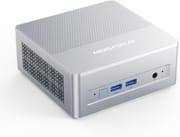
The X1 Lite-255 features a premium build quality with an aluminum alloy top and sides paired with a plastic base and back panel. The silver metallic finish is fingerprint-resistant, which is a thoughtful touch for a device that’s likely to be handled frequently. The front panel houses two USB 3.2 Gen2 ports running at 10Gbps, a 3.5mm combo audio jack, and a power button. Around back, you’ll find the dual USB4 ports (both supporting DisplayPort Alt Mode, with one handling power delivery), a single USB 2.0 port, HDMI 2.1 FRL, DisplayPort 1.4, and 2.5 Gigabit Ethernet. The port layout is logical and well-spaced, though the limited USB-A count means most users will want to keep a hub handy.
The AMD Ryzen 7 255 processor is essentially a refresh of the popular Ryzen 7 8745HS, built on AMD’s Zen 4 architecture with 8 cores and 16 threads capable of boosting up to 4.9GHz. In benchmarks, reviewers have recorded Cinebench R23 multi-core scores around 16,000-17,000 and Geekbench 6 scores exceeding 12,000 in multi-core tests. The integrated Radeon 780M graphics punch well above their weight class, delivering playable framerates in popular esports titles: CS2 runs at 90+ FPS on low settings, Valorant exceeds 200 FPS, and even more demanding titles like Street Fighter 6 maintain a steady 60 FPS at 1080p low. Multiple reviewers noted that the 780M outperforms Intel’s Core Ultra integrated graphics in gaming scenarios.
Connectivity and expansion options are where the X1 Lite-255 truly shines for its category. The dual USB4 ports running at 40Gbps each provide substantial bandwidth for external displays, storage, and accessories. More notably, MINISFORUM includes an M.2 to OCuLink adapter in the box, allowing users to connect an external GPU enclosure for significantly enhanced graphics performance. Reviewers measured approximately 45% better eGPU performance via OCuLink compared to USB4 connections. The system supports up to 128GB of DDR5-5600 RAM across two SO-DIMM slots and offers two M.2 2280 PCIe Gen 4 x4 slots for storage, though using the OCuLink adapter does sacrifice one storage slot. WiFi 6E and Bluetooth 5.2 handle wireless connectivity, with 2.5 Gigabit Ethernet available for wired connections.
Reviewer Insights on the MINISFORUM X1 Lite-255

Rob Tech’s Perspective
Rob Tech provides an in-depth look at the X1 Lite-255, noting that it represents “a more NUC-style mini PC instead of the Mac inspiration of the Pro” model. His testing revealed impressive gaming performance from the Radeon 780M, achieving 91 FPS average in CS2 at 1080p low settings and an impressive 171 FPS in League of Legends at very high settings. He was particularly pleased with the dual USB4 and OCuLink capabilities, calling it “a solid choice for external GPU users who prefer the traditional NUC form factor.” However, he did note some drawbacks: “You’re going to have to sacrifice the second M.2 storage slot if you plan to use an Oculink eGPU,” and the Bluetooth range was weaker than expected. His thermal testing showed the CPU hitting 92C in performance mode with fan noise around 40-44dB.
ETA PRIME’s Perspective
ETA PRIME sees significant potential in the X1 Lite-255, suggesting that “this little mini PC could turn out to be the best budget mini PC of 2026 given the specs that this thing’s rocking, price, and overall IO.” His detailed testing focuses on the system’s impressive power delivery, noting it can sustain 64-70W TDP in performance mode. Unlike other reviewers who reported higher temperatures, his thermal testing showed maximum CPU temperatures of only 78°C while remaining remarkably quiet even under load. He highlights the versatile USB4 port that supports single-cable operation with compatible monitors, explaining that “all you need is a single cable with the correct monitor to get this thing up and running—your monitor is going to send power to the unit and in turn it’s going to send that video signal right back to the monitor.” He praises the included OCuLink adapter and notes that without it, “you can do up to 8 TB of storage in the X1 Lite.” However, he cautions that the price “does jump up significantly going up to 32 gigs of RAM and 1 TB of storage,” making the barebones option attractive for users who already have components on hand.
Mr. Sujano’s Perspective
Mr. Sujano came away highly impressed with the X1 Lite-255’s overall performance, declaring “This thing has excelled for pretty much everything I’ve thrown at it.” He was particularly enthusiastic about the gaming performance, stating that “In my testing it beat the pants off the Intel Core Ultra 9 185H” in integrated graphics benchmarks. His thermal testing showed more moderate temperatures of 60-70C under gaming loads with idle temps around 47C, suggesting some variance between units or testing conditions. He praised the easy upgradeability and silver metallic finish but expressed disappointment with the limited USB port count, noting “I’m a little bit disappointed to see a lack of USB ports on this device.” For home office use, content creation, and light 1080p gaming, he considers it highly recommended.
Hostbor’s Written Review
According to Hostbor, which awarded the system a 7.8/10 score, “The AI X1 255 excels as a portable gaming PC with superior eGPU connectivity via OCuLink.” Their comprehensive benchmark testing recorded Cinebench R23 single-core scores of 1728 and multi-core scores of 16997, along with Geekbench 6 scores of 2584 (single) and 12967 (multi). They noted that “OCuLink provides 45% better eGPU performance vs USB4,” making this a compelling option for users planning to expand with an external graphics card later. However, they cautioned about thermal concerns, noting the system “reaches 92C under sustained loads” and mentioned some factory quality control issues with thermal pad installation.
All three reviewers agree on the X1 Lite-255’s core strengths: excellent CPU performance, surprisingly capable integrated graphics, and standout expansion options via OCuLink. The consistent criticism across reviews is the limited USB-A port count, which most users will need to address with a hub.
Customer Reviews of the MINISFORUM X1 Lite-255
Early Amazon customer reviews have been overwhelmingly positive, with the product currently holding a perfect 5.0-star rating from 11 reviews. Customers frequently praise the compact form factor and powerful performance, with many highlighting how the small size doesn’t compromise on capability. The included OCuLink adapter and VESA mounting bracket are mentioned as welcome additions that add value to the package.
The most common positive themes center on the system’s performance-to-size ratio and the quality of the aluminum construction. Several customers coming from older systems or budget mini PCs express pleasant surprise at how well the Radeon 780M handles casual gaming without a dedicated GPU. The quiet operation under normal workloads is another frequently mentioned benefit.
Given the limited number of reviews so far and the product’s recent release, it’s worth watching for longer-term feedback on thermal performance and reliability. The $639 price point for the 32GB/1TB configuration positions it competitively against similar Ryzen 7-based mini PCs, though the OCuLink adapter inclusion adds genuine value for users interested in future GPU expansion.
Conclusion
The MINISFORUM X1 Lite-255 carves out a compelling niche for users who want serious computing power in a truly compact package. The combination of AMD’s 8-core Ryzen 7 255 processor, capable Radeon 780M graphics, and the included OCuLink adapter makes it particularly attractive for users who might want external GPU expansion down the road. For productivity work, home office tasks, and even light 1080p gaming, the integrated graphics deliver better performance than most Intel alternatives in this form factor.
This mini PC is ideal for power users who prioritize a small footprint, enthusiasts interested in eGPU setups, content creators who need portable workstation performance, and anyone seeking a capable HTPC or home server that won’t take up much desk space. The 128GB RAM ceiling and dual M.2 slots provide genuine upgrade headroom that budget mini PCs simply can’t match.
However, prospective buyers should consider alternatives if they need more than five USB ports without a hub, require sustained heavy workloads (given the thermal limitations), or specifically want AI/NPU acceleration capabilities. The X1 Lite-255 with the Ryzen 7 255 lacks the dedicated NPU found in some competing AMD chips. Users focused on running large language models locally should also explore Strix Halo systems, which offer 128GB of unified memory for dramatically better AI inference performance. For those looking to compare options, Starry Hope’s Mini PC Comparison Chart provides a valuable resource for evaluating the X1 Lite-255 against alternatives in this competitive category.
Frequently Asked Questions
What is OCuLink and why is it useful on the MINISFORUM X1 Lite-255?
OCuLink (Optical-Copper Link) is a high-speed PCIe connection standard that provides 64Gbps bandwidth when using PCIe 4.0 x4. The X1 Lite-255 includes an M.2 to OCuLink adapter that lets you connect an external GPU enclosure. Reviewers measured approximately 45% better eGPU performance via OCuLink compared to USB4 connections, making it the preferred choice for external graphics expansion.
Can the MINISFORUM X1 Lite-255 handle gaming?
Yes, the integrated Radeon 780M graphics can handle 1080p gaming at low to medium settings in many titles. Reviewers achieved 90+ FPS in CS2, over 200 FPS in Valorant, 171 FPS in League of Legends, and stable 60 FPS in Street Fighter 6. For more demanding games or higher settings, the included OCuLink adapter allows connection to an external GPU for significantly improved performance.
How much RAM can the X1 Lite-255 support?
The X1 Lite-255 supports up to 128GB of DDR5-5600 RAM across two SO-DIMM slots. The pre-configured version ships with 32GB, but users can easily upgrade by accessing the bottom panel. This substantial RAM ceiling makes it suitable for demanding workstation tasks, virtual machines, and content creation workflows.
How loud is the MINISFORUM X1 Lite-255?
The X1 Lite-255 uses active cooling with a fan, dual heat pipes, and phase-change thermal material. Under typical workloads, reviewers measured noise levels around 29-35dB, which is essentially whisper-quiet. Under heavy gaming or sustained CPU loads, fan noise increases to approximately 40-45dB, which is noticeable but not disruptive in most environments.
What displays can I connect to the MINISFORUM X1 Lite-255?
The X1 Lite-255 can drive up to three displays simultaneously. It features HDMI 2.1 FRL (supporting up to 8K@60Hz or 4K@120Hz), DisplayPort 1.4 (supporting 8K@60Hz or 4K@144Hz), and both USB4 ports support DisplayPort Alt Mode (8K@60Hz or 4K@144Hz each). This makes it well-suited for multi-monitor productivity setups.
Does the X1 Lite-255 have WiFi 7?
No, the X1 Lite-255 comes with WiFi 6E and Bluetooth 5.2. Some reviewers confused this with the separate AI X1 Pro which features WiFi 7 and Bluetooth 5.4. The X1 Lite-255 specifically uses WiFi 6E, which still provides excellent wireless performance with support for the 6GHz band.
What comes in the box with the MINISFORUM X1 Lite-255?
The X1 Lite-255 package includes the mini PC itself, a 19V 120W power adapter, an HDMI cable, a VESA mounting bracket with screws, an M.2 to OCuLink adapter, and a user manual. The inclusion of both the VESA mount and OCuLink adapter adds genuine value compared to competitors that charge extra for these accessories.