
MINIX Z100-Aero
Updated on

The MINIX Z100-Aero is an active-cooled mini PC built on the Intel N100 (Alder Lake-N), aimed at buyers who want a small, quiet Windows 11 Pro desktop for everyday work, media, and light gaming without paying for more chip than they need. It packs dual Ethernet, HDMI and DisplayPort video, and a single upgradable memory slot into a 5-inch chassis.
One DDR4 slot, NVMe storage, and a 2.5-inch SATA bay
The Z100-Aero runs the quad-core Intel N100 (0.8GHz base, up to 3.4GHz) with integrated Intel UHD Graphics. Storage is a single M.2 PCIe 3.0 x4 NVMe slot, populated with 512GB and upgradable to 4TB, plus an included cable and rails for a 2.5-inch SATA drive. Memory is one DDR4 SO-DIMM slot (3200MHz) that takes up to 32GB.
Connectivity is Intel Wireless-AC 9560 Wi-Fi 5 (802.11ac) and Bluetooth 5.1, with two Ethernet ports (one 1G, one 2.5G). Video runs over HDMI and DisplayPort, both up to 4K at 60Hz, and the USB-C port also carries display out. The chassis measures 5” x 5” x 1.69” and runs off a 12V power adapter.
Smooth 4K playback and comfortable retro emulation
The Z100-Aero ships with Windows 11 Pro 64-bit. In Robtech’s testing it handled the usual N100 workload without trouble: it played 4K 60fps YouTube without dropped frames and managed basic 1080p video editing.
For gaming and emulation, the N100 handles older and lighter titles. Robtech found Minecraft ran well enough and League of Legends held up at high detail, and it emulated older consoles such as PlayStation 2, GameCube, and Wii at 720p. Current AAA titles are out of reach.
Robtech reported low CPU temperatures and low fan noise even under load. The fan is the main difference from the fanless Z100-0dB, which uses the same N100 platform.
| Pros | Cons |
|---|---|
| Intel Alder Lake-N Quad-Core N100 | Accessing memory and storage requires removing screws |
| Supports up to 32GB DDR4 3200MHz RAM | Uses DDR4 RAM instead of faster DDR5 |
| Up to 4TB M.2 NVMe SSD storage | Included NVMe SSD limited to PCIe Gen 3 x1 speeds |
| Dual Ethernet ports (1G + 2.5G) | Plastic build instead of metal |
| Supports multiple 4K 60Hz displays via HDMI and DisplayPort | One memory slot, so an upgrade means replacing the module |
| Full-function USB-C with Power Delivery and display output | Wi-Fi 5 (AC 9560) only; no Wi-Fi 6 |
Related Videos
MINIX Z100-Aero Comparison Chart
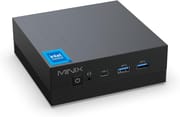 MINIX Z100-Aero | |
| Price | List Price: $249.90 Amazon Prices: |
| Version | 16GB/512GB/Intel N100 |
| Performance Rating | 4.9 |
| Operating System | Windows 11 Pro |
| Processor | Quad-core 3.40 Ghz (max 3.40 Ghz) Intel Processor N100 |
| GPU | Integrated Intel UHD Graphics |
| RAM | 16 GB |
| Internal Storage | 512 GB |
| Dimensions width x length x thickness | 5 x 5 x 1.69 inches (127 x 127 x 42.93 mm) |
| Weight | unknown |
| WiFi | Wi-Fi 5 (802.11ac) |
| Bluetooth | Bluetooth 5.1 |
| Ethernet | 2 Ethernet ports at 2.5 Gbps |
| HDMI | 1 Full-Size HDMI Port |
| DisplayPort | 1 DisplayPort |
| VGA | No VGA Ports |
| USB Ports | 4 USB 3, 1 USB-C (USB-C supports data transfer up to 5Gbps, video output up to 4K@60Hz) |
| Thunderbolt Ports | No |
| OCuLink | No |
| Internal SATA Ports | No SATA ports |
| Card Reader | No Card Reader |
| Headphone Jack | combo |
| Fanless | No |
| VESA Mount | Yes |
| In the Box | Mini PC, power adapter, VESA mount, HDMI Cable, screws and rails for 2.5 inch storage expansion, user guide |
| Expandability | Memory and storage are upgradeable |
Related Mini PCs
-
 Bmax B4 PlusThe BMAX B4 Plus is an Intel N100 mini PC with a 2.5-inch SATA drive bay next to its M.2 slot, so a…
 -
 Bmax B4 UltraThe Bmax B4 Ultra is an ultra-compact mini PC featuring Intel's N150 processor, 12GB LPDDR5 RAM,…
 -
 BOSGAME B100The BOSGAME B100 is a budget Intel N100 mini PC with 16GB of DDR4, a 512GB NVMe SSD, dual HDMI plus…
 -
 BOSGAME B95The BOSGAME B95 is a low-cost Intel N95 mini PC with 16GB of DDR4, a 512GB M.2 SSD, 2.5Gb Ethernet,…
 -
 CyberGeek Nano A1The CyberGeek Nano A1 is a compact Intel N100 mini PC with Windows 11 Pro, Wi-Fi 6, dual HDMI 4K…
 -
 DreamQuest Pro Mini PCThe DreamQuest Pro Mini PC is a budget Intel N95 box (16GB or 32GB RAM, 512GB or 1TB SSD) with dual…
Strong cooling, weak Wi-Fi in the one hands-on review
The one hands-on review of the Z100-Aero specifically (not the fanless Z100-0dB) is from Robtech. His high point was the cooling: “I’m impressed by its cooler. Not only is the CPU temperature low, but fan noises as well.” He also rated the ports highly, saying the Aero “takes the N100 as far as it can go,” and singled out the “full-featured USB-C” that “supports power delivery and display,” with HDMI and DisplayPort each driving a 4K 60Hz screen.
His criticisms were the memory and storage compartments, which are awkward to get into, and the DDR4 memory, which costs a little graphics performance next to DDR5. He also felt that at this price MINIX could have included a better Wi-Fi chip than the Wi-Fi 5 AC 9560.
The N150 Z150-Aero now holds the same listing
MINIX has refreshed this line. The Amazon listing that carried the N100 Z100-Aero now sells the Z150-Aero, built on the newer Intel N150 (an upgraded N100), and that listing’s owner ratings pool the N100 and N150 generations together. If you want the N100 machine, check the exact processor on any listing before buying; otherwise the N150 Z150-Aero is the current equivalent. For a silent option on the same N100 platform, see the fanless MINIX Z100-0dB.
A quiet Windows desktop for media, emulation, and a small home server
The two Ethernet ports and the N100’s low idle power make it a reasonable base for a small home server running self-hosted services, with the 2.5-inch SATA bay taking a second drive for storage. Its strongest points are the cooling Robtech praised, the dual Ethernet (1G + 2.5G), and the 4K-capable HDMI and DisplayPort outputs, which cover home entertainment, light gaming and emulation, and general productivity.
Buyers who want DDR5 memory, a metal chassis, or no fan at all should look elsewhere. On the same N100 platform, the fanless MINIX Z100-0dB is the sibling to consider. To weigh this machine against other models, use Starry Hope’s Mini PC Comparison Chart.
Frequently Asked Questions
What processor does the MINIX Z100-Aero use?
It uses the Intel® Alder Lake-N Quad-Core N100, which runs from a 0.8GHz base to a 3.4GHz maximum turbo frequency.
How much RAM and storage can the mini PC support?
Memory is one DDR4 SO-DIMM slot taking up to 32GB at 3200MHz. Storage ships as a 512GB M.2 PCIe 3.0 x4 NVMe SSD and can be upgraded to 4TB.
What connectivity options does the Z100-Aero offer?
Wired networking is two Ethernet ports (1G + 2.5G); wireless is Intel Wireless-AC 9560 Wi-Fi 5 (802.11ac) and Bluetooth 5.1. Ports are four USB 3.2 Gen 1 Type-A, one USB 3.2 Gen 2 Type-C with Power Delivery and display output, HDMI, and DisplayPort, the last two both up to 4K at 60Hz.
Can the MINIX Z100-Aero handle 4K displays?
Yes. Both the HDMI and the DisplayPort output run 4K at 60Hz, and the USB-C port also carries video.
What operating system does the mini PC come with?
Windows 11 Pro 64-bit comes pre-installed.
Is the Z100-Aero suitable for gaming?
Light gaming and emulation, yes; current AAA titles, no. In Robtech’s testing, Minecraft ran well and League of Legends held up at high detail, and it emulated PlayStation 2, GameCube, and Wii at 720p.
How easy is it to upgrade the memory and storage?
Both are user-upgradable, but getting to them means removing screws and working around the board, which Robtech found awkward.
What are the dimensions and weight of the mini PC?
The chassis measures 127x127x43mm (5”x5”x1.69”) and weighs approximately 2.8 pounds (1.27 kg).
Does the Z100-Aero have a VESA mount option?
Yes. A VESA mount is in the box, so the machine can hang off the back of a monitor or TV.
What is included in the box?
The box holds the mini PC, a power adapter, a VESA mount, an HDMI cable, screws and rails for 2.5-inch storage expansion, and a user guide.