
NVIDIA DGX Spark
Published on

The NVIDIA DGX Spark is NVIDIA’s own desktop AI developer machine, built for people who want to run, test, and fine-tune large language models locally with CUDA instead of renting cloud GPUs. Its selling point is 128GB of unified memory that the GPU can use directly, which holds models far larger than any consumer graphics card can. Its 273 GB/s of memory bandwidth is far slower than a discrete Blackwell card, so it holds bigger models but generates tokens more slowly. It runs NVIDIA DGX OS, an Ubuntu-based Linux on Arm64, with no Windows option. The same GB10 platform is sold by partners as well, including MSI’s EdgeXpert MS-C931; this page covers NVIDIA’s own Founders Edition unit.
Pros and cons
| Pros | Cons |
|---|---|
| 128GB of unified LPDDR5x the GPU can address directly | 273 GB/s of memory bandwidth is far below a discrete Blackwell card |
| NVIDIA rates the GB10 at up to 1 PFLOP of FP4 compute | Arm64 and DGX OS rule out Windows and x86-only software |
| 10GbE plus two ConnectX-7 QSFP ports to pair two units | Memory is soldered; nothing can be upgraded later |
| Quiet: Tom’s Hardware measured 37.5 dBA at 18 inches under load | Idles at 35 to 46 W in reviews, high for an Arm system |
| DGX OS ships with NVIDIA’s CUDA stack and setup playbooks | No USB-A, no audio jack, no card reader |
| 4TB self-encrypting NVMe in a 1.1-liter chassis | Early units had display caveats over HDMI |
Related Videos
NVIDIA DGX Spark Comparison Chart
 NVIDIA DGX Spark | |
| Price | List Price: $4,699.00 Amazon Prices: Loading prices... |
| Version | 128GB/4TB/NVIDIA GB10 |
| Performance Rating | -- |
| Operating System | Linux |
| Processor | Twenty-core NVIDIA GB10 Grace Blackwell Superchip |
| GPU | Integrated NVIDIA GB10 Blackwell GPU |
| RAM | 128 GB LPDDR5X (128GB unified, shared by CPU and GPU) |
| Internal Storage | 2 TB NVMe SSD |
| Dimensions width x length x thickness | 5.91 x 5.91 x 1.99 inches (150.11 x 150.11 x 50.55 mm) |
| Weight | 2.65 lbs (1.2 kg) |
| WiFi | Wi-Fi 7 (802.11be) |
| Bluetooth | Bluetooth 5.4 |
| Ethernet | 1 Ethernet port at 10 Gbps |
| HDMI | 1 Full-Size HDMI Port |
| DisplayPort | 3 DisplayPorts (DP alt mode via 3 USB-C ports) |
| VGA | No VGA Ports |
| USB Ports | 4 USB-C 4x USB-C (1 power in, 3 with DP alt mode) |
| Thunderbolt Ports | No |
| OCuLink | No |
| Internal SATA Ports | No SATA ports |
| Card Reader | No Card Reader |
| Headphone Jack | -- |
| Fanless | No |
| VESA Mount | No |
| In the Box | DGX Spark unit, USB-C power adapter, power cord, quick start guide. |
| Expandability | Memory is unified and soldered. One M.2 2242 NVMe (4TB from the factory). Two ConnectX-7 QSFP ports pair two units. |
Related Mini PCs
-
 MSI EdgeXpert MS-C931MSI's build of the NVIDIA DGX Spark platform puts the GB10 Grace Blackwell Superchip and 128GB of…
 -
 Beelink GTi15 UltraA high-end mini PC with Intel Core Ultra 9 285H, dual 10GbE networking, built-in 145W power supply,…
 -
 Beelink GTR9 ProA high-performance AI Mini PC featuring the AMD Ryzen AI Max+ 395 processor with 126 AI TOPS, 128GB…
 -
 BOSGAME M5The BOSGAME M5 puts the 16-core AMD Ryzen AI Max+ 395 and its Radeon 8060S graphics in a metal…
 -
 GMKtec EVO-X2The GMKtec EVO-X2 is a 3.6-pound upright mini PC built on the AMD Ryzen AI Max+ 395 with Radeon…
 -
 NIMO Mini PC AMD Ryzen AI Max+ 395The NIMO Mini PC packs the flagship AMD Ryzen AI Max+ 395 with 16 Zen 5 cores and Radeon 8060S…
A 6-inch square box with all ports on the back

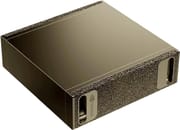
The DGX Spark measures about 5.9 x 5.9 x 2 inches and weighs 2.65 pounds. The chassis is champagne-gold metal with a textured metal-foam panel on the front and back that lets air through, and two recessed oval cutouts frame the front panel. Every port sits on the rear: a power button, four USB Type-C ports, a full-size HDMI 2.1a output, a 10GbE RJ-45 jack, and two QSFP cages driven by an NVIDIA ConnectX-7 NIC rated at 200 Gbps. One USB-C port is the power input for the 240W adapter and the other three carry DisplayPort alt mode, so the machine can drive up to four displays counting HDMI. Audio goes out over HDMI only; there is no 3.5mm jack, no USB-A, and no card reader.
Wireless is WiFi 7 and Bluetooth 5.4. The two QSFP ports exist to link a second DGX Spark directly with one cable and no switch, which gives the pair 256GB of memory to split a larger model across. NVIDIA supports clusters of up to four DGX Spark systems for models of up to 700 billion parameters: three units can cable directly to each other in a ring, and four need a QSFP switch. Storage is a single 4TB self-encrypting NVMe drive in an M.2 2242 slot under a magnetic rubber pad on the bottom. For noise, NVIDIA declares 29 dB of sound pressure at the operator position under maximum GPU stress and 13 dB at idle.
128GB of unified memory with a 273 GB/s ceiling
The GB10 Grace Blackwell Superchip pairs a 20-core Arm CPU (10 Cortex-X925 plus 10 Cortex-A725 cores) with a Blackwell GPU that has fifth-generation Tensor cores, joined by NVIDIA’s NVLink-C2C link. Both halves share the same 128GB pool of LPDDR5x on a 256-bit bus, and the GPU can use nearly all of it as if it were VRAM. NVIDIA rates the package at up to 1 petaFLOP of FP4 compute (a sparse, theoretical figure) and the chip’s TDP at 140 W. NVIDIA says a single unit handles inference on models of up to 200 billion parameters and fine-tuning of models up to 70 billion parameters. There is no PassMark CPU Mark for the GB10, so it has no direct score against x86 chips.
Token generation on a large model is limited by how fast weights stream from memory, and 273 GB/s is a fraction of what the GDDR7 on a desktop RTX 5090 delivers. The DGX Spark can load a 70B or 120B model that no single consumer card can hold, but it produces tokens from that model slowly, and a smaller model that fits on a gaming GPU will run faster there. NVIDIA’s NVFP4 4-bit format helps a lot, because smaller weights mean less data to move per token. Our look at the DGX Spark and local AI hardware in 2026 covers where this class fits against Apple and AMD options, and the Strix Halo local LLM guide covers the 128GB x86 alternative.
Reviewer Insights

ServeTheHome, Level1Techs, LMSYS, and The Register tested early units around the October 2025 launch, on launch-era software. Tom’s Hardware published its review in January 2026, three months later, and Alex Ziskind bought his unit at retail on launch day and kept testing it into 2026. NVIDIA has shipped several DGX OS and software updates since launch, so the early software observations are a snapshot of that period.
ServeTheHome
Patrick Kennedy of ServeTheHome tested a pre-production unit and summed it up in the written review: “If you want a high-memory, NVIDIA-based mini AI workstation, this is it.” The article also flagged some display caveats with the pre-production unit over HDMI. In the video review he opened with “This has everything you need for an ultra portable AI workstation,” and compared the GPU to something in the class of a GeForce RTX 5070 rather than a workstation card.
The unit idled at about 44 to 46 watts, and he said, “So, it’s definitely not the lowest idle mini PC we’ve ever seen.” A CPU stress test pushed it to about 120 to 125 watts. During setup he reported “so far we have not heard this thing hit 40 dBA. This thing has been super quiet all the way up here,” and after the stress run he concluded that “Nvidia’s engineers did a phenomenal job on making this quiet.” He ran Qwen 32B and GPT-OSS 120B through Open WebUI with Ollama, and pointed out that the larger model needs something like 60 to 65 GB of memory, well beyond a single consumer GPU.
Level1Techs
Wendell of Level1Techs framed the DGX Spark as a learning and prototyping machine: “This is a tool for learners in my opinion.” He was direct about the compute ceiling: “Under the hood, this thing has no more compute capability than a 5070 gaming GPU has, but it has 128 gigs of LPDDR5 memory.” He added that “a 5070 is going to be faster, but you’re going to run out of VRAM really quickly.”
In his benchmarks, an 8B Llama model ran at 39 tokens per second in NVFP4 against 23 tokens per second at 8-bit, and he reported a 70B Llama model in NVFP4 on the TensorRT-LLM backend at roughly 11 to 12 tokens per second. He warned that at higher precision “you’re going to hit the bandwidth wall a bit sooner on Spark than you would on other Blackwell based platforms because of the LPDDR5.” He also measured the ConnectX-7 ports at about 130 to 150 gigabits combined at peak, below what he sees from the same NIC in servers, and noted a hardware quirk: “Now, the Wi-Fi antenna placement here is a little bit odd. And the case is made out of metal.” Against AMD’s Ryzen AI Max+ 395 in a Framework Desktop, he found similar 8-bit inference performance, with the DGX Spark’s advantages coming from NVFP4, the networking, and NVIDIA’s software ecosystem.
Tom’s Hardware
Jeffrey Kampman of Tom’s Hardware tested the Founders Edition against a Ryzen AI Max+ 395 system (Corsair’s AI Workstation 300). His verdict: “The DGX Spark is a well-rounded toolkit for local AI thanks to solid performance from its GB10 SoC, a spacious 128GB of RAM, and access to the proven CUDA stack. But it’s a pricey platform if you don’t intend to use its features to the fullest.” In his llama.cpp tests the closest result was the dense 27B Gemma model, and the Spark led every other test at every context depth, with its biggest margin in prompt processing. A Flux.2 Klein 9B image workflow in ComfyUI took just over 60 seconds per iteration on the Spark and about four times as long on the AMD system. The LTX-2 video model ran on the Spark as soon as he loaded it, while the AMD system threw HIP errors, which led him to write “That experience emphasizes a major advantage of the Spark as of this writing: stuff just works.”
“The Spark idles at about 35 W as a headless system, and at about 40 W with a 4K 160Hz panel connected,” and it drew about 160 W at the wall under a mostly GPU load. The loudest reading during an extended image generation run was 37.5 dBA at 18 inches, against a 33 dBA room noise floor. The corner of the case over the power-delivery inductor gets “too hot to comfortably touch under load,” while nvtop showed the GPU at no more than 82 °C. On value, he pointed to ASUS’s cheaper Ascent GX10 version of the platform with a 1TB SSD and wrote that “we’d take the Ascent GX10 any day for a general-purpose local AI system.”
The Register
Tobias Mann of The Register tested the Founders Edition at launch against an RTX 6000 Ada and an RTX 3090 Ti, and wrote that “the best way we can describe the Spark is as the AI equivalent of a pickup truck. There are certainly faster or higher capacity options available, but, for most of the AI work you might want to do, it’ll get the job done.” Fine-tuning a 3B Llama model on a million tokens of data took just over a minute and a half on the Spark and just under 30 seconds on the 48GB RTX 6000 Ada, while the 24GB RTX 3090 Ti ran out of memory. FLUX.1 Dev at BF16 took about 97 seconds per image against 37 seconds on the RTX 6000 Ada. In a multi-user serving test, “With four concurrent users, the Spark was able to process one request every three seconds while maintaining a relatively interactive experience at 17 tok/s per user.”
He also hit launch-era software problems: “Many apps haven’t been optimized for the GB10’s unified memory architecture. In our testing, this led to more than a few awkward situations where the GPU robbed enough memory from the system to crash Firefox, or worse, lock up the system.”
LMSYS
The SGLang team at LMSYS, writing as Jerry Zhou and Richard Chen, ran SGLang and Ollama benchmarks on an early-access unit. GPT-OSS 20B in Ollama reached 2,053 tokens per second of prefill and 49.7 tokens per second of decode, against 10,108 and 215 on an RTX Pro 6000 Blackwell. A 70B Llama model at FP8 decoded at 2.7 tokens per second, and they concluded that large models like this are “best suited for prototyping and experimentation rather than production.” Batching raised throughput a lot. An 8B Llama model in SGLang went from 20.5 tokens per second at batch 1 to 368 at batch 32, and EAGLE3 speculative decoding gave up to a 2x speed-up. They reported that “The DGX Spark maintains sustained throughput across high-intensity tests without thermal throttling,” and noted that their numbers could date quickly as software support matured.
Alex Ziskind
Alex Ziskind bought his unit at Micro Center on launch day, in a video Micro Center sponsored. In llama-bench with a 30B Qwen coding model at Q4, the Spark processed prompts at 2,107 tokens per second, against 563 on an M4 Pro Mac mini and 342 on a Strix Halo Framework Desktop, and generated 83 tokens per second against 55 and 73. ComfyUI’s default image workflow finished in just under 4 seconds, against about 6.8 seconds on the Strix Halo machine and 9.1 on the Mac mini. He called it a “very quiet machine for what it can do,” and on heat he said “the Spark gets pretty hot, but based on what I’ve seen, and I’ve ran some sustained tests on it, it stays pretty consistent, and I haven’t gotten it to throttle just yet.” For buyers who only want a general development box, his advice was “if that’s all you’re going to be doing, then don’t buy this box.”
A later video tested the Spark as a server. With one chat stream on llama.cpp at 8-bit it managed 51 tokens per second, behind an M3 Ultra Mac Studio at 97. With vLLM and 64 or more concurrent requests, total throughput rose to about 1,150 tokens per second, and an NVFP4 model reached 1,573, ahead of every other machine he tested. His conclusion: “Single-user benchmarks will mislead you.”
In a third video he ran the DGX Spark, the Dell Pro Max GB10, the ASUS Ascent GX10, and the MSI EdgeXpert through 45-minute heat-soak runs. None of them showed clock throttling. Under a GPU burn test, each one hit a software power cap at just under 100 W of GPU power, the figure John Carmack had pointed to, and Ziskind stressed that “This isn’t a thermal event.” Only the ASUS also logged a thermal slowdown. He rated the Spark the quietest of the four, while noting that this is hard to measure without an anechoic chamber. The Spark was also the only one with a PCIe Gen 5 SSD: over 13,000 MB/s in large file copies against about 7,000 MB/s on the Gen 4 drives, and 8.49 seconds to load a Nemotron 30B model and return its first token, against about 11.5 seconds on the others.
Customer Reviews
The DGX Spark averages 4.4 stars across 110 Amazon ratings, with 77% at five stars and 7% at one star.
Adam, who runs four units in a cluster, listed “Large memory overhead for the money (128gb unified)” and “Fast networking (200Gb/s)” as pros, though he added “I wouldn’t necessarily recommend this as a standalone unit as the on-board CX-7 NIC is an expensive part to have to buy and not use.” One buyer reviewing an export-controlled codebase with a Qwen model through Ollama wrote that the system “is letting me use current tools on an ITAR codebase without having to worry about code exposure.” Oliver said it “beats buying 5 gpu’s to get the memory I want. Though it’s not as fast.”
Adam’s one con was “Not all that fast on the CPU or GPU for the money.” Van West wrote that setup “takes some planning” and that the machine is “better suited to enthusiasts and technical users than someone looking for a plug-and-play office PC.” Oliver reported that his ultrawide monitor “kept crashing gdm,” so he now runs the machine headless, and Ahiro’s unit would not finish its first boot because “the WiFi drivers weren’t working.” On heat, Victor Williams returned a unit that kept overheating and shutting down without notice, while NH reported “It does get very hot if you’re running a big model for a long task, but I’ve not had any sudden reboots because of the heat.” Read more owner reviews on Amazon.
Worth buying when CUDA and model size matter more than speed
The DGX Spark suits anyone who needs large models resident in memory, wants NVIDIA’s CUDA stack and container tooling rather than Apple’s or AMD’s, and is comfortable working on Arm64 Linux, often from another machine over the network. That buyer gets 128GB of GPU-addressable memory in a quiet 6-inch box and can link a second unit directly.
It is a poor buy for anyone whose models fit in 32GB, because a desktop GPU will generate tokens faster for less money. It is also the wrong machine for gaming, Windows software, or general desktop use, and nothing inside can be upgraded. If you want the same GB10 silicon from a different vendor, the MSI EdgeXpert MS-C931 offers a 1TB configuration, and our roundup of mini PCs for running local LLMs compares this class with x86 alternatives.
Frequently Asked Questions
What processor does the NVIDIA DGX Spark use?
The DGX Spark uses the NVIDIA GB10 Grace Blackwell Superchip. Its CPU is a 20-core Arm cluster of 10 Cortex-X925 and 10 Cortex-A725 cores, and its GPU is a Blackwell design with fifth-generation Tensor cores, joined to the CPU by NVLink-C2C. NVIDIA rates the package at up to 1 petaFLOP of FP4 compute. There is no PassMark CPU Mark for the GB10.
How large a model can the DGX Spark run?
NVIDIA says one DGX Spark handles inference on models of up to 200 billion parameters and fine-tuning of models up to 70 billion parameters in its 128GB of unified memory. Two units linked over their ConnectX-7 ports share 256GB. Speed at those sizes is limited by the 273 GB/s memory bandwidth, so large models load but generate tokens slowly; 4-bit NVFP4 versions run much faster than 8-bit ones.
Can I upgrade the RAM or storage in the DGX Spark?
The 128GB of LPDDR5x is soldered and shared by the CPU and GPU, so it cannot be upgraded. Storage is a single 4TB self-encrypting NVMe drive in an M.2 2242 slot, reached by removing a magnetic rubber pad and four screws on the bottom. There is no second M.2 slot and no way to add a graphics card.
What operating system does the DGX Spark run?
It ships with NVIDIA DGX OS, an Ubuntu-based Linux distribution with NVIDIA’s drivers, CUDA, and AI software stack preinstalled, running on Arm64. Windows is not supported, and x86-only Linux software will not run natively. NVIDIA Sync and the DGX Dashboard let you use it from another computer on your network.
How is the DGX Spark different from the MSI EdgeXpert?
Both are built on the same NVIDIA GB10 platform with 128GB of unified memory, the same port layout, and DGX OS. The DGX Spark is NVIDIA’s own Founders Edition unit with a 4TB drive and a gold metal-foam chassis. The MSI EdgeXpert MS-C931 is MSI’s version, with its own chassis and cooling and a choice of 1TB or 4TB storage.
How much power does the DGX Spark use?
It draws power through a 240W USB-C adapter, and NVIDIA lists the GB10 chip’s TDP at 140 W. ServeTheHome measured about 44 to 46 watts at idle and about 120 to 125 watts during a CPU stress test. Tom’s Hardware measured about 35 W at idle with no display attached, about 40 W with a 4K monitor, and about 160 W at the wall under a mostly GPU load. Alex Ziskind found the GPU capped in software at just under 100 W.