
wo-we H5
Updated on

The wo-we H5 represents a new generation of budget-friendly mini PCs built around Intel’s Twin Lake N150 processor. This compact desktop replacement weighs just 390 grams and measures barely larger than a paperback book, yet it packs enough power for everyday productivity tasks, media consumption, and multi-monitor workflows. The H5 targets home office users and students who need a capable machine without the bulk or expense of a traditional desktop, offering triple 4K display output and 2.5 Gigabit Ethernet at an aggressive price point.
Pros and Cons of the wo-we H5
| Pros | Cons |
|---|---|
| Intel Twin Lake N150 processor with improved performance over N100 | WiFi 5 instead of WiFi 6 limits wireless speeds |
| Triple 4K@60Hz display support via dual HDMI and USB-C | Single RAM slot prevents future memory upgrades |
| 2.5 Gigabit Ethernet for fast wired networking | Not suitable for gaming or intensive 3D workloads |
| Ultra-compact and lightweight at 390g | No Thunderbolt support on USB-C port |
| Full-featured USB-C with DisplayPort and Power Delivery 3.0 | Limited professional review coverage |
| Quiet operation with intelligent variable-speed fan | Integrated graphics only |
Related Videos
wo-we H5 Comparison Chart
 wo-we H5 | |
| Price | List Price: $209.00 Amazon Prices: Loading prices... |
| Version | 16GB/512GB |
| Performance Rating | 4.9 |
| Operating System | Windows 11 Pro |
| Processor | Quad-core 3.60 Ghz Intel Processor N150 |
| GPU | Integrated Intel UHD Graphics |
| RAM | 16 GB |
| Internal Storage | 512 GB |
| Dimensions width x length x thickness | 5 x 4.4 x 1.6 inches (127 x 111.76 x 40.64 mm) |
| Weight | 0.86 lbs (0.39 kg) |
| WiFi | Wi-Fi 5 (802.11ac) |
| Bluetooth | Bluetooth 5.2 |
| Ethernet | 1 Ethernet port at 2.5 Gbps |
| HDMI | 2 HDMI Ports |
| DisplayPort | No DisplayPort |
| VGA | No VGA Ports |
| USB Ports | 4 USB 3, 1 USB-C |
| Thunderbolt Ports | No |
| Internal SATA Ports | No SATA ports |
| Card Reader | microSD Card Reader |
| Headphone Jack | combo |
| Fanless | No |
| VESA Mount | Yes |
| In the Box | Mini PC, power adapter, HDMI cable, VESA mounting bracket with screws, user manual |
| Expandability | Storage expandable to 2TB via single M.2 2280 NVMe slot. Single DDR4 SO-DIMM slot (16GB pre-installed, not user-upgradeable to higher capacity). |
Related Mini PCs
-
 Beelink SER3The Beelink SER3 offers a compact form factor with AMD Ryzen 3 3200U power, dual 4K HDMI output,…
 -
 Bmax B4 PlusThe BMAX B4 Plus Mini PC delivers Intel N100 performance with a unique 2.5-inch SATA expansion bay…
 -
 Bmax B4 UltraThe Bmax B4 Ultra is an ultra-compact mini PC featuring Intel's N150 processor, 12GB LPDDR5 RAM,…
 -
 BOSGAME B100Compact yet powerful, the BOSGAME B100 features Intel UHD Graphics for 4K playback, dual HDMI for…
 -
 BOSGAME B95Compact yet powerful, the BOSGAME B95 Mini PC features an Intel Processor N95, 16GB DDR4 RAM, and…
 -
 CyberGeek Nano A1The CyberGeek Nano A1 packs impressive power in a compact form with its Windows 11 Pro OS, Wi-Fi 6,…
Detailed Insights into the wo-we H5

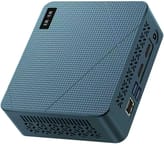
The wo-we H5 sports a compact blue chassis measuring 5 inches wide, 4.4 inches deep, and just 1.6 inches tall. At under a pound, it disappears behind a monitor with the included VESA mount or tucks neatly into any desk setup. The build quality is functional rather than premium, but the small footprint makes it an excellent choice for space-constrained environments. The intelligent variable-speed fan keeps the system cool under load while maintaining noise levels below 38dB, making it suitable for quiet office environments.
Under the hood, the Intel Twin Lake N150 processor delivers a noticeable step up from the older N100 chips that dominate this price segment. With DRAM prices surging across the industry, the 16GB pre-installed configuration helps buyers avoid paying inflated upgrade costs. With four cores and four threads running at up to 3.6GHz turbo, the N150 handles office applications, web browsing, and 4K video playback without breaking a sweat. The 16GB of DDR4 RAM provides plenty of headroom for multitasking, though the single SO-DIMM slot means you cannot upgrade beyond the factory configuration. The 512GB NVMe SSD offers fast boot times and responsive application loading, with room to expand up to 2TB if needed.
Connectivity is where the wo-we H5 punches above its weight class for a budget mini PC. The dual HDMI 2.0 ports and full-function USB-C with DisplayPort alternate mode enable triple 4K displays at 60Hz, perfect for productivity-focused setups. The 2.5 Gigabit Ethernet port using an Intel I226-V controller provides fast wired networking, while four USB 3.2 ports (two Gen 2 at 10Gbps, two Gen 1) handle peripherals and fast file transfers. The USB-C port also supports Power Delivery 3.0 for charging accessories. WiFi 5 and Bluetooth 5.2 round out the wireless options, though the lack of WiFi 6 is a minor disappointment at this price point.
Reviewer Insights on the wo-we H5

Tech doc’s Perspective
Tech doc describes the wo-we H5 as a “compact yet surprisingly capable desktop computer” that represents a “noticeable step up from the older N100.” The review highlights the triple 4K display support as ideal for multi-monitor productivity setups, noting that “the fan is barely noticeable” during normal operation. The reviewer recommends the H5 for home office use, students, and general productivity tasks, while cautioning that it is not designed for heavy gaming or 3D rendering workloads.
Click To Cart’s Perspective
Click To Cart emphasizes the H5’s incredibly compact size, describing it as “about the size of a paperback book” and noting that it delivers “more than adequate for office and business productivity.” The review highlights the triple 4K display support and 2.5G Ethernet as standout features, concluding that “if you want a space-saving desktop that delivers on day-to-day tasks without breaking the bank, this is a great choice.” The system reportedly stays cool to the touch even after hours of use.
Both reviewers agree that the wo-we H5 excels as a compact productivity machine, with the Intel N150 processor providing tangible improvements over the previous generation N100 chips. The consistent praise for quiet operation and triple display support suggests these are genuine strengths of the platform.
Customer Reviews of the wo-we H5
Amazon customers have rated the wo-we H5 highly, with the primary listing averaging 4.5 stars from 87 reviews. Customers frequently praise the compact form factor and the value proposition of getting an Intel N150 processor with 16GB RAM at this price point. The triple display capability draws positive comments from users setting up home offices and trading workstations, while the quiet operation earns appreciation from those working in shared spaces.
Common concerns from customers center on the limited upgrade path due to the single RAM slot, with some users wishing they could expand beyond 16GB for future-proofing. A few reviews mention the WiFi 5 limitation as a minor annoyance in environments with WiFi 6 routers. Overall, the customer sentiment reflects satisfaction with the H5 as a reliable productivity machine that delivers solid performance for its price tier.
Conclusion
The wo-we H5 earns its place as a compelling option for budget-conscious buyers seeking a compact, capable mini PC for productivity tasks. The Intel Twin Lake N150 processor provides meaningful performance improvements over earlier generation chips, while the triple 4K display support and 2.5G Ethernet add genuine value for home office and multi-monitor setups. The ultra-compact 390g design with VESA mounting makes it versatile for space-limited environments.
However, the H5 is not without limitations. The single RAM slot, WiFi 5 wireless, and integrated graphics mean this is strictly a productivity machine rather than a content creation or gaming platform. Buyers needing future upgrade flexibility or higher performance should consider alternatives from established brands like Beelink or GMKtec. For those whose needs align with office work, media consumption, and multi-display productivity, the wo-we H5 delivers excellent value at an aggressive price point.
For those looking to compare options, Starry Hope’s Mini PC Comparison Chart provides a valuable resource for evaluating the H5 against other budget mini PCs in its category.
Frequently Asked Questions
What processor does the wo-we H5 use?
The wo-we H5 uses the Intel Twin Lake N150 processor, which features 4 cores and 4 threads with a base clock of 0.8GHz and turbo boost up to 3.6GHz. This is an upgraded processor compared to the Intel N100, offering approximately 6-10% better performance while maintaining a low 6W TDP for energy efficiency.
Can the wo-we H5 connect to multiple monitors?
Yes, the wo-we H5 supports up to three 4K displays simultaneously at 60Hz. You can connect monitors using the two HDMI 2.0 ports and the USB-C port with DisplayPort alternate mode. This makes it well-suited for productivity workstations and multi-monitor home office setups.
Can I upgrade the RAM in the wo-we H5?
The wo-we H5 has a single DDR4 SO-DIMM slot with 16GB pre-installed. While the RAM module is technically accessible, there is only one slot, so you cannot add additional memory. The 16GB configuration is the practical maximum for this system.
How much storage can the wo-we H5 support?
The wo-we H5 comes with a 512GB NVMe SSD and has one M.2 2280 slot that supports drives up to 2TB. You can replace the factory drive with a larger capacity NVMe SSD if you need more storage space.
Is the wo-we H5 good for gaming?
The wo-we H5 is not designed for gaming. While it uses Intel UHD integrated graphics capable of 8K video decoding, the integrated graphics are only suitable for casual games and older titles at low settings. For gaming, you would want a mini PC with a dedicated GPU or a more powerful AMD APU.
Does the wo-we H5 support VESA mounting?
Yes, the wo-we H5 includes a VESA mounting bracket with screws in the box. You can mount it directly behind a VESA-compatible monitor to create a clean, space-saving all-in-one style setup.
How loud is the wo-we H5 during operation?
The wo-we H5 uses an intelligent variable-speed fan that keeps noise levels below 38dB under load. Multiple reviewers describe the fan as “barely noticeable” during normal operation, making it suitable for quiet office environments and shared workspaces.
What networking options does the wo-we H5 offer?
The wo-we H5 includes 2.5 Gigabit Ethernet using an Intel I226-V controller for fast wired networking, plus WiFi 5 (802.11ac) and Bluetooth 5.2 for wireless connectivity. The 2.5G Ethernet is particularly useful for NAS access or fast file transfers on compatible networks.