
Acer Chromebook Plus Spin 714
Updated on

The Acer Chromebook Plus Spin 714 delivers a premium 2-in-1 experience for productivity-focused users who need versatility without compromise. Powered by the Intel Core Ultra 5 115U processor, this 14-inch convertible handles demanding multitasking with ChromeOS efficiency while bringing modern AI features to everyday tasks. The 360-degree hinge transforms it from traditional laptop to tablet mode, complete with a garaged stylus that never needs charging. Acer has refined the chassis design with rounded rear corners that make tablet mode significantly more comfortable to hold, addressing a common pain point with convertible devices. With Thunderbolt 4 connectivity, a standout 1440p webcam, and ChromeOS updates guaranteed through June 2034, this machine positions itself as a long-term investment for professionals and students alike.
Pros and Cons of the Acer Chromebook Plus Spin 714
| Pros | Cons |
|---|---|
| Premium aluminum chassis with refined rounded edges | Keyboard deck is plastic with slight flex |
| Excellent 1440p webcam with privacy shutter | All USB-C/Thunderbolt ports on left side only |
| Significantly larger glass trackpad than previous generations | No microSD card reader |
| Garaged stylus charges automatically inside device | Stylus cannot be removed in tablet mode |
| 10-year ChromeOS update support through June 2034 | 8GB RAM limit at this configuration |
| Thunderbolt 4 for fast data transfer and external displays | Speakers lack bass depth despite clear audio |
Related Videos
Acer Chromebook Plus Spin 714 Comparison Chart
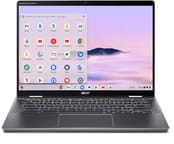 Acer Chromebook Plus Spin 714 | |
| Price | List Price: $699 Amazon Prices: Best Buy: Loading price... |
| Model number | CP714-1H-54UB |
| Performance Rating | 8.3 |
| Chromebook Plus | Yes |
| Processor | Octa-core 1.50 Ghz (max 4.20 Ghz) Intel Core Ultra 5 115U |
| RAM | 8 GB |
| Internal Storage | 256 GB NVMe SSD |
| Screen Size | 14" |
| Screen Resolution | 1920x1200 |
| Screen Type | IPS |
| Touch Screen | Yes |
| Stylus / Pen | Supported |
| Dimensions width x length x thickness | 12.35 x 8.84 x 0.71 inches (313.69 x 224.54 x 18.03 mm) |
| Weight | 3.21 lbs (1.46 kg) |
| Backlit Keyboard | Yes |
| Webcam | 1440p |
| WiFi | Wi-Fi 6E (802.11ax) |
| Bluetooth | Bluetooth 5.2 |
| Ethernet | No |
| Cellular Modem | No |
| HDMI | Full-Size HDMI |
| USB Ports | 1 USB 3, 2 USB-C 2x Thunderbolt 4 (USB-C with DisplayPort and 65W Power Delivery), 1x USB-A 3.2 Gen 1, HDMI 2.0 |
| Thunderbolt Ports | 2 |
| Card Reader | No Card Reader |
| Battery | Li-ion |
| Battery Life | 10 hours |
| Fanless | No |
| Auto Update Expiration Date | June, 2034 |
Related Chromebooks
-
 Acer Chromebook Spin 714Master productivity with the Acer Chromebook Spin 714, featuring a 14-inch touchscreen, potent…
 -
 Acer Chromebook Vero 514The Acer Chromebook Vero 514 blends sustainability with performance. Sporting a Full HD IPS…
 -
 Lenovo Chromebook Plus 2-in-1 14The Lenovo Chromebook Plus 2-in-1 14 combines premium aluminum build quality with versatile…
 -
 Lenovo IdeaPad Flex 5i Chromebook PlusThe Lenovo IdeaPad Flex 5i Chromebook Plus combines Chromebook Plus certification, Intel Core…
 -
 HP Chromebook Plus x360 14cThe HP Chromebook Plus x360 14c combines a 12th-gen Intel Core i3-1215U processor with a 16:10…
 -
 Dell Latitude 5430 Chromebook 2-in-1Elevate your productivity with the Dell Latitude 5430 Chromebook, featuring a high-resolution…
Detailed Insights into the Acer Chromebook Plus Spin 714

The Acer Chromebook Plus Spin 714 measures 12.35 x 8.84 x 0.71 inches and weighs 3.21 pounds, making it portable enough for daily commuting while remaining substantial enough to feel premium. The top and bottom panels feature solid aluminum construction that reviewers consistently praise for its durability and refined appearance in the Steel Gray finish. Acer moved the speakers from the top of the keyboard to the sides, creating space for a dramatically larger Gorilla Glass trackpad that provides excellent responsiveness across its surface. The rounded rear corners represent a thoughtful design evolution that makes holding the device in tablet mode significantly more comfortable compared to angular predecessors. Port placement includes two Thunderbolt 4 USB-C ports and HDMI on the left edge with a single USB-A 3.2 port on the right side.
The Intel Core Ultra 5 115U processor brings 8 cores and 10 threads to ChromeOS, handling heavy browser workloads with dozens of tabs without breaking stride. Reviewers found the system responsive for everyday productivity tasks including document editing, video conferencing, and light photo editing. The capable processor also supports creative workflows like web-based music production through apps such as BandLab and Soundtrap. The processor’s integrated NPU enables Google’s Gemini AI features throughout ChromeOS for tasks like summarization and writing assistance. Gaming performance remains limited as expected on ChromeOS, with some demanding Android games like Call of Duty Mobile struggling according to Chrome Unboxed testing. The PassMark score of approximately 12,771 places this processor comfortably in the premium Chromebook tier.
Connectivity options include WiFi 6E (802.11ax) for fast wireless performance on modern networks and Bluetooth 5.2 for peripherals. The Thunderbolt 4 ports support external displays, fast data transfer, and 65W charging, though having both ports on the same side means less flexibility for cable management. The HDMI 2.0 port handles external displays without adapters. Storage uses a PCIe Gen 4 NVMe SSD for responsive system performance, though the 256GB capacity requires cloud storage reliance for users with large local file collections.
Reviewer Insights on the Acer Chromebook Plus Spin 714

Chrome Unboxed’s Perspective
Chrome Unboxed tested the Spin 714 extensively and praised the design refinements Acer made for 2024. They highlighted that “it makes this whole device feel more approachable… those rounded corners… makes this more of an approachable tablet type device that feels so much more comfortable in the hand.” The significantly larger trackpad drew attention as a meaningful upgrade enabled by relocating the speakers to the sides of the keyboard.
The reviewer appreciated the keyboard quality, noting “no wiggle there. You’ve got backlighting obviously here that’s done the right way with nice dark keys.” The Quad HD webcam earned particular praise with the observation that “it looks really really good man that looks really really good. You get a privacy shutter at the top.” They concluded that “this is the type of iteration I love to see in high-end Chromebooks because if you’re going to ask somebody to pay 700 bucks for something you need to be thinking through those kind of things.”
Just Josh’s Review
Just Josh provided a detailed hands-on review emphasizing the build quality and long-term value proposition. He noted that “the full aluminium outer chassis has felt great every time I’ve picked it up” while acknowledging that “I just wish the keyboard deck itself was aluminum too rather than what feels like plastic.” The display earned praise for its 100% sRGB coverage and comfortable 16:10 aspect ratio for productivity work.
The webcam stood out in his testing: “The Quad HD webcam at the top of the screen with its privacy slider has been a real step up.” He concluded with strong support for the investment, stating “with Chrome OS updates through to June 2034 I can fully get behind investing in a higher-end Chromebook like this.” However, he experienced a unit-specific bug where the device failed to sleep correctly and crashed, suggesting quality control monitoring may be warranted.
Comparison with Samsung Galaxy Chromebook Plus
The Everyday Dad compared the Spin 714 directly against the Samsung Galaxy Chromebook Plus at the same price point. The Samsung’s AMOLED display produced more vibrant colors, but the Acer offered advantages in webcam quality, speaker placement, and Thunderbolt 4 support. They observed that “Samsung definitely looks a little better [with its AMOLED display]… it’s a little brighter, has a little better viewing angles, makes the colors a little more vibrant.”
The Acer’s 2-in-1 versatility with touchscreen and fold-flat capability differentiated it from Samsung’s traditional clamshell design. Battery testing showed the Acer lasting approximately 8.5 hours compared to Samsung’s shorter runtime due to the AMOLED panel’s power draw. The review noted “one advantage for Acer is it gets software updates for 10 years versus 8 years for Samsung.”
Accessibility and Setup Focus
Emms Tech provided perspective on the Chromebook’s accessibility features and out-of-box experience. As a visually impaired user, they appreciated the comprehensive accessibility options available during ChromeOS setup including ChromeVox and screen magnification. They noted “it’s essential to know that not everyone is going to use these settings, but it’s nice to have, especially for myself being visually impaired.”
The reviewer praised the backlit keyboard and overall portability at 1.37kg (approximately 3 lbs), calling it “lightweight and portable, so it’s only 1.37 kilos, meaning it’s easy enough to fit in any tech bag and won’t be too heavy.” One practical observation was that the large touchpad offers only “a 90% clickable area, so can’t quite click at the far top side of it.”
Across multiple reviews, the consensus points to the 1440p webcam with privacy shutter and refined chassis design as primary strengths, while the plastic keyboard deck and USB-C port placement on only one side appear consistently as areas for improvement. Reviewers generally agreed that the 10-year update support makes the premium pricing easier to justify for long-term users.
Customer Reviews of the Acer Chromebook Plus Spin 714
Best Buy customers have rated the Acer Chromebook Plus Spin 714 4.3 out of 5 stars based on 93 reviews. The most praised aspects include the display quality, build construction, and overall performance for productivity tasks. Buyers particularly appreciate the 2-in-1 versatility and long software support commitment from Google.
However, some customers note the 8GB RAM limitation for heavy multitasking and the lack of a microSD card slot for storage expansion. A few reviewers mentioned that the stylus requires getting used to the garage mechanism. The plastic keyboard deck received occasional mentions as feeling less premium than the aluminum outer shell.
Overall, the customer sentiment is positive, with most buyers finding the Spin 714 well-suited for professional productivity, content consumption, and light creative work in a versatile form factor.
Conclusion
The Acer Chromebook Plus Spin 714 stands out as a refined premium 2-in-1 for users who need versatility across laptop, tent, and tablet modes. Its combination of Thunderbolt 4 connectivity and the excellent 1440p webcam makes it particularly well-suited for professionals who frequently video conference and need reliable external display support. The 10-year ChromeOS update support through June 2034 provides exceptional long-term value for educational institutions and business deployments.
That said, power users who require extensive local storage or more than 8GB RAM should consider alternatives with higher configuration options. Users who need USB-C charging from either side for desk setup flexibility might find the left-side-only port placement limiting. The lack of a microSD card reader also means cloud storage becomes essential for larger file libraries.
For those comparing options, see our Chromebook Comparison Chart to find the best match for your needs.
Frequently Asked Questions
What processor does the Acer Chromebook Plus Spin 714 use?
The Acer Chromebook Plus Spin 714 (CP714-1H) is powered by the Intel Core Ultra 5 115U processor, featuring 8 cores and 10 threads with a base clock of 1.5 GHz that boosts up to 4.2 GHz. This processor includes an integrated NPU for AI acceleration and scores approximately 12,771 on PassMark’s CPU benchmark, placing it firmly in the premium Chromebook performance tier.
Can I upgrade the RAM in the Acer Chromebook Plus Spin 714?
No, the Acer Chromebook Plus Spin 714 uses soldered LPDDR5 memory that cannot be upgraded after purchase. The model reviewed here includes 8GB of RAM. If you anticipate needing more memory for heavy multitasking, consider looking for configurations with higher RAM options at purchase time.
What ports does the Acer Chromebook Plus Spin 714 have?
The Acer Chromebook Plus Spin 714 includes 2x Thunderbolt 4 USB-C ports with DisplayPort and 65W Power Delivery support (both on the left side), 1x USB-A 3.2 Gen 1 port, HDMI 2.0, and a 3.5mm combo audio jack. Note that there is no microSD card reader on this model.
When does the Acer Chromebook Plus Spin 714 stop receiving updates?
The Acer Chromebook Plus Spin 714 (CP714-1H) has an Auto Update Expiration (AUE) date of June 2034, providing approximately 10 years of guaranteed ChromeOS updates including security patches and new features. This extended support makes it suitable for long-term educational and enterprise deployments.
Does the Acer Chromebook Plus Spin 714 include a stylus?
Yes, the Acer Chromebook Plus Spin 714 includes a garaged USI stylus that stores and charges inside the chassis. The stylus slides out from the rear corner of the device. Note that reviewers mention the stylus cannot be removed when the device is already folded into tablet mode, so you’ll need to extract it before rotating the screen.
Is the Acer Chromebook Plus Spin 714 a Chromebook Plus device?
Yes, the Acer Chromebook Plus Spin 714 is certified as a Chromebook Plus device, meaning it meets Google’s enhanced hardware requirements including faster processors, at least 8GB RAM, and 128GB or more storage. Chromebook Plus devices also receive exclusive AI-powered features like Google Gemini integration, Magic Eraser in Google Photos, and enhanced video calling capabilities.
What is the webcam resolution on the Acer Chromebook Plus Spin 714?
The Acer Chromebook Plus Spin 714 features a 1440p (QHD) webcam with approximately 3.7 megapixels, significantly exceeding the typical 720p or 1080p webcams found on most laptops. The webcam includes a physical privacy shutter and Acer’s TNR (Temporal Noise Reduction) technology for improved image quality in video calls, even in lower light conditions.