
Acer Chromebook Spin 311
Updated on

The Acer Chromebook Spin 311 (model CP311-2H) is an 11.6-inch convertible that doubles as an Android tablet. The HD IPS touch panel is paired with a fanless dual-core Intel Celeron N4000 or N4020, 4GB of LPDDR4 RAM, and either 32GB or 64GB of eMMC storage, enough headroom for browsing, Google Docs, Android apps, and light media. Acer rounds the design out with two USB-C ports (both support charging and DisplayPort output), two full-size USB-A 3 ports, a microSD reader, and a 360-degree hinge that flips the screen flat against the back of the keyboard. The plastic chassis weighs 2.65 lb and stays cool without a fan.
| Pros | Cons |
|---|---|
| 360-degree convertible hinge for tablet, tent, and stand modes | 1366x768 HD display at roughly 70% sRGB and only about 205 nits |
| Comfortable keyboard with deep key travel for the price | Thick screen bezels look dated |
| Two USB-C ports with charging and DisplayPort out | No backlit keyboard |
| Fanless, silent operation | 4GB RAM ceiling on every variant; storage soldered to the board |
| Real-world battery life of 10+ hours | 720p webcam is noisy in low light |
| Long Auto Update support through June 2029 | Speakers are thin on bass for movie watching |
Related Videos
Acer Chromebook Spin 311 Comparison Chart
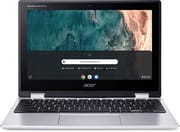 Acer Chromebook Spin 311 | Acer Chromebook Spin 311 | Acer Chromebook Spin 311 | |
| Price | List Price: $499.99 Amazon Prices: Loading prices... | List Price: $349.99 Amazon Prices: Loading prices... | List Price: $249.99 Amazon Prices: Loading prices... |
| Model number | CP311-2H-C679 / NX.HKKAA.005 | CP311-2H-C3KA / NX.HKKAA.001 | CP311-2H-C7QD / NX.HKKAA.006 |
| Performance Rating | 3.1 | 3.1 | 3.1 |
| Chromebook Plus | No | No | No |
| Processor | Dual-core 1.10 Ghz (max 2.80 Ghz) Intel Celeron Processor N4020 | Dual-core 1.10 Ghz (max 2.60 Ghz) Intel Celeron N4000 Processor | Dual-core 1.10 Ghz (max 2.60 Ghz) Intel Celeron N4000 Processor |
| RAM | 4 GB | 4 GB | 4 GB |
| Internal Storage | 32 GB eMMC | 64 GB eMMC | 64 GB eMMC |
| Screen Size | 11.6" | 11.6" | 11.6" |
| Screen Resolution | 1366x768 | 1366x768 | 1366x768 |
| Screen Type | IPS | IPS | IPS |
| Touch Screen | Yes | Yes | Yes |
| Stylus / Pen | No Stylus Support | No Stylus Support | No Stylus Support |
| Dimensions width x length x thickness | 11.7 x 8.1 x 0.79 inches (297.18 x 205.74 x 20.07 mm) | 11.7 x 8.1 x 0.79 inches (297.18 x 205.74 x 20.07 mm) | 11.7 x 8.1 x 0.79 inches (297.18 x 205.74 x 20.07 mm) |
| Weight | 2.65 lbs (1.2 kg) | 2.65 lbs (1.2 kg) | 2.65 lbs (1.2 kg) |
| Backlit Keyboard | No | No | No |
| Webcam | HD | HD | HD |
| WiFi | IEEE 802.11a/b/g/n/ac | IEEE 802.11a/b/g/n/ac | IEEE 802.11a/b/g/n/ac |
| Bluetooth | Bluetooth 5.0 | Bluetooth 5.0 | Bluetooth 5.0 |
| Ethernet | No | No | No |
| Cellular Modem | No | No | No |
| HDMI | No HDMI | No HDMI | No HDMI |
| USB Ports | 2 USB 3, 2 USB-C (with DisplayPort) | 2 USB 3, 2 USB-C (with DisplayPort) | 2 USB 3, 2 USB-C (with DisplayPort) |
| Thunderbolt Ports | No | No | No |
| Card Reader | microSD Card Reader | microSD Card Reader | microSD Card Reader |
| Battery | 3 cell, Lithium-ion | 3 cell, Lithium-ion | 3 cell, Lithium-ion |
| Battery Life | 10.0 hours | 10.0 hours | 10.0 hours |
| Fanless | Yes | Yes | Yes |
| Auto Update Expiration Date | June, 2029 | June, 2029 | June, 2029 |
Related Chromebooks
-
 Acer Chromebook 311An 11.6-inch Chromebook with an Intel Celeron N4000, 4GB of RAM, a fanless chassis, and up to 10…
 -
 Acer Chromebook Spin 311The Acer Chromebook Spin 311 (CP311-3H) is an 11.6-inch convertible on an eight-core MediaTek…
 -
 ASUS Chromebook Flip C214The ASUS Chromebook Flip C214 is a rugged 11.6-inch education convertible with an Intel Celeron…
 -
 HP Fortis Flip G1m 11 inch ChromebookThe HP Fortis Flip G1m 11 inch Chromebook is a rugged convertible 2-in-1 built for K-12 classrooms,…
 -
 Lenovo 300e Yoga Chromebook Gen 4The Lenovo 300e Yoga Chromebook Gen 4 is a rugged 11.6-inch education convertible with a MediaTek…
 -
 Dell Chromebook 3120The Dell Chromebook 3120 is a fanless 11.6-inch education Chromebook with an Intel N100, sold in…
The hinge folds the display all the way around, so the same machine works as a laptop, a tent for video, a propped-up stand, and a flat tablet. The keyboard is not backlit but offers a tactile experience with decent-sized keycaps and deep key travel, and the trackpad tracks cleanly with reliable palm rejection. ChromeOS handles browsing, Docs, and most Android apps without complaint, though anything CPU-heavy (long video calls with effects, large spreadsheets, dozens of open tabs) will expose the limits of the 2-core, 4GB platform.
The three variants are easy to mix up, because the model numbers differ by one letter. The CP311-2H-C679 (B086MBQKH2) pairs the Celeron N4020 with 32GB of eMMC; the CP311-2H-C3KA (B07XMJ65B5) and CP311-2H-C7QD (B08NTP5RTN) both run the Celeron N4000 with 64GB. The N4000 and N4020 land within a few percent of each other on ChromeOS workloads, so storage is the spec that decides between them. ChromeOS plus Android apps and a few offline videos leave little of the 32GB free.
Reviewer Insights
In a video review, KLGadgetTV calls the Spin 311 “the nicest budget Chromebook” they had come across at the time, praising the build quality, solid display hinges, and comfortable keyboard and trackpad. They flagged the speakers as the main weak point, since they produce very little bass and undermine the otherwise capable media experience. KLGadgetTV’s battery test came in close to Acer’s claim. “In my experience, I got up to an impressive 8 hours with a mixture of video streaming and web browsing activities.”
Tom’s Guide gave the Spin 311 a 3.5 out of 5 (70%), with the summary line “Good battery life and a great keyboard help the Acer Chromebook Spin 311 stand out.” Their lab measured the panel at 204.2 nits peak brightness and only 70.4% of the sRGB color spectrum, which the reviewer notes is “disappointing when you consider that a similarly-priced competitor like the Acer Chromebook R 11 is able to deliver a 73.2% sRGB spectrum rating.” Their web-surfing battery test ran 11 hours and 41 minutes before the battery died, comfortably above the 10-hour mark Acer advertises but more than three hours short of the optimistic 15-hour claim. On movies and TV they conclude, “In short, it’s not a great screen for watching movies or TV shows.”
Matthew Elliott from PCMag recommends it as an affordable, versatile pick for grade-school students, and points to the 2-in-1 form factor as its main draw. “Finding this 2-in-1 versatility in a Chromebook at this price is rare and is the Spin 311’s chief attraction.” He echoes Tom’s Guide on the small, low-resolution screen, and his testing put the battery life on the shorter side of Acer’s claim, a potential deal-breaker for users planning all-day untethered use.
In a 2025 revisit at PCVarge, Allan Smith looks specifically at the CP311-2H-C7QD, the 64GB N4000 variant. He singles out the keyboard as the standout feature, claiming the 1.6 mm key travel “rivals the typing experience on the Dell XPS 15”; that is a bold comparison for a sub-$300 Chromebook, though the deep, snappy travel he describes matches what KLGadgetTV and Tom’s Guide report. His display measurements, 205.3 nits brightness and 70.6% sRGB, land within a hair of Tom’s Guide’s numbers. Video playback battery in his test ran above 10 hours, in line with the original reviews.
Customer Reviews
Across 10,293 ratings on Amazon, the Acer Chromebook Spin 311 averages 4.5 stars, with 76 percent of reviewers leaving five stars and 6 percent leaving one or two. Most of the positive reviews come from parents buying it for kids or students, who praise the light weight, the responsive touchscreen, and the value of a convertible 2-in-1 at this price. Melrel05, a verified buyer who bought it for a 9-year-old, wrote “It really is amazing that you can get a touchscreen 2-in-1 laptop for $200-$300”, and Tobias Fairman, also a verified purchaser, summed it up as “Versatile little laptop that works everywhere I need it to.”
The lower ratings cluster around a few repeat complaints. A verified buyer posting as AmazonCustomer reported a recurring video playback bug: “The Chromebook picture will start to jump/wiggle a bit and then get stuck”, requiring a reboot almost daily, and Ms. Buie, who otherwise gave it five stars, noted her son “has been having issues with it freezing up or connecting to the internet” at some locations. A verified reviewer named Tracker flagged the hardware ceiling, calling it “a crime that they’re still releasing models in 2020-2021 with only 32gb of storage” and adding the 4GB of RAM is “a little lackluster too.” Craig Olsen, who still rated it four stars, found some ChromeOS apps did not match their desktop counterparts. Read more owner reviews on Amazon.
A browser-first 2-in-1 held back by 4GB of RAM
Tom’s Guide and PCVarge agree on the strengths (battery, keyboard, build) and on the weaknesses (small, dim, low-gamut display), and the 4GB RAM ceiling makes it a poor fit for anyone who keeps 20+ tabs open or runs demanding Android apps. Google’s Auto Update Expiration for the Spin 311 (CP311-2H) runs through June 2029, so ChromeOS security updates are still arriving on a unit bought today. For broader options, see Starry Hope’s Chromebook Comparison Tool.
Frequently Asked Questions
Q: What is the screen size of the Acer Chromebook Spin 311? A: 11.6 inches. It is an IPS touchscreen running at 1366x768, compact enough to carry all day and large enough for most daily tasks.
Q: How much storage and RAM does the Acer Chromebook Spin 311 have? A: Every variant ships with 4GB of RAM. Storage is 32GB or 64GB of eMMC, depending on the model number.
Q: Does the Acer Chromebook Spin 311 have a backlit keyboard? A: No. The keyboard is not backlit, though both KLGadgetTV and Allan Smith single out its key travel.
Q: Can the Acer Chromebook Spin 311 be used as a tablet? A: Yes. The 360-degree hinge folds the display flat against the back of the keyboard for tablet mode.
Q: What is the battery life of the Acer Chromebook Spin 311? A: Acer quotes up to 10 hours. Tom’s Guide measured 11 hours and 41 minutes in its web-surfing test, and PCVarge measured above 10 hours playing video.
Q: Is the Acer Chromebook Spin 311 suitable for gaming? A: Not for high-end gaming. Casual Android games from the Google Play Store are within reach.
Q: Does the Acer Chromebook Spin 311 have a webcam? A: Yes, an HD webcam.
Q: What kind of ports does the Acer Chromebook Spin 311 have? A: Two USB-C ports that support USB PD charging and display output, two full-size USB-A (USB 3.0) ports, and a microSD card slot for additional storage.
Q: When will the Acer Chromebook Spin 311 reach its end of life? A: Google’s Chrome Enterprise Auto Update Policy database lists the CP311-2H and CP311-2HN for automatic ChromeOS updates through June 2029. Google no longer guarantees new ChromeOS feature or security updates after that date.
Q: Can the Acer Chromebook Spin 311 connect to Wi-Fi and Bluetooth? A: Yes, Wi-Fi (IEEE 802.11a/b/g/n/ac) and Bluetooth 5.0.