
Acer Chromebook Spin 311 (AMD)
Updated on

The Acer Chromebook Spin 311 (AMD) is a budget 11.6-inch convertible Chromebook built around the AMD A6-9220C APU with Radeon R5 graphics. The 360-degree hinge lets you use it as a laptop, a tablet, or in tent mode, and the fanless design runs silently. It targets students and casual users who need a durable, all-day device for web browsing, documents, and media. This is the AMD model (R721T); Acer also sold the Spin 311 with Intel and MediaTek chips under different model numbers.
| Pros | Cons |
|---|---|
| Hinge folds through 4 usable modes, including tent and tablet | Thick bezels eat into an already small 11.6-inch panel |
| Fanless, so there is no fan noise to work around | No keyboard backlight for typing in dim rooms |
| Keyboard drainage channels handle spills up to 342ml | 32GB of eMMC fills quickly once Android apps are installed |
| IPS touchscreen with Gorilla Glass protection | 1366x768 on this panel size looks soft for text work |
| Full-size keys with enough travel for long typing sessions | Screen is too dim for bright rooms or outdoor use |
| 8-10 hours of mixed use on a charge | A6-9220C trails newer Celeron N4000/N4020 chips in benchmarks |
Acer Chromebook Spin 311 (AMD) Comparison Chart
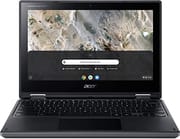 Acer Chromebook Spin 311 (AMD) | |
| Price | List Price: $399.99 Amazon Prices: |
| Model number | R721T-62ZQ / NX.HBRAA.003 |
| Performance Rating | 2.1 |
| Chromebook Plus | No |
| Processor | Dual-core 1.80 Ghz (max 2.70 Ghz) AMD A6-9220C APU with Radeon R5 Graphics |
| RAM | 4 GB |
| Internal Storage | 32 GB eMMC |
| Screen Size | 11.6" |
| Screen Resolution | 1366x768 |
| Screen Type | IPS |
| Touch Screen | Yes |
| Stylus / Pen | No Stylus Support |
| Dimensions width x length x thickness | 11.42 x 8.11 x 0.74 inches (290.07 x 205.99 x 18.8 mm) |
| Weight | 2.64 lbs (1.2 kg) |
| Backlit Keyboard | No |
| Webcam | HD |
| WiFi | IEEE 802.11ac |
| Bluetooth | Bluetooth 4.1 |
| Ethernet | No |
| Cellular Modem | No |
| HDMI | No HDMI |
| USB Ports | 2 USB 3, 2 USB-C (with DisplayPort and charging) |
| Thunderbolt Ports | No |
| Card Reader | microSD Card Reader |
| Battery | 3 cell, 4200 mAh, Lithium Ion |
| Battery Life | 10.0 hours |
| Fanless | Yes |
| Auto Update Expiration Date | June, 2029 |
Related Chromebooks
-
 Acer Chromebook Spin 11 CP311The Acer Chromebook Spin 11 combines functionality and portability with its 11.6-inch touch IPS…
 -
 Acer Chromebook 311An 11.6-inch Chromebook with an Intel Celeron N4000, 4GB of RAM, a fanless chassis, and up to 10…
 -
 Lenovo Flex 3 ChromebookThe Lenovo Flex 3 Chromebook is a fanless 11.6-inch convertible with an IPS touchscreen, a MediaTek…
 -
 ASUS Chromebook Flip CR1The ASUS Chromebook Flip CR1 (CR1100FKA) is a rugged 11.6-inch education convertible on an Intel…
 -
 Samsung Chromebook Plus v2The Samsung Chromebook Plus v2 is a fanless 12.2-inch convertible Chromebook with an Intel Celeron…
 -
 ASUS Chromebook C203XAThe ASUS Chromebook C203XA is a rugged 11.6-inch education laptop with a MediaTek MT8173C, an…
A drop-tested shell built for classroom use

The matte black plastic chassis has a subtle diamond pattern on the lid, and while the thick bezels date the look, they double as grip points in tablet mode. The 360-degree hinge feels sturdy and holds its position, so transitions between laptop, tablet, tent, and display modes are smooth. At 2.64 pounds and 0.74 inches thick, it slides into a backpack without much thought.
The chassis is rated for drops from 122cm (about 4 feet) onto plywood, and the keyboard’s drainage channels take spills up to 342ml, roughly a full can of soda. Two USB-C ports carry DisplayPort output and charging, two USB-A ports handle older peripherals, and a microSD slot takes the pressure off internal storage. Typing holds up for the price, with well-defined keys and enough travel for a school day, though the missing backlight makes dim rooms awkward.
The A6-9220C and 4GB of RAM cover ChromeOS basics: web browsing with a handful of tabs, document editing, and video streaming run fine, but you will see hesitation when juggling many apps or heavy sites. The 32GB of eMMC fills up fast once you add a few Android apps, so cloud storage or a microSD card becomes necessary. Battery runs 8 to 10 hours in mixed use against Acer’s 10-hour claim, and the fanless design keeps it silent in a library or on a call.
Reviewer Insights

Pocket-lint’s Perspective
Andrew Williams at Pocket-lint reviewed the AMD-powered R721T model and gave it 4 out of 5 stars. The keyboard was his standout: he called the 311 “a superb little laptop for typing and work,” noting “it’s got a full-size keyboard; key definition is solid, and there’s no sense of feeling cramped when typing.” He rated the screen “pleasant enough (even with big borders and low resolution)” and listed solid battery life among the pros.
He was candid about the dated look, writing that “some aspects of the 311 look dated” because of the oversized bezels, but landed on it being worth its price.
TechRadar’s Perspective
TechRadar’s Rob Dwiar reviewed the AMD Spin 311 and gave it 4.5 out of 5 stars, calling it “one of the best Chromebooks 2021 has to offer” (it was released in 2020). He credited its “easy usability thanks to that fantastic touch screen, great design, and stellar flexibility,” and was impressed by how it handled multiple Chrome tabs, YouTube, Spotify, and messaging apps at once.
TechRadar’s main knock was the screen: Dwiar flagged it as “too dim” and listed “Massive bezels drastically reduce actual screen size” among the cons. Overall he recommended it as an affordable, versatile Chromebook that does not compromise on build quality.
NotebookCheck’s Aggregate Analysis
NotebookCheck compiled 7 professional reviews of the R721T into an 85.71% average, rated “good,” with strong marks for value and workmanship.
Durable and comfortable, with a screen that dates it
The full-size keyboard, 8 to 10 hours of battery, fanless silence, and drop-rated build still make it a sensible pick for students and casual users who put durability ahead of speed. The Radeon R5 graphics give media playback a small edge over the Intel Celeron chips in this class.
This is a 2020 design, so it serves current owners and used-market shoppers. Its Auto Update Expiration date is June 2029, per Google’s schedule. To see how it compares with current models, use the Chromebook Comparison Chart.
Frequently Asked Questions
Can the RAM or storage be upgraded on the Acer Chromebook Spin 311?
No. The 4GB of RAM and the 32GB eMMC are soldered to the motherboard. Extra space has to come from a microSD card in the built-in reader or from cloud storage such as Google Drive.
Is the Acer Chromebook Spin 311 good for students?
Yes, especially for K-12 students. It is rated for drops from 4 feet, the keyboard drains spills, and ChromeOS stays easy for a school to manage. The 360-degree hinge and touchscreen suit educational apps that expect tablet input.
How does the AMD processor compare to Intel Celeron in Chromebooks?
The AMD A6-9220C performs comparably to older Intel Celeron N-series processors but typically falls slightly behind newer Celeron N4000/N4020 chips in benchmarks. For basic Chromebook tasks like web browsing, document editing, and video streaming, the difference is minimal in daily use. The AMD chip does offer slightly better integrated graphics with Radeon R5.
Can you connect an external monitor to the Chromebook Spin 311?
Yes, you can connect external monitors using either of the two USB-C ports, which support DisplayPort output. You’ll need a USB-C to HDMI or USB-C to DisplayPort adapter. The device does not have a dedicated HDMI port. External displays can extend your workspace or mirror the built-in screen.
How long does the battery last on the Chromebook Spin 311?
Acer claims up to 10 hours. Mixed use (web browsing, document work, and video playback) lands closer to 8 to 10 hours, and the figure moves with screen brightness, workload, and Wi-Fi use.
Does the Acer Chromebook Spin 311 support Android apps?
Yes, through the Google Play Store. Compatibility is uneven: some Android games and apps are not optimized for this screen size or for the AMD processor. The 32GB of storage also fills quickly once you install a few of them.