
Acer Chromebook Tab 10
Updated on

Note: The Acer Chromebook Tab 10 reached its Auto Update Expiration in August 2023 and no longer receives Chrome OS updates. This page is maintained for historical reference.
The Acer Chromebook Tab 10 holds a special place in Chrome OS history as the first tablet designed exclusively for Google’s operating system. Released in early 2018 and aimed primarily at the education market, this pioneering device attempted to carve out space between traditional Chromebooks and Android tablets. With its included Wacom EMR stylus, high-resolution display, and classroom-friendly design, the Tab 10 represented Google’s early vision for Chrome OS in pure tablet form. While it never gained the mainstream traction of competing iPads, the device served as an important stepping stone toward later Chrome OS tablets and detachables.
Related Videos
Acer Chromebook Tab 10 Comparison Chart
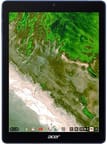 Acer Chromebook Tab 10 | |
| Price | List Price: $329.99 Amazon Prices: |
| Model number | D651N-K9WT / NX.H0BAA.001 |
| Performance Rating | 2.5 |
| Chromebook Plus | No |
| Processor | Hexa-core 1.60 Ghz (max 2.00 Ghz) OP1 |
| RAM | 4 GB |
| Internal Storage | 32 GB eMMC |
| Screen Size | 9.7" |
| Screen Resolution | 2048x1536 |
| Screen Type | IPS |
| Touch Screen | Yes |
| Stylus / Pen | Supported |
| Dimensions width x length x thickness | 6.78 x 9.38 x 0.39 inches (172.21 x 238.25 x 9.91 mm) |
| Weight | 1.2 lbs (0.55 kg) |
| Backlit Keyboard | No |
| Webcam | Front webcam: 1600x1200. Rear webcam: 2560x1920. 720p video recording. |
| WiFi | 2x2 MIMO 802.11 a/b/g/n/ac 2.4 GHz and 5 GHz |
| Bluetooth | Bluetooth 4.1 |
| Ethernet | No |
| Cellular Modem | No |
| HDMI | No HDMI |
| USB Ports | 1 USB-C |
| Thunderbolt Ports | No |
| Card Reader | microSD Card Reader |
| Battery | 2 cell, 34.02 Wh 8860 mAh, Li-polymer |
| Battery Life | 9.0 hours |
| Fanless | Yes |
| Auto Update Expiration Date | August, 2023 |
Related Chromebooks
-
 Acer Chromebook Spin 11 CP311The Acer Chromebook Spin 11 combines functionality and portability with its 11.6-inch touch IPS…
 -
 Acer Chromebook 15The Acer Chromebook 15 stands out with a 15.6" FHD IPS touch display, backlit keyboard, and up to…
 -
 ASUS Chromebook Detachable CM3 (CM3000)Lightweight and versatile, the ASUS Chromebook Detachable CM3 shines with a 10.5-inch touchscreen,…
 -
 Lenovo Chromebook DuetLenovo Chromebook Duet offers a 10.1" touch IPS display, versatile tablet form factor, and 10-hour…
 -
 Samsung Chromebook Plus v2The Samsung Chromebook Plus v2 boasts a versatile 12.2" touch LED screen, dual cameras, and pen…
 -
 Lenovo Flex 3 ChromebookThe Lenovo Flex 3 Chromebook hits the sweet spot with its 11.6-inch IPS touchscreen, 4GB RAM, and…
The First Tablet Built for Chrome OS
When Acer unveiled the Chromebook Tab 10 at the Bett education technology show in London on January 24, 2018, it marked a quiet but consequential pivot in Google’s classroom strategy. Chrome OS had spent its first seven years on clamshells and convertibles, growing into the dominant classroom platform across the United States while leaving the pure tablet form factor entirely to Apple. The Tab 10 was Google’s attempt to follow students who had grown up tapping at iPads back into the slate factor, while keeping the management plane, account model, and software tooling that school districts had already standardized on.
Acer’s role in that pivot was deliberate. The company shipped some of the earliest education Chromebooks in 2011 and had built a sustained business around the ruggedized C720, C740, and Chromebook 11 N7 lines. A pure tablet was a natural extension of that catalog: same Google Admin console, same per-seat management, same fleet rollout muscle, only flatter. The D651N model number placed the Tab 10 explicitly inside Acer’s education series, and the bulk SKU NX.H0BAA.001 shipped through the channel partners that already had quarterly purchase cycles with K-12 districts. The retail USD 329 price was designed to undercut the contemporary 9.7-inch iPad’s classroom configuration by enough to matter at the volume bid level.
The Tab 10 also arrived at a specific moment in Google’s own roadmap. Chrome OS had just absorbed full Play Store support across most Chromebooks released after 2017, which gave a tablet form factor real software depth for the first time. Crostini Linux containers were beginning to appear in canary builds. The earliest detachables, like the HP Chromebook x2 announced a few months later, were edging in the same direction from the opposite side of the form factor. The Tab 10 sat at a hinge point in Chrome OS history, when Google was trying to prove that one operating system could serve the laptop, tablet, and detachable customer without forking into something Android-shaped.
Detailed Insights into the Acer Chromebook Tab 10
The Chromebook Tab 10’s industrial design prioritized durability over aesthetics, featuring a ridged blue plastic shell that provided excellent grip but felt noticeably less premium than metal-bodied competitors. Reviewers consistently noted that the device had a somewhat toy-like appearance, with large bezels surrounding the display and an all-plastic construction that telegraphed its education-market origins. The textured back made one-handed operation comfortable, and at 1.2 pounds the tablet remained portable enough for extended handheld use. However, the bulky included power adapter detracted from the overall travel-friendly package.
Performance from the Rockchip OP1 processor proved adequate for single-task workflows but struggled when users attempted to multitask or run demanding applications. Web browsing, streaming video, and basic productivity apps worked smoothly, but opening multiple Chrome tabs or switching between apps frequently exposed the limitations of the mid-range silicon. Benchmark testing by reviewers showed the device lagging behind contemporary iPads in raw processing power. The 4GB of RAM provided sufficient headroom for light Android app usage, though heavy multitasking caused noticeable slowdowns and occasional stuttering.
The 9.7-inch IPS display emerged as the standout feature, earning praise from virtually every reviewer. With its 2048x1536 resolution matching Apple’s Retina displays pixel-for-pixel and a 4:3 aspect ratio well-suited for documents and web content, text appeared exceptionally sharp and images rendered with vibrant colors. Wide viewing angles from the IPS technology made screen sharing easy, while the laminated construction reduced glare and improved stylus accuracy. The included Wacom EMR stylus supported 2048 levels of pressure sensitivity without requiring batteries or charging, making it particularly valuable for note-taking and basic drawing tasks in educational settings.
Reviewer Insights on the Acer Chromebook Tab 10
Lon Seidman’s Perspective
Lon Seidman from Lon.TV provided one of the most thorough technical examinations of the Tab 10, running benchmark tests and exploring its Linux app capabilities. He praised the display quality, noting that “things look really nice and sharp on here, both the text and the photos, similar to what you might find on an iPad with their Retina display.” His testing revealed significant software quirks when switching between tablet and desktop modes, particularly when connecting external peripherals. Despite these issues, Lon saw promise in the device, describing it as “a real window into what the future of portable computing might be from Google.”
Andre’s Perspective
Andre from MyNextTablet offered pointed criticism of the build quality while acknowledging the device’s unique software advantages. He bluntly noted that “it kind of looks like a children’s toy” and “does not feel high-end at all” compared to the 2018 iPad or Huawei MediaPad M5. However, he highlighted the value proposition of the included stylus and the benefit of getting “the best of both worlds: a great desktop-class browser including extensions and Android apps.” His battery testing showed approximately 10 hours of HD video playback at 50% brightness.
Written Review Consensus
Professional written reviews painted a consistent picture of a device better suited for classrooms than living rooms. Chrome Unboxed called it “a promising start for Chrome OS tablets” while noting the OP1 processor “keeps up much better” when used for single tasks. 9to5Google’s Stephen Hall gave it “a passing grade” for education use but cautioned against consumer purchase. Laptop Mag and Android Central both awarded 3 out of 5 stars, with particular criticism directed at the poor speaker quality (making it unsuitable for music production) and the absence of Chrome OS’s signature windowed interface in tablet mode. TechRadar described the display as “just gorgeous” but questioned whether the $329 price point was competitive enough against Apple’s classroom offerings.
Why Chrome OS Tablets Faded
The Tab 10 was the first slate built for Chrome OS, and over the next two years it would also become one of the last. Google followed with the Pixel Slate in late 2018, a premium flagship that drew the same tablet-mode criticism the Tab 10 had received, only at a price point several times higher. By mid-2019 Google publicly stepped back from first-party tablet hardware, and the cancellation of two unannounced Pixel tablet projects later that year effectively ended Chrome OS as a pure tablet platform.
Manufacturers read the signal quickly. Lenovo’s Chromebook Duet, launched in 2020, looked superficially like a successor to the Tab 10 but was sold and reviewed as a detachable laptop, with the keyboard cover included in the base price rather than billed as a separate accessory. The Duet’s success then defined the shape of the category: Chrome OS slates from that point on were detachables with bundled keyboards, not pure tablets. Acer never shipped a follow-up Chromebook Tab, and the D651N line ended with the original SKU. The Tab 10 sits in the catalog as a useful marker for the moment Google decided Chrome OS would not chase iPads head-on after all.
Living with an End-of-Life Tab 10
For owners who still have a Tab 10 in a desk drawer or a classroom cart, the Auto Update Expiration in August 2023 is the spec that matters most today. Chrome OS no longer pushes browser engine updates, security patches, or platform fixes to the device. The Chrome version on the tablet is frozen at whatever shipped in the final stable release, and over time more of the modern web will silently fail on it as sites tighten their TLS, JavaScript engine, and certificate requirements.
The Wacom EMR stylus continues to work as a passive input device regardless of operating system support. The same is true of the cameras, the headphone jack, and the microSD reader. What erodes is anything that touches an external service or relies on the browser keeping pace. Banking sites and single-sign-on flows are usually the first to break, since they refuse outdated browsers on purpose. Video streaming services that rely on hardware DRM will increasingly throttle to lower resolutions or fall back to a “not supported” notice as the device’s certified DRM tier ages out, and any web app that requires a current TLS handshake or a recent JavaScript engine feature can drop without warning.
Before a Tab 10 leaves an owner’s hands, it should be powerwashed to clear the local Google account, browser data, and any Play Store credentials. The simplest path is Settings, Advanced, Reset settings, Powerwash; the recovery-mode procedure documented in Acer’s original user manual covers the deeper case where the tablet has fallen out of the owner’s Google account entirely. For owners keeping the device for personal use, treating it as a read-mostly tablet (a recipe reader in the kitchen, a sheet music display on a music stand, a kids’ video player docked on a shelf) is the path that ages most gracefully, because none of those workloads depend on the browser staying current.
The Linux container support that arrived on the Tab 10 in its later years was limited by the OP1 / Rockchip RK3399 SoC, which had a narrower Crostini package catalog than the Intel Chromebooks of the same era. Repurposing the tablet as a general-purpose Linux workstation is not realistic in the way it is for many later models. Owners who want a second life for the Tab 10 hardware are better served by leaning into the cameras, stylus, and IPS display in low-stakes roles, rather than trying to push the OP1 past what it was specified for. Educational fleets retiring Tab 10s at scale typically pull the devices from the inventory entirely, since the security implications of a no-update tablet on a school network outweigh the residual value of the hardware.
Conclusion
The Acer Chromebook Tab 10 represented an ambitious first attempt at bringing Chrome OS to the pure tablet form factor. Its excellent display, included stylus, and education-focused feature set made it a serviceable tool for classrooms seeking alternatives to iPad deployments. However, the plastic build quality, modest processor performance, and rough-around-the-edges software experience limited its appeal outside specialized educational use cases. As a historical artifact, the Tab 10 demonstrated both the potential and the growing pains of Chrome OS’s expansion beyond traditional laptop form factors. The lessons learned from this device informed later, more refined Chrome OS tablets like the Pixel Slate and Lenovo Duet series. If you are weighing current options, the Chromebook Comparison Chart lets you sort and filter the full catalog by specs and form factor.