
ASUS Chromebook C202SA
Updated on

The ASUS Chromebook C202SA reached its Chrome OS Auto Update Expiration in June 2022 (Google’s official Chrome Enterprise list lists “Chromebook C202SA: Jun 2022”). The hardware still powers on, but the device no longer receives Chrome OS updates or security patches, and Starry Hope does not recommend it for new purchases. The specs below are here for owners who still have one in a drawer or a classroom cart. Two retail configurations shipped: C202SA-YS01 (Intel Celeron N3060, 2 GB RAM, 16 GB eMMC, $199) and C202SA-YS02 (Intel Celeron N3060, 4 GB RAM, 16 GB eMMC, $229).
A 2016 education laptop built around its case
The ASUS Chromebook C202SA shipped in February 2016 with an Intel Celeron N3060 (Braswell, dual-core, 1.6 to 2.48 GHz), 2 or 4 GB of LPDDR3 RAM, 16 GB of eMMC, and an 11.6-inch 1366x768 anti-glare TN display. The chassis is where the engineering went: rubber bumpers around the lid and lower half, a spill-resistant keyboard, a 180-degree hinge so a dropped open lid does not snap back on itself, and an ASUS drop spec of 120 cm flat and 80 cm side. The design goal was a machine that comes back from a fall and keeps working through a spilled juice box.
The TN panel is bright enough for indoor classroom use, but the colors are dull and the viewing angles are narrow. The Celeron N3060 handles single-tab Chrome OS work and Google Docs comfortably and slows down with several open tabs and media-rich pages. It listed at $199 to $229 and remained Chrome-supported until June 2022.
Related Videos
ASUS Chromebook C202SA Comparison Chart
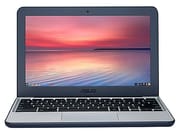 ASUS Chromebook C202SA | ASUS Chromebook C202SA | |
| Price | List Price: $229.00 Amazon Prices: | List Price: $199.00 Amazon Prices: |
| Model number | C202SA-YS02 | C202SA-YS01 |
| Performance Rating | 2.0 | 1.6 |
| Chromebook Plus | No | No |
| Processor | Dual-core 1.60 Ghz (max 2.48 Ghz) Intel Celeron Processor N3060 | Dual-core 1.60 Ghz (max 2.48 Ghz) Intel Celeron Processor N3060 |
| RAM | 4 GB | 2 GB |
| Internal Storage | 16 GB eMMC | 16 GB eMMC |
| Screen Size | 11.6" | 11.6" |
| Screen Resolution | 1366x768 | 1366x768 |
| Screen Type | Anti-glare TN | Anti-glare TN |
| Touch Screen | No | No |
| Stylus / Pen | No Stylus Support | No Stylus Support |
| Dimensions width x length x thickness | 11.6 x 7.9 x 0.9 inches (294.64 x 200.66 x 22.86 mm) | 11.6 x 7.9 x 0.9 inches (294.64 x 200.66 x 22.86 mm) |
| Weight | 2.2 lbs (1 kg) | 2.2 lbs (1 kg) |
| Backlit Keyboard | No | No |
| Webcam | HD | HD |
| WiFi | 802.11 b/g/n/ac | 802.11 b/g/n/ac |
| Bluetooth | Bluetooth 4.2 | Bluetooth 4.2 |
| Ethernet | No | No |
| Cellular Modem | No | No |
| HDMI | Full-Size HDMI | Full-Size HDMI |
| USB Ports | 2 USB 3 | 2 USB 3 |
| Thunderbolt Ports | No | No |
| Card Reader | SD | SD |
| Battery | 2 cell, 38 Whrs, Lithium-ion | 2 cell, 38 Whrs, Lithium-ion |
| Battery Life | 10.0 hours | 10.0 hours |
| Fanless | Yes | Yes |
| Auto Update Expiration Date | June, 2022 | June, 2022 |
Related Chromebooks
-
 ASUS Chromebook C203XAThe ASUS Chromebook C203XA is a rugged 11.6-inch education laptop with a MediaTek MT8173C, an…
 -
 ASUS Chromebook C423The ASUS Chromebook C423 pairs a 14-inch 1366x768 display with a dual-core Celeron N3350, 4GB of…
 -
 Acer Chromebook 311 (AMD)The Acer Chromebook 311 (CB311-10H) is an 11.6-inch ChromeOS laptop on an AMD A4-9120C with 4GB of…
 -
 Acer Chromebook Spin 11 CP311The Acer Chromebook Spin 11 combines functionality and portability with its 11.6-inch touch IPS…
 -
 Lenovo Flex 3 ChromebookThe Lenovo Flex 3 Chromebook is a fanless 11.6-inch convertible with an IPS touchscreen, a MediaTek…
 -
 Dell Chromebook 3120The Dell Chromebook 3120 is a fanless 11.6-inch education Chromebook with an Intel N100, sold in…
Rubber bumpers and a chassis that opens with a screwdriver
PCWorld’s Melissa Riofrio (August 15, 2016) reported the official ASUS durability figures verbatim: “the C202S can handle a flat drop (onto its bottom panel) of up to 120 centimeters (a little over 47 inches), and a side drop of up to 80 centimeters (a little over 31 inches).” Her verdict was that “what sets the Asus C202S apart from other low-cost models is the better build and better keyboard, all of which improve the user experience. This is one of the very few bargains I’d heartily recommend.”
The protection extends past drop resistance. ASUS includes rubber bumpers around the lid and the bottom edges, plus rubber feet that take up a meaningful percentage of the underside (Lon Seidman, in his Lon.TV review, points this out directly: the chassis “is surrounded by Rubber here so it’s designed in case you drop it off the desk or something to most likely survive the fall”). The spill-resistant keyboard sits over a mylar-lined protective plate; PCWorld notes that “Asus says it can handle a small spill of up to 2.23 ounces because the innards are protected by a solid, mylar-lined plate built underneath the keyboard.”
The construction is modular, which matters to an IT department repairing a cart of these rather than replacing them. PCWorld measured the path to the internals: “12 screws stand between you and removing the bottom, plus more screws await inside to remove the thermal module, the motherboard, and the battery in order to get to other components.” ASUS’s own teardown video walks through the same procedure and shows 10 outer screws on the unit it opens.
The screen is the clearest sign of the $199 price
The 11.6-inch 1366x768 panel is a TN with an anti-glare coating. TechRadar’s Jacob Grana (June 3, 2016) summarized it bluntly in the published Cons list: “Dull, glare-prone screen.” The viewing angles narrow off-center, which is the standard TN behavior. At this price point in 2016 that was not unusual; mid-range and upper-tier Chromebooks of the same era moved to IPS, and ASUS stayed on TN to hit the $199 starting price.
The matte coating does help in fluorescent classroom lighting; it does not fix the underlying color and viewing-angle limitations. The screen does not support touch input and the lid does not fold past 180 degrees. That hinge exists to keep a student from tearing the display cable when the lid is thrown open.
Octane scores put it well behind the Acer C740
TechRadar measured the JavaScript performance: “Octane: 8,303, Mozilla Kraken: 3,913.8.” Lon Seidman’s Octane test on the same device returned a “great score of 8,714,” which lines up with the published Octane reference for the Intel Celeron N3060 and with the run-to-run variance you get on a low-power chip. TechRadar also ran the comparison against the Acer C740: “the Acer C740, for comparison, scored nearly 60% better on the Octane and Kraken tests.” Day-to-day use tracks the benchmarks. TechRadar described the typical experience as “the C202 handles multiple browser windows and applications well enough, but open too many and the device slows down considerably,” and Lon Seidman framed it the same way (“this actually is performing very well for what it has under the hood” given the price point).
The 4 GB SKU (C202SA-YS02) and the 2 GB SKU (C202SA-YS01) share the same SoC and storage, so RAM is the difference that matters for multi-tab Chrome OS work. The 2 GB variant strains noticeably with more than a handful of tabs and Android apps; the 4 GB variant handles classroom workloads without obvious complaint. Both have soldered RAM and a soldered 16 GB eMMC, and the SD card slot is the only post-purchase expansion path.
Long battery life, well-liked keys, and no USB-C
The keyboard is one of the strongest features here. PCWorld called it out directly: “the C202S offers a keyboard with a surprisingly gentle, 2 mm travel. The fonts on the keys are even a little bigger than usual so it’s easier to see the letters.” Lon Seidman said the same thing from a different angle: “I am very pleased with the keyboard it’s very solid feeling it doesn’t feel cheap,” and noted that the chunky chassis allows “a lot of travel” in the keystroke. There is no backlight, which is a reasonable cost decision for a machine meant to be used in a lit classroom.
ASUS rated the 38 Wh battery at up to 10 hours. TechRadar’s HD-video battery test landed at 8 hours and 42 minutes (“the C202 actually fares quite well: it lasts a school-day-ready 8 hours and 42 minutes”). Lon Seidman reported real-world figures in the same range: “I’m going to put that around 8 to 10 hours based on my usage so enough to get through a school day.” Both numbers clear a full school day on one charge.
The port complement is two USB 3.0 Type-A (both on the right edge), one full-size HDMI, a full-size SD card reader, a combo 3.5 mm jack, and a Kensington lock slot. There is no Ethernet, so a wired classroom drop needs a USB Ethernet adapter, and there is no USB-C at all, so charging runs through the barrel jack. Wireless is dual-band 802.11ac with Bluetooth 4.2, and the fanless design keeps the machine silent under any workload.
Reviewer Insights
PCWorld (Melissa Riofrio, August 15 2016) published under the headline: “Asus Chromebook C202S review: You won’t find a better-built bargain.” Published pros: “Very durable design, Chassis can be opened for upgrades or repairs, Very nice keyboard for the price, Very long battery life.” Published con: “Average chip limits it to mainstream applications.” Verdict: “What sets the Asus C202S apart from other low-cost models is the better build and better keyboard, all of which improve the user experience. This is one of the very few bargains I’d heartily recommend.” The drop-resistance figures, the spill-resistance figure (2.23 ounces), and the 12-screw teardown count cited above all come from this review.
TechRadar (Jacob Grana, June 3 2016) rated the C202SA 3 / 5. Published pros: “Built like a tank, Easy-to-use keyboard, Budget friendly.” Published cons: “Looks and runs like a tank, Dull, glare-prone screen.” Octane 2.0 score: 8,303. Mozilla Kraken: 3,913.8. Battery life on the HD-video test: 8 hours 42 minutes. Comparison against the Acer C740: “scored nearly 60% better on the Octane and Kraken tests.”
Lon Seidman’s Lon.TV hands-on is a full video walkthrough of the machine, and his Octane number (8,714) matches the Intel reference for the N3060. ASUS’s own Introducing the ASUS C202 Chromebook and Tear Down videos document the chassis details, including the 10 outer screws on the unit ASUS opens.
A durable classroom laptop that outlived its update window
ASUS built this Chromebook for K-12 classrooms, and at $199 to $229 it also served as a silent fanless machine for a household that needed something that survives a coffee spill or a slide off the couch. Speed was never the reason to buy one.
A color-accurate display, touch input, and USB-C charging were all missing even in 2016. Chrome OS support ran out in June 2022, so the browser is no longer patched and the machine is limited to offline work.
To see how the C202SA compares against other Chromebooks by specs, see the Chromebook Comparison Chart.
Frequently Asked Questions
When did the ASUS Chromebook C202SA reach its Chrome OS Auto Update Expiration date?
June 2022. Google’s official Chrome Enterprise Auto Update Expiration list shows “Chromebook C202SA: Jun 2022.” After that date, Chrome OS no longer ships updates or security patches to the device. The browser still loads, but the device should not be used for accounts that involve a current browser security sandbox (banking, payments, healthcare logins).
What is the difference between the C202SA-YS01 and C202SA-YS02?
RAM, and nothing else. The YS01 ships 2 GB of LPDDR3 at $199 and the YS02 ships 4 GB at $229. Both use the Intel Celeron N3060, 16 GB of eMMC, the 11.6-inch 1366x768 anti-glare TN display, the rubber-bumpered chassis, the spill-resistant keyboard, the 38 Wh battery, the same 2x USB 3.0 / HDMI / full-size SD card / combo audio port set, and 802.11ac with Bluetooth 4.2. Look for the 4 GB model if you find one secondhand; 2 GB runs Chrome OS itself but is tight with several tabs open.
How durable is the C202SA?
ASUS certified the device for a 120 cm (47 inch) flat drop onto the bottom panel and an 80 cm (31 inch) side drop. The chassis is wrapped in rubber bumpers around the lid and lower edges. The keyboard is rated for a spill of up to 2.23 ounces because of a mylar-lined plate underneath. PCWorld reported all of these figures at review time.
Can I upgrade the RAM or storage?
No. Both the LPDDR3 RAM (2 or 4 GB depending on SKU) and the 16 GB eMMC are soldered to the motherboard. The included SD card slot is the only post-purchase storage expansion path.
Is the C202SA still safe to use in 2026?
Not for anything sensitive. The Chrome OS Auto Update Expiration was June 2022, so the browser sandbox is no longer being patched. The device still works for offline tasks such as typing into cached Google Docs, simple homework, and reading. Keep it away from online banking, online payments, school accounts that handle PII, and any other workflow where browser security matters.
What replaced the C202SA?
ASUS continued the rugged-education line with the convertible Chromebook Flip C213 and later the Chromebook Flip C214, both of which added a touchscreen, stylus support, and a 360-degree hinge while keeping the rubber-bumper, spill-resistant, drop-rated design language.