
ASUS Chromebook CX14 (CX1405)
Updated on

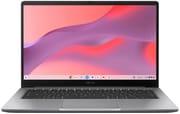
The ASUS Chromebook CX14 (CX1405) represents ASUS’s 2025 entry into the budget Chromebook market with two distinct configurations designed to meet different needs and budgets. The base model features an Intel Celeron N4500 processor with 4GB RAM and 64GB storage at $279, while the Chromebook Plus variant steps up to an Intel Core 3 N355 with 8GB RAM and 128GB storage. Both share a textured plastic build that feels more premium than expected, a practical 180-degree lay-flat hinge, and the reassurance of military-grade durability testing (MIL-STD 810H). With software support guaranteed through June 2035, these Chromebooks offer exceptional longevity regardless of which configuration you choose. The CX14 targets students, casual users, and anyone seeking a portable, reliable machine for web browsing, document editing, and light productivity work without breaking the bank.
Pros and Cons of the ASUS Chromebook CX14 (CX1405)
| Pros | Cons |
|---|---|
| Unique textured finish makes plastic chassis feel premium | Bottom-firing speakers easily muffled when used on lap |
| 180-degree lay-flat hinge for flexible viewing and sharing | Celeron model has TN display with poor viewing angles |
| Long software support through June 2035 | Core 3 model has disappointing 5-hour battery life |
| Military-grade durability (MIL-STD 810H) | Celeron model struggles with multitasking on 4GB RAM |
| Good port selection including full-sized HDMI | Privacy shutter on camera is difficult to operate |
| Lightweight at 3.04-3.06 lbs for easy portability | Core 3 model’s backlit keyboard not available on Celeron |
Related Videos
ASUS Chromebook CX14 (CX1405) Comparison Chart
 ASUS Chromebook CX14 (CX1405) | ASUS Chromebook CX14 (CX1405) | |
| Price | List Price: $279 Amazon Prices: Best Buy: Loading price... | List Price: $239 Amazon Prices: Best Buy: Loading price... |
| Model number | CX1405CKA | CX1405CTA |
| Performance Rating | 3.1 | 9.4 |
| Chromebook Plus | No | No |
| Processor | Dual-core 1.10 Ghz (max 2.80 Ghz) Intel Celeron Processor N4500 | Octa-core 1.70 Ghz (max 3.80 Ghz) Intel Core 3 N355 |
| RAM | 4 GB | 8 GB |
| Internal Storage | 64 GB | 128 GB |
| Screen Size | 14" | 14" |
| Screen Resolution | 1920x1080 | 1920x1080 |
| Screen Type | TN | TN |
| Touch Screen | No | No |
| Stylus / Pen | No Stylus Support | No Stylus Support |
| Dimensions width x length x thickness | 12.78 x 8.44 x 0.78 inches (324.61 x 214.38 x 19.81 mm) | 12.78 x 8.44 x 0.78 inches (324.61 x 214.38 x 19.81 mm) |
| Weight | 3.04 lbs (1.38 kg) | 3.04 lbs (1.38 kg) |
| Backlit Keyboard | No | No |
| Webcam | 720p | 720p |
| WiFi | Wi-Fi 6 (802.11ax) | Wi-Fi 6 (802.11ax) |
| Bluetooth | Bluetooth 5.4 | Bluetooth 5.4 |
| Ethernet | No | No |
| Cellular Modem | No | No |
| HDMI | Full-Size HDMI | Full-Size HDMI |
| USB Ports | 2 USB 3, 2 USB-C | 2 USB 3, 2 USB-C |
| Thunderbolt Ports | No | No |
| Card Reader | No Card Reader | No Card Reader |
| Battery | 42WHrs | 42WHrs |
| Battery Life | 9.5 hours | 9.5 hours |
| Fanless | Yes | Yes |
| Auto Update Expiration Date | June, 2035 | June, 2035 |
Related Chromebooks
-
 ASUS Chromebook Plus CX34 (CX3402)The ASUS Chromebook Plus CX34 balance power and affordability, featuring an Intel Core i3, 8GB RAM,…
 -
 ASUS ExpertBook CX54 Chromebook PlusThe ASUS ExpertBook CX54 Chromebook Plus is a premium business Chromebook featuring Intel Core…
 -
 Acer Chromebook Spin 314 (2024)A 14-inch convertible Chromebook with a 16:10 WUXGA touch display, 360-degree hinge, and software…
 -
 HP Chromebook 14 (AMD)The HP Chromebook 14 combines a 14-inch WLED-backlit display, TrueVision HD webcam, and fanless…
 -
 HP Chromebook 14a (2022)The HP Chromebook 14a offers a 14-inch anti-glare display, a Quad-core Intel Celeron N4120, 4GB…
 -
 Acer Chromebook Plus 514The Acer Chromebook Plus 514 delivers impressive value with its Intel Core i3-N305 processor,…
Detailed Insights into the ASUS Chromebook CX14 (CX1405)
The ASUS CX14 impresses with a build quality that belies its budget pricing, featuring a distinctive textured plastic finish that reviewers consistently describe as feeling like paper and contributing to a more premium tactile experience than typical entry-level Chromebooks. At just 3.04 to 3.06 pounds and measuring 12.78 x 8.44 x 0.67-0.78 inches, the CX14 proves highly portable without sacrificing the 14-inch screen real estate that many users prefer over smaller 11-inch alternatives. The 180-degree lay-flat hinge stands out as a practical feature rarely found at this price point, enabling easy content sharing in classroom or collaborative settings. The port arrangement places all connections on the left side, including two USB-C ports (both supporting DisplayPort and Power Delivery), two USB-A 3.2 Gen 1 ports, a full-sized HDMI 1.4 port, and a 3.5mm combo audio jack. Users needing wired internet can connect a USB Ethernet adapter through one of the USB-A ports. While some users might prefer ports on both sides for flexibility, the comprehensive selection ensures compatibility with most peripherals and displays without requiring adapters.
Performance expectations should be calibrated to the specific configuration chosen, as the difference between the Celeron and Core 3 models proves substantial in real-world use. The budget Celeron N4500 configuration with its dual-core processor and 4GB RAM operates at what NotebookCheck describes as the “lowest acceptable limit” for ChromeOS, making multitasking with numerous browser tabs a test of patience. NotebookCheck’s testing revealed the Celeron model achieved Geekbench 6 scores of 462 (single-core) and 757 (multi-core), positioning it squarely in basic-use territory for web browsing and simple document editing. In contrast, the Core 3 N355 variant delivers a dramatically different experience with its 8-core processor (10,476 PassMark score) and 8GB LPDDR5 RAM, handling Android gaming and heavier multitasking with ease according to MergeDroid’s hands-on testing with Real Racing 3. The Core 3 model’s performance approaches what users might expect from entry-level Windows laptops, though ChromeOS’s lighter overhead helps it feel more responsive than raw benchmark numbers might suggest.
The display situation presents one of the most significant differentiators between the two models beyond the processor and RAM. The Celeron variant ships with a TN panel that NotebookCheck criticizes heavily for its limited 56% sRGB color gamut coverage, poor viewing angles, and washed-out appearance despite offering Full HD 1920x1080 resolution. At 250 nits brightness, the Celeron’s screen proves adequate for indoor use but struggles in bright environments or outdoor settings. The Core 3 Chromebook Plus model upgrades to an IPS panel maintaining the same Full HD resolution but improving to 300 nits brightness and significantly better color reproduction and viewing angles, though still falling short of the vibrant displays found on more expensive Chromebooks. Both configurations feature anti-glare coatings and an 86% screen-to-body ratio thanks to slim bezels, but the panel technology difference means Core 3 users enjoy a markedly superior visual experience for everything from Netflix streaming to photo editing in Google Photos.
Reviewer Insights on the ASUS Chromebook CX14 (CX1405)
MergeDroid provides extensive coverage of the Chromebook Plus CX14 with the Core 3 N355 processor in his unboxing and initial review. He emphasizes the rigid build quality as a standout feature, noting that despite being constructed entirely from plastic, the chassis exhibits minimal flex and feels substantially more solid than competing budget Chromebooks. The reviewer praises the backlit keyboard as a rare feature in this price range, calling out the new Quick Insert key that provides quick access to emoji, GIFs, and Google Drive files. However, MergeDroid doesn’t hold back on criticisms, describing the Rock Grey color as boring and the plastic texture as feeling slightly cheap despite the solid construction. He expresses particular frustration with the privacy shutter on the 1080p webcam, which requires fingernails to operate effectively rather than sliding easily with a finger press. The reviewer confirms software updates through June 2035, positioning this as an excellent value for users seeking a Chromebook that will remain supported for nearly a decade.
In a detailed comparison video, MergeDroid pits the ASUS Chromebook Plus CX14 against the Acer Chromebook Plus 514, both featuring identical Intel Core 3 N355 specifications, to help buyers distinguish between similarly-priced options. The controlled battery drain test reveals the ASUS’s most significant weakness: lasting only five hours during continuous 4K video playback compared to over six hours on the competing Acer. This underwhelming battery performance (despite a respectable 42Wh capacity) suggests power management optimization issues or the 16:9 display consuming more power than expected. MergeDroid notes the ASUS delivers richer sound output than the Acer when placed on a desk, but the bottom-firing speaker placement means this audio advantage disappears when the Chromebook rests on your lap, with sound becoming noticeably muffled. The reviewer emphasizes the backlit keyboard as the ASUS’s key differentiator, recommending it specifically for users who type in dim environments and aren’t concerned about maximizing battery endurance. He suggests waiting for sale prices around £167 ($210 USD) to get the best value.
MergeDroid’s budget model review examines the Celeron N4500 variant (CX1405CKA), which he positions as potentially the “least worst option” for entry-level Chromebook shopping under £130 ($170 USD). The reviewer is pleasantly surprised by the Full HD 1920x1080 resolution, which remains uncommon in the absolute budget tier where 1366x768 HD displays dominate. However, he immediately qualifies this praise by revealing the TN panel’s limitations, demonstrating how colors wash out dramatically at any viewing angle besides straight-on and how the low 250-nit brightness makes outdoor use impractical. MergeDroid highlights that despite being marketed as a 2025 model, the use of the 2021-vintage Celeron N4500 processor means software support only extends to June 2031 (though the user in this conversation confirmed June 2035 for both models). The unique “Pure Grey” textured finish earns specific praise for its paper-like feel that helps the budget device punch above its weight class aesthetically. He recommends strongly considering the 8GB RAM variant if budget allows, as 4GB proves limiting even for ChromeOS’s lightweight demands when juggling multiple tabs and Android apps.
According to NotebookCheck, the Celeron CX1405CKA earns a 66% rating as an “average” device designed for a specific niche. Reviewer Marc Herter positions it primarily for users who prioritize completely silent operation, as the fanless passive cooling design produces zero noise even under sustained load. The thermal measurements confirm this benefit, with the chassis reaching only 38.1°C maximum temperature while consuming just 12.99W at peak load. NotebookCheck’s standardized battery testing recorded an impressive 9 hours 26 minutes of runtime in their Wi-Fi web surfing scenario, contrasting sharply with the Core 3 model’s disappointing results and suggesting the Celeron’s lower power consumption pays tangible dividends for all-day unplugged use. However, Herter minces no words about the performance limitations, characterizing the Celeron N4500 as operating at the “lowest acceptable limit” for ChromeOS and warning that multitasking becomes “a test of patience.” The review’s measured specs reveal a keyboard with greater than 1mm key travel (subjectively comfortable), a generously sized 10.5 x 7.5 cm touchpad, and WiFi speeds around 867 Mbps transmit / 821 Mbps receive using the Realtek RTL8852BE chip. NotebookCheck concludes the Celeron CX14 works best for users with very specific requirements: silent computing for basic tasks in quiet environments like libraries or offices, where the TN display’s deficiencies and minimal performance prove acceptable trade-offs.
Customer Reviews of the ASUS Chromebook CX14 (CX1405)
Best Buy customers rate the Celeron variant highly at 4.6 stars across 263 reviews, with many praising the sub-$280 pricing as exceptional value for a Full HD display and solid construction. Positive feedback consistently mentions the lightweight design making it ideal for students carrying laptops between classes, the adequate performance for Google Workspace applications and web browsing, and appreciation for the physical privacy shutter despite its stiffness. Several reviewers specifically call out the textured finish as feeling more premium than expected and appreciate the military-grade durability claims for peace of mind with kids using the device. Common complaints center on the display quality, with multiple mentions of washed-out colors and poor viewing angles confirming the TN panel limitations that professional reviewers documented. Some users report the 4GB RAM configuration showing its limits when working with Google Docs while streaming music, with occasional lag when switching between tabs. A few reviews mention the bottom speaker placement negatively affecting audio when the Chromebook sits on soft surfaces.
The Chromebook Plus Core 3 variant maintains a solid 4.5-star rating from 125 Best Buy customer reviews, with enthusiasm for the backlit keyboard appearing in numerous positive comments alongside praise for the snappier overall performance compared to older Celeron Chromebooks. Customers appreciate the on-sale pricing bringing the device down from $429 MSRP to $239, making it feel like a significant upgrade over the Celeron model for minimal additional cost. The improved IPS display earns specific praise for better color reproduction and viewing angles during video calls and Netflix viewing. However, battery life emerges as the most frequent complaint, with multiple users reporting they need to recharge by late afternoon after starting with a full battery in the morning, a significant disappointment given expectations of all-day computing from Chromebooks. Some reviewers express frustration with the plastic trackpad feeling cheap compared to the otherwise solid build. Several recent reviews praise the Google AI features that come as part of the Chromebook Plus designation, including enhanced Google Photos editing capabilities and improved Assistant functionality, positioning this as a forward-looking purchase for users wanting AI integration without stepping up to premium pricing.
Conclusion
The ASUS Chromebook CX14 (CX1405) succeeds at its primary mission of delivering a solid, durable Chromebook at budget-friendly pricing, though the substantial differences between the Celeron and Core 3 configurations mean buying recommendations diverge based on use case and budget. The Celeron model at $279 makes sense for users with genuinely basic needs—web browsing, Google Docs, email, and light YouTube viewing—who value the silent fanless operation and impressive 9+ hour battery life while accepting the TN display’s visual limitations and occasionally sluggish performance during multitasking. Students purchasing primarily for note-taking and research, or seniors seeking a simple machine for staying connected online, will find the Celeron configuration adequate if they maintain realistic performance expectations and rarely juggle numerous tabs simultaneously.
The Chromebook Plus Core 3 variant at $239 (frequently on sale from $429 MSRP) represents the stronger overall value for most users despite its disappointing 5-hour battery life. The combination of significantly improved performance, 8GB RAM enabling comfortable multitasking, superior IPS display, 1080p webcam, and backlit keyboard transforms the daily computing experience enough to justify choosing this configuration unless battery endurance ranks as an absolute top priority. The backlit keyboard alone proves valuable for anyone who types in dim environments, from students working in dorm rooms to professionals taking notes during evening meetings. Best Buy’s frequent promotional pricing on the Core 3 model makes it a standout deal when available under $250, effectively delivering Chromebook Plus features and Google AI capabilities at budget Chromebook pricing.
Both configurations benefit from ASUS’s solid build quality, the practical 180-degree hinge for content sharing, comprehensive port selection including full HDMI, and the lengthy June 2035 software support ensuring the device remains updated for years. The 180-degree hinge particularly benefits educators and students who frequently share screens during collaboration or tutoring sessions. For those comparing within the budget Chromebook segment, Starry Hope’s Chromebook Comparison Chart provides a valuable resource for weighing the CX14 against alternatives from Acer, HP, and Lenovo that may offer different trade-offs in display quality, battery life, or performance at similar price points. Consider the Celeron model if silent operation and maximum battery life outweigh display quality and performance, but opt for the Core 3 Chromebook Plus version for a more well-rounded experience that handles demanding tabs, Android apps, and prolonged multitasking with greater ease.
Frequently Asked Questions
What’s the main difference between the Celeron and Core 3 versions of the ASUS Chromebook CX14?
The Core 3 version (model CX1405CTA) offers significantly better performance with an 8-core processor, double the RAM at 8GB, double the storage at 128GB, an upgraded IPS display, a 1080p webcam instead of 720p, and a backlit keyboard. However, it suffers from shorter battery life at around 5 hours compared to the Celeron model’s 9+ hours. The Celeron version (CX1405CKA) uses a dual-core processor with 4GB RAM and 64GB storage at a lower $279 price point, making it suitable for basic tasks only.
How long will the ASUS Chromebook CX14 receive software updates?
Both versions of the ASUS Chromebook CX14 (CX1405) receive ChromeOS updates through June 2035, providing nearly a decade of software support from the 2025 release date. This Auto Update Expiration (AUE) date ensures long-term security patches, feature updates, and compatibility with new web standards regardless of which configuration you purchase.
Can I upgrade the RAM or storage on the ASUS Chromebook CX14?
No, the RAM and storage are soldered directly to the motherboard and cannot be upgraded after purchase. This makes choosing the right configuration upfront critical. If you anticipate running multiple tabs, Android apps, or Linux applications, the 8GB RAM version is strongly recommended over the 4GB model, as ChromeOS with limited RAM can struggle with multitasking.
Does the ASUS Chromebook CX14 have a good display?
The display quality depends entirely on which version you purchase. The Celeron model uses a TN panel with poor viewing angles, washed-out colors (56% sRGB), and 250-nit brightness that struggles in bright environments, earning criticism from NotebookCheck despite offering Full HD resolution. The Core 3 Chromebook Plus model upgrades to an IPS panel with better viewing angles, improved color reproduction, and 300-nit brightness, providing a significantly superior viewing experience for media consumption and productivity.
What ports does the ASUS Chromebook CX14 have?
The CX14 offers comprehensive connectivity all positioned on the left side: two USB-C 3.2 Gen 1 ports (both supporting DisplayPort and Power Delivery), two USB-A 3.2 Gen 1 ports, one full-sized HDMI 1.4 port, one 3.5mm combo audio jack, and a Kensington Nano security slot. This port selection allows connection to external monitors up to 4K resolution, legacy USB peripherals, and charging without needing adapters or dongles.
Is the ASUS Chromebook CX14 good for students?
Yes, both versions suit different student needs effectively. The Celeron model works well for students focused on Google Workspace apps, research, and note-taking who prioritize all-day battery life and affordability. The Core 3 model better serves students who need to multitask heavily with research tabs, Google Docs, and Spotify simultaneously, or who take notes during evening study sessions and value the backlit keyboard. The military-grade durability (MIL-STD 810H), lightweight 3.04-3.06 lb design, and long software support through 2035 make both configurations solid choices for education.
Does the 180-degree hinge on the CX14 actually make a difference?
Yes, the 180-degree lay-flat hinge proves genuinely useful for specific scenarios rather than being just a marketing feature. It enables easier content sharing when collaborating with classmates or colleagues by laying the screen completely flat on a desk for multiple people to view simultaneously. Teachers and tutors particularly benefit when demonstrating concepts to students seated across from them. The hinge also allows using the Chromebook in very tight spaces where a traditional 130-degree maximum opening angle might not fit, such as on airplane tray tables or cramped library desks.
How is the battery life on the Core 3 Chromebook Plus version?
The Core 3 model delivers disappointing battery life at approximately 5 hours during continuous video playback testing, according to MergeDroid’s controlled comparison test. This falls well short of typical Chromebook expectations and means users will likely need to recharge by afternoon with morning-to-evening use. The Celeron model performs much better at 9+ hours in NotebookCheck’s testing, suggesting the more powerful Core 3 processor and brighter IPS display drain the 42Wh battery significantly faster despite identical capacity across both models.